Solved can't bypass window logon screen

giwatcher

New member
Local time
3:05 AM
Messages
25
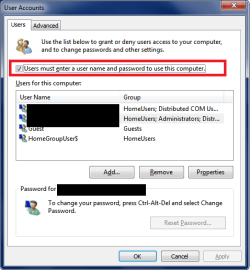
"Under User Accounts dialog box, uncheck the box named Users must enter a user name and password to use this computer."
I do not have this line in my user account tab, so I can't uncheck it. What is the solution so that I can bypass logon screen? I have considered adding a new account and deleting my original account, to see if the new account has this option. Is this the solution? Is there another way?
 

My Computer

Computer type
PC/Desktop
Computer Manufacturer/Model Number
hpm5700
OS
win7 ultimate 32 bit
CPU
intel duo 1.8 G
Memory
4g
Hard Drives
wd sata 2 329g
Antivirus
sophos
Browser
ie10
Are you an Administrator ?

Is this your PC ?
 

My Computer

Computer type
PC/Desktop
Computer Manufacturer/Model Number
Skylake Special #666
OS
Windows 10 Pro x64
CPU
Intel Core i7 6700K
Motherboard
Asus Sabertooth Z170 Mark 1
Memory
GSkill TridentZ RGB 16GB 3600 16-16-16-36
Graphics Card(s)
EVGA GTX 980 Ti SC x2
Sound Card
Realtek High Definition
Monitor(s) Displays
AOC G2460PG
Screen Resolution
1920 x 1080 144Hz
Hard Drives
Samsung 860 Pro 256GB, Seagate Barracuda 4TB x2
PSU
EVGA 1000 P2, EVGA White Custom Braided Cables
Case
Corsair Vengeance C70 Gunmetal Black
Cooling
Corsair H100i v2, Corsair ML120 x2, Thermal Grizzly Kryonaut
Keyboard
Logitech G910 Orion Spectrum
Mouse
Logitech G700s
Internet Speed
Verizon Fios Quantum Gateway 75/75
Antivirus
Windows Defender, Malwarebytes Free 3.8.3
Browser
Chrome
Other Info
Corsair SP120 x4, LG Blu-ray Drive, Durabrand HT-395 100 Watt Dolby Digital Amp, Corsair H2100 Wireless 7.1 Headset
yes to both questions. I just checked another win7 computer at work, and it also doesn't have the line Users must enter a user name and password to use this computer so that a box can be unchecked.
 

My Computer

Computer type
PC/Desktop
Computer Manufacturer/Model Number
hpm5700
OS
win7 ultimate 32 bit
CPU
intel duo 1.8 G
Memory
4g
Hard Drives
wd sata 2 329g
Antivirus
sophos
Browser
ie10

My Computer

Computer type
PC/Desktop
Computer Manufacturer/Model Number
home built
OS
Multi-Boot W7_Pro_x64 W8.1_Pro_x64 W10_Pro_x64 +Linux_VMs +Chromium_VM
CPU
AMD Athlon II x4 620
Motherboard
Gigabyte GA-MA785G-UD3H
Memory
6GB GSkill DDR2 800
Graphics Card(s)
AMD 4670 GPU + AMD 4200 IGP
Sound Card
on board Realtek ALC889A
Monitor(s) Displays
RCA 40" LCD TV, Insignia 32" LCD TV, HP 15" LCD monitor
Screen Resolution
1680 x 1050
Hard Drives
OCZ Vertex 3 120GB,
Samsung F3 1TB (3),
Several others - WD, Seagate, Hitachi, ...
PSU
Corsair 500 W
Case
Rosewill mid tower
Cooling
CM 90mm rifle
Keyboard
Gyration wireless, Logitech wireless, Dell USB wired
Mouse
Gyration wireless, Logitech wireless, V7 USB wired
Internet Speed
Spectrum - 100Mbps D / 10Mbps U
Antivirus
Avast, MBAM3, EMET, WinPatrol
Browser
Pale Moon, Firefox, IE
Other Info
2 multi-boot PC's
Mainly HTPC/Office/Gen purpose (no gaming).
Trendnet USB KVM.
LG DVD burner/Blue Ray Player.
Tray system for removable SATA backup drives.

Not currently OCd, under-volted.
I use Hybrid sleep, rarely re-boot or shutdown.

Hauppauge HD-PVR, Avermedia PCIe TV Tuner, Hauppauge PCI TV Tuner.
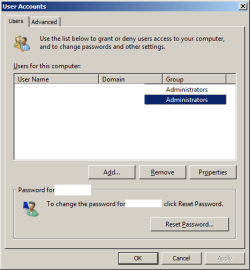
If the computer is in a domain, that option probably will not be there:

Untitled.png


edit:
Adding domain credentials (user name and password) to the registry to get the computer to automatically log on is not a good idea. Domain admins (and others) can see the password via remote connection to the registry or via local scripts/apps that they run to check on such things. If you do get approval from IT security to automatically log a computer on using domain credentials, then I suggest using this secure tool https://technet.microsoft.com/en-us/sysinternals/autologon.aspx to store the credentials in an encrypted vault.
 

My Computer

Computer type
Laptop
Computer Manufacturer/Model Number
Employer provided Dell Latitude
OS
W7 Pro SP1 64bit
CPU
i7
Memory
8GB
Graphics Card(s)
Intel HD Graphics
Hard Drives
crappy SSD
Antivirus
Employer mandated Symantec Endpoint Protection
Browser
Pale Moon 64bit, IE11 64bit & Chrome 64bit
You are correct, I was on a domain. The domain has been removed and now the line is there. I have unchecked the box and now can boot to desktop. Problem solved. Thanks!
 

My Computer

Computer type
PC/Desktop
Computer Manufacturer/Model Number
hpm5700
OS
win7 ultimate 32 bit
CPU
intel duo 1.8 G
Memory
4g
Hard Drives
wd sata 2 329g
Antivirus
sophos
Browser
ie10
Back
Top