Cant change screen resoloution

tolska

New member
Local time
12:48 AM
Messages
9
Hi all
I recently broke my VGA port on the motherboard, so i had to get a VGA via graphics slot, Since I have done this i am not able to change the resolution.
8
8


I have also gone into advanced settings, list all modes, when I do this it does change but it's weird and discoloured.
8
8


I have also updated drivers via device manager but it tells me I have the most up to date version, Please help me i need to change this
 

My Computer

Computer type
PC/Desktop
Computer Manufacturer/Model Number
HP
OS
Windows 7 Professional x32
CPU
Intel Pentium E2140
Motherboard
Foxconn Lucknow
Memory
2.00 GB
Graphics Card(s)
(1) Standard VGA Graphics Adapter (2) Intel(R) 82945G Expr
Sound Card
High Definition Audio Device
tolska you haven't mentioned your PC's BIOS--you first need to restart into the BIOS and find the setting to use Onboard Video (and turn that off).

OK maybe you've done that--then the only other thing I can think is the driver you picked for your graphics card is somehow wrong.
 

My Computer

Computer type
Laptop
Computer Manufacturer/Model Number
Dell Latitude E6540 Laptop
OS
Windows 7 Professional 64bit
CPU
Intel Core i7 4600M @ 2.90GHz
Motherboard
Dell Inc. 0CYT5F (SOCKET 0)
Memory
16.0GB Dual-Channel DDR3 @ 797MHz (11-11-11-28)
Graphics Card(s)
Intel HD Graphics 4600 (Dell) 2048MB ATI AMD Radeon HD 8790M
Sound Card
Realtek High Definition Audio
Monitor(s) Displays
HP ZR30w (2560x1600@60Hz)
Hard Drives
256GB LITEONIT LMT-256M6M-41 mm SATA (SSD)
1TB Samsung SSD 860 EVO mSATA SATA (SSD)
2TB USB 3.0 USB Device
115GB SanDisk Ultra Fit USB
Other Info
Multiple Dell E-Port Plus II Port Replicator/Docking Stations 0Y72NH USB 3.0 + 130W AC Adapters
Hi, Welcome to forums.

First thing I would suggest to you is to fill in your system specs. Tell us what video card are you using. If it is NVIDIA or AMD, you have to download the drivers from their site, rather than Windows.

It will be really helpful, if you can fill in your specs first.
 

My Computer

Computer type
PC/Desktop
Computer Manufacturer/Model Number
Custom Bulid/Self made
OS
Windows 11 x64
CPU
i5 2500K @ 3.3 GHz
Motherboard
ASUS P8 Z77 V pro
Memory
16 GB DDR 3 @ 1600Mhz
Graphics Card(s)
MSI 1050TI 4GB OC version
Sound Card
On Board (Realtek HD audio)
Monitor(s) Displays
Samsung 22" LCD
Screen Resolution
1920*1080
Hard Drives
Seagate 1 TB, WD 1TB, Seagate 2 TB ( I use a lot of space)
PSU
coolermaster 750 W
Case
Coolermaster HAF912
Cooling
Coolermaster hyper 212 EVO
Keyboard
Samsung
Mouse
Dell Wireless
Internet Speed
Wireless 50 Mbps
Antivirus
AVG 2016 Internet Security
Browser
Google Chrome
Hi sorry for the delay,
I have a HP COMPAQ, Windows 7 Pro, 2GB Ram, Intel Processor,
Graphics card is made by Trident which they have gone bust, So i will need to buy a new one i think,

maxseven I tried your and it messed my PC up even worse, Took me a while to reset the bios, since when i turned it off, Boom I could not see nothing at all, It was not picking up screen so i had t put it bak
 

My Computer

Computer type
PC/Desktop
Computer Manufacturer/Model Number
HP
OS
Windows 7 Professional x32
CPU
Intel Pentium E2140
Motherboard
Foxconn Lucknow
Memory
2.00 GB
Graphics Card(s)
(1) Standard VGA Graphics Adapter (2) Intel(R) 82945G Expr
Sound Card
High Definition Audio Device
My Computer

Computer type
Laptop
Computer Manufacturer/Model Number
Packard Bell
OS
Windows 7 Home Premium 64Bit
CPU
AMD A6-3420M 1.5GHZ OC - 2.0GHZ
Memory
4GB DDR3 1600MHZ
Graphics Card(s)
AMD RADEON 6520G+AMD RADEON HD7470M 1GB DDR3
Screen Resolution
1366x768
Hard Drives
500GB SATA
Internet Speed
18Mb Unlimited
Antivirus
AVAST!
Browser
MOZILLA FIREFOX
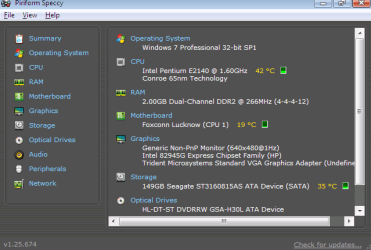
Here you go, Devlin,
send11111.PNG

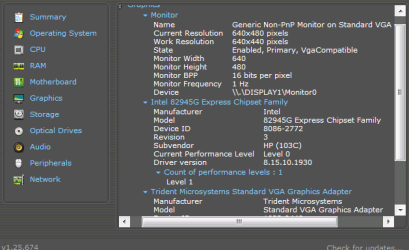
Graphics:

send111111111111.PNG
 

My Computer

Computer type
PC/Desktop
Computer Manufacturer/Model Number
HP
OS
Windows 7 Professional x32
CPU
Intel Pentium E2140
Motherboard
Foxconn Lucknow
Memory
2.00 GB
Graphics Card(s)
(1) Standard VGA Graphics Adapter (2) Intel(R) 82945G Expr
Sound Card
High Definition Audio Device

My Computer

Computer type
Laptop
Computer Manufacturer/Model Number
Packard Bell
OS
Windows 7 Home Premium 64Bit
CPU
AMD A6-3420M 1.5GHZ OC - 2.0GHZ
Memory
4GB DDR3 1600MHZ
Graphics Card(s)
AMD RADEON 6520G+AMD RADEON HD7470M 1GB DDR3
Screen Resolution
1366x768
Hard Drives
500GB SATA
Internet Speed
18Mb Unlimited
Antivirus
AVAST!
Browser
MOZILLA FIREFOX
I installed the drivers you gave, but it's still not made a difference, After reboot nothing has changed,
Any other suggestions please
 

My Computer

Computer type
PC/Desktop
Computer Manufacturer/Model Number
HP
OS
Windows 7 Professional x32
CPU
Intel Pentium E2140
Motherboard
Foxconn Lucknow
Memory
2.00 GB
Graphics Card(s)
(1) Standard VGA Graphics Adapter (2) Intel(R) 82945G Expr
Sound Card
High Definition Audio Device

My Computer

Computer type
PC/Desktop
Computer Manufacturer/Model Number
HP
OS
Windows 7 Professional x32
CPU
Intel Pentium E2140
Motherboard
Foxconn Lucknow
Memory
2.00 GB
Graphics Card(s)
(1) Standard VGA Graphics Adapter (2) Intel(R) 82945G Expr
Sound Card
High Definition Audio Device
Hi Tolska.

You applied the Trident VGA adapter after breaking the VGA port?

Upload your MSINFO32.nfo file, as it will help us to understand the situation better.

  1. Click on the start button
  2. Type "msinfo32" (without quotes) in the search bar of the start menu, click the resulting link. It will open the System Information window.
  3. File>Save. In the "File Name" filed, put "MSINFO32" (without Quote), give the save location to desktop, and click the "save" button.
  4. Give the time for processing, it will save a .nfo file on your desktop.
  5. Zip it, and upload it following the instruction.
 

My Computer

Computer type
PC/Desktop
Computer Manufacturer/Model Number
Self Assembled
OS
Microsoft Windows 10 Pro Insider Preview 64-bit
CPU
Intel(R) Core(TM) i3-4130 CPU @ 3.40GHz
Motherboard
Gigabyte Technology Co., Ltd. B85M-D3H
Memory
Corsair Vengence 4GB x2 (8.00GB Dual-Channel DDR3 @ 798MHz)
Graphics Card(s)
2047MB GeForce GTS 450 (ZOTAC International)
Sound Card
Onboard (Realtek High Definition Audio)
Monitor(s) Displays
LG Flatron E2040T
Screen Resolution
1600x900
Hard Drives
Western Digital 1 TB
Seagate 500 GB
PSU
Corsair VS550
Case
Cooler Master K380
Cooling
Cooler Master Seidon 120V Plus
Keyboard
Logitech MK260r
Mouse
Logitech MK260r
Internet Speed
PMPL Broadband
Antivirus
Windows Defender + MBAM
Browser
Firefox
Other Info
Dell Studio 15" Laptop
Hi Tolska.

You applied the Trident VGA adapter after breaking the VGA port?

Upload your MSINFO32.nfo file, as it will help us to understand the situation better.

  1. Click on the start button
  2. Type "msinfo32" (without quotes) in the search bar of the start menu, click the resulting link. It will open the System Information window.
  3. File>Save. In the "File Name" filed, put "MSINFO32" (without Quote), give the save location to desktop, and click the "save" button.
  4. Give the time for processing, it will save a .nfo file on your desktop.
  5. Zip it, and upload it following the instruction.

Yes thats correct, I broke the VGA Port, then installed standard VGA card, (Cheaper option I believe)

Here is the file you requested,
View attachment MS.zip
 

My Computer

Computer type
PC/Desktop
Computer Manufacturer/Model Number
HP
OS
Windows 7 Professional x32
CPU
Intel Pentium E2140
Motherboard
Foxconn Lucknow
Memory
2.00 GB
Graphics Card(s)
(1) Standard VGA Graphics Adapter (2) Intel(R) 82945G Expr
Sound Card
High Definition Audio Device
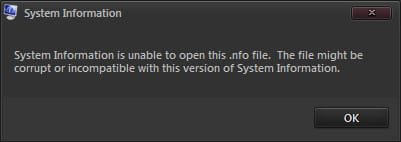
Unfortunately the .nfo is not opening.

2014-02-09_225935.jpg

Can you export is as a text file? Steps are almost same as above. Just a change in step 3. Do File > Export rather than File > Save.
 

My Computer

Computer type
PC/Desktop
Computer Manufacturer/Model Number
Self Assembled
OS
Microsoft Windows 10 Pro Insider Preview 64-bit
CPU
Intel(R) Core(TM) i3-4130 CPU @ 3.40GHz
Motherboard
Gigabyte Technology Co., Ltd. B85M-D3H
Memory
Corsair Vengence 4GB x2 (8.00GB Dual-Channel DDR3 @ 798MHz)
Graphics Card(s)
2047MB GeForce GTS 450 (ZOTAC International)
Sound Card
Onboard (Realtek High Definition Audio)
Monitor(s) Displays
LG Flatron E2040T
Screen Resolution
1600x900
Hard Drives
Western Digital 1 TB
Seagate 500 GB
PSU
Corsair VS550
Case
Cooler Master K380
Cooling
Cooler Master Seidon 120V Plus
Keyboard
Logitech MK260r
Mouse
Logitech MK260r
Internet Speed
PMPL Broadband
Antivirus
Windows Defender + MBAM
Browser
Firefox
Other Info
Dell Studio 15" Laptop

My Computer

Computer type
PC/Desktop
Computer Manufacturer/Model Number
HP
OS
Windows 7 Professional x32
CPU
Intel Pentium E2140
Motherboard
Foxconn Lucknow
Memory
2.00 GB
Graphics Card(s)
(1) Standard VGA Graphics Adapter (2) Intel(R) 82945G Expr
Sound Card
High Definition Audio Device
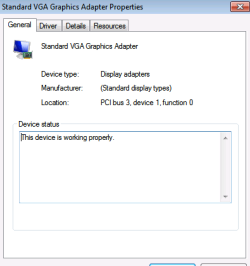
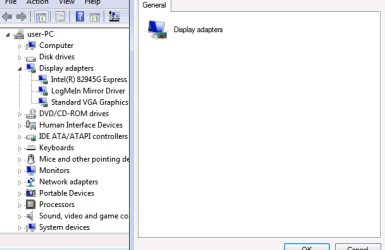
Most probably the VGA adapter that you applied does not have a driver that is compatible with windows 7. It is being used as the Standard VGA Graphics Adapter, not any description of the vendor, and using the system native VGA/Super VGA Video Driver, c:\windows\system32\drivers\vgapnp.sys.

Can you apply a decent GPU there?
 

My Computer

Computer type
PC/Desktop
Computer Manufacturer/Model Number
Self Assembled
OS
Microsoft Windows 10 Pro Insider Preview 64-bit
CPU
Intel(R) Core(TM) i3-4130 CPU @ 3.40GHz
Motherboard
Gigabyte Technology Co., Ltd. B85M-D3H
Memory
Corsair Vengence 4GB x2 (8.00GB Dual-Channel DDR3 @ 798MHz)
Graphics Card(s)
2047MB GeForce GTS 450 (ZOTAC International)
Sound Card
Onboard (Realtek High Definition Audio)
Monitor(s) Displays
LG Flatron E2040T
Screen Resolution
1600x900
Hard Drives
Western Digital 1 TB
Seagate 500 GB
PSU
Corsair VS550
Case
Cooler Master K380
Cooling
Cooler Master Seidon 120V Plus
Keyboard
Logitech MK260r
Mouse
Logitech MK260r
Internet Speed
PMPL Broadband
Antivirus
Windows Defender + MBAM
Browser
Firefox
Other Info
Dell Studio 15" Laptop
Most probably the VGA adapter that you applied does not have a driver that is compatible with windows 7. It is being used as the Standard VGA Graphics Adapter, not any description of the vendor, and using the system native VGA/Super VGA Video Driver, c:\windows\system32\drivers\vgapnp.sys.

Can you apply a decent GPU there?

To be honest, I'm not to sure with that, The company who manufactured the graphics card, went bust some years ago so that is why no drivers can be found,
I may just buy a new graphics card, If i can find one what is compat with W7PRO, Only problem I have is that the slots are PCI not PCI Express, so need to be careful on which one I purchase,
By the screen shots I posted earlier, Do you recommend a reasonable priced GCard?
 

My Computer

Computer type
PC/Desktop
Computer Manufacturer/Model Number
HP
OS
Windows 7 Professional x32
CPU
Intel Pentium E2140
Motherboard
Foxconn Lucknow
Memory
2.00 GB
Graphics Card(s)
(1) Standard VGA Graphics Adapter (2) Intel(R) 82945G Expr
Sound Card
High Definition Audio Device
Unfortunately the .nfo is not opening.

View attachment 305593

Can you export is as a text file? Steps are almost same as above. Just a change in step 3. Do File > Export rather than File > Save.

For future reference arc, right clicking on an "NFO" file and opening it with notepad or something similar will allow you to read it:)
 

My Computer

Computer type
Laptop
Computer Manufacturer/Model Number
Packard Bell
OS
Windows 7 Home Premium 64Bit
CPU
AMD A6-3420M 1.5GHZ OC - 2.0GHZ
Memory
4GB DDR3 1600MHZ
Graphics Card(s)
AMD RADEON 6520G+AMD RADEON HD7470M 1GB DDR3
Screen Resolution
1366x768
Hard Drives
500GB SATA
Internet Speed
18Mb Unlimited
Antivirus
AVAST!
Browser
MOZILLA FIREFOX
Unfortunately the .nfo is not opening.

View attachment 305593

Can you export is as a text file? Steps are almost same as above. Just a change in step 3. Do File > Export rather than File > Save.

For future reference arc, right clicking on an "NFO" file and opening it with notepad or something similar will allow you to read it:)
Who want to read it in a mess.
 

My Computer

Computer type
PC/Desktop
Computer Manufacturer/Model Number
Self Assembled
OS
Microsoft Windows 10 Pro Insider Preview 64-bit
CPU
Intel(R) Core(TM) i3-4130 CPU @ 3.40GHz
Motherboard
Gigabyte Technology Co., Ltd. B85M-D3H
Memory
Corsair Vengence 4GB x2 (8.00GB Dual-Channel DDR3 @ 798MHz)
Graphics Card(s)
2047MB GeForce GTS 450 (ZOTAC International)
Sound Card
Onboard (Realtek High Definition Audio)
Monitor(s) Displays
LG Flatron E2040T
Screen Resolution
1600x900
Hard Drives
Western Digital 1 TB
Seagate 500 GB
PSU
Corsair VS550
Case
Cooler Master K380
Cooling
Cooler Master Seidon 120V Plus
Keyboard
Logitech MK260r
Mouse
Logitech MK260r
Internet Speed
PMPL Broadband
Antivirus
Windows Defender + MBAM
Browser
Firefox
Other Info
Dell Studio 15" Laptop
Fair point lol, can be useful at times though
 

My Computer

Computer type
Laptop
Computer Manufacturer/Model Number
Packard Bell
OS
Windows 7 Home Premium 64Bit
CPU
AMD A6-3420M 1.5GHZ OC - 2.0GHZ
Memory
4GB DDR3 1600MHZ
Graphics Card(s)
AMD RADEON 6520G+AMD RADEON HD7470M 1GB DDR3
Screen Resolution
1366x768
Hard Drives
500GB SATA
Internet Speed
18Mb Unlimited
Antivirus
AVAST!
Browser
MOZILLA FIREFOX
How about a snip of your Device Manager with Display Adapters expanded and its properties opened?

To better help us to help you would you please add your systems specs? Here's the correct way to do it. :SystemInfo See Your System Specs Under System Manufacturer/Model Number add whether it is a desktop or laptop and whether self built. Very important

Log in to Seven Forums and you will be able to transfer the info directly to the specs page in your profile from within the System Info app.

Your System Specs here.

After doing this your specs will be available in each of your posts.
Click on My system Specs in the lower left of this post to see how it should look.:)
Full instructions are in the tutorial.

Here is a list of some PCI graphics cards.
http://www.newegg.com/Product/ProductList.aspx?Submit=ENE&N=100007709%20600007853&IsNodeId=1&name=PCI
 

My Computer

Computer type
PC/Desktop
Computer Manufacturer/Model Number
Home Built Desktop By DataTech
OS
Windows 7 Ultimate X64 SP1
CPU
Intel i5-2550K, Differing ~4.4-4.8GHz No built in GPU
Motherboard
ASUS P8Z68-V PRO/GEN3
Memory
16GB G.Skill Sniper 1866MHz @ 2133MHz 2x8GB
Graphics Card(s)
ASUS GTX650TIB-DC2OC-2GD5, (650TI Boost)
Sound Card
Onboard Realtek 5-1
Monitor(s) Displays
Samsung P2570HD
Screen Resolution
1920x1080
Hard Drives
Samsung 840 Pro 256GB SSD for OS, 500GB Seagate Constellation (Enterprise drive) for Data
PSU
Corsair HX650W
Case
Inwin Dragon Rider
Cooling
Hyper 212 EVO w/two Noctua fans, push-pull, @1300 RPM
Keyboard
E-Z Eyes, bright yellow keys with large characters
Mouse
steelseries SENSEI Laser Pro Gaming
Internet Speed
48-51Mbs Mbs down, 11 Mbs up Xfinity Cable
Antivirus
Norton Internet Security 2013
Browser
IE 10, Opera, Pale Moon if needed
Other Info
4 case fans, LG BluRay-RE, ASUS DVD-RW, Mr. Fusion power supply, 1.21 gigawatts.
How about a snip of your Device Manager with Display Adapters expanded and its properties opened?

To better help us to help you would you please add your systems specs? Here's the correct way to do it. :SystemInfo See Your System Specs Under System Manufacturer/Model Number add whether it is a desktop or laptop and whether self built. Very important

Log in to Seven Forums and you will be able to transfer the info directly to the specs page in your profile from within the System Info app.

Your System Specs here.

After doing this your specs will be available in each of your posts.
Click on My system Specs in the lower left of this post to see how it should look.:)
Full instructions are in the tutorial.

Here is a list of some PCI graphics cards.
Newegg.com - Computer Hardware, Video Cards & Video Devices, Desktop Graphics Cards, PCI

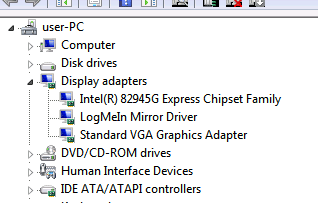
I will take a look at the graphics cards, I have updated the specs on my profile, I have a screen shot here for you., Not sure what you meant by its properties open, so heres a couple...

snip1111.PNG
snip222.PNG
snip233.PNG
 

My Computer

Computer type
PC/Desktop
Computer Manufacturer/Model Number
HP
OS
Windows 7 Professional x32
CPU
Intel Pentium E2140
Motherboard
Foxconn Lucknow
Memory
2.00 GB
Graphics Card(s)
(1) Standard VGA Graphics Adapter (2) Intel(R) 82945G Expr
Sound Card
High Definition Audio Device
Back
Top