Can't connect to certain websites

w4mps

New member
Local time
2:45 PM
Messages
22
I'm having problems connecting to certain websites. We have 3 computers in the house, all running W7, all going through the same router. Only one is having the problem; the other 2 connect without issue. On the affected machine, I can connect to all websites without problem when the machine is first turned on. After the initial connections, certain websites time out when try subsequent connections. Occasionally (but rarely), they will connect after multiple re-tries. Two sites that experience this problem are: www.zerohedge.com and SOTAwatch2 The vast majority of websites I go to do not have a problem. This has been going on for about 6 months. I've tried every anti virus support I can find, a bunch of on line suggestions, but nothing seems to help. Very strange. Any suggestions appreciated.
Regards
Marc Sullivan
 

My Computer

Computer type
PC/Desktop
OS
W7Home Premium 32b
CPU
2.6 GHz Intel Pentium Dual core
Memory
4 MB
Hard Drives
750 GB
Browser
Chrome & IE
Hi and welcome to SevenForums,
Best I can say is concentrate on 1 browser at a time and test,
I would prefer to turn off a setting in Chrome and try to use Internet explorer at first
Open Chrome and go to settings and advanced settings,
All the way at the bottom see if Continue running background apps when Chrome is closed is checked if so Uncheck it and save and close Chrome.

Then open ie like this,
Click start and type in the search box
internet explorer and click on the No Add-ons suggestion on the list
or type in
iexplore.exe -extoff
Test the site for a while and report back.

If it helps a bit review your ie browser add-ons and Chrome's Extensions.
 

My Computer

Computer type
PC/Desktop
Computer Manufacturer/Model Number
Custom assembled by me :}
OS
Win-7-Pro64bit 7-H-Prem-64bit
CPU
i7-5930K 2nd i9-9940x both water blocked VRM's too
Motherboard
ASUS SABERTOOTH X99 2nd ASUS x299 Apex
Memory
Trident-z 3200C14 2nd Trident-z 3600C16
Graphics Card(s)
EVGA 1080ti ftw3 2nd Titan Xp both water blocked
Sound Card
Built-in Realtek
Monitor(s) Displays
1-AOC G2460PG 24"G-Sync 144Hz/ 2nd 1-ASUS VG248QE 24" 144Hz
Screen Resolution
1920 x 1080 144Hz
Hard Drives
2-Samsung M.2 Evo & Evo Plus
2-Samsung 850 EVO 500GB SSD's/ 3-2.5 W.D. Black 1tb-&3-1tb/3-3.5 WD Black 1tb hdd's
PSU
EVGA SuperNOVA 1000-P2 2nd 1200-P2
Case
2-Corsair Obsidian Series 450D Black ATX Mid Tower
Cooling
Custom water loops
Keyboard
Logitech G710+/ 2nd Logitech G910
Mouse
2-RedDragon M901 Perdition 16400 dpi Gaming mouse = wired
Internet Speed
Comcast Ping 19ms 89.31mbps download speed 6.12mbps upload
Antivirus
Malwarebytes Pro/ Superantispyware Pro
Browser
FireFox & Pale moon
Other Info
2nd ASUS X299 Apex/Intel i9-9940x with Custom water loop/7H-Prem-x64/Corsair 450D case/Ram Trident-z 3600C16 4x8gb / Samsung970Evo plus 500gb SSD/Dual ssd EZ swap evo/PSU EVGA SuperNova 1200w-P2 80+Platinum/GPU Titan Xp /8-ML-140 on push-pull on 2-280GTX rads
Thanks for replying to my post. Background apps was previously turned off. Neither IE or Chrome have any extensions or add ons. Still no joy. What's weird to me is that I can click on one of the sites continuously and get nothing. But once in a while (when least expected) it will connect. It's like something is blocking those sites. 95% of my other bookmarks work without a problem. If I run a path test on the problem sites neither Chrome or IE finds any problem. Frustrating.
 

My Computer

Computer type
PC/Desktop
OS
W7Home Premium 32b
CPU
2.6 GHz Intel Pentium Dual core
Memory
4 MB
Hard Drives
750 GB
Browser
Chrome & IE
Hi,
Run this,
SAS is safe to remove anything it finds ;)
http://www.superantispyware.com/?tag=SUPERANTISPYWARE

Which antivirus and any other security utility do you have installed ?

Does the issue reoccur using clean boot ?
http://www.sevenforums.com/tutorials/179159-troubleshoot-application-conflicts-performing-clean-startup.html
Click Start and type in the search box,
msconfig
Click on the suggestion on top or hit the Enter key,
Go to the Startup section and take some screen shots for a complete list,
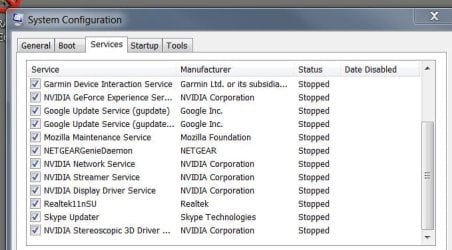
Go to the Services section and on the bottom left Check the box to Hide All Microsoft services,
Repeat the screen shots,
See the links above my signature on how to take and upload screen shots here,
Cheers.
 

My Computer

Computer type
PC/Desktop
Computer Manufacturer/Model Number
Custom assembled by me :}
OS
Win-7-Pro64bit 7-H-Prem-64bit
CPU
i7-5930K 2nd i9-9940x both water blocked VRM's too
Motherboard
ASUS SABERTOOTH X99 2nd ASUS x299 Apex
Memory
Trident-z 3200C14 2nd Trident-z 3600C16
Graphics Card(s)
EVGA 1080ti ftw3 2nd Titan Xp both water blocked
Sound Card
Built-in Realtek
Monitor(s) Displays
1-AOC G2460PG 24"G-Sync 144Hz/ 2nd 1-ASUS VG248QE 24" 144Hz
Screen Resolution
1920 x 1080 144Hz
Hard Drives
2-Samsung M.2 Evo & Evo Plus
2-Samsung 850 EVO 500GB SSD's/ 3-2.5 W.D. Black 1tb-&3-1tb/3-3.5 WD Black 1tb hdd's
PSU
EVGA SuperNOVA 1000-P2 2nd 1200-P2
Case
2-Corsair Obsidian Series 450D Black ATX Mid Tower
Cooling
Custom water loops
Keyboard
Logitech G710+/ 2nd Logitech G910
Mouse
2-RedDragon M901 Perdition 16400 dpi Gaming mouse = wired
Internet Speed
Comcast Ping 19ms 89.31mbps download speed 6.12mbps upload
Antivirus
Malwarebytes Pro/ Superantispyware Pro
Browser
FireFox & Pale moon
Other Info
2nd ASUS X299 Apex/Intel i9-9940x with Custom water loop/7H-Prem-x64/Corsair 450D case/Ram Trident-z 3600C16 4x8gb / Samsung970Evo plus 500gb SSD/Dual ssd EZ swap evo/PSU EVGA SuperNova 1200w-P2 80+Platinum/GPU Titan Xp /8-ML-140 on push-pull on 2-280GTX rads
Completed both suggestions. Nothing serious found in the virus scan. Second suggestion completed, rebooted. Same result: first click to the problem websites worked no problem. After that ---- the dreaded timeout screen pops up.
The good news is that I can connect to this site instantly.
Aaargh
 

Attachments

  • timeout.JPG
    timeout.JPG
    15 KB · Views: 49

My Computer

Computer type
PC/Desktop
OS
W7Home Premium 32b
CPU
2.6 GHz Intel Pentium Dual core
Memory
4 MB
Hard Drives
750 GB
Browser
Chrome & IE

My Computer

Computer type
PC/Desktop
OS
W7Home Premium 32b
CPU
2.6 GHz Intel Pentium Dual core
Memory
4 MB
Hard Drives
750 GB
Browser
Chrome & IE
Hi,
You didn't post any of my requested msconfig screen shots :(
Please review my post #4 again ;)

That message does not look like Internet explorer produced it :/
 

My Computer

Computer type
PC/Desktop
Computer Manufacturer/Model Number
Custom assembled by me :}
OS
Win-7-Pro64bit 7-H-Prem-64bit
CPU
i7-5930K 2nd i9-9940x both water blocked VRM's too
Motherboard
ASUS SABERTOOTH X99 2nd ASUS x299 Apex
Memory
Trident-z 3200C14 2nd Trident-z 3600C16
Graphics Card(s)
EVGA 1080ti ftw3 2nd Titan Xp both water blocked
Sound Card
Built-in Realtek
Monitor(s) Displays
1-AOC G2460PG 24"G-Sync 144Hz/ 2nd 1-ASUS VG248QE 24" 144Hz
Screen Resolution
1920 x 1080 144Hz
Hard Drives
2-Samsung M.2 Evo & Evo Plus
2-Samsung 850 EVO 500GB SSD's/ 3-2.5 W.D. Black 1tb-&3-1tb/3-3.5 WD Black 1tb hdd's
PSU
EVGA SuperNOVA 1000-P2 2nd 1200-P2
Case
2-Corsair Obsidian Series 450D Black ATX Mid Tower
Cooling
Custom water loops
Keyboard
Logitech G710+/ 2nd Logitech G910
Mouse
2-RedDragon M901 Perdition 16400 dpi Gaming mouse = wired
Internet Speed
Comcast Ping 19ms 89.31mbps download speed 6.12mbps upload
Antivirus
Malwarebytes Pro/ Superantispyware Pro
Browser
FireFox & Pale moon
Other Info
2nd ASUS X299 Apex/Intel i9-9940x with Custom water loop/7H-Prem-x64/Corsair 450D case/Ram Trident-z 3600C16 4x8gb / Samsung970Evo plus 500gb SSD/Dual ssd EZ swap evo/PSU EVGA SuperNova 1200w-P2 80+Platinum/GPU Titan Xp /8-ML-140 on push-pull on 2-280GTX rads
From what you tell, it looks like DNS cache is somewhat corrupted?

Run the command after failing to connect: ipconfig -flushdns
then try again. Also stop "DNS Client" service (run services.msc) and try again.
 

My Computer

Computer type
PC/Desktop
Computer Manufacturer/Model Number
Custom Build
OS
Windows 7 Ultimate x64 SP1
CPU
AMD Phenom 2 1090T
Motherboard
Gigabyte GA-890FXA-UD5
Memory
2x8GB Kingston HyperX Fury Black 1600Mhz Unganged
Graphics Card(s)
MSI GTX 970 Gaming 4G
Sound Card
Realtek On-Board HD 7.1 Audio / Logitech G35
Monitor(s) Displays
3xAcer GD245HQ
Screen Resolution
1920x1080
Hard Drives
Samsung 850 Pro 512GB SSD - OS /
WD Caviar Black SATA 3 - 1 TBx2 - Dynamic RAID 0 /
WD Caviar Green SATA 2 - 640GBx2 - Dynamic RAID 0 /
WD Caviar Green SATA 2 - 640GB - Internal Backup /
Seagate Barracude SATA 3 - 3TB - External Backup/ Sync
PSU
HighPower 1000W
Case
Cooler Master HAF 932
Cooling
Noctua NH-D14
Keyboard
Logitech G19
Mouse
Logitech G500
Internet Speed
100/4 Mbit Cable (100GB quota)
Antivirus
ZoneAlarm Extreme Security / MBAM Pro / MBAE Free / SAS Free
Browser
IE 11 - Firefox - Chrome
Other Info
Logitech F710/ G27/ G940/ Z5500 // TrackIR 5 // Nvidia 3D Surround Vision
Can you connect to them with Tor?
If you can't, your ISP is probably blocking those sites.
 

My Computer

Computer type
PC/Desktop
Computer Manufacturer/Model Number
Custom Build
OS
OpenBSD 6.8
CPU
AMD A10-7850K APU @ 4300MHz
Motherboard
ASRock FM2A58M-VG3+ R2.0
Memory
8GB G-Skill Ripjaws @ 2133MHz
Graphics Card(s)
I have an APU
Monitor(s) Displays
LG 24M35
Screen Resolution
1920x1080@74Hz
Hard Drives
931GB Seagate ST31000524NS 45W8867 59Y1812IBM
PSU
Cooler Master 750W
Case
Bitfenix NOVA
Cooling
120mm fan
Keyboard
Microsoft Digital Media Keyboard 1.0A
Mouse
Logitech G403
Internet Speed
40Mbps
Browser
Firefox
Other Info
Headset: Audio-Technica M50X
ThrashZone- I'll get those screenshots for your tomorrow, sorry. You're right, that was a Chrome message, but I also get the IE version.
Gokay- Thanks, I believe I've tried that previously, but will try again
JustCall- I'm not familiar with Tor, can you tell me more please.
Thanks all for responding.
 

My Computer

Computer type
PC/Desktop
OS
W7Home Premium 32b
CPU
2.6 GHz Intel Pentium Dual core
Memory
4 MB
Hard Drives
750 GB
Browser
Chrome & IE

My Computer

Computer type
PC/Desktop
Computer Manufacturer/Model Number
Custom assembled by me :}
OS
Win-7-Pro64bit 7-H-Prem-64bit
CPU
i7-5930K 2nd i9-9940x both water blocked VRM's too
Motherboard
ASUS SABERTOOTH X99 2nd ASUS x299 Apex
Memory
Trident-z 3200C14 2nd Trident-z 3600C16
Graphics Card(s)
EVGA 1080ti ftw3 2nd Titan Xp both water blocked
Sound Card
Built-in Realtek
Monitor(s) Displays
1-AOC G2460PG 24"G-Sync 144Hz/ 2nd 1-ASUS VG248QE 24" 144Hz
Screen Resolution
1920 x 1080 144Hz
Hard Drives
2-Samsung M.2 Evo & Evo Plus
2-Samsung 850 EVO 500GB SSD's/ 3-2.5 W.D. Black 1tb-&3-1tb/3-3.5 WD Black 1tb hdd's
PSU
EVGA SuperNOVA 1000-P2 2nd 1200-P2
Case
2-Corsair Obsidian Series 450D Black ATX Mid Tower
Cooling
Custom water loops
Keyboard
Logitech G710+/ 2nd Logitech G910
Mouse
2-RedDragon M901 Perdition 16400 dpi Gaming mouse = wired
Internet Speed
Comcast Ping 19ms 89.31mbps download speed 6.12mbps upload
Antivirus
Malwarebytes Pro/ Superantispyware Pro
Browser
FireFox & Pale moon
Other Info
2nd ASUS X299 Apex/Intel i9-9940x with Custom water loop/7H-Prem-x64/Corsair 450D case/Ram Trident-z 3600C16 4x8gb / Samsung970Evo plus 500gb SSD/Dual ssd EZ swap evo/PSU EVGA SuperNova 1200w-P2 80+Platinum/GPU Titan Xp /8-ML-140 on push-pull on 2-280GTX rads
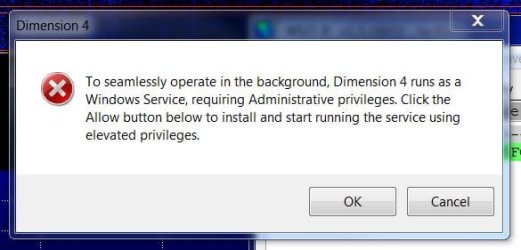
I'm really starting to understand why so many people hate the windows operating system. Now that I have been fiddling with umpteen potential fixes for my website problem, changing settings in windows has caused other problems to appear. I'm a ham radio operator. Computers have become an integral part of that hobby. For example, I run a program called Dimension 4. It is used to accurately set the computer clock which must be dead on correct for certain ham radio applications. Now I can't load that program. I get the attached error message. So, just do what it says, you might say. Well, clicking the Allow button does nothing. Going through procedure to "elevate" the program does nothing. Now, because I've been farting around with all the other stuff, I've crated a new problem that I can't seem to fix. I'm a retired banker, not a computer tekkie. I'm intelligent enough to follow instructions but not knowledgeable enough to unravel the quagmire of potential windows glitches. Really gets me PO'd. Sorry for ranting.
 

Attachments

  • D4-error.JPG
    D4-error.JPG
    38 KB · Views: 32

My Computer

Computer type
PC/Desktop
OS
W7Home Premium 32b
CPU
2.6 GHz Intel Pentium Dual core
Memory
4 MB
Hard Drives
750 GB
Browser
Chrome & IE
Tor is a free browser where you can surf the web anonymously, but in your case, it can also be used to go to blocked sites.
If you want to try it, here's the link.
 

My Computer

Computer type
PC/Desktop
Computer Manufacturer/Model Number
Custom Build
OS
OpenBSD 6.8
CPU
AMD A10-7850K APU @ 4300MHz
Motherboard
ASRock FM2A58M-VG3+ R2.0
Memory
8GB G-Skill Ripjaws @ 2133MHz
Graphics Card(s)
I have an APU
Monitor(s) Displays
LG 24M35
Screen Resolution
1920x1080@74Hz
Hard Drives
931GB Seagate ST31000524NS 45W8867 59Y1812IBM
PSU
Cooler Master 750W
Case
Bitfenix NOVA
Cooling
120mm fan
Keyboard
Microsoft Digital Media Keyboard 1.0A
Mouse
Logitech G403
Internet Speed
40Mbps
Browser
Firefox
Other Info
Headset: Audio-Technica M50X
Regarding Dimension 4 issue;

...
Does the issue reoccur using clean boot ?
http://www.sevenforums.com/tutorials/179159-troubleshoot-application-conflicts-performing-clean-startup.html
Click Start and type in the search box,
msconfig
Click on the suggestion on top or hit the Enter key,
Go to the Startup section and take some screen shots for a complete list,
Go to the Services section and on the bottom left Check the box to Hide All Microsoft services,
Repeat the screen shots,
...

If you are still running with a clean boot then it is possible Dimension4 service/s are disabled. Open msconfig again and enable (tick) relevant services and startup items, restart and see if ok afterwards.
 

My Computer

Computer type
PC/Desktop
Computer Manufacturer/Model Number
Custom Build
OS
Windows 7 Ultimate x64 SP1
CPU
AMD Phenom 2 1090T
Motherboard
Gigabyte GA-890FXA-UD5
Memory
2x8GB Kingston HyperX Fury Black 1600Mhz Unganged
Graphics Card(s)
MSI GTX 970 Gaming 4G
Sound Card
Realtek On-Board HD 7.1 Audio / Logitech G35
Monitor(s) Displays
3xAcer GD245HQ
Screen Resolution
1920x1080
Hard Drives
Samsung 850 Pro 512GB SSD - OS /
WD Caviar Black SATA 3 - 1 TBx2 - Dynamic RAID 0 /
WD Caviar Green SATA 2 - 640GBx2 - Dynamic RAID 0 /
WD Caviar Green SATA 2 - 640GB - Internal Backup /
Seagate Barracude SATA 3 - 3TB - External Backup/ Sync
PSU
HighPower 1000W
Case
Cooler Master HAF 932
Cooling
Noctua NH-D14
Keyboard
Logitech G19
Mouse
Logitech G500
Internet Speed
100/4 Mbit Cable (100GB quota)
Antivirus
ZoneAlarm Extreme Security / MBAM Pro / MBAE Free / SAS Free
Browser
IE 11 - Firefox - Chrome
Other Info
Logitech F710/ G27/ G940/ Z5500 // TrackIR 5 // Nvidia 3D Surround Vision
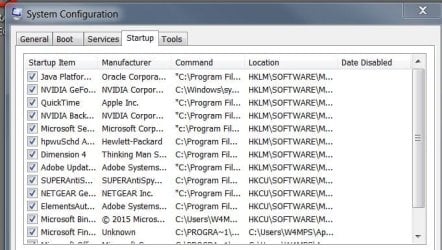
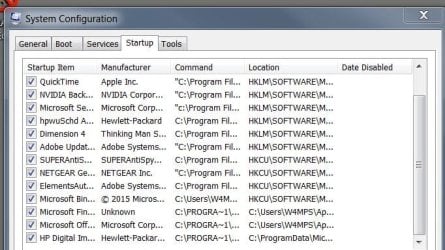
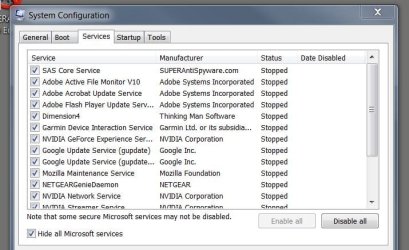
ThrashZone - Here are the screen shots you requested
 

Attachments

  • msconfig01.JPG
    msconfig01.JPG
    82.6 KB · Views: 28
  • msconfig02.JPG
    msconfig02.JPG
    81.4 KB · Views: 28
  • msconfig03.JPG
    msconfig03.JPG
    80 KB · Views: 2
  • msconfig04.JPG
    msconfig04.JPG
    65.2 KB · Views: 27

My Computer

Computer type
PC/Desktop
OS
W7Home Premium 32b
CPU
2.6 GHz Intel Pentium Dual core
Memory
4 MB
Hard Drives
750 GB
Browser
Chrome & IE
Gokay - Yes, that worked. Dimension 4 is now running. Many thanks !
 

My Computer

Computer type
PC/Desktop
OS
W7Home Premium 32b
CPU
2.6 GHz Intel Pentium Dual core
Memory
4 MB
Hard Drives
750 GB
Browser
Chrome & IE
Did you use disable all on the services section ?
I might need to review the clean boot tutorial myself :confused:
 

My Computer

Computer type
PC/Desktop
Computer Manufacturer/Model Number
Custom assembled by me :}
OS
Win-7-Pro64bit 7-H-Prem-64bit
CPU
i7-5930K 2nd i9-9940x both water blocked VRM's too
Motherboard
ASUS SABERTOOTH X99 2nd ASUS x299 Apex
Memory
Trident-z 3200C14 2nd Trident-z 3600C16
Graphics Card(s)
EVGA 1080ti ftw3 2nd Titan Xp both water blocked
Sound Card
Built-in Realtek
Monitor(s) Displays
1-AOC G2460PG 24"G-Sync 144Hz/ 2nd 1-ASUS VG248QE 24" 144Hz
Screen Resolution
1920 x 1080 144Hz
Hard Drives
2-Samsung M.2 Evo & Evo Plus
2-Samsung 850 EVO 500GB SSD's/ 3-2.5 W.D. Black 1tb-&3-1tb/3-3.5 WD Black 1tb hdd's
PSU
EVGA SuperNOVA 1000-P2 2nd 1200-P2
Case
2-Corsair Obsidian Series 450D Black ATX Mid Tower
Cooling
Custom water loops
Keyboard
Logitech G710+/ 2nd Logitech G910
Mouse
2-RedDragon M901 Perdition 16400 dpi Gaming mouse = wired
Internet Speed
Comcast Ping 19ms 89.31mbps download speed 6.12mbps upload
Antivirus
Malwarebytes Pro/ Superantispyware Pro
Browser
FireFox & Pale moon
Other Info
2nd ASUS X299 Apex/Intel i9-9940x with Custom water loop/7H-Prem-x64/Corsair 450D case/Ram Trident-z 3600C16 4x8gb / Samsung970Evo plus 500gb SSD/Dual ssd EZ swap evo/PSU EVGA SuperNova 1200w-P2 80+Platinum/GPU Titan Xp /8-ML-140 on push-pull on 2-280GTX rads
We are that community! :p

To be honest I still think this is a DNS cache issue. Can you try stopping DNS Client service please? Sorry from your reply I don't understand you actually tried.

Also try changing to a different DNS server.

Another thing I would try is go to https://zenmate.com with Firefox or Chrome (IE doesn't work) and install it. No registration needed, free browser based VPN service. It is as simlple as clicking one button to enable/disable from within the browser. See if you can connect reliably.
 

My Computer

Computer type
PC/Desktop
Computer Manufacturer/Model Number
Custom Build
OS
Windows 7 Ultimate x64 SP1
CPU
AMD Phenom 2 1090T
Motherboard
Gigabyte GA-890FXA-UD5
Memory
2x8GB Kingston HyperX Fury Black 1600Mhz Unganged
Graphics Card(s)
MSI GTX 970 Gaming 4G
Sound Card
Realtek On-Board HD 7.1 Audio / Logitech G35
Monitor(s) Displays
3xAcer GD245HQ
Screen Resolution
1920x1080
Hard Drives
Samsung 850 Pro 512GB SSD - OS /
WD Caviar Black SATA 3 - 1 TBx2 - Dynamic RAID 0 /
WD Caviar Green SATA 2 - 640GBx2 - Dynamic RAID 0 /
WD Caviar Green SATA 2 - 640GB - Internal Backup /
Seagate Barracude SATA 3 - 3TB - External Backup/ Sync
PSU
HighPower 1000W
Case
Cooler Master HAF 932
Cooling
Noctua NH-D14
Keyboard
Logitech G19
Mouse
Logitech G500
Internet Speed
100/4 Mbit Cable (100GB quota)
Antivirus
ZoneAlarm Extreme Security / MBAM Pro / MBAE Free / SAS Free
Browser
IE 11 - Firefox - Chrome
Other Info
Logitech F710/ G27/ G940/ Z5500 // TrackIR 5 // Nvidia 3D Surround Vision
(IE doesn't work) .

Unless I missed something here neither does Chrome :p
Throwing Firefox in the mix ?

It's tough enough to get the op to concentrate on 1 browser at a time now :confused:

Safe mode with networking would be a better final test.
 

My Computer

Computer type
PC/Desktop
Computer Manufacturer/Model Number
Custom assembled by me :}
OS
Win-7-Pro64bit 7-H-Prem-64bit
CPU
i7-5930K 2nd i9-9940x both water blocked VRM's too
Motherboard
ASUS SABERTOOTH X99 2nd ASUS x299 Apex
Memory
Trident-z 3200C14 2nd Trident-z 3600C16
Graphics Card(s)
EVGA 1080ti ftw3 2nd Titan Xp both water blocked
Sound Card
Built-in Realtek
Monitor(s) Displays
1-AOC G2460PG 24"G-Sync 144Hz/ 2nd 1-ASUS VG248QE 24" 144Hz
Screen Resolution
1920 x 1080 144Hz
Hard Drives
2-Samsung M.2 Evo & Evo Plus
2-Samsung 850 EVO 500GB SSD's/ 3-2.5 W.D. Black 1tb-&3-1tb/3-3.5 WD Black 1tb hdd's
PSU
EVGA SuperNOVA 1000-P2 2nd 1200-P2
Case
2-Corsair Obsidian Series 450D Black ATX Mid Tower
Cooling
Custom water loops
Keyboard
Logitech G710+/ 2nd Logitech G910
Mouse
2-RedDragon M901 Perdition 16400 dpi Gaming mouse = wired
Internet Speed
Comcast Ping 19ms 89.31mbps download speed 6.12mbps upload
Antivirus
Malwarebytes Pro/ Superantispyware Pro
Browser
FireFox & Pale moon
Other Info
2nd ASUS X299 Apex/Intel i9-9940x with Custom water loop/7H-Prem-x64/Corsair 450D case/Ram Trident-z 3600C16 4x8gb / Samsung970Evo plus 500gb SSD/Dual ssd EZ swap evo/PSU EVGA SuperNova 1200w-P2 80+Platinum/GPU Titan Xp /8-ML-140 on push-pull on 2-280GTX rads
Back
Top