Can't connect to certain websites

Callender: Thanks. I downloaded Firefox as a temporary fix and am really not familiar with it yet. It works because of the add-on ZenMate that one of the guys recommended. I don't want to mess with FF further right now as it will no doubt further confuse the situation. The main problems occur running Chrome and IE. Can you help me with similar instructions for Chrome and IE ? I'd be happy to try that before I decide to reformat the computer.
 

My Computer My Computer

Computer type
PC/Desktop
OS
W7Home Premium 32b
CPU
2.6 GHz Intel Pentium Dual core
Memory
4 MB
Hard Drives
750 GB
Browser
Chrome & IE
W4mps: did you try closing and reopening IE or chrome? Will that work?
 

My Computer My Computer

Computer type
PC/Desktop
Computer Manufacturer/Model Number
Custom Build
OS
Windows 7 Ultimate x64 SP1
CPU
AMD Phenom 2 1090T
Motherboard
Gigabyte GA-890FXA-UD5
Memory
2x8GB Kingston HyperX Fury Black 1600Mhz Unganged
Graphics Card(s)
MSI GTX 970 Gaming 4G
Sound Card
Realtek On-Board HD 7.1 Audio / Logitech G35
Monitor(s) Displays
3xAcer GD245HQ
Screen Resolution
1920x1080
Hard Drives
Samsung 850 Pro 512GB SSD - OS /
WD Caviar Black SATA 3 - 1 TBx2 - Dynamic RAID 0 /
WD Caviar Green SATA 2 - 640GBx2 - Dynamic RAID 0 /
WD Caviar Green SATA 2 - 640GB - Internal Backup /
Seagate Barracude SATA 3 - 3TB - External Backup/ Sync
PSU
HighPower 1000W
Case
Cooler Master HAF 932
Cooling
Noctua NH-D14
Keyboard
Logitech G19
Mouse
Logitech G500
Internet Speed
100/4 Mbit Cable (100GB quota)
Antivirus
ZoneAlarm Extreme Security / MBAM Pro / MBAE Free / SAS Free
Browser
IE 11 - Firefox - Chrome
Other Info
Logitech F710/ G27/ G940/ Z5500 // TrackIR 5 // Nvidia 3D Surround Vision
Re: Chrome and IE. I don't use either. If I want to use Chrome I'll use SRWare Iron but I rarely use it!

Re: IE cache. I see that it's possible to clear the cache using a command. Something like:

"c:\windows\system32\rundll32.exe" inetcpl.cpl,clearmytracksbyprocess xx

I could never get it to work manually. xx is replaced by certain codes depending on what you want to clear.

If I run Fiddler I get the option to Clear WinINET cache and WinINET cookies but I'm not sure exactly what it does.

Here's the command lines I see when Clear WinINET cache and WinINET cookies (including persistent cookies) runs.

WinINET.jpg

My thoughts were simply that if testing using Firefox it's possible that it is reloading pages from it's cache.
 

My Computer My Computer

Computer type
Laptop
Computer Manufacturer/Model Number
ASUS
OS
Microsoft Windows 7 Home Premium 64-bit 7601 Multiprocessor Free Service Pack 1
CPU
AMD C-60 APU with Radeon(tm) HD Graphics
Motherboard
ASUSTeK COMPUTER INC. X501U
Memory
4.00 GB
Graphics Card(s)
AMD Radeon HD 6290 Graphics
Sound Card
(1) AMD High Definition Audio Device (2) Realtek High Defi
Screen Resolution
1366 x 768 x 32 bits (4294967296 colors) @ 60 Hz
Hard Drives
Hitachi HTS545050A7E380 SATA Disk Device
Antivirus
Comodo CIS & FW, SecureAplus App Whitelisting, Threatfire
Browser
Cyberfox 64bit, Opera 64bit, Airfox
Other Info
Spy-The-Spy, HitmanPro.Alert, Norton Connect Safe, MJRegWatcher, BitDefender TrafficLight, Voodoo Shield, Zemana AntiMalware
@ w4mps: What happens if you type the URL into the address bar and press enter? Then try doing the same again. Do you get the same problem.

Also try typing the wesite URL into this:

WebKick

Then try navigating around the site using the buttons. Then re-type the website URL into the box and press "Kick"

Does it connect?
 

My Computer My Computer

Computer type
Laptop
Computer Manufacturer/Model Number
ASUS
OS
Microsoft Windows 7 Home Premium 64-bit 7601 Multiprocessor Free Service Pack 1
CPU
AMD C-60 APU with Radeon(tm) HD Graphics
Motherboard
ASUSTeK COMPUTER INC. X501U
Memory
4.00 GB
Graphics Card(s)
AMD Radeon HD 6290 Graphics
Sound Card
(1) AMD High Definition Audio Device (2) Realtek High Defi
Screen Resolution
1366 x 768 x 32 bits (4294967296 colors) @ 60 Hz
Hard Drives
Hitachi HTS545050A7E380 SATA Disk Device
Antivirus
Comodo CIS & FW, SecureAplus App Whitelisting, Threatfire
Browser
Cyberfox 64bit, Opera 64bit, Airfox
Other Info
Spy-The-Spy, HitmanPro.Alert, Norton Connect Safe, MJRegWatcher, BitDefender TrafficLight, Voodoo Shield, Zemana AntiMalware

My Computer My Computer

Computer type
PC/Desktop
OS
W7Home Premium 32b
CPU
2.6 GHz Intel Pentium Dual core
Memory
4 MB
Hard Drives
750 GB
Browser
Chrome & IE
@ w4mps: What happens if you type the URL into the address bar and press enter? Then try doing the same again. Do you get the same problem.

Also try typing the wesite URL into this:

WebKick

Then try navigating around the site using the buttons. Then re-type the website URL into the box and press "Kick"

Does it connect?
-------------------
Nope, won't load
 

My Computer My Computer

Computer type
PC/Desktop
OS
W7Home Premium 32b
CPU
2.6 GHz Intel Pentium Dual core
Memory
4 MB
Hard Drives
750 GB
Browser
Chrome & IE
Okay I'd wait to see if other members offer suggestions but in the meantime would you download this:

MiniToolBox Download

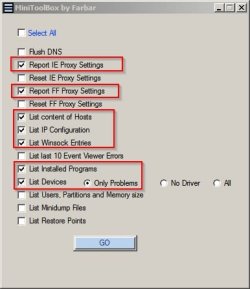
It will run without installation. If you run the program and choose the following settings:

MiniToolBox by Farbar.jpg

It should save a report on your desktop with the file name result.txt

Will you upload the file and attach it to your next post or else copy the contents into your next post?
 

My Computer My Computer

Computer type
Laptop
Computer Manufacturer/Model Number
ASUS
OS
Microsoft Windows 7 Home Premium 64-bit 7601 Multiprocessor Free Service Pack 1
CPU
AMD C-60 APU with Radeon(tm) HD Graphics
Motherboard
ASUSTeK COMPUTER INC. X501U
Memory
4.00 GB
Graphics Card(s)
AMD Radeon HD 6290 Graphics
Sound Card
(1) AMD High Definition Audio Device (2) Realtek High Defi
Screen Resolution
1366 x 768 x 32 bits (4294967296 colors) @ 60 Hz
Hard Drives
Hitachi HTS545050A7E380 SATA Disk Device
Antivirus
Comodo CIS & FW, SecureAplus App Whitelisting, Threatfire
Browser
Cyberfox 64bit, Opera 64bit, Airfox
Other Info
Spy-The-Spy, HitmanPro.Alert, Norton Connect Safe, MJRegWatcher, BitDefender TrafficLight, Voodoo Shield, Zemana AntiMalware
Results file attached as requested. I have no idea what that last thing is :confused:
 

Attachments

My Computer My Computer

Computer type
PC/Desktop
OS
W7Home Premium 32b
CPU
2.6 GHz Intel Pentium Dual core
Memory
4 MB
Hard Drives
750 GB
Browser
Chrome & IE
Okay I'm not seeing anything obvious in the file you attached.

What's your Antivirus currently?

Anyway from this point I'm not entirely sure what's going on.

Suggest: Await confirmation and suggestions from other members.

Your could try adding this line to above the first entry in your hosts file:

127.0.0.1 localhost

Those other entries usually get added to a hosts file by Spybot Search & Destroy. Have you used it in the past?

Could you copy your hosts file and upload it?

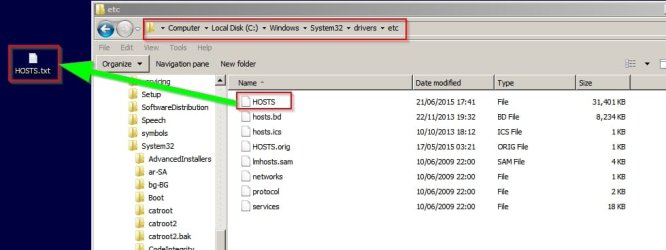
Navigate to:

C:\Windows\System32\drivers\etc

Copy HOSTS to your desktop and once copied - rename to HOSTS.txt and upload it please. Thanks.

EDIT: Forget uploading your hosts file. More than 15000 entries is too many to check!

Hosts.jpg

You could just try renaming it to HOSTS.old temporarily
 
Last edited:

My Computer My Computer

Computer type
Laptop
Computer Manufacturer/Model Number
ASUS
OS
Microsoft Windows 7 Home Premium 64-bit 7601 Multiprocessor Free Service Pack 1
CPU
AMD C-60 APU with Radeon(tm) HD Graphics
Motherboard
ASUSTeK COMPUTER INC. X501U
Memory
4.00 GB
Graphics Card(s)
AMD Radeon HD 6290 Graphics
Sound Card
(1) AMD High Definition Audio Device (2) Realtek High Defi
Screen Resolution
1366 x 768 x 32 bits (4294967296 colors) @ 60 Hz
Hard Drives
Hitachi HTS545050A7E380 SATA Disk Device
Antivirus
Comodo CIS & FW, SecureAplus App Whitelisting, Threatfire
Browser
Cyberfox 64bit, Opera 64bit, Airfox
Other Info
Spy-The-Spy, HitmanPro.Alert, Norton Connect Safe, MJRegWatcher, BitDefender TrafficLight, Voodoo Shield, Zemana AntiMalware
Also from your log - I'm not entirely sure what this is:

Code:
Name: BAPIDRV
Description: BAPIDRV
Class Guid: {8ECC055D-047F-11D1-A537-0000F8753ED1}
Manufacturer: 
Service: BAPIDRV
Device ID: ROOT\LEGACY_BAPIDRV\0000
Problem: : This device is not present, is not working properly, or does not have all its drivers installed. (Code 24)
Resolution: The device is installed incorrectly. The problem could be a hardware failure, or a new driver might be needed.
Devices stay in this state if they have been prepared for removal.
After you remove the device, this error disappears.Remove the device, and this error should be resolved.

Seems to be related to security products from Qihoo 360. Do you use any of them?
 

My Computer My Computer

Computer type
Laptop
Computer Manufacturer/Model Number
ASUS
OS
Microsoft Windows 7 Home Premium 64-bit 7601 Multiprocessor Free Service Pack 1
CPU
AMD C-60 APU with Radeon(tm) HD Graphics
Motherboard
ASUSTeK COMPUTER INC. X501U
Memory
4.00 GB
Graphics Card(s)
AMD Radeon HD 6290 Graphics
Sound Card
(1) AMD High Definition Audio Device (2) Realtek High Defi
Screen Resolution
1366 x 768 x 32 bits (4294967296 colors) @ 60 Hz
Hard Drives
Hitachi HTS545050A7E380 SATA Disk Device
Antivirus
Comodo CIS & FW, SecureAplus App Whitelisting, Threatfire
Browser
Cyberfox 64bit, Opera 64bit, Airfox
Other Info
Spy-The-Spy, HitmanPro.Alert, Norton Connect Safe, MJRegWatcher, BitDefender TrafficLight, Voodoo Shield, Zemana AntiMalware
I have no idea what that is. Qihoo means nothing to me. Regarding anti virus, I've probably used every one that has been recommended here and elsewhere, and I never seem to find anything horrendous on any scan. I currently have Superantispyware loaded which was recommended on this site. Looks like I'm quickly heading toward a reformat "do-over" next week. Thanks again for your help.
 

My Computer My Computer

Computer type
PC/Desktop
OS
W7Home Premium 32b
CPU
2.6 GHz Intel Pentium Dual core
Memory
4 MB
Hard Drives
750 GB
Browser
Chrome & IE
Back
Top