Can't connect to certain websites

ThrashZone et als - Sorry if I didn't explain what I did properly. I performed a Clean Startup exactly as described in the link you sent. All items unchecked and disabled as instructed. After restart, the same symptoms occurred. First attempt to connect with zerohedge.com for example, worked fine. After that.... nada... back to the timeout issues. As I previously mentioned, most other websites (this one included) load without a problem. One contributor suggested it might be a torrent blocking issue. I don't think any website I go to is related to torrent. Same for both IE and chrome. So I reverted back to normal startup mode.
 

My Computer My Computer

Computer type
PC/Desktop
OS
W7Home Premium 32b
CPU
2.6 GHz Intel Pentium Dual core
Memory
4 MB
Hard Drives
750 GB
Browser
Chrome & IE
Mike, sorry for the confusion, ZenMate doesn't work with IE, that's what I was trying to say. OP would need to use one of the supported browsers. Firefox is the best candidate. It would take 3 minutes tops to install and try the offending websites. I would run "ipconfig -flushdns" after connecting to the VPN by the way, just in case.
 

My Computer My Computer

Computer type
PC/Desktop
Computer Manufacturer/Model Number
Custom Build
OS
Windows 7 Ultimate x64 SP1
CPU
AMD Phenom 2 1090T
Motherboard
Gigabyte GA-890FXA-UD5
Memory
2x8GB Kingston HyperX Fury Black 1600Mhz Unganged
Graphics Card(s)
MSI GTX 970 Gaming 4G
Sound Card
Realtek On-Board HD 7.1 Audio / Logitech G35
Monitor(s) Displays
3xAcer GD245HQ
Screen Resolution
1920x1080
Hard Drives
Samsung 850 Pro 512GB SSD - OS /
WD Caviar Black SATA 3 - 1 TBx2 - Dynamic RAID 0 /
WD Caviar Green SATA 2 - 640GBx2 - Dynamic RAID 0 /
WD Caviar Green SATA 2 - 640GB - Internal Backup /
Seagate Barracude SATA 3 - 3TB - External Backup/ Sync
PSU
HighPower 1000W
Case
Cooler Master HAF 932
Cooling
Noctua NH-D14
Keyboard
Logitech G19
Mouse
Logitech G500
Internet Speed
100/4 Mbit Cable (100GB quota)
Antivirus
ZoneAlarm Extreme Security / MBAM Pro / MBAE Free / SAS Free
Browser
IE 11 - Firefox - Chrome
Other Info
Logitech F710/ G27/ G940/ Z5500 // TrackIR 5 // Nvidia 3D Surround Vision
Also, right after you login, run in cmd:
tracert -d www.zerohedge.com
Then run the same command after you get time out, see if route is the same.
 

My Computer My Computer

Computer type
PC/Desktop
Computer Manufacturer/Model Number
Custom Build
OS
Windows 7 Ultimate x64 SP1
CPU
AMD Phenom 2 1090T
Motherboard
Gigabyte GA-890FXA-UD5
Memory
2x8GB Kingston HyperX Fury Black 1600Mhz Unganged
Graphics Card(s)
MSI GTX 970 Gaming 4G
Sound Card
Realtek On-Board HD 7.1 Audio / Logitech G35
Monitor(s) Displays
3xAcer GD245HQ
Screen Resolution
1920x1080
Hard Drives
Samsung 850 Pro 512GB SSD - OS /
WD Caviar Black SATA 3 - 1 TBx2 - Dynamic RAID 0 /
WD Caviar Green SATA 2 - 640GBx2 - Dynamic RAID 0 /
WD Caviar Green SATA 2 - 640GB - Internal Backup /
Seagate Barracude SATA 3 - 3TB - External Backup/ Sync
PSU
HighPower 1000W
Case
Cooler Master HAF 932
Cooling
Noctua NH-D14
Keyboard
Logitech G19
Mouse
Logitech G500
Internet Speed
100/4 Mbit Cable (100GB quota)
Antivirus
ZoneAlarm Extreme Security / MBAM Pro / MBAE Free / SAS Free
Browser
IE 11 - Firefox - Chrome
Other Info
Logitech F710/ G27/ G940/ Z5500 // TrackIR 5 // Nvidia 3D Surround Vision
I downloaded and installed Firefox and tried it with the two offending sites I know are consistent problems: zerohedge and sotawatch. Exactly the same results. First attempt to connect= OK. After that= NG.
 

My Computer My Computer

Computer type
PC/Desktop
OS
W7Home Premium 32b
CPU
2.6 GHz Intel Pentium Dual core
Memory
4 MB
Hard Drives
750 GB
Browser
Chrome & IE
GokAy- Please translate your suggestion into non-tekkie-ese :)

[ I would run "ipconfig -flushdns" after connecting to the VPN by the way, just in case. ]
Need you to explain that one for me. Remember, I'm a retired banker (i.e. not too intelligent)

[ Also, right after you login, run in cmd: tracert -d www.zerohedge.com ]
[ Then run the same command after you get time out, see if route is the same. ]

I can follow that instruction, but not sure I would know what the results would mean. But I'd be happy to screenshot and post.

BTW, when I was venting frustration yesterday, it was not directed at you guys personally. I very much appreciate the fact that you are trying to help me. Many thanks !
 

My Computer My Computer

Computer type
PC/Desktop
OS
W7Home Premium 32b
CPU
2.6 GHz Intel Pentium Dual core
Memory
4 MB
Hard Drives
750 GB
Browser
Chrome & IE
Didn't even notice you were venting :)

Ok, now please visit zenmate with firefox (it was not firefox I was curious to test, but the zenmate connection) link is above or just google it
It is an add-on/extension that will install to firefox, connecting to it you will bypass your ISP.
After connecting to their VPN, run in cmd:
Code:
ipconfig -flushdns
Then visit your problem sites, report back.

The other thing you can try is, right after you login (when it is supposed to work) run in cmd:
Code:
tracert -d www.zerohedge.com
Copy paste the result here, then open your browser and make it stop responding and rerun the same command, copy paste that too.

So 2 things to try. Plus the one below. It will take 10 minutes all.

Also since I still need an answer. Did you stop DNS Client service (run services.msc and scroll down to it, right click and stop). Try your regular browser now.
 

My Computer My Computer

Computer type
PC/Desktop
Computer Manufacturer/Model Number
Custom Build
OS
Windows 7 Ultimate x64 SP1
CPU
AMD Phenom 2 1090T
Motherboard
Gigabyte GA-890FXA-UD5
Memory
2x8GB Kingston HyperX Fury Black 1600Mhz Unganged
Graphics Card(s)
MSI GTX 970 Gaming 4G
Sound Card
Realtek On-Board HD 7.1 Audio / Logitech G35
Monitor(s) Displays
3xAcer GD245HQ
Screen Resolution
1920x1080
Hard Drives
Samsung 850 Pro 512GB SSD - OS /
WD Caviar Black SATA 3 - 1 TBx2 - Dynamic RAID 0 /
WD Caviar Green SATA 2 - 640GBx2 - Dynamic RAID 0 /
WD Caviar Green SATA 2 - 640GB - Internal Backup /
Seagate Barracude SATA 3 - 3TB - External Backup/ Sync
PSU
HighPower 1000W
Case
Cooler Master HAF 932
Cooling
Noctua NH-D14
Keyboard
Logitech G19
Mouse
Logitech G500
Internet Speed
100/4 Mbit Cable (100GB quota)
Antivirus
ZoneAlarm Extreme Security / MBAM Pro / MBAE Free / SAS Free
Browser
IE 11 - Firefox - Chrome
Other Info
Logitech F710/ G27/ G940/ Z5500 // TrackIR 5 // Nvidia 3D Surround Vision
Since we failed to ask you this yet, please run cmd as admin (start menu search box - cmd, then right click the icon that will show and select "run as administrator"):
Code:
Sfc /scannow
Report the results (it will take 20 minutes or so), or just copy paste.
 

My Computer My Computer

Computer type
PC/Desktop
Computer Manufacturer/Model Number
Custom Build
OS
Windows 7 Ultimate x64 SP1
CPU
AMD Phenom 2 1090T
Motherboard
Gigabyte GA-890FXA-UD5
Memory
2x8GB Kingston HyperX Fury Black 1600Mhz Unganged
Graphics Card(s)
MSI GTX 970 Gaming 4G
Sound Card
Realtek On-Board HD 7.1 Audio / Logitech G35
Monitor(s) Displays
3xAcer GD245HQ
Screen Resolution
1920x1080
Hard Drives
Samsung 850 Pro 512GB SSD - OS /
WD Caviar Black SATA 3 - 1 TBx2 - Dynamic RAID 0 /
WD Caviar Green SATA 2 - 640GBx2 - Dynamic RAID 0 /
WD Caviar Green SATA 2 - 640GB - Internal Backup /
Seagate Barracude SATA 3 - 3TB - External Backup/ Sync
PSU
HighPower 1000W
Case
Cooler Master HAF 932
Cooling
Noctua NH-D14
Keyboard
Logitech G19
Mouse
Logitech G500
Internet Speed
100/4 Mbit Cable (100GB quota)
Antivirus
ZoneAlarm Extreme Security / MBAM Pro / MBAE Free / SAS Free
Browser
IE 11 - Firefox - Chrome
Other Info
Logitech F710/ G27/ G940/ Z5500 // TrackIR 5 // Nvidia 3D Surround Vision
GokAy - OK, I'm almost afraid to report this: 1) Stop DNS Client Service= no change 2) Zenmate added to Firefox 3) ipconfig -flushdns completed.

I restarted, went to Firefox and the problem websites loaded quickly. I then surfed the web for a bit and tried them again. They loaded. I had lunch, surfed a bit more and tried again. They loaded. I closed Firefox and opened Chrome. The two sites would not load. I went back to Firefox. They loaded ! I didn't perform tracert -d since Firefox was working. Let me play with this for a while and see if Firefox now consistently loads the problem sites. But it certainly seems as though progress is being made. I'm hopefully optimistic. I'll report more later. Can you explain to me what is actually happening when you say that this bypasses my ISP? Also, would you still like me to perform the tracert -d ? If so, how should I proceed in Firefox (sites loading) vs. Chrome (sites not loading). Thank you.
 

My Computer My Computer

Computer type
PC/Desktop
OS
W7Home Premium 32b
CPU
2.6 GHz Intel Pentium Dual core
Memory
4 MB
Hard Drives
750 GB
Browser
Chrome & IE
I performed Sfc /scannow (as Administrator). When I try to open the file CBS.log where the results are, I get an Access Denied message. What do I have to do to view the results of the scan?
 

My Computer My Computer

Computer type
PC/Desktop
OS
W7Home Premium 32b
CPU
2.6 GHz Intel Pentium Dual core
Memory
4 MB
Hard Drives
750 GB
Browser
Chrome & IE
Still working ok in Firefox. However, in surfing some of my other sites, they are reporting that my computer seems to be in many different locations, ranging from nearby my actual location to as far away as New Zealand. Have I opened myself up to security risks by applying this "fix" in Firefox?
 

My Computer My Computer

Computer type
PC/Desktop
OS
W7Home Premium 32b
CPU
2.6 GHz Intel Pentium Dual core
Memory
4 MB
Hard Drives
750 GB
Browser
Chrome & IE
Ok, regarding ZenMate:

It is a VPN (Virtual Private Network) service. A VPN is a tunnel between two points (your PC being one, and the server of ZenMate on the other). Communications between the two are encrypted. It is as if you are connected to the Internet from their servers, hence bypass your ISP.

The free version you loaded is a browser based VPN. The extension you installed for Firefox creates the tunnel between your PC and servers. There is a small icon on top right part of Firefox and see which country you are connected from. You can disable it from that icon, or change the country.

I usually use ZenMate for sites that would normally open but fail to at any time, or to access banned (due to some retarded court order) sites.

You don't need to use it for everything (I don't). I was more interested in seeing how it would behave. Your regular browsers are unaffected by the VPN (they will still connect through your ISP) and you won't get those warnings about being in other countries.

What you can do is, keep Firefox for these 2 sites but do your other stuff with IE and Chrome as usual. That is until (if) we can find a solution for you.

What we learned by this test is that your PC is ok (at least that's how I see it). So I will ask again, did you try to change DNS servers? If not, try it:
- Network and Sharing Center
- click on Local Area Connection
- properties
- TCP/IPv4 properties
- check "use the following DNS server addresses" and enter 8.8.8.8 and 8.8.4.4 in the 2 boxes (these are Google)
- ok your way out
- in cmd: ipconfig -flushdns
- try browsing to your problem sites with IE

By the way, if changing DNS works you don't need to use Google DNS (some people don't fancy it due to being tracked), you can switch to, say, OpenDNS.
 

My Computer My Computer

Computer type
PC/Desktop
Computer Manufacturer/Model Number
Custom Build
OS
Windows 7 Ultimate x64 SP1
CPU
AMD Phenom 2 1090T
Motherboard
Gigabyte GA-890FXA-UD5
Memory
2x8GB Kingston HyperX Fury Black 1600Mhz Unganged
Graphics Card(s)
MSI GTX 970 Gaming 4G
Sound Card
Realtek On-Board HD 7.1 Audio / Logitech G35
Monitor(s) Displays
3xAcer GD245HQ
Screen Resolution
1920x1080
Hard Drives
Samsung 850 Pro 512GB SSD - OS /
WD Caviar Black SATA 3 - 1 TBx2 - Dynamic RAID 0 /
WD Caviar Green SATA 2 - 640GBx2 - Dynamic RAID 0 /
WD Caviar Green SATA 2 - 640GB - Internal Backup /
Seagate Barracude SATA 3 - 3TB - External Backup/ Sync
PSU
HighPower 1000W
Case
Cooler Master HAF 932
Cooling
Noctua NH-D14
Keyboard
Logitech G19
Mouse
Logitech G500
Internet Speed
100/4 Mbit Cable (100GB quota)
Antivirus
ZoneAlarm Extreme Security / MBAM Pro / MBAE Free / SAS Free
Browser
IE 11 - Firefox - Chrome
Other Info
Logitech F710/ G27/ G940/ Z5500 // TrackIR 5 // Nvidia 3D Surround Vision
I went through the DNS server change instructions. On the first try, IE connected to zerohedge after some delay. After that, I couldn't get it to reconnect again. Same on the other problem sites. BTW, I'm one of those who doesn't like being tracked by Google. What would the settings be for Open DNS? Thanks
 

My Computer My Computer

Computer type
PC/Desktop
OS
W7Home Premium 32b
CPU
2.6 GHz Intel Pentium Dual core
Memory
4 MB
Hard Drives
750 GB
Browser
Chrome & IE
Reformat?

Since the other computers in my home seem to be connecting to sites without a problem, and considering the extraordinary amount of time I have devoted trying to solve the problem on my machine, I'm now wondering if it wouldn't make sense to back up my computer and reformat the damn thing. That's not even taking into account the amount of time you wonderful people have spent trying to help me figure out what's causing my problems. I know it's a pain to reload everything, but in the long run, it might be a quicker (and simpler) solution to my connection problems. I'd appreciate anyone's thoughts on the idea. Many thanks.
 

My Computer My Computer

Computer type
PC/Desktop
OS
W7Home Premium 32b
CPU
2.6 GHz Intel Pentium Dual core
Memory
4 MB
Hard Drives
750 GB
Browser
Chrome & IE
See: Use OpenDNS

Also use the commands:

Start>search>cmd>IPconfig /flushdns

IPconfig /release

Then IPconfig /renew
 

My Computer My Computer

Computer type
Laptop
Computer Manufacturer/Model Number
ASUS
OS
Microsoft Windows 7 Home Premium 64-bit 7601 Multiprocessor Free Service Pack 1
CPU
AMD C-60 APU with Radeon(tm) HD Graphics
Motherboard
ASUSTeK COMPUTER INC. X501U
Memory
4.00 GB
Graphics Card(s)
AMD Radeon HD 6290 Graphics
Sound Card
(1) AMD High Definition Audio Device (2) Realtek High Defi
Screen Resolution
1366 x 768 x 32 bits (4294967296 colors) @ 60 Hz
Hard Drives
Hitachi HTS545050A7E380 SATA Disk Device
Antivirus
Comodo CIS & FW, SecureAplus App Whitelisting, Threatfire
Browser
Cyberfox 64bit, Opera 64bit, Airfox
Other Info
Spy-The-Spy, HitmanPro.Alert, Norton Connect Safe, MJRegWatcher, BitDefender TrafficLight, Voodoo Shield, Zemana AntiMalware
Callender: Performed your suggestions. No change/improvement. Problem sites still load ok in Firefox using ZenMate.
 

My Computer My Computer

Computer type
PC/Desktop
OS
W7Home Premium 32b
CPU
2.6 GHz Intel Pentium Dual core
Memory
4 MB
Hard Drives
750 GB
Browser
Chrome & IE
...Only one is having the problem; the other 2 connect without issue....
This would seem to rule out the ISP blocking anything (assuming that all 3 computers use the same ISP).

The following info is mostly directed at those helping you:

The Firefox/ZenMate work around is interesting, but I don't think that it tells us anything about the local ISP - given that other computers are not blocked by the ISP.

DNS:
I could be wrong about this, but my various monitoring tools have led me to think that browsers have their own DNS cache. Once a browser knows the relationship between a text based web address and its IP address, it keeps/reuses that info until the browser exits RAM. (e.g. with the Windows DNS Client service disabled, browsers show up in Process Monitor and Wireshark making their own DNS requests. I don't see any further name resolution traffic when visiting the same website twice in one browsing session.) Given that, it seems odd to me that IE connects and then fails.

With the Windows DNS Client service enabled and running, IE (or any other app) would ask that service to resolve domain names (turn a text based web address into an IP address). If the Windows DNS Client service does not have that info, it requests it for the ISP's DNS servers. [Or from whatever DNS servers are configured for the network adapter in use.] The Windows DNS Client service keeps/caches this info so that subsequent requests to resolve the same domain name (text based web address) will not require another inquiry to the ISP's DNS servers. The fact that IE connects once, but fails after that should have nothing to do with the ISP.

As far as I can tell, the Windows DNS Client keeps its cache of resolved domain names in RAM. I have yet to find a source to back up that assertion. Empirical data suggests that stopping the service will flush the DNS cache. There should be no need to flush the cache via ipconfig if the service was stopped. However, browsers should be closed and Task Manager consulted to ensure that the browser did indeed exit RAM.

All of the above info could be flawed. I am open to correction/education on the points made.


There are already enough cooks in this kitchen, so I'll not ask the OP to do anything - yet :-)
 

My Computer My Computer

Computer type
Laptop
Computer Manufacturer/Model Number
Employer provided Dell Latitude
OS
W7 Pro SP1 64bit
CPU
i7
Memory
8GB
Graphics Card(s)
Intel HD Graphics
Hard Drives
crappy SSD
Antivirus
Employer mandated Symantec Endpoint Protection
Browser
Pale Moon 64bit, IE11 64bit & Chrome 64bit
UsernameIssues:

- I don't think ISP is blocking either, it would have failed every time instead if so.
- As I have mentioned it before, I suspected the DNS caching to be the issue. As you told, first attempt works as there is nothing in cache, but subsequent requests are first looked in the cache (disregarding hosts file etc, talking about the DNS side) and don't use DNS lookup if they are readily available. I don't know about the individual browsers caching themselves. There is a cache you can see with "ipconfig -displaydns". I don't think this cache is related to any browser alone. This is the cache that gets deleted with -flushdns or after a reboot as far as I know.

Since it works with ZenMate, it can't be a cache issue either. ZenMate has its own DNS servers but PC would be using the same cache. Perhaps a routing issue (should be the only other thing different than a non-VPN connection)? I keep wondering about router acting up, then again why only these 2 sites and why work once after each restart?

I would still try connecting PC directly to modem (if possible) to eliminate router suspicion.

** Does it work if you close and restart the browser only?

w4mps: It is up to you to decide on a re-install. You are the boss here.
 

My Computer My Computer

Computer type
PC/Desktop
Computer Manufacturer/Model Number
Custom Build
OS
Windows 7 Ultimate x64 SP1
CPU
AMD Phenom 2 1090T
Motherboard
Gigabyte GA-890FXA-UD5
Memory
2x8GB Kingston HyperX Fury Black 1600Mhz Unganged
Graphics Card(s)
MSI GTX 970 Gaming 4G
Sound Card
Realtek On-Board HD 7.1 Audio / Logitech G35
Monitor(s) Displays
3xAcer GD245HQ
Screen Resolution
1920x1080
Hard Drives
Samsung 850 Pro 512GB SSD - OS /
WD Caviar Black SATA 3 - 1 TBx2 - Dynamic RAID 0 /
WD Caviar Green SATA 2 - 640GBx2 - Dynamic RAID 0 /
WD Caviar Green SATA 2 - 640GB - Internal Backup /
Seagate Barracude SATA 3 - 3TB - External Backup/ Sync
PSU
HighPower 1000W
Case
Cooler Master HAF 932
Cooling
Noctua NH-D14
Keyboard
Logitech G19
Mouse
Logitech G500
Internet Speed
100/4 Mbit Cable (100GB quota)
Antivirus
ZoneAlarm Extreme Security / MBAM Pro / MBAE Free / SAS Free
Browser
IE 11 - Firefox - Chrome
Other Info
Logitech F710/ G27/ G940/ Z5500 // TrackIR 5 // Nvidia 3D Surround Vision
Thanks GokAy.


:::goes back to lurking:::
 

My Computer My Computer

Computer type
Laptop
Computer Manufacturer/Model Number
Employer provided Dell Latitude
OS
W7 Pro SP1 64bit
CPU
i7
Memory
8GB
Graphics Card(s)
Intel HD Graphics
Hard Drives
crappy SSD
Antivirus
Employer mandated Symantec Endpoint Protection
Browser
Pale Moon 64bit, IE11 64bit & Chrome 64bit
Okay so just some more thoughts.

RE: Firefox. I don't use it much and prefer Cyberfox. I do have FF Portable though.

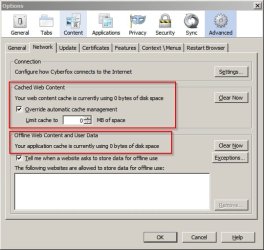
Firefox cache: As far as I know Firefox stores visited pages in it's cache somewhere and when you attempt to visit a website for a second time it loads the page from cache rather than the actual live page doesn't it?

On my machine I have changed default settings.

Cyberfox Options.jpg

Cache after some browsing:

FF Cache 2.jpg

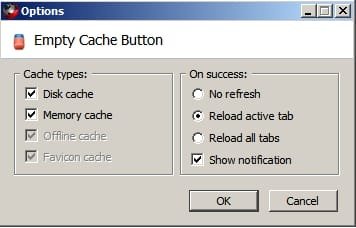
Also I have an add on installed (currently disabled) that forces pages to reload.

FF Cache.jpg

I guess that pressing F5 or CTRL+F5 might also force a reload of the current page.

So I wonder if FF with Zenmate actually displays the cached page on subsequent visits?
 

My Computer My Computer

Computer type
Laptop
Computer Manufacturer/Model Number
ASUS
OS
Microsoft Windows 7 Home Premium 64-bit 7601 Multiprocessor Free Service Pack 1
CPU
AMD C-60 APU with Radeon(tm) HD Graphics
Motherboard
ASUSTeK COMPUTER INC. X501U
Memory
4.00 GB
Graphics Card(s)
AMD Radeon HD 6290 Graphics
Sound Card
(1) AMD High Definition Audio Device (2) Realtek High Defi
Screen Resolution
1366 x 768 x 32 bits (4294967296 colors) @ 60 Hz
Hard Drives
Hitachi HTS545050A7E380 SATA Disk Device
Antivirus
Comodo CIS & FW, SecureAplus App Whitelisting, Threatfire
Browser
Cyberfox 64bit, Opera 64bit, Airfox
Other Info
Spy-The-Spy, HitmanPro.Alert, Norton Connect Safe, MJRegWatcher, BitDefender TrafficLight, Voodoo Shield, Zemana AntiMalware
Good info there, however OP tried FF without ZenMate and that failed too. One would expect behavior be same with or without it?

I also thought of temp Internet files being corrupt but that is only for IE, right?
 

My Computer My Computer

Computer type
PC/Desktop
Computer Manufacturer/Model Number
Custom Build
OS
Windows 7 Ultimate x64 SP1
CPU
AMD Phenom 2 1090T
Motherboard
Gigabyte GA-890FXA-UD5
Memory
2x8GB Kingston HyperX Fury Black 1600Mhz Unganged
Graphics Card(s)
MSI GTX 970 Gaming 4G
Sound Card
Realtek On-Board HD 7.1 Audio / Logitech G35
Monitor(s) Displays
3xAcer GD245HQ
Screen Resolution
1920x1080
Hard Drives
Samsung 850 Pro 512GB SSD - OS /
WD Caviar Black SATA 3 - 1 TBx2 - Dynamic RAID 0 /
WD Caviar Green SATA 2 - 640GBx2 - Dynamic RAID 0 /
WD Caviar Green SATA 2 - 640GB - Internal Backup /
Seagate Barracude SATA 3 - 3TB - External Backup/ Sync
PSU
HighPower 1000W
Case
Cooler Master HAF 932
Cooling
Noctua NH-D14
Keyboard
Logitech G19
Mouse
Logitech G500
Internet Speed
100/4 Mbit Cable (100GB quota)
Antivirus
ZoneAlarm Extreme Security / MBAM Pro / MBAE Free / SAS Free
Browser
IE 11 - Firefox - Chrome
Other Info
Logitech F710/ G27/ G940/ Z5500 // TrackIR 5 // Nvidia 3D Surround Vision
Back
Top