Solved Can't connect using DHCP

sleepless

New member
Local time
5:30 PM
Messages
84
I can't figure out why i can't get a connection using DHCP (obtain ip address automatically). The only way i get an internet connection is by assigning a static ip. i have another pc connected to the network also windows 7 and dhcp works fine. i'm confused, can anyone help?
 

My Computer

Computer type
Laptop
Computer Manufacturer/Model Number
Asus K52N
OS
Windows 7 Ultimate x64 SP1
CPU
AMD Turion II P540
Motherboard
Asus
Memory
6 GB
Graphics Card(s)
ATI Radeon HD 4200
Antivirus
Avast
Browser
Chrome
I would try this simple idea first and see what happens: click start, programs, accessories, then right click on command prompt and select run as administrator; once there; type ipconfig /release then wait till the adapter releases; then type ipconfig /renew and hopefully that will resolve the issue. If that does nothing for ya post back
 

My Computer

Computer type
PC/Desktop
Computer Manufacturer/Model Number
custom built
OS
Windows 7 ultimate 64-bit
CPU
Intel I7 2600K 3.4ghz
Motherboard
Asus Evo P8P67
Memory
Corsair 16gb ddr3 1600mhz
Graphics Card(s)
Nvidia Geforce gt 430
Sound Card
Sound Blaster Titanium x-fi pci express
Monitor(s) Displays
Dell E198WFP
Hard Drives
1 western digital 2TB drive.
PSU
Antec 1200 watt
Case
Inwin Dragon Rider
Cooling
6 case supplied cooling fans
Keyboard
logitech mk700
Mouse
logitech m705
Internet Speed
25-50mbps download; 10mbps upload(i think)
Antivirus
avg free 2014
Browser
mozilla firefox
Other Info
Also have a pretty bad speaker setup which is a klipsch promedia 5.1 surround speaker setup with huge subwoofer and lg blu ray player/writer. Also a hp officejet pro 8600 plus wireless all in one and a logitech s7500 webcam.
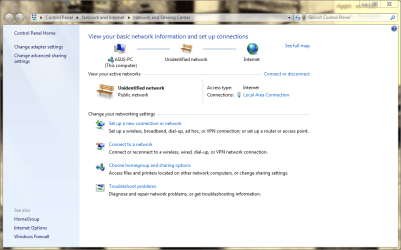
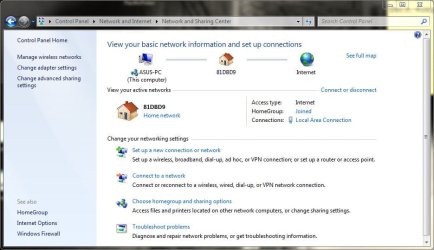
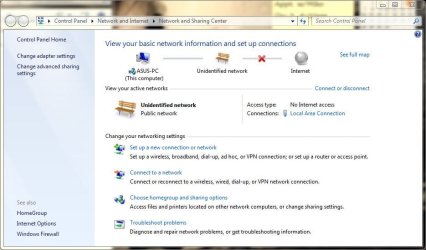
well at first i thought it worked as the network icon is showing to be connected. in the network and sharing center, it displays as being connected to an unidentified network with internet access.

nasc.PNG

However... i have NO connection to the internet AT ALL. (weird that it displays as though it is).

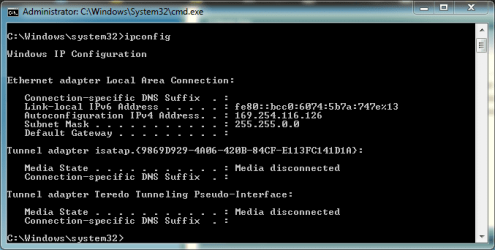
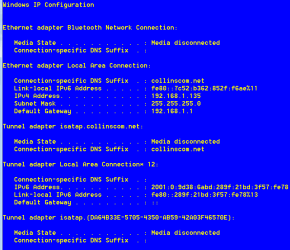
My local ip is 192.168.0.1 but this is what's displayed in ipconfig:

ipconfig.PNG

thoughts?
 

My Computer

Computer type
Laptop
Computer Manufacturer/Model Number
Asus K52N
OS
Windows 7 Ultimate x64 SP1
CPU
AMD Turion II P540
Motherboard
Asus
Memory
6 GB
Graphics Card(s)
ATI Radeon HD 4200
Antivirus
Avast
Browser
Chrome
can someone please help me with this?
 

My Computer

Computer type
Laptop
Computer Manufacturer/Model Number
Asus K52N
OS
Windows 7 Ultimate x64 SP1
CPU
AMD Turion II P540
Motherboard
Asus
Memory
6 GB
Graphics Card(s)
ATI Radeon HD 4200
Antivirus
Avast
Browser
Chrome
I'm puzzled about your configuration.

(1) The 169.254.x.x IP address shown as "autoconfiguration IPv4 address" resolves to:

National Aeronautics and Space Administration
IS05/Office of the Chief Information Officer
MSFC
AL
35812
United States

which of course doesn't make sense. How can this can't be manually configured? Did you set this? Has it always been the same value?

(2) Why does Network and Sharing Center show you to be on a "public network" for that "unidentified network"? And the "public network" text isn't shown as it normally would be, as a LINK that you can click on to change "set network location" say to "home network".

(3) Why does IPCONFIG show no default gateway?

(4) If you're wired-connected from PC to router, and you get into the router from your second computer, does this problem comptuter show up on "attached devices"?

No ideas yet, and I'm still just gathering clues and info.
 

My Computer

Computer type
PC/Desktop
Computer Manufacturer/Model Number
Home-built, two systems (1) and (2)
OS
Windows 7 Pro x64 (1), Win7 Pro X64 (2)
CPU
i5-3350p 3.1Ghz/6MB-cache (1); E8400 3.0Ghz/6MB-cache (2)
Motherboard
ASUS P8Z77-V Pro (1); ASUS P5Q3 (2)
Memory
8GB PC3-12800 DDR3 (1); 4GB PC3-10600 DDR3 (2)
Graphics Card(s)
ATI HD7750 (1), (see TV cards); ATI R7 250 (2)
Sound Card
Realtek ALC892 HD Audio (1); Realtek ALC1200 HD Audio (2)
Monitor(s) Displays
Eizo HD2441W LCD, Eizo S2433W (1); Eizo 24" S2433W (2)
Screen Resolution
1920x1200, 1920x1200 (1); 1920x1200 (2)
Hard Drives
(1) 1TB SATA-II (7200RPM), 2x2TB SATA-III (7200RPM), 250GB SATA-III (10000RPM) for OS; 2x2TB external USB 3.0

(2) 320GB SATA-II (7200RPM), 750GB SATA-II (7200RPM), 150GB SATA-II (10000RPM) for OS; 2TB external USB 3.0
PSU
Nesteq ECS-6001 600W (1); Nesteq ECS-5001 500W (2)
Case
Acousti-Case 360 (1) and (2)
Cooling
Noctua NH-U12P SE2 for CPU, 2x120mm case fans (1) and (2)
Keyboard
IBM PS/2 (1) and (2)
Mouse
Logitech MX Revolution wireless (1); Microsoft wired (2)
Internet Speed
100mbps down / 10mbps up
Antivirus
Microsoft Security Essentials; Malwarebyte Anti-Malware Pro
Browser
Firefox
Other Info
Ceton InfiniTV 4-tuner cablecard-enabled TV card as well as Hauppauge HVR-2250 OTA/ATSC 2-tuner TV card in (1), running under Win7 WMC
My local ip is 192.168.0.1
I don't follow this. Are you saying you've set your own IP manually to be 192.168.0.1? When? Why? That's not right.

If you had a router, then the router might be 192.168.0.1. But your own PC would not be this.

Whether your own PC's IP address is assigned automatically through DHCP or manually assigned by you in TPCIP V4 Properties, from the perspective of your PC the router is the device which gets 192.168.0.1 address assigned. Your PC would never get this address. Your PC should be 192.168.0.2 or 192.168.0.3 or something similar.
 

My Computer

Computer type
PC/Desktop
Computer Manufacturer/Model Number
Home-built, two systems (1) and (2)
OS
Windows 7 Pro x64 (1), Win7 Pro X64 (2)
CPU
i5-3350p 3.1Ghz/6MB-cache (1); E8400 3.0Ghz/6MB-cache (2)
Motherboard
ASUS P8Z77-V Pro (1); ASUS P5Q3 (2)
Memory
8GB PC3-12800 DDR3 (1); 4GB PC3-10600 DDR3 (2)
Graphics Card(s)
ATI HD7750 (1), (see TV cards); ATI R7 250 (2)
Sound Card
Realtek ALC892 HD Audio (1); Realtek ALC1200 HD Audio (2)
Monitor(s) Displays
Eizo HD2441W LCD, Eizo S2433W (1); Eizo 24" S2433W (2)
Screen Resolution
1920x1200, 1920x1200 (1); 1920x1200 (2)
Hard Drives
(1) 1TB SATA-II (7200RPM), 2x2TB SATA-III (7200RPM), 250GB SATA-III (10000RPM) for OS; 2x2TB external USB 3.0

(2) 320GB SATA-II (7200RPM), 750GB SATA-II (7200RPM), 150GB SATA-II (10000RPM) for OS; 2TB external USB 3.0
PSU
Nesteq ECS-6001 600W (1); Nesteq ECS-5001 500W (2)
Case
Acousti-Case 360 (1) and (2)
Cooling
Noctua NH-U12P SE2 for CPU, 2x120mm case fans (1) and (2)
Keyboard
IBM PS/2 (1) and (2)
Mouse
Logitech MX Revolution wireless (1); Microsoft wired (2)
Internet Speed
100mbps down / 10mbps up
Antivirus
Microsoft Security Essentials; Malwarebyte Anti-Malware Pro
Browser
Firefox
Other Info
Ceton InfiniTV 4-tuner cablecard-enabled TV card as well as Hauppauge HVR-2250 OTA/ATSC 2-tuner TV card in (1), running under Win7 WMC
my laptop is 192.168.0.14 (wired) and 192.168.0.15 (wireless). desktop is 192.168.0.13 (set automatically using dhcp).

that unidentified public network and ipconfig.jpeg (i never set that ip address 169.254...myself) is what i get when i try using dhcp (automatic in windows adapter properties) on my laptop. there is no internet connection, however. when i set static ip i connect to local area home network and it works fine.

i'm confused because the auto setting (dhcp) works fine on my desktop.
 

My Computer

Computer type
Laptop
Computer Manufacturer/Model Number
Asus K52N
OS
Windows 7 Ultimate x64 SP1
CPU
AMD Turion II P540
Motherboard
Asus
Memory
6 GB
Graphics Card(s)
ATI Radeon HD 4200
Antivirus
Avast
Browser
Chrome
What is your router IP on the LAN private network 192.168.0.x ?

This would normally be 192.168.0.1 with the DHCP pool starting at 192.168.0.2 and running up to 192.168.0.254 although this is not the only allowed setting. In commercial premiss it's often set up to allocate all the system infrastructure, (Routers managed switches, printers Etc), to addresses at the top end of the range and the user devices lower down. In these installations the router will often be allocated 192.168.0.254 or .255

If you can check the details set in the actual router and let us know the router address, & ip pool range, as it appears that the DHCP server is not in operation - the 169.254.x.x is a Microsoft fall back address allocated when DHCP fails
 

My Computers

System One System Two

  • Computer type
    PC/Desktop
    Computer Manufacturer/Model Number
    ChillBlast - Custom to my design
    OS
    Windows 11 Pro x64 [Latest Release and Release Preview]
    CPU
    Ryzen 9 5950X, 3.8 - 5.2 MHz
    Motherboard
    Asus Prime X570-Pro
    Memory
    64GB [2 x 32GB] DDR4 3200MHz
    Graphics Card(s)
    4GB NVIDIA GEFORCE GTX 1650 Ti
    Sound Card
    On-board SPDIF to 5.1 System + HDMI [5.1 system]
    Monitor(s) Displays
    32" UHD 32 Bit HDR Monitor + 43" UHD 4K 32Bit HDR TV
    Screen Resolution
    2 x 3840 x 2160 @60Hz
    Hard Drives
    1TB M2 SSD OS, 500GB Fast Access SSD, 2 x 8TB Data + Various Externals from 1TB to 4TB, 10TB NAS
    PSU
    NZXT C750 80 PLUS Gold 750W Modular PSU
    Case
    Workstation Case [Matt Black]
    Cooling
    NZXT Kraken X63 280mm CPU Cooler +2x Quiet Case fans
    Keyboard
    Logitech Wireless MX Keys & K400 + others
    Mouse
    Logitech Wireless MX Master 3S
    Internet Speed
    920 MB Down 50 MB Up
    Antivirus
    BitDefender Total Security Pro
    Browser
    Chrome (always run latest Non-Beta)
    Other Info
    Also run ...
    Laptop - Quad 8GB - Windows 10 Pro x64
    Nexus 7 Android tablet x2
    Samsung 10.2" tablet
    Blackview TAB 8 4G Android Tablet c/w Keyboard
    Wacom Intuos Pro Medium Pen Pad
    Wacom Intuos Pro Small Pen Pad
    Wacom Expresskeys Remote
    Loopdeck+ Graphics Controller
    Shuttle Pro v2 Control
  • Computer type
    Laptop
    System Manufacturer/Model Number
    Dell XPS 17 10750H
    OS
    Windows 11 Pro x64 Latest RP
    CPU
    Intel I7 10750H 5.0GHz
    Motherboard
    Dell XPS
    Memory
    32GB [2x16GB] DDR4 2933 MHz
    Graphics Card(s)
    nVidia GTX1650Ti 4 GB GDDR6
    Sound Card
    Stock [Realtek] 4 Speaker
    Monitor(s) Displays
    17" IPS UHD+ Infinity Edge Touchscreen
    Screen Resolution
    3840 x 2400
    Hard Drives
    2TB M2 NVMe, 4TB External + various 500GB & 1TB External NVMe (also have access to spinner HDD from
    PSU
    Stock
    Case
    Stock XPS Aluminium & Carbon Fibre
    Cooling
    Stock - Active Fan Control
    Keyboard
    Backlit + Various Logitech
    Mouse
    Stock Track Pad + Logitech MX Trackball
    Internet Speed
    72 MB Down 18MB Up
    Browser
    Chrome
    Other Info
    Also run ...
    Laptop - Quad 8GB - Windows 10 Pro x64
    Nexus 7 Android tablet x2
    10.2" tablet
    Sony Z3 Android Smartphone
    Wacom Intuos Pro Medium Pen Pad
    Wacom Intuos Pro Small Pen Pad
    Wacom Expresskeys Remote
    Loopdeck+ Graphics Controller
    Shuttle Pro v2 Control Pad
    10TB NAS
my laptop is 192.168.0.14 (wired) and 192.168.0.15 (wireless). desktop is 192.168.0.13 (set automatically using dhcp).

that unidentified public network and ipconfig.jpeg (i never set that ip address 169.254...myself) is what i get when i try using dhcp (automatic in windows adapter properties) on my laptop. there is no internet connection, however. when i set static ip i connect to local area home network and it works fine.
Let's sort this out...

(1) Your desktop is wired connected to your router, and is configured for obtaining its IP address via "automatic DHCP". The router assigns 192.168.0.13 to your desktop. So the DHCP server functionality of your router must be enabled and working properly.

(2) You haven't confirmed that your router is 192.168.0.1, but I'm guessing it is. If you do IPCONFIG on your desktop machine, you will probably see "TCPIP IPv4 Address" of 192.168.0.13 and a "default gateway" address of 192.168.0.1. Yes??

EDIT: corrected default gateway address for typo.

(3) You say that when you manually set the IP address of the ASUS laptop's wired ethernet connection to 192.168.0.14, and manually set the IP address of the ASUS laptop's wireless connection to 192.168.0.15, that you now have Internet access through both of these networks? Can you please post a screenshot from Network and Sharing Center with these two manual IP address settings in effect.


Normally, there would be no reason to have both wired and wireless connections to your router from your laptop. If you have wired, that's sufficient and preferable. I normally disable wireless on my own laptop when I'm at home (there's a slide switch on my Lenovo W530 that turns off wireless radio) and connected wired to my router. I also use wired whenever possible when I'm away from home, using wireless only when necessary (by pushing the slide switch back to "on").

Anyway, from Network and Sharing Center, if you click on the "change adapter settings" link in the upper-left of the window, you'll get the Network Connections dialog. You should see both your wireless and wired connections and both will probably show a status of ENABLED, and a network name as they are both enabled and active (when you're manually setting the IP addresses).

If you then select each of the two network adapter objects and right-click and select DISABLE, to disable both wired and wireless. You should get a red "X" in the network icon in the system tray for each.

Then select the wired network adapter object, and right-click, and select Properties. Then select the Internet Protocol Version 4 item, and push the Properties button, and reset your manually assigned IP address back to "obtain IP address automatically" for both the PC and DNS server addresses. Push OK, to get back to the Network Connections view.

Now again right-click on the wired network adapter object, and select ENABLE. In a few seconds the red "X" should disappear (hopefully), wired handshake conversation with the router should occur to obtain a DHCP address, and hopefully you might now actually be connected... but just through wired, not wireless which you've previously DISABLE'd.

Yes??

What do things look like now? Same as before when you tried DHCP, or different? What does Network and Sharing Center show? Do you have a DHCP-assigned IP address, and do you have Internet access? Or still not working??

And what does IPCONFIG now show?

 
Last edited:

My Computer

Computer type
PC/Desktop
Computer Manufacturer/Model Number
Home-built, two systems (1) and (2)
OS
Windows 7 Pro x64 (1), Win7 Pro X64 (2)
CPU
i5-3350p 3.1Ghz/6MB-cache (1); E8400 3.0Ghz/6MB-cache (2)
Motherboard
ASUS P8Z77-V Pro (1); ASUS P5Q3 (2)
Memory
8GB PC3-12800 DDR3 (1); 4GB PC3-10600 DDR3 (2)
Graphics Card(s)
ATI HD7750 (1), (see TV cards); ATI R7 250 (2)
Sound Card
Realtek ALC892 HD Audio (1); Realtek ALC1200 HD Audio (2)
Monitor(s) Displays
Eizo HD2441W LCD, Eizo S2433W (1); Eizo 24" S2433W (2)
Screen Resolution
1920x1200, 1920x1200 (1); 1920x1200 (2)
Hard Drives
(1) 1TB SATA-II (7200RPM), 2x2TB SATA-III (7200RPM), 250GB SATA-III (10000RPM) for OS; 2x2TB external USB 3.0

(2) 320GB SATA-II (7200RPM), 750GB SATA-II (7200RPM), 150GB SATA-II (10000RPM) for OS; 2TB external USB 3.0
PSU
Nesteq ECS-6001 600W (1); Nesteq ECS-5001 500W (2)
Case
Acousti-Case 360 (1) and (2)
Cooling
Noctua NH-U12P SE2 for CPU, 2x120mm case fans (1) and (2)
Keyboard
IBM PS/2 (1) and (2)
Mouse
Logitech MX Revolution wireless (1); Microsoft wired (2)
Internet Speed
100mbps down / 10mbps up
Antivirus
Microsoft Security Essentials; Malwarebyte Anti-Malware Pro
Browser
Firefox
Other Info
Ceton InfiniTV 4-tuner cablecard-enabled TV card as well as Hauppauge HVR-2250 OTA/ATSC 2-tuner TV card in (1), running under Win7 WMC
dsperber:

First off, thank-you very much for the detailed reply :)

(1) Your desktop is wired connected to your router, and is configured for obtaining its IP address via "automatic DHCP". The router assigns 192.168.0.13 to your desktop. So the DHCP server functionality of your router must be enabled and working properly.
Correct.

(2) You haven't confirmed that your router is 192.168.0.1, but I'm guessing it is. If you do IPCONFIG on your desktop machine, you will probably see "TCPIP IPv4 Address" of 192.168.0.13 and a "default gateway" address of 192.168.09.1. Yes??
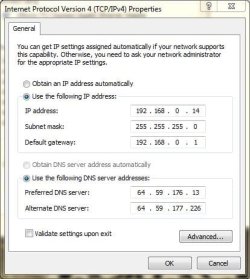
Correct, with the exception that the router has now assigned the address 192.168.0.10 to the desktop adapter. also the def. gateway is 192.168.0.1 (i'm assuming the 9 was a typo). here's the wired adapter settings for the laptop:
wired.ipv4.asus.JPG

And here's the laptop ipconfig:
ipconfig.asus2.JPG

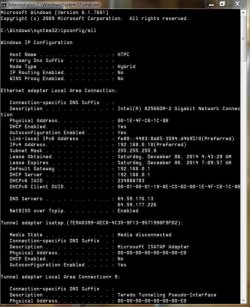
And the desktop ipconfig:
ipconfig.htpc.JPG

And the router settings:
routersettings.JPG


(3) You say that when you manually set the IP address of the ASUS laptop's wired ethernet connection to 192.168.0.14, and manually set the IP address of the ASUS laptop's wireless connection to 192.168.0.15, that you now have Internet access through both of these networks? Can you please post a screenshot from Network and Sharing Center with these two manual IP address settings in effect.


Normally, there would be no reason to have both wired and wireless connections to your router from your laptop. If you have wired, that's sufficient and preferable. I normally disable wireless on my own laptop when I'm at home (there's a slide switch on my Lenovo W530 that turns off wireless radio) and connected wired to my router. I also use wired whenever possible when I'm away from home, using wireless only when necessary (by pushing the slide switch back to "on").

Anyway, from Network and Sharing Center, if you click on the "change adapter settings" link in the upper-left of the window, you'll get the Network Connections dialog. You should see both your wireless and wired connections and both will probably show a status of ENABLED, and a network name as they are both enabled and active (when you're manually setting the IP addresses).
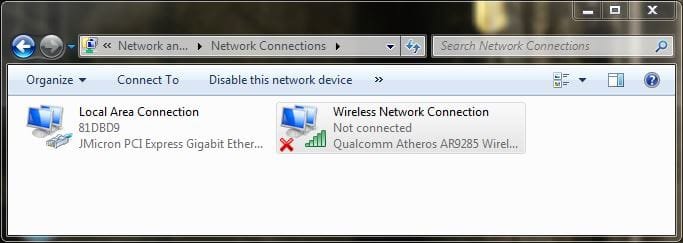
Correct. Both are enabled and working, but i normally use the wired so the wireless switch is disconnected:
adaptersettings.asus.JPG

nasc.asus.JPG

If you then select each of the two network adapter objects and right-click and select DISABLE, to disable both wired and wireless. You should get a red "X" in the network icon in the system tray for each.

Then select the wired network adapter object, and right-click, and select Properties. Then select the Internet Protocol Version 4 item, and push the Properties button, and reset your manually assigned IP address back to "obtain IP address automatically" for both the PC and DNS server addresses. Push OK, to get back to the Network Connections view.

Now again right-click on the wired network adapter object, and select ENABLE. In a few seconds the red "X" should disappear (hopefully), wired handshake conversation with the router should occur to obtain a DHCP address, and hopefully you might now actually be connected... but just through wired, not wireless which you've previously DISABLE'd.

Yes??

What do things look like now? Same as before when you tried DHCP, or different? What does Network and Sharing Center show? Do you have a DHCP-assigned IP address, and do you have Internet access? Or still not working??

And what does IPCONFIG now show?
I'm afraid it's the same as before. connects to unidentified network with no internet access. I tried the wired connection first (with wireless disabled), then the wireless. the results were the same:
nasc.JPG

ipconfig.asus1.JPG

Please let me know what you think. There must be some settings or services in windows that are causing this, as dhcp works fine on the desktop... no?
 

My Computer

Computer type
Laptop
Computer Manufacturer/Model Number
Asus K52N
OS
Windows 7 Ultimate x64 SP1
CPU
AMD Turion II P540
Motherboard
Asus
Memory
6 GB
Graphics Card(s)
ATI Radeon HD 4200
Antivirus
Avast
Browser
Chrome
And the router settings:
View attachment 342347
Out of curiosity, why does the DHCP-assigned IP address range of the router begin at 192.168.0.10? Ordinarily, I would have guessed the default starting IP address to be 192.168.0.2. Did you change this initial default value to 192.168.0.10, or did it come that way from Cisco?

Do you have any other IP addresses between 192.168.0.2 and 192.168.0.9 "reserved" by MAC address?

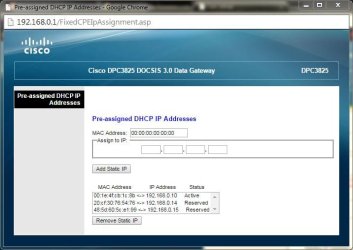
You've shown the router's "connected devices" summary, with the desktop's now DHCP-assigned 192.168.0.10, as well as the laptop's hard-forced 192.168.0.14. But is there anything in your "pre-assigned DHCP IP addresses"? What is shown if you push that button?
 

My Computer

Computer type
PC/Desktop
Computer Manufacturer/Model Number
Home-built, two systems (1) and (2)
OS
Windows 7 Pro x64 (1), Win7 Pro X64 (2)
CPU
i5-3350p 3.1Ghz/6MB-cache (1); E8400 3.0Ghz/6MB-cache (2)
Motherboard
ASUS P8Z77-V Pro (1); ASUS P5Q3 (2)
Memory
8GB PC3-12800 DDR3 (1); 4GB PC3-10600 DDR3 (2)
Graphics Card(s)
ATI HD7750 (1), (see TV cards); ATI R7 250 (2)
Sound Card
Realtek ALC892 HD Audio (1); Realtek ALC1200 HD Audio (2)
Monitor(s) Displays
Eizo HD2441W LCD, Eizo S2433W (1); Eizo 24" S2433W (2)
Screen Resolution
1920x1200, 1920x1200 (1); 1920x1200 (2)
Hard Drives
(1) 1TB SATA-II (7200RPM), 2x2TB SATA-III (7200RPM), 250GB SATA-III (10000RPM) for OS; 2x2TB external USB 3.0

(2) 320GB SATA-II (7200RPM), 750GB SATA-II (7200RPM), 150GB SATA-II (10000RPM) for OS; 2TB external USB 3.0
PSU
Nesteq ECS-6001 600W (1); Nesteq ECS-5001 500W (2)
Case
Acousti-Case 360 (1) and (2)
Cooling
Noctua NH-U12P SE2 for CPU, 2x120mm case fans (1) and (2)
Keyboard
IBM PS/2 (1) and (2)
Mouse
Logitech MX Revolution wireless (1); Microsoft wired (2)
Internet Speed
100mbps down / 10mbps up
Antivirus
Microsoft Security Essentials; Malwarebyte Anti-Malware Pro
Browser
Firefox
Other Info
Ceton InfiniTV 4-tuner cablecard-enabled TV card as well as Hauppauge HVR-2250 OTA/ATSC 2-tuner TV card in (1), running under Win7 WMC
How did you acquire that DPC3825? New? Used? Provided by your cable company or purchased yourself? Does it have the latest version of firmware installed? Doesn't appear to be the world's most universally loved device by user reviewers. A bit of bad-mouthing going on, but that doesn't really have relevance to your specific situation.

Nevertheless, it's honestly quite remarkable that BOTH your wired and wireless connections to the router from the laptop BOTH fail to work with DHCP, but BOTH work with hard-assigned IP addresses. I don't know if that's really a critical problem or maybe just one of life's inexplicable mysteries that we learn to work around and just live with. More specifically, it's hard to conclude that the problem is likely caused on the PC side somewhere in your laptop Windows system, or on the router side (which seems less likely as there's no issue with DHCP performing properly with your desktop machine and its installed Windows system).

One other idea. Seems you can easily try an "address reservation" in the router for both wired and wireless laptop adapters' specific two MAC addresses in the router (say to 192.168.0.2 for wired in the laptop, and 192.168.0.3 for wireless in the laptop), along with "obtain addresses automatically" in the TCPIP IPv4 Properties setup for both adapters on the laptop, to see if that works. You're now kind of bypassing true DHCP in the router by requesting specific 192.168.0.2 and 192.168.0.3 IP addresses to be assigned by the DHCP server mechanism when specific hardware MAC addresses are detected in the connecting device adapters (i.e. in your laptop), but at least your laptop still thinks of it as "obtain addresses automatically" and you haven't set anything hard-assigned in the laptop itself. Your configuration is in the router.

We really don't know where the issue is... whether (a) it's in BOTH of your laptop adapters trying to agree with the router on a true DHCP-assigned IP address, which really seems unlikely, or (b) it's a problem with the router unhappy with BOTH of your laptop adapters in trying to agree on a true DHCP-assigned IP address, which again really seems unlikely. So maybe an acceptable workaround is honestly the best we can hope for. You already have a proven workaround, of hard-specifying the IP address for both wired and wireless adapters in the laptop.

Using "address reservation" by MAC address in the router is truly a standard DHCP technique (coupled with "obtain addresses automatically" in the laptop), for situations such as remotely accessed host/server machines running RealVNC Server which require specific port-forwarding configuration in the router to get through firewalls for remote access from RealVNC Clients. Only when "address reservation by MAC" is used can the specific RealVNC Server machines be consistently accessed via consistent port-forwarding.

So there's nothing improper or non-standard about "address reservation by MAC" simply if you wanted consistent IP address assignment for your particular LAN machines, and I would still think of it as DHCP working properly.

But mostly, I'm curious to know if this particular "reserved by MAC" IP address assignment technique in the router coupled with "obtain addresses automatically" in the laptop, manages to overcome the symptoms we've been fighting, and instead successfully works the same way things do when you hard-assign IP addresses for PC and DNS in the laptop.
 

My Computer

Computer type
PC/Desktop
Computer Manufacturer/Model Number
Home-built, two systems (1) and (2)
OS
Windows 7 Pro x64 (1), Win7 Pro X64 (2)
CPU
i5-3350p 3.1Ghz/6MB-cache (1); E8400 3.0Ghz/6MB-cache (2)
Motherboard
ASUS P8Z77-V Pro (1); ASUS P5Q3 (2)
Memory
8GB PC3-12800 DDR3 (1); 4GB PC3-10600 DDR3 (2)
Graphics Card(s)
ATI HD7750 (1), (see TV cards); ATI R7 250 (2)
Sound Card
Realtek ALC892 HD Audio (1); Realtek ALC1200 HD Audio (2)
Monitor(s) Displays
Eizo HD2441W LCD, Eizo S2433W (1); Eizo 24" S2433W (2)
Screen Resolution
1920x1200, 1920x1200 (1); 1920x1200 (2)
Hard Drives
(1) 1TB SATA-II (7200RPM), 2x2TB SATA-III (7200RPM), 250GB SATA-III (10000RPM) for OS; 2x2TB external USB 3.0

(2) 320GB SATA-II (7200RPM), 750GB SATA-II (7200RPM), 150GB SATA-II (10000RPM) for OS; 2TB external USB 3.0
PSU
Nesteq ECS-6001 600W (1); Nesteq ECS-5001 500W (2)
Case
Acousti-Case 360 (1) and (2)
Cooling
Noctua NH-U12P SE2 for CPU, 2x120mm case fans (1) and (2)
Keyboard
IBM PS/2 (1) and (2)
Mouse
Logitech MX Revolution wireless (1); Microsoft wired (2)
Internet Speed
100mbps down / 10mbps up
Antivirus
Microsoft Security Essentials; Malwarebyte Anti-Malware Pro
Browser
Firefox
Other Info
Ceton InfiniTV 4-tuner cablecard-enabled TV card as well as Hauppauge HVR-2250 OTA/ATSC 2-tuner TV card in (1), running under Win7 WMC

Attachments

  • IPCONFIG.png
    IPCONFIG.png
    29.1 KB · Views: 2

My Computer

Computer type
PC/Desktop
Computer Manufacturer/Model Number
Customs, Dell, Gateway, HP, Toshiba, Acer, ASUS
OS
Windows 7 Ultimate 64-bit, Windows 8.1 64-bit, Mac OS X 10.10, Linux Mint 17, Windows 10 Pro TP
Keyboard
Microsoft
Mouse
Microsoft
dsperber:

Out of curiosity, why does the DHCP-assigned IP address range of the router begin at 192.168.0.10? Ordinarily, I would have guessed the default starting IP address to be 192.168.0.2. Did you change this initial default value to 192.168.0.10, or did it come that way from Cisco?
That's the default setting. in this whole process i reset the router to default, just to see if that might solve the problem. it did not.

Do you have any other IP addresses between 192.168.0.2 and 192.168.0.9 "reserved" by MAC address?
No.

You've shown the router's "connected devices" summary, with the desktop's now DHCP-assigned 192.168.0.10, as well as the laptop's hard-forced 192.168.0.14. But is there anything in your "pre-assigned DHCP IP addresses"? What is shown if you push that button?
p-a.dhcp.JPG

How did you acquire that DPC3825? New? Used? Provided by your cable company or purchased yourself? Does it have the latest version of firmware installed? Doesn't appear to be the world's most universally loved device by user reviewers. A bit of bad-mouthing going on, but that doesn't really have relevance to your specific situation.
Standard issue from my isp.

One other idea. Seems you can easily try an "address reservation" in the router for both wired and wireless laptop adapters' specific two MAC addresses in the router (say to 192.168.0.2 for wired in the laptop, and 192.168.0.3 for wireless in the laptop), along with "obtain addresses automatically" in the TCPIP IPv4 Properties setup for both adapters on the laptop, to see if that works.
If by "address reservation", you mean pre-assigned addresses, i tried that (not with those specific addresses) - didn't work.

Also, it should be noted that dhcp did work for me in the past. i switched to static ip's years ago and only noticed the problem when i tried to switch back. i have even re-installed windows since then. that is why i'm asking:

ARE THERE ANY WINDOWS PROCESSES/SERVICES THAT ARE REQUIRED FOR DHCP TO WORK?

i realize it's not "really a critical problem", nonetheless i would like to know what's going on. :confused:
 

My Computer

Computer type
Laptop
Computer Manufacturer/Model Number
Asus K52N
OS
Windows 7 Ultimate x64 SP1
CPU
AMD Turion II P540
Motherboard
Asus
Memory
6 GB
Graphics Card(s)
ATI Radeon HD 4200
Antivirus
Avast
Browser
Chrome
I wonder if not having the Default Gateway listed in IPCONFIG is the problem?
I'd say it's one of the resulting symptoms, not "the problem" itself.

It's remarkable, that when DHCP is enabled on the laptop the router doesn't see it as a "connected device" via the wired or wireless paths (and thus does not provide either IP for the laptop or IP for the "default gateway" or DNS servers). But when DHCP is disabled on the laptop (and thus DHCP IP address assignment in the router bypassed) the very same still-in-effect wired or wireless connection paths now work fine.

It would seem to be a router issue, but the fact that the second "desktop" machine in the story works perfectly in DHCP mode from the very same router via its wired connection. So that would seem to eliminate the router as the possible culprit, rather than point to it.

I would have suggested trying a different ethernet cable from router to the laptop, but that too is pointless since the same failure occurs on the wireless approach as well.

Again, seems like a problem with the Windows and DHCP in the laptop when communicating to the router for a DHCP-assigned IP and DNS and default gateway address, as the most likely explanation, as it extends across both wired and wireless options to the laptop.

I still want to know the results of the "address reservation by MAC" router configuration with laptop still configured for DHCP with "obtain addresses automatically", to see if that works.
 

My Computer

Computer type
PC/Desktop
Computer Manufacturer/Model Number
Home-built, two systems (1) and (2)
OS
Windows 7 Pro x64 (1), Win7 Pro X64 (2)
CPU
i5-3350p 3.1Ghz/6MB-cache (1); E8400 3.0Ghz/6MB-cache (2)
Motherboard
ASUS P8Z77-V Pro (1); ASUS P5Q3 (2)
Memory
8GB PC3-12800 DDR3 (1); 4GB PC3-10600 DDR3 (2)
Graphics Card(s)
ATI HD7750 (1), (see TV cards); ATI R7 250 (2)
Sound Card
Realtek ALC892 HD Audio (1); Realtek ALC1200 HD Audio (2)
Monitor(s) Displays
Eizo HD2441W LCD, Eizo S2433W (1); Eizo 24" S2433W (2)
Screen Resolution
1920x1200, 1920x1200 (1); 1920x1200 (2)
Hard Drives
(1) 1TB SATA-II (7200RPM), 2x2TB SATA-III (7200RPM), 250GB SATA-III (10000RPM) for OS; 2x2TB external USB 3.0

(2) 320GB SATA-II (7200RPM), 750GB SATA-II (7200RPM), 150GB SATA-II (10000RPM) for OS; 2TB external USB 3.0
PSU
Nesteq ECS-6001 600W (1); Nesteq ECS-5001 500W (2)
Case
Acousti-Case 360 (1) and (2)
Cooling
Noctua NH-U12P SE2 for CPU, 2x120mm case fans (1) and (2)
Keyboard
IBM PS/2 (1) and (2)
Mouse
Logitech MX Revolution wireless (1); Microsoft wired (2)
Internet Speed
100mbps down / 10mbps up
Antivirus
Microsoft Security Essentials; Malwarebyte Anti-Malware Pro
Browser
Firefox
Other Info
Ceton InfiniTV 4-tuner cablecard-enabled TV card as well as Hauppauge HVR-2250 OTA/ATSC 2-tuner TV card in (1), running under Win7 WMC
Berton:

I wonder if not having the Default Gateway listed in IPCONFIG is the problem?
That certainly is a CLUE... i just don't know what it means. :(
 

My Computer

Computer type
Laptop
Computer Manufacturer/Model Number
Asus K52N
OS
Windows 7 Ultimate x64 SP1
CPU
AMD Turion II P540
Motherboard
Asus
Memory
6 GB
Graphics Card(s)
ATI Radeon HD 4200
Antivirus
Avast
Browser
Chrome
Your "pre-assigned DHCP IP address" screenshot shows the two .14 and .15 static addresses as "reserved". This seems odd to me as these would really be properly shown as "connected devices", not "reserved". I wonder if this is residual from some of your earlier experiments, and the Cisco firmware has not cleared out these entries. I'd like to see if we can purge these two items and see if it makes any difference.

While working from your desktop machine and with your laptop powered off, can you select each one of those individually, and then push the "remove static IP" button to delete the entry. I want you to thus remove both of these entries from that list.

Now power everything off. Shut down your desktop, and pull the power plug on the DPC3825. Let things "rest" for 30 seconds.

Now power the DPC3825 on first, and let all the front panel lights stabilize.

When the DPC3825 is stabilized, power on the desktop. When everything on the desktop machine is stabilized, connect to the router and re-verify that only the desktop machine (what you called "HTPC" I believe?) shows up in connected devices as well as "active" in the pre-assigned list (although I find that kind of odd, since you didn't actually pre-assign it yourself I don't believe, per your story). Or is it not shown in the pre-assigned list? Anyway, hopefully the previously present .14 and .15 entries should definitely NOT be shown.

Now, finally, and with DHCP enabled on the laptop (i.e. "obtain addresses automatically" checked), power on the laptop and let it stabilize (to whatever it gets). Now once again, get back into the router from your desktop machine, and see what shows for both (a) connected devices, and also (b) pre-assigned address. What shows?
 

My Computer

Computer type
PC/Desktop
Computer Manufacturer/Model Number
Home-built, two systems (1) and (2)
OS
Windows 7 Pro x64 (1), Win7 Pro X64 (2)
CPU
i5-3350p 3.1Ghz/6MB-cache (1); E8400 3.0Ghz/6MB-cache (2)
Motherboard
ASUS P8Z77-V Pro (1); ASUS P5Q3 (2)
Memory
8GB PC3-12800 DDR3 (1); 4GB PC3-10600 DDR3 (2)
Graphics Card(s)
ATI HD7750 (1), (see TV cards); ATI R7 250 (2)
Sound Card
Realtek ALC892 HD Audio (1); Realtek ALC1200 HD Audio (2)
Monitor(s) Displays
Eizo HD2441W LCD, Eizo S2433W (1); Eizo 24" S2433W (2)
Screen Resolution
1920x1200, 1920x1200 (1); 1920x1200 (2)
Hard Drives
(1) 1TB SATA-II (7200RPM), 2x2TB SATA-III (7200RPM), 250GB SATA-III (10000RPM) for OS; 2x2TB external USB 3.0

(2) 320GB SATA-II (7200RPM), 750GB SATA-II (7200RPM), 150GB SATA-II (10000RPM) for OS; 2TB external USB 3.0
PSU
Nesteq ECS-6001 600W (1); Nesteq ECS-5001 500W (2)
Case
Acousti-Case 360 (1) and (2)
Cooling
Noctua NH-U12P SE2 for CPU, 2x120mm case fans (1) and (2)
Keyboard
IBM PS/2 (1) and (2)
Mouse
Logitech MX Revolution wireless (1); Microsoft wired (2)
Internet Speed
100mbps down / 10mbps up
Antivirus
Microsoft Security Essentials; Malwarebyte Anti-Malware Pro
Browser
Firefox
Other Info
Ceton InfiniTV 4-tuner cablecard-enabled TV card as well as Hauppauge HVR-2250 OTA/ATSC 2-tuner TV card in (1), running under Win7 WMC
If by "address reservation", you mean pre-assigned addresses, i tried that (not with those specific addresses) - didn't work.
Yes, by "address reservation" I did mean manually creating entries in that "pre-assigned IP address" list to correspond to both your wired MAC (say, addressing it with 192.168.0.2) and wireless MAC (addressing it with 192.168.0.3) in your laptop.

Now when your laptop is booted and tries to connect to the router through DHCP instead of with a hard-requested IP address for laptop and DNS servers, either/both of the laptop's MAC addresses would be recognized by the router in this list you just placed those MAC addresses in, and the specified 192.168.0.2 and/or 192.168.0.3 addresses should then be assigned. This is conceptually just as "DHCP-assigned" as anything 192.168.0.10 or higher, except that you've requested the router's DHCP mechanism to assign a specific IP address instead of taking one from the available pool above 192.168.0.10.

I'm just interested to see what this results in... same failure as before, or does it actually work.
 

My Computer

Computer type
PC/Desktop
Computer Manufacturer/Model Number
Home-built, two systems (1) and (2)
OS
Windows 7 Pro x64 (1), Win7 Pro X64 (2)
CPU
i5-3350p 3.1Ghz/6MB-cache (1); E8400 3.0Ghz/6MB-cache (2)
Motherboard
ASUS P8Z77-V Pro (1); ASUS P5Q3 (2)
Memory
8GB PC3-12800 DDR3 (1); 4GB PC3-10600 DDR3 (2)
Graphics Card(s)
ATI HD7750 (1), (see TV cards); ATI R7 250 (2)
Sound Card
Realtek ALC892 HD Audio (1); Realtek ALC1200 HD Audio (2)
Monitor(s) Displays
Eizo HD2441W LCD, Eizo S2433W (1); Eizo 24" S2433W (2)
Screen Resolution
1920x1200, 1920x1200 (1); 1920x1200 (2)
Hard Drives
(1) 1TB SATA-II (7200RPM), 2x2TB SATA-III (7200RPM), 250GB SATA-III (10000RPM) for OS; 2x2TB external USB 3.0

(2) 320GB SATA-II (7200RPM), 750GB SATA-II (7200RPM), 150GB SATA-II (10000RPM) for OS; 2TB external USB 3.0
PSU
Nesteq ECS-6001 600W (1); Nesteq ECS-5001 500W (2)
Case
Acousti-Case 360 (1) and (2)
Cooling
Noctua NH-U12P SE2 for CPU, 2x120mm case fans (1) and (2)
Keyboard
IBM PS/2 (1) and (2)
Mouse
Logitech MX Revolution wireless (1); Microsoft wired (2)
Internet Speed
100mbps down / 10mbps up
Antivirus
Microsoft Security Essentials; Malwarebyte Anti-Malware Pro
Browser
Firefox
Other Info
Ceton InfiniTV 4-tuner cablecard-enabled TV card as well as Hauppauge HVR-2250 OTA/ATSC 2-tuner TV card in (1), running under Win7 WMC
Your "pre-assigned DHCP IP address" screenshot shows the two .14 and .15 static addresses as "reserved". This seems odd to me as these would really be properly shown as "connected devices", not "reserved". I wonder if this is residual from some of your earlier experiments, and the Cisco firmware has not cleared out these entries. I'd like to see if we can purge these two items and see if it makes any difference.
I tried that already AND reset the router completely to default - no dice. those reserved settings are there so that the router doesn't assign the static ip addresses to another device. the desktop (HTPC) doesn't need a reserved/preassigned address because it has been assigned by the router(dhcp) and the router knows not to assign the same address to another device.

i will try again, using the power on/off instructions you suggested. in the adapters tcp/ipv4 properties should i have the "obtain dns server address automatically" checked, or should i fill in my routers dns settings?
 

My Computer

Computer type
Laptop
Computer Manufacturer/Model Number
Asus K52N
OS
Windows 7 Ultimate x64 SP1
CPU
AMD Turion II P540
Motherboard
Asus
Memory
6 GB
Graphics Card(s)
ATI Radeon HD 4200
Antivirus
Avast
Browser
Chrome
I tried that already AND reset the router completely to default - no dice. those reserved settings are there so that the router doesn't assign the static ip addresses to another device.
But they didn't just get there by themselves. They either became part of that list automatically placed there (by the router) when you manually configured your laptop's two adapters with these addresses to get things to work, or you manually "pre-assigned" them yourself into that router list at some time in the past.

However they got to be in that list I'd like to at least ensure that they are NOT present when you next boot your laptop and try to get DHCP-assigned IP and DNS addresses assigned by the router, same as happens naturally and properly for your desktop machine.


the desktop (HTPC) doesn't need a reserved/preassigned address because it has been assigned by the router(dhcp) and the router knows not to assign the same address to another device.
Well that's what the "connected devices" list information conveys. So why does an entry appear in TWO lists for this router? Again, may be right for this equipment, but it does seem odd.

If an IP address is dynamically assigned by DHCP, I wouldn't expect it to appear in the "pre-assigned" list. That's only for manually reserved IP addresses for specific devices identified by their MAC address.

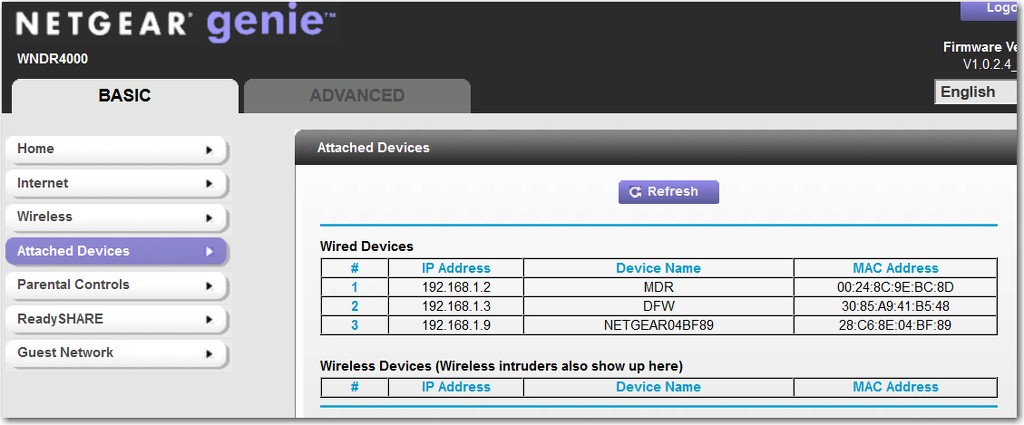
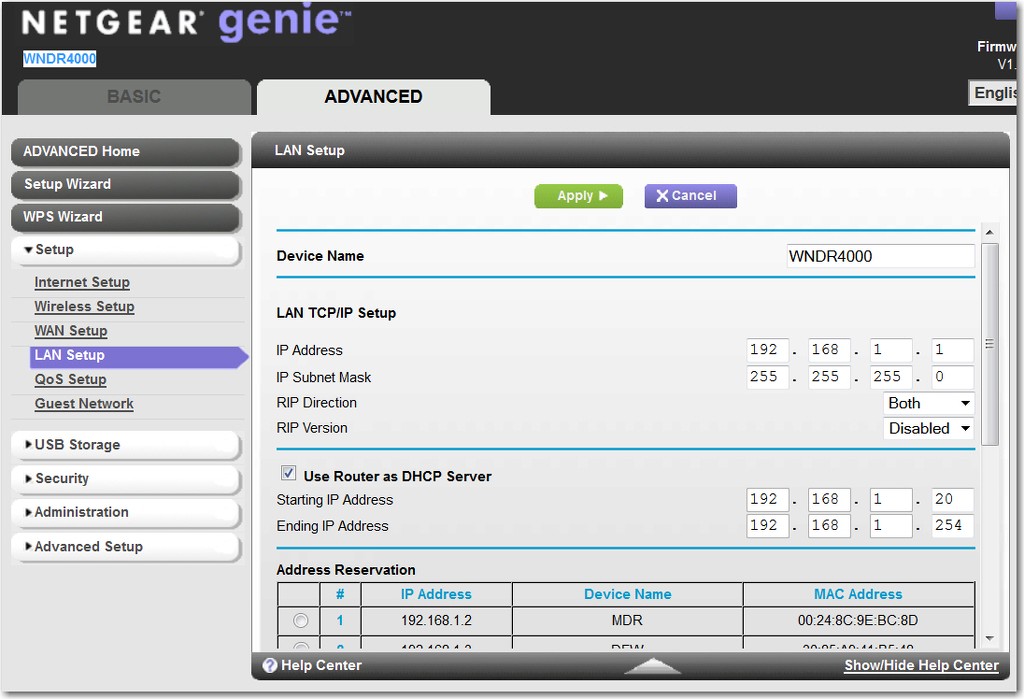
Here's my own Netgear router's (a) attached devices, and (b) pre-assigned address reservations [in two shots]. Note that I currently do not have any dynamically assigned IP address devices present (i.e. with IP addresses 192.168.1.20 or higher, which is the starting point for DHCP in my configuration).

NOTE: every single device in my home LAN which has an "address reservation" entry for it, is itself configured for "obtain IP address automatically" (i.e. from its perspective, assigned through DHCP) with the router itself recognizing the particular MAC addresses in its "address reservation" list and assigning the requested specific IP addresses accordingly. But the devices themselves, in each PC or player, TV, etc., thinks it is getting a "dynamic DHCP-assigned address".


vmHwUP.jpg


hxXkOi.jpg


JMCL0F.jpg


And I need the "address reservation" to assign fixed IP addresses to certain of the PC's on my LAN because I use RealVNC to communicate with my home machines from my laptop when I'm out of town. This makes use of port-forwarding on the router, but to do that reliably you need to have static IP addresses in order to port-forward consistently.

AYA2Tb.jpg
 

My Computer

Computer type
PC/Desktop
Computer Manufacturer/Model Number
Home-built, two systems (1) and (2)
OS
Windows 7 Pro x64 (1), Win7 Pro X64 (2)
CPU
i5-3350p 3.1Ghz/6MB-cache (1); E8400 3.0Ghz/6MB-cache (2)
Motherboard
ASUS P8Z77-V Pro (1); ASUS P5Q3 (2)
Memory
8GB PC3-12800 DDR3 (1); 4GB PC3-10600 DDR3 (2)
Graphics Card(s)
ATI HD7750 (1), (see TV cards); ATI R7 250 (2)
Sound Card
Realtek ALC892 HD Audio (1); Realtek ALC1200 HD Audio (2)
Monitor(s) Displays
Eizo HD2441W LCD, Eizo S2433W (1); Eizo 24" S2433W (2)
Screen Resolution
1920x1200, 1920x1200 (1); 1920x1200 (2)
Hard Drives
(1) 1TB SATA-II (7200RPM), 2x2TB SATA-III (7200RPM), 250GB SATA-III (10000RPM) for OS; 2x2TB external USB 3.0

(2) 320GB SATA-II (7200RPM), 750GB SATA-II (7200RPM), 150GB SATA-II (10000RPM) for OS; 2TB external USB 3.0
PSU
Nesteq ECS-6001 600W (1); Nesteq ECS-5001 500W (2)
Case
Acousti-Case 360 (1) and (2)
Cooling
Noctua NH-U12P SE2 for CPU, 2x120mm case fans (1) and (2)
Keyboard
IBM PS/2 (1) and (2)
Mouse
Logitech MX Revolution wireless (1); Microsoft wired (2)
Internet Speed
100mbps down / 10mbps up
Antivirus
Microsoft Security Essentials; Malwarebyte Anti-Malware Pro
Browser
Firefox
Other Info
Ceton InfiniTV 4-tuner cablecard-enabled TV card as well as Hauppauge HVR-2250 OTA/ATSC 2-tuner TV card in (1), running under Win7 WMC
Back
Top