Can't delete old vista partition :/

Wouldn't it be easier to just delete partions after booting from the win7 dvd and do a clean install if you're getting rid of everything else on the drive?
 

My Computer My Computer

At a glance

7 home premium 64 bitAMD Turion X2 64 bit 2 ghz3 gigNVIDIA GeForce 8200M G
Computer Manufacturer/Model Number
HP G60 120US Laptop
OS
7 home premium 64 bit
CPU
AMD Turion X2 64 bit 2 ghz
Motherboard
Whatever HP puts inside
Memory
3 gig
Graphics Card(s)
NVIDIA GeForce 8200M G
Sound Card
Conexent High Definition SmartAudio 221
Monitor(s) Displays
One attached to the laptop
Screen Resolution
1366X768
Hard Drives
Hitachi HTS543225L9A300 ATA 232 gb
Keyboard
attached
Mouse
touch pad attached
If your planning on installing Win7 soon, just install it in the Vista partition and you won't have to worry about deleting or the boot manager.

ok i will follow your instructions. Thanks a lot mate.

So i install over Vista. Then in my boot manager there will be 2 Windows 7 entries. I boot into the first one because that will be the newer one. I then follow the tut u provided to remove the RC entry from the boot manager. Then from here i can finally delete the partition.

Is this correct?

Honestly, you're getting some weird and incomplete advice here.

When you start your installation of Windows 7, you will have the opportunity to adjust your partitions. You will need to click on "advanced" on the screen where it asks you where to install.

From that screen (if you want your drive completely clean), delete ALL the partitions on the drive. If you want multiple partitions, you can create them on this screen as well, or you can simply tell Windows 7 to install into the unallocated space and it will create the partition(s) it needs and start the install.

ah i can delete all partitions during the install? that should solve a lot of problems! thanks mate!
 

My Computer My Computer

At a glance

Main OS: Windows 7 64 bit, Secondary: Vista 3...Intel Core 2 Duo P8400 @ 2.26 Ghz4GB DDR2ATI Radeon Mobility HD3470
Computer Manufacturer/Model Number
Sony
OS
Main OS: Windows 7 64 bit, Secondary: Vista 32 bit
CPU
Intel Core 2 Duo P8400 @ 2.26 Ghz
Motherboard
Intel PM45
Memory
4GB DDR2
Graphics Card(s)
ATI Radeon Mobility HD3470
Sound Card
Integrated Realtek
Monitor(s) Displays
Integrated (Laptop) 16.4 inch
Screen Resolution
1600x900
Hard Drives
320 GB
Mouse
Logitech
Internet Speed
1 Mb/s
Tough crowd tonight.

Yes, you can delete all partitions when you install.

Is there anything on these partitions that you want to keep?

This is the consideration I had in mind.

Let us know if you have any questions.
 

My Computer My Computer

At a glance

Windows 7 Ult x64 - SP1/ Windows 8 Pro x64Intel Core i5-3570K 4.6GHz8GB (2X4GB) DDR3 1600 Corsair Vengeance CL8 1.5vSapphire HD 7770 Vapor-X OC 1GB DDR5
Computer type
PC/Desktop
Computer Manufacturer/Model Number
76~2.0
OS
Windows 7 Ult x64 - SP1/ Windows 8 Pro x64
CPU
Intel Core i5-3570K 4.6GHz
Motherboard
Gigabyte GA-Z77X UD3H, f18
Memory
8GB (2X4GB) DDR3 1600 Corsair Vengeance CL8 1.5v
Graphics Card(s)
Sapphire HD 7770 Vapor-X OC 1GB DDR5
Sound Card
Onboard VIA VT2021
Monitor(s) Displays
22" LCD Dell
Screen Resolution
1680x1050
Hard Drives
Samsung 840Pro 128GB SSD,
Seagate Barracuda 500GB SATA2 7200rpm 32MB cache, Seagate Barracuda 1TB SATA2 7200rpm 32MB cache,
PSU
Corsair HX650W
Case
Cooler Master Storm Scout
Cooling
Corsair H80 2x12cm Noctua NF P12 , 2x14cm case fans
Keyboard
Logitech Wave
Mouse
CM Sentinel
Internet Speed
Dismal
Antivirus
Avast
Browser
Opera Next
Other Info
Haswell laptop: HP Envy 17t-j, i7-4700MQ, GeForce 740M 2GB DDR3, 17.3" Full HD 1920x1080, 16GB RAM, Samsung 840 Pro 128GB, 1TB Hitachi 7200 HDD,
Desktop: eSATA ports,
External eSATA Seagate 500GB SATA2 7200rpm,
External WD USB 500GB
Tough crowd tonight.

Yes, you can delete all partitions when you install.

Is there anything on these partitions that you want to keep?

This is the consideration I had in mind.

Let us know if you have any questions.

yeh i realized you were considering that. Your way should work fine too, but i have an external hdd so i'll just back things up that way.

Anyway thanks for the help! u deserve some rep :D
 

My Computer My Computer

At a glance

Main OS: Windows 7 64 bit, Secondary: Vista 3...Intel Core 2 Duo P8400 @ 2.26 Ghz4GB DDR2ATI Radeon Mobility HD3470
Computer Manufacturer/Model Number
Sony
OS
Main OS: Windows 7 64 bit, Secondary: Vista 32 bit
CPU
Intel Core 2 Duo P8400 @ 2.26 Ghz
Motherboard
Intel PM45
Memory
4GB DDR2
Graphics Card(s)
ATI Radeon Mobility HD3470
Sound Card
Integrated Realtek
Monitor(s) Displays
Integrated (Laptop) 16.4 inch
Screen Resolution
1600x900
Hard Drives
320 GB
Mouse
Logitech
Internet Speed
1 Mb/s
That's a good plan.

Didn't want you to loose everything.

Sounds like your all set.

Your welcome,

Let us know if you have any questions.
 

My Computer My Computer

At a glance

Windows 7 Ult x64 - SP1/ Windows 8 Pro x64Intel Core i5-3570K 4.6GHz8GB (2X4GB) DDR3 1600 Corsair Vengeance CL8 1.5vSapphire HD 7770 Vapor-X OC 1GB DDR5
Computer type
PC/Desktop
Computer Manufacturer/Model Number
76~2.0
OS
Windows 7 Ult x64 - SP1/ Windows 8 Pro x64
CPU
Intel Core i5-3570K 4.6GHz
Motherboard
Gigabyte GA-Z77X UD3H, f18
Memory
8GB (2X4GB) DDR3 1600 Corsair Vengeance CL8 1.5v
Graphics Card(s)
Sapphire HD 7770 Vapor-X OC 1GB DDR5
Sound Card
Onboard VIA VT2021
Monitor(s) Displays
22" LCD Dell
Screen Resolution
1680x1050
Hard Drives
Samsung 840Pro 128GB SSD,
Seagate Barracuda 500GB SATA2 7200rpm 32MB cache, Seagate Barracuda 1TB SATA2 7200rpm 32MB cache,
PSU
Corsair HX650W
Case
Cooler Master Storm Scout
Cooling
Corsair H80 2x12cm Noctua NF P12 , 2x14cm case fans
Keyboard
Logitech Wave
Mouse
CM Sentinel
Internet Speed
Dismal
Antivirus
Avast
Browser
Opera Next
Other Info
Haswell laptop: HP Envy 17t-j, i7-4700MQ, GeForce 740M 2GB DDR3, 17.3" Full HD 1920x1080, 16GB RAM, Samsung 840 Pro 128GB, 1TB Hitachi 7200 HDD,
Desktop: eSATA ports,
External eSATA Seagate 500GB SATA2 7200rpm,
External WD USB 500GB
lol sorry but i have one more question. Last one i promise.

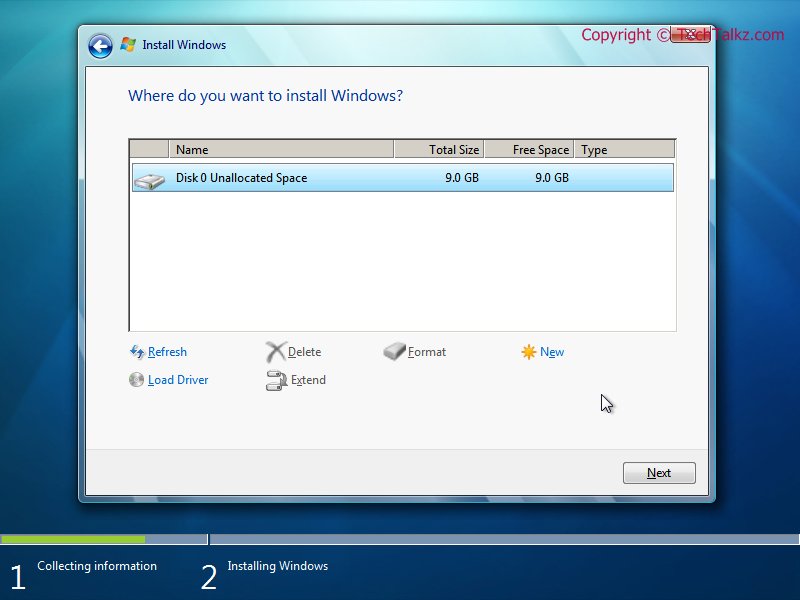
Windows7-2008-11-04-14-55-10.jpg


from this pic i see there's the option to delete and format. Im not sure but when i delete does this leave behind unallocated disc space? So if i delete both my partitions, then i have two unallocated disc spaces? Then i join them? And then format? Whats the ordering here?
 

My Computer My Computer

At a glance

Main OS: Windows 7 64 bit, Secondary: Vista 3...Intel Core 2 Duo P8400 @ 2.26 Ghz4GB DDR2ATI Radeon Mobility HD3470
Computer Manufacturer/Model Number
Sony
OS
Main OS: Windows 7 64 bit, Secondary: Vista 32 bit
CPU
Intel Core 2 Duo P8400 @ 2.26 Ghz
Motherboard
Intel PM45
Memory
4GB DDR2
Graphics Card(s)
ATI Radeon Mobility HD3470
Sound Card
Integrated Realtek
Monitor(s) Displays
Integrated (Laptop) 16.4 inch
Screen Resolution
1600x900
Hard Drives
320 GB
Mouse
Logitech
Internet Speed
1 Mb/s
No problem with the questions.

When you delete a partition it will leave unallocated space.

All unallocated space will be combined if it is next to each other, no partition between them.

If the unallocated space is big enough you can choose it to install Win7 to, it will format and install in the unallocated space.
Or, you can make partitions any size you want and install to one of them.

You can delete then install.
Or delete, format then install.
Or delete, partition, format, then install.

It depends on what you want to have in the end.
If you want one big partition then use the delete and install.
If you want one partition for the OS and one partition for personal data, then delete, partition, format and install.

A lot of people make separate partitions for the OS and personal data. This makes it easier to restore, repair or re-install your OS without loosing your personal data, and it's easier to backup your HD.
 

My Computer My Computer

At a glance

Windows 7 Ult x64 - SP1/ Windows 8 Pro x64Intel Core i5-3570K 4.6GHz8GB (2X4GB) DDR3 1600 Corsair Vengeance CL8 1.5vSapphire HD 7770 Vapor-X OC 1GB DDR5
Computer type
PC/Desktop
Computer Manufacturer/Model Number
76~2.0
OS
Windows 7 Ult x64 - SP1/ Windows 8 Pro x64
CPU
Intel Core i5-3570K 4.6GHz
Motherboard
Gigabyte GA-Z77X UD3H, f18
Memory
8GB (2X4GB) DDR3 1600 Corsair Vengeance CL8 1.5v
Graphics Card(s)
Sapphire HD 7770 Vapor-X OC 1GB DDR5
Sound Card
Onboard VIA VT2021
Monitor(s) Displays
22" LCD Dell
Screen Resolution
1680x1050
Hard Drives
Samsung 840Pro 128GB SSD,
Seagate Barracuda 500GB SATA2 7200rpm 32MB cache, Seagate Barracuda 1TB SATA2 7200rpm 32MB cache,
PSU
Corsair HX650W
Case
Cooler Master Storm Scout
Cooling
Corsair H80 2x12cm Noctua NF P12 , 2x14cm case fans
Keyboard
Logitech Wave
Mouse
CM Sentinel
Internet Speed
Dismal
Antivirus
Avast
Browser
Opera Next
Other Info
Haswell laptop: HP Envy 17t-j, i7-4700MQ, GeForce 740M 2GB DDR3, 17.3" Full HD 1920x1080, 16GB RAM, Samsung 840 Pro 128GB, 1TB Hitachi 7200 HDD,
Desktop: eSATA ports,
External eSATA Seagate 500GB SATA2 7200rpm,
External WD USB 500GB
Maybe i should have mentioned that i was going to install the retail version of win 7 as soon as it arrives.So i figured it would be best to install Windows 7 over D (vista partition), and then delete C (Win 7 RC). Can i do this?


LOL. That's completely different from your original question.


from this pic i see there's the option to delete and format. Im not sure but when i delete does this leave behind unallocated disc space? So if i delete both my partitions, then i have two unallocated disc spaces? Then i join them? And then format? Whats the ordering here?

Unallocated space is just what it says - there is no division - you will just get one larger amount of Unallocated space if the partitions you deleted were next to each other.

When you create a partition from that - select how much of it to partition and the remaining Unallocated space can be used to create another partition.

Or select it all and create just one partition.
 

My Computers My Computers

  • At a glance

    7 X64i5 84002x8gb 3200mhz
    Computer type
    PC/Desktop
    OS
    7 X64
    CPU
    i5 8400
    Motherboard
    gigabyte b365m ds3h
    Memory
    2x8gb 3200mhz
    Hard Drives
    various
    PSU
    pure power 11 400w cm
    Case
    Coolermaster
    Cooling
    cryorig m9i
  • At a glance

    7x64g54008gb ddr4 2400
    Computer type
    PC/Desktop
    OS
    7x64
    CPU
    g5400
    Motherboard
    ga b365m ds3h
    Memory
    8gb ddr4 2400
    PSU
    xfx pro 450w
i would prefer to have one big partition where i can install win7 into. but remember, that pic is not from my computer. Mine would have two drives. So i can delete both of them, they will be combined into one unallocated space, and then i can install?

thanks for all your help. Your the best
 

My Computer My Computer

At a glance

Main OS: Windows 7 64 bit, Secondary: Vista 3...Intel Core 2 Duo P8400 @ 2.26 Ghz4GB DDR2ATI Radeon Mobility HD3470
Computer Manufacturer/Model Number
Sony
OS
Main OS: Windows 7 64 bit, Secondary: Vista 32 bit
CPU
Intel Core 2 Duo P8400 @ 2.26 Ghz
Motherboard
Intel PM45
Memory
4GB DDR2
Graphics Card(s)
ATI Radeon Mobility HD3470
Sound Card
Integrated Realtek
Monitor(s) Displays
Integrated (Laptop) 16.4 inch
Screen Resolution
1600x900
Hard Drives
320 GB
Mouse
Logitech
Internet Speed
1 Mb/s
i would prefer to have one big partition where i can install win7 into. but remember, that pic is not from my computer. Mine would have two drives. So i can delete both of them, they will be combined into one unallocated space, and then i can install?

thanks for all your help. Your the best

Unallocated space from two drives will not be combined. That would show as two separate entries in the list.
 

My Computer My Computer

At a glance

Windows 7 Ultimate RTM (Technet)3.00 gigahertz Intel Core2 Duo E84004GBATI Radeon X1950 Pro
Computer Manufacturer/Model Number
Custom
OS
Windows 7 Ultimate RTM (Technet)
CPU
3.00 gigahertz Intel Core2 Duo E8400
Motherboard
ASUSTeK Computer INC. P5K/EPU Rev 1.xx
Memory
4GB
Graphics Card(s)
ATI Radeon X1950 Pro
Sound Card
Built in HD Audio
Monitor(s) Displays
22" Gateway LCD
Screen Resolution
1920 x 1200
Hard Drives
ST3160023A [Hard drive] (160.04 GB) -- drive 0, rev 8.01, ST3500630AS [Hard drive] (500.11 GB) -- drive 2, rev 3.AAK
ST3500630AS [Hard drive] (500.11 GB) -- drive 1, rev 3.AAK
Keyboard
Logitech G11
Mouse
Microsoft Wireless Laser Mouse 5000
Internet Speed
13.44 Mbps
from this pic i see there's the option to delete and format. Im not sure but when i delete does this leave behind unallocated disc space? So if i delete both my partitions, then i have two unallocated disc spaces? Then i join them? And then format? Whats the ordering here?
Unallocated space is just what it says - there is no division - you will just get one larger amount of Unallocated space if the partitions you deleted were next to each other.

When you create a partition from that - select how much of it to partition and the remaining Unallocated space can be used to create another partition.

Or select it all and create just one partition.

when you say create partition, do u mean i must format? Because when i delete both partitions i will have one big unallocated space, then from here should i click format, or i can just go ahead and press next?
 

My Computer My Computer

At a glance

Main OS: Windows 7 64 bit, Secondary: Vista 3...Intel Core 2 Duo P8400 @ 2.26 Ghz4GB DDR2ATI Radeon Mobility HD3470
Computer Manufacturer/Model Number
Sony
OS
Main OS: Windows 7 64 bit, Secondary: Vista 32 bit
CPU
Intel Core 2 Duo P8400 @ 2.26 Ghz
Motherboard
Intel PM45
Memory
4GB DDR2
Graphics Card(s)
ATI Radeon Mobility HD3470
Sound Card
Integrated Realtek
Monitor(s) Displays
Integrated (Laptop) 16.4 inch
Screen Resolution
1600x900
Hard Drives
320 GB
Mouse
Logitech
Internet Speed
1 Mb/s
Yes, you could - but if you do that you will get an extra 100mb system reserved partition.

7 creates that if you haven't already partitioned the disk first into one (or more ) and marked it Active.

Most people prefer to install the o/s on one partition , and keep their data on a separate partition.

Makes it much easier to manage. Also, if you need to reinstall, or restore an image - the data partition remains untouched.

I suggest ( assuming you are not going to use Bitlocker ) Create 2 partitions.

Mark the one on the Left Active. Install 7 onto the Active partition.
 

My Computers My Computers

  • At a glance

    7 X64i5 84002x8gb 3200mhz
    Computer type
    PC/Desktop
    OS
    7 X64
    CPU
    i5 8400
    Motherboard
    gigabyte b365m ds3h
    Memory
    2x8gb 3200mhz
    Hard Drives
    various
    PSU
    pure power 11 400w cm
    Case
    Coolermaster
    Cooling
    cryorig m9i
  • At a glance

    7x64g54008gb ddr4 2400
    Computer type
    PC/Desktop
    OS
    7x64
    CPU
    g5400
    Motherboard
    ga b365m ds3h
    Memory
    8gb ddr4 2400
    PSU
    xfx pro 450w
i would prefer to have one big partition where i can install win7 into. but remember, that pic is not from my computer. Mine would have two drives. So i can delete both of them, they will be combined into one unallocated space, and then i can install?

thanks for all your help. Your the best

Unallocated space from two drives will not be combined. That would show as two separate entries in the list.

ok then should i extend them?
 

My Computer My Computer

At a glance

Main OS: Windows 7 64 bit, Secondary: Vista 3...Intel Core 2 Duo P8400 @ 2.26 Ghz4GB DDR2ATI Radeon Mobility HD3470
Computer Manufacturer/Model Number
Sony
OS
Main OS: Windows 7 64 bit, Secondary: Vista 32 bit
CPU
Intel Core 2 Duo P8400 @ 2.26 Ghz
Motherboard
Intel PM45
Memory
4GB DDR2
Graphics Card(s)
ATI Radeon Mobility HD3470
Sound Card
Integrated Realtek
Monitor(s) Displays
Integrated (Laptop) 16.4 inch
Screen Resolution
1600x900
Hard Drives
320 GB
Mouse
Logitech
Internet Speed
1 Mb/s
MacGyver was talking about 2 separate HD's.

It is clear from your first post that you only have one HD.
 

My Computers My Computers

  • At a glance

    7 X64i5 84002x8gb 3200mhz
    Computer type
    PC/Desktop
    OS
    7 X64
    CPU
    i5 8400
    Motherboard
    gigabyte b365m ds3h
    Memory
    2x8gb 3200mhz
    Hard Drives
    various
    PSU
    pure power 11 400w cm
    Case
    Coolermaster
    Cooling
    cryorig m9i
  • At a glance

    7x64g54008gb ddr4 2400
    Computer type
    PC/Desktop
    OS
    7x64
    CPU
    g5400
    Motherboard
    ga b365m ds3h
    Memory
    8gb ddr4 2400
    PSU
    xfx pro 450w
i would prefer to have one big partition where i can install win7 into. but remember, that pic is not from my computer. Mine would have two drives. So i can delete both of them, they will be combined into one unallocated space, and then i can install?

thanks for all your help. Your the best

Yes, that's correct.

As SIW2 suggests, you will find this two partition setup very useful.
 

My Computer My Computer

At a glance

Windows 7 Ult x64 - SP1/ Windows 8 Pro x64Intel Core i5-3570K 4.6GHz8GB (2X4GB) DDR3 1600 Corsair Vengeance CL8 1.5vSapphire HD 7770 Vapor-X OC 1GB DDR5
Computer type
PC/Desktop
Computer Manufacturer/Model Number
76~2.0
OS
Windows 7 Ult x64 - SP1/ Windows 8 Pro x64
CPU
Intel Core i5-3570K 4.6GHz
Motherboard
Gigabyte GA-Z77X UD3H, f18
Memory
8GB (2X4GB) DDR3 1600 Corsair Vengeance CL8 1.5v
Graphics Card(s)
Sapphire HD 7770 Vapor-X OC 1GB DDR5
Sound Card
Onboard VIA VT2021
Monitor(s) Displays
22" LCD Dell
Screen Resolution
1680x1050
Hard Drives
Samsung 840Pro 128GB SSD,
Seagate Barracuda 500GB SATA2 7200rpm 32MB cache, Seagate Barracuda 1TB SATA2 7200rpm 32MB cache,
PSU
Corsair HX650W
Case
Cooler Master Storm Scout
Cooling
Corsair H80 2x12cm Noctua NF P12 , 2x14cm case fans
Keyboard
Logitech Wave
Mouse
CM Sentinel
Internet Speed
Dismal
Antivirus
Avast
Browser
Opera Next
Other Info
Haswell laptop: HP Envy 17t-j, i7-4700MQ, GeForce 740M 2GB DDR3, 17.3" Full HD 1920x1080, 16GB RAM, Samsung 840 Pro 128GB, 1TB Hitachi 7200 HDD,
Desktop: eSATA ports,
External eSATA Seagate 500GB SATA2 7200rpm,
External WD USB 500GB
the reason why i dont want to have my files on a separate partition is because some family members occasionally use my pc. They will have access to those files then which i dont want.

Is there any way i can install it on one big partition and not have win7 create another 100 mb partition that SIW2 mentioned. If that 100mb partition is hidden then i have not problem with that

edit: i think i could do this and it wont create that extra partition. I delete the second drive only. Then extend it to the first drive (vista one). I format it then click next. Would this avoid that?
 

My Computer My Computer

At a glance

Main OS: Windows 7 64 bit, Secondary: Vista 3...Intel Core 2 Duo P8400 @ 2.26 Ghz4GB DDR2ATI Radeon Mobility HD3470
Computer Manufacturer/Model Number
Sony
OS
Main OS: Windows 7 64 bit, Secondary: Vista 32 bit
CPU
Intel Core 2 Duo P8400 @ 2.26 Ghz
Motherboard
Intel PM45
Memory
4GB DDR2
Graphics Card(s)
ATI Radeon Mobility HD3470
Sound Card
Integrated Realtek
Monitor(s) Displays
Integrated (Laptop) 16.4 inch
Screen Resolution
1600x900
Hard Drives
320 GB
Mouse
Logitech
Internet Speed
1 Mb/s
The 100mb will be hidden in Computer view - because it is not allocated a drive letter, but you can see it in Disk Management.

If you mark the one big partition Active before installing 7 onto it - you won't get the 100mb partition.
 

My Computers My Computers

  • At a glance

    7 X64i5 84002x8gb 3200mhz
    Computer type
    PC/Desktop
    OS
    7 X64
    CPU
    i5 8400
    Motherboard
    gigabyte b365m ds3h
    Memory
    2x8gb 3200mhz
    Hard Drives
    various
    PSU
    pure power 11 400w cm
    Case
    Coolermaster
    Cooling
    cryorig m9i
  • At a glance

    7x64g54008gb ddr4 2400
    Computer type
    PC/Desktop
    OS
    7x64
    CPU
    g5400
    Motherboard
    ga b365m ds3h
    Memory
    8gb ddr4 2400
    PSU
    xfx pro 450w
Your family members will have access to one big partition the same as if there are two partitions.

Either way, as SIW2 mentioned, make one or two partitions, then mark the one on the left (if two) or the big partition as active. This will keep you from getting the 100mb partition.
 

My Computer My Computer

At a glance

Windows 7 Ult x64 - SP1/ Windows 8 Pro x64Intel Core i5-3570K 4.6GHz8GB (2X4GB) DDR3 1600 Corsair Vengeance CL8 1.5vSapphire HD 7770 Vapor-X OC 1GB DDR5
Computer type
PC/Desktop
Computer Manufacturer/Model Number
76~2.0
OS
Windows 7 Ult x64 - SP1/ Windows 8 Pro x64
CPU
Intel Core i5-3570K 4.6GHz
Motherboard
Gigabyte GA-Z77X UD3H, f18
Memory
8GB (2X4GB) DDR3 1600 Corsair Vengeance CL8 1.5v
Graphics Card(s)
Sapphire HD 7770 Vapor-X OC 1GB DDR5
Sound Card
Onboard VIA VT2021
Monitor(s) Displays
22" LCD Dell
Screen Resolution
1680x1050
Hard Drives
Samsung 840Pro 128GB SSD,
Seagate Barracuda 500GB SATA2 7200rpm 32MB cache, Seagate Barracuda 1TB SATA2 7200rpm 32MB cache,
PSU
Corsair HX650W
Case
Cooler Master Storm Scout
Cooling
Corsair H80 2x12cm Noctua NF P12 , 2x14cm case fans
Keyboard
Logitech Wave
Mouse
CM Sentinel
Internet Speed
Dismal
Antivirus
Avast
Browser
Opera Next
Other Info
Haswell laptop: HP Envy 17t-j, i7-4700MQ, GeForce 740M 2GB DDR3, 17.3" Full HD 1920x1080, 16GB RAM, Samsung 840 Pro 128GB, 1TB Hitachi 7200 HDD,
Desktop: eSATA ports,
External eSATA Seagate 500GB SATA2 7200rpm,
External WD USB 500GB
how would i mark it as active?

sorry for all these questions, its just that i want to be 100% sure

edit: if i dont delete the vista partition and delete the win7 one, then expand the unallocated space to the vista one, then format it and install will it then be active because the vista one was active to begin with
 

My Computer My Computer

At a glance

Main OS: Windows 7 64 bit, Secondary: Vista 3...Intel Core 2 Duo P8400 @ 2.26 Ghz4GB DDR2ATI Radeon Mobility HD3470
Computer Manufacturer/Model Number
Sony
OS
Main OS: Windows 7 64 bit, Secondary: Vista 32 bit
CPU
Intel Core 2 Duo P8400 @ 2.26 Ghz
Motherboard
Intel PM45
Memory
4GB DDR2
Graphics Card(s)
ATI Radeon Mobility HD3470
Sound Card
Integrated Realtek
Monitor(s) Displays
Integrated (Laptop) 16.4 inch
Screen Resolution
1600x900
Hard Drives
320 GB
Mouse
Logitech
Internet Speed
1 Mb/s
Windows will not let you delete any partition if there is a swap file on it.
Boot into Vista and remove the swap file, then you will be able to delete the Vista partition.
MachineGun
 

My Computer My Computer

At a glance

Win 7 ProIntel Q66004 gig OCZEGVA 260
Computer Manufacturer/Model Number
Asus
OS
Win 7 Pro
CPU
Intel Q6600
Motherboard
P5Q deluxe
Memory
4 gig OCZ
Graphics Card(s)
EGVA 260
Sound Card
N/A
Monitor(s) Displays
Nec LCD 1970
Hard Drives
Western Digital
PSU
Enermax 625
Case
Lian Li P70
Cooling
stock
Keyboard
Logitech EX 110
Mouse
Logitech MX
Back
Top