Can't Do "Run" by Pressing Win + R

bast7

New member
Local time
10:35 AM
Messages
15
Why now I can't do the "Run" by pressing Win + R?
When I press Win + R, it highlights the icon at my desktop start with letter R.
How do I change it back to "Run" when pressing the Win + R?
Thank you
 

My Computer

Computer type
PC/Desktop
OS
Windows 7 Professional x86
That should only happen if the menu is open is that the case
 

My Computer

Computer type
PC/Desktop
OS
win 8 32 bit

My Computer

Computer type
PC/Desktop
OS
Windows 7 Professional x86
Are you saying that when you run it, it picks an existing icon on your desktop that starts with R?

If this just started, do you have a system restore point you can use to restore the system?
 

My Computer

Computer type
Laptop
Computer Manufacturer/Model Number
Dell M6500 Precision Work Station
OS
Windows 7 Pro SP1 64 bit
Memory
8 GB
Screen Resolution
1920x
Internet Speed
30 Mbps
Antivirus
Norton Security
Browser
IE 11
What icon is being highlighted?

Do you have a keyboard software installed? That may or may not be the issue.
 

My Computer

Computer type
PC/Desktop
OS
Windows 7 Ultimate x64
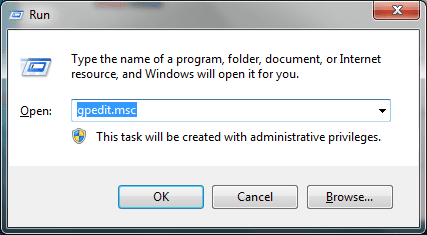
What I meant with "Run" is like the attached image.

Before the problem appear, I always do "Run" by pressing Win logo + R in my keyboard.

Now it suddenly change (I don't know why). When I press Win logo + R in my keyboard, it highlights icons at my desktop start with letter R (for example: Red Alert 2, Roblox Studio, Resident Evil 4 [they are PC games]).
 

Attachments

  • run.PNG
    run.PNG
    8.3 KB · Views: 11

My Computer

Computer type
PC/Desktop
OS
Windows 7 Professional x86
If you simply click on the Windows key (no others), does it bring up the Start menu? If so, are recently opened programs whose names may start with an R shown, in addition to the Run button?

In the absence of a system restore point, I suggest going to Accessories, Command Prompt. Right click on it and select Run as Administrator. Type in the following-

SFC \scannow

Let it run. Does it find and fix any problems? If so, reboot and try it again.
 

My Computer

Computer type
Laptop
Computer Manufacturer/Model Number
Dell M6500 Precision Work Station
OS
Windows 7 Pro SP1 64 bit
Memory
8 GB
Screen Resolution
1920x
Internet Speed
30 Mbps
Antivirus
Norton Security
Browser
IE 11
If you simply click on the Windows key (no others), does it bring up the Start menu? If so, are recently opened programs whose names may start with an R shown, in addition to the Run button?

In the absence of a system restore point, I suggest going to Accessories, Command Prompt. Right click on it and select Run as Administrator. Type in the following-

SFC \scannow

Let it run. Does it find and fix any problems? If so, reboot and try it again.

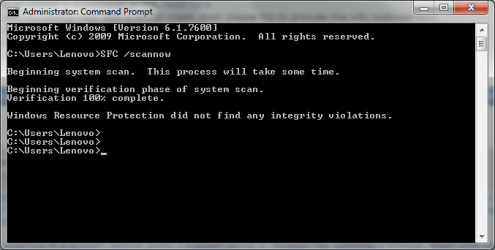
I already try the "SFC /scannow" method like you said but it still doesn't work. The result is like this attached image below.

So, what should I do?
 

Attachments

  • SFC.PNG
    SFC.PNG
    12.5 KB · Views: 11

My Computer

Computer type
PC/Desktop
OS
Windows 7 Professional x86
Hi bast 7-

You didn't answer my other questions.

I assume from your answer, you don't have a system restore point.
 

My Computer

Computer type
Laptop
Computer Manufacturer/Model Number
Dell M6500 Precision Work Station
OS
Windows 7 Pro SP1 64 bit
Memory
8 GB
Screen Resolution
1920x
Internet Speed
30 Mbps
Antivirus
Norton Security
Browser
IE 11
Hi bast 7-

You didn't answer my other questions.

I assume from your answer, you don't have a system restore point.

No, it doesn't show start menu when I push the Win button on my keyboard.

What is "system restore point"?
 

My Computer

Computer type
PC/Desktop
OS
Windows 7 Professional x86
Looks like something is screwed up with your keyboard. If I simply click on the Windows key in either Vista or Win 7, the start menu opens. I wonder if one of your games has changed the effect of clicking on the W+R. Which keyboard do you have? As F22 Simpilot asked, do you have software installed with it?

You can set a "system restore point" at any time which would allow you to restore your system back to the time at which you created it if, something went awry. Go to All Programs, Accessories, System Tools, and click on System Restore. It takes a while to come up but, in the subsequent screen, click on Next. It should identify the last created system restore point. You can also look up previous restore points.
 

My Computer

Computer type
Laptop
Computer Manufacturer/Model Number
Dell M6500 Precision Work Station
OS
Windows 7 Pro SP1 64 bit
Memory
8 GB
Screen Resolution
1920x
Internet Speed
30 Mbps
Antivirus
Norton Security
Browser
IE 11
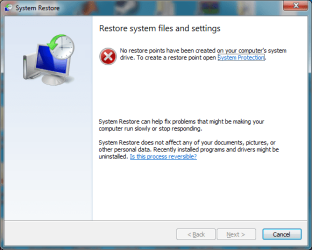
This is my system restore look like.

I can't click "next" because its color is grey.
 

Attachments

  • system_restore.PNG
    system_restore.PNG
    23.5 KB · Views: 8

My Computer

Computer type
PC/Desktop
OS
Windows 7 Professional x86
As it shows, you haven't created any restore points so the Next is greyed out. You can click on System Protection to get where you can create one. Of course, that doesn't help solve the current problem and if you create one now, you will be saving a restore point with the problem within it.
 

My Computer

Computer type
Laptop
Computer Manufacturer/Model Number
Dell M6500 Precision Work Station
OS
Windows 7 Pro SP1 64 bit
Memory
8 GB
Screen Resolution
1920x
Internet Speed
30 Mbps
Antivirus
Norton Security
Browser
IE 11
So what should I do?
 

My Computer

Computer type
PC/Desktop
OS
Windows 7 Professional x86
bast7

I would try another keyboard to see if the current one is defective.

If you don't have one, maybe a friend could let you try theirs on your Desktop to see if that is the issue.

Snick
 

My Computer

Computer type
PC/Desktop
Computer Manufacturer/Model Number
HP Desktop & Compaq Laptop
OS
Win 10 x64, Linux Lite, Win 7 x64, BlackArch, & Kali
Hard Drives
Samsung 850 Pro 256Gb,
Hitachi HDD 1Tb,
Crucial MX SSD 250Gb
Segate 3Tb USB 3.0 Ext. Backup HDD
Internet Speed
150Mbps dn, 20Mbps up
Antivirus
Avast Free, Malwarebytes Anti-Exploit & Anti-Ransomware
Browser
Firefox, Chrome, Opera, & VPN
He hasn't told us which keyboard he has and, if there's any software with it. Some keyboards have special keys just for games which can alter the function of some keys.
 

My Computer

Computer type
Laptop
Computer Manufacturer/Model Number
Dell M6500 Precision Work Station
OS
Windows 7 Pro SP1 64 bit
Memory
8 GB
Screen Resolution
1920x
Internet Speed
30 Mbps
Antivirus
Norton Security
Browser
IE 11
My computer is Lenovo ThinkCentre. My keyboard, mouse, monitor, are Lenovo.
 

My Computer

Computer type
PC/Desktop
OS
Windows 7 Professional x86
That doesn't help since we'd need to know the model number. It may be on the keyboard. Looking to see if there's functions which could cause the Windows key to not function properly.

I would say to uninstall the driver and reboot but, that's kind of iffy depending on whether or not it uses a Windows driver. If not, it wouldn't be functional if you rebooted after doing that. I don't know if Windows would ask you if you wanted to find the driver.

Go to Control Panel, Device Manager, Keyboards. Try either updating the driver or rolling it back in the Driver tab.

The other option would be to try a different keyboard, as suggested by Snick.
 

My Computer

Computer type
Laptop
Computer Manufacturer/Model Number
Dell M6500 Precision Work Station
OS
Windows 7 Pro SP1 64 bit
Memory
8 GB
Screen Resolution
1920x
Internet Speed
30 Mbps
Antivirus
Norton Security
Browser
IE 11
Back
Top