
You are using an out of date browser. It may not display this or other websites correctly.
You should upgrade or use an alternative browser.
You should upgrade or use an alternative browser.
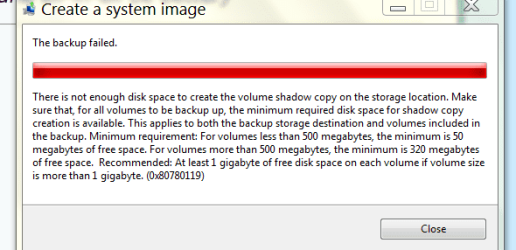
Can't do system image, pics attached
- Thread starter sablegsd
- Start date


tman69
Followed the lemmings
- Local time
- 4:47 PM
- Messages
- 414
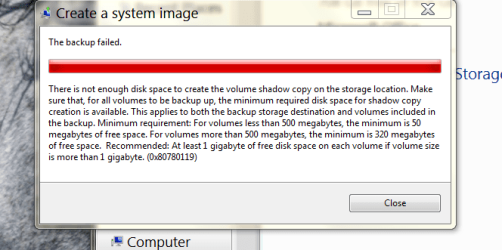
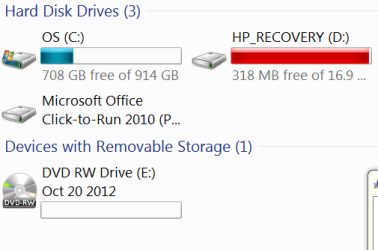
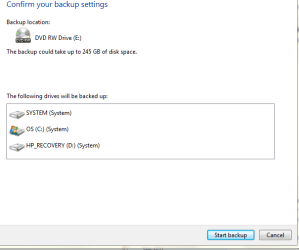
from the posted images--it appears that you are trying to make an image of your C drive on your D drive
1.there is not enough space on the D drive
2.it's a very bad idea to image onto the recovery partition--should your drive fail you will most likely lose your your recovery partition
3. get an external hard drive for storing hard drive images (at least 250 GB) as a system image will most likely be around 50GB
1.there is not enough space on the D drive
2.it's a very bad idea to image onto the recovery partition--should your drive fail you will most likely lose your your recovery partition
3. get an external hard drive for storing hard drive images (at least 250 GB) as a system image will most likely be around 50GB
My Computer
- Computer Manufacturer/Model Number
- SALEON model 2.2b
- OS
- win7 ultimate 32bit
- CPU
- core2 Extreme QX6850-OCd to 3.15 GHz
- Motherboard
- ASUS P5G41-M LE
- Memory
- 4 GB
- Graphics Card(s)
- NVidia 8600 GT
- Monitor(s) Displays
- 23" acer
- Hard Drives
- one SATA 250GB partitioned equally in half
one SATA 160GB-internal storage
- PSU
- 500W Thermaltake
- Case
- mini tower

- Local time
- 6:47 PM
- Messages
- 63
Thanks for answering. I am not doing anything different than I have before. Why would it try to make an image on the HP partition? It never has before. Sometimes that is filled in red, sometimes in a green color like OS has. I never figured out why that would change, but I didn't really care.from the posted images--it appears that you are trying to make an image of your C drive on your D drive
1.there is not enough space on the D drive
2.it's a very bad idea to image onto the recovery partition--should your drive fail you will most likely lose your your recovery partition
3. get an external hard drive for storing hard drive images (at least 250 GB) as a system image will most likely be around 50GB
My Computer
- Computer Manufacturer/Model Number
- HP p7-1254
- OS
- 7 64 bit Home Premium
tman69
Followed the lemmings
- Local time
- 4:47 PM
- Messages
- 414
"I am not doing anything different than I have before. Why would it try to make an image on the HP partition? It never has before. Sometimes that is filled in red, sometimes in a green color like OS has. I never figured out why that would change, but I didn't really care"
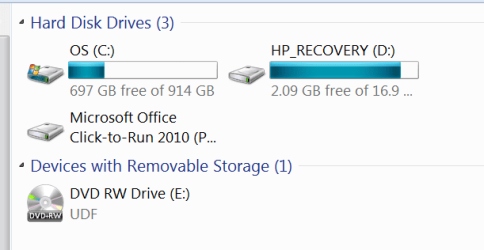
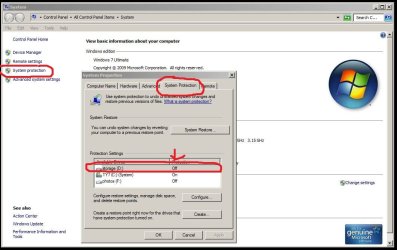
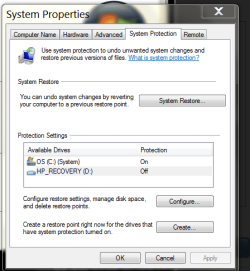
even though you don't care why--the recovery partition turns red when it's getting filled up--which would only happen if 'system restore' is turned on for that drive.
Why would it try to make an image on the HP partition? er because it's the only drive available
question--to what location are you 'trying' to write the image--I don't see another drive listed
even though you don't care why--the recovery partition turns red when it's getting filled up--which would only happen if 'system restore' is turned on for that drive.
Why would it try to make an image on the HP partition? er because it's the only drive available
question--to what location are you 'trying' to write the image--I don't see another drive listed
My Computer
- Computer Manufacturer/Model Number
- SALEON model 2.2b
- OS
- win7 ultimate 32bit
- CPU
- core2 Extreme QX6850-OCd to 3.15 GHz
- Motherboard
- ASUS P5G41-M LE
- Memory
- 4 GB
- Graphics Card(s)
- NVidia 8600 GT
- Monitor(s) Displays
- 23" acer
- Hard Drives
- one SATA 250GB partitioned equally in half
one SATA 160GB-internal storage
- PSU
- 500W Thermaltake
- Case
- mini tower
- Local time
- 6:47 PM
- Messages
- 63
My Computer
- Computer Manufacturer/Model Number
- HP p7-1254
- OS
- 7 64 bit Home Premium
- Local time
- 6:47 PM
- Messages
- 63
My Computer
- Computer Manufacturer/Model Number
- HP p7-1254
- OS
- 7 64 bit Home Premium
Seems it's over 200 GB to backup, you'll maybe get 50% compression (much less if lots of pictures\videos files), do the math regarding approx. disc use, must be a nightmare to keep track of them all, + a risk of some disc write or read failure.
Maybe high time to skip the optical and get a large usb hd
Maybe high time to skip the optical and get a large usb hd
My Computer
- Computer type
- Laptop
- Computer Manufacturer/Model Number
- Dell \ Lenovo\ HP \ Toshiba
- OS
- W7, W8.1
- Antivirus
- MSE, Malwarebytes
- Browser
- FF

Hello Sablegsd,
For system images, I would strongly recommend to save them to a separate internal or external physical HDD for the best reliability. DVDs have been proven not nearly as reliable, and usually when it's to late.
For system images, I would strongly recommend to save them to a separate internal or external physical HDD for the best reliability. DVDs have been proven not nearly as reliable, and usually when it's to late.
My Computer
- Computer type
- PC/Desktop
- Computer Manufacturer/Model Number
- Self built custom
- OS
- 64-bit Windows 11 Pro for Workstations
- CPU
- Intel i7-8700K OC'd to 5 GHz
- Motherboard
- ASUS ROG Maximus XI Formula Z390
- Memory
- 64 GB (4x16GB) G.SKILL TridentZ RGB DDR4 3600 MHz
- Graphics Card(s)
- ASUS ROG-STRIX-GTX1080TI-O11G-GAMING
- Sound Card
- Integrated
- Monitor(s) Displays
- 2 x Samsung Odyssey G7 27"
- Screen Resolution
- 2560x1440
- Hard Drives
- 1TB Samsung 990 PRO M.2,
4TB Samsung 990 PRO PRO M.2,
TerraMaster F8 SSD Plus NAS
- PSU
- Seasonic Prime Titanium 850W
- Case
- Thermaltake Core P3
- Cooling
- Corsair Hydro H115i
- Keyboard
- Logitech wireless K800
- Mouse
- Logitech MX Master 4
- Internet Speed
- 2 Gb/s Download and 100 Mb/s Upload
- Antivirus
- Malwarebyte Anti-Malware Premium
- Browser
- Google Chrome
- Other Info
- Logitech Z625 speaker system,
Logitech BRIO 4K Pro webcam,
HP Color LaserJet Pro MFP M477fdn,
APC SMART-UPS RT 1000 XL - SURT1000XLI,
Galaxy S23 Plus phone
tman69
Followed the lemmings
- Local time
- 4:47 PM
- Messages
- 414
"I wanted to show you that the HP recovery changed color again"
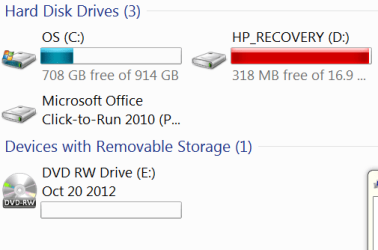
the amount of free space on the D drive changed from 318 MB (red) to 2.09 GB (blue)--so yes--perhaps your machine is possessed...or system restore is turned on for that drive...or your previous backup utility is set to use that drive
the amount of free space on the D drive changed from 318 MB (red) to 2.09 GB (blue)--so yes--perhaps your machine is possessed...or system restore is turned on for that drive...or your previous backup utility is set to use that drive
My Computer
- Computer Manufacturer/Model Number
- SALEON model 2.2b
- OS
- win7 ultimate 32bit
- CPU
- core2 Extreme QX6850-OCd to 3.15 GHz
- Motherboard
- ASUS P5G41-M LE
- Memory
- 4 GB
- Graphics Card(s)
- NVidia 8600 GT
- Monitor(s) Displays
- 23" acer
- Hard Drives
- one SATA 250GB partitioned equally in half
one SATA 160GB-internal storage
- PSU
- 500W Thermaltake
- Case
- mini tower
- Local time
- 6:47 PM
- Messages
- 63
"I wanted to show you that the HP recovery changed color again"
the amount of free space on the D drive changed
Why? It's randomly adding and subtracting from itself?

I still don't understand why it wont do the system image. It doesn't know I have about a hundred of these disks, what is it basing it's not enough space on?
My Computer
- Computer Manufacturer/Model Number
- HP p7-1254
- OS
- 7 64 bit Home Premium
tman69
Followed the lemmings
- Local time
- 4:47 PM
- Messages
- 414
"I wanted to show you that the HP recovery changed color again"
the amount of free space on the D drive changed
Why? It's randomly adding and subtracting from itself?
I still don't understand why it wont do the system image. It doesn't know I have about a hundred of these disks, what is it basing it's not enough space on?
it is basing NOT ENOUGH DISK SPACE on the size of the D drive (the HP recovery partition) as to why it's adding and subtracting ??? is your backup software set to use the D drive?
My Computer
- Computer Manufacturer/Model Number
- SALEON model 2.2b
- OS
- win7 ultimate 32bit
- CPU
- core2 Extreme QX6850-OCd to 3.15 GHz
- Motherboard
- ASUS P5G41-M LE
- Memory
- 4 GB
- Graphics Card(s)
- NVidia 8600 GT
- Monitor(s) Displays
- 23" acer
- Hard Drives
- one SATA 250GB partitioned equally in half
one SATA 160GB-internal storage
- PSU
- 500W Thermaltake
- Case
- mini tower

tman69
Followed the lemmings
- Local time
- 4:47 PM
- Messages
- 414
My Computer
- Computer Manufacturer/Model Number
- SALEON model 2.2b
- OS
- win7 ultimate 32bit
- CPU
- core2 Extreme QX6850-OCd to 3.15 GHz
- Motherboard
- ASUS P5G41-M LE
- Memory
- 4 GB
- Graphics Card(s)
- NVidia 8600 GT
- Monitor(s) Displays
- 23" acer
- Hard Drives
- one SATA 250GB partitioned equally in half
one SATA 160GB-internal storage
- PSU
- 500W Thermaltake
- Case
- mini tower
- Local time
- 6:47 PM
- Messages
- 63
My Computer
- Computer Manufacturer/Model Number
- HP p7-1254
- OS
- 7 64 bit Home Premium
tman69
Followed the lemmings
- Local time
- 4:47 PM
- Messages
- 414
to create the system image you desire would take approx 70 DVDs--you can purchase a Terrabyte USB external for less than the cost of the DVDs--also IF you ever want to restore your HD from the DVDs...imagine trying to insert them in the proper order--bite the bullet--buy a real backup drive.
am out
am out
My Computer
- Computer Manufacturer/Model Number
- SALEON model 2.2b
- OS
- win7 ultimate 32bit
- CPU
- core2 Extreme QX6850-OCd to 3.15 GHz
- Motherboard
- ASUS P5G41-M LE
- Memory
- 4 GB
- Graphics Card(s)
- NVidia 8600 GT
- Monitor(s) Displays
- 23" acer
- Hard Drives
- one SATA 250GB partitioned equally in half
one SATA 160GB-internal storage
- PSU
- 500W Thermaltake
- Case
- mini tower

I use Macrium Reflect free version to make drive images, one never knows what the w7 back up is doing. Macrium does a fine job.
As others have said use an external hard drive to store images/back ups on. You'll need to buy another $100 stack of DVDs when you want to make a new image your way. A hard drive has room for several images and will make and restore them 10-20 times faster as well.
Our member WHS has made a video tutorial on the subject.
http://www.sevenforums.com/tutorials/73828-imaging-free-macrium.html
As others have said use an external hard drive to store images/back ups on. You'll need to buy another $100 stack of DVDs when you want to make a new image your way. A hard drive has room for several images and will make and restore them 10-20 times faster as well.
Our member WHS has made a video tutorial on the subject.
http://www.sevenforums.com/tutorials/73828-imaging-free-macrium.html
My Computer
- Computer type
- PC/Desktop
- Computer Manufacturer/Model Number
- Home Built Desktop By DataTech
- OS
- Windows 7 Ultimate X64 SP1
- CPU
- Intel i5-2550K, Differing ~4.4-4.8GHz No built in GPU
- Motherboard
- ASUS P8Z68-V PRO/GEN3
- Memory
- 16GB G.Skill Sniper 1866MHz @ 2133MHz 2x8GB
- Graphics Card(s)
- ASUS GTX650TIB-DC2OC-2GD5, (650TI Boost)
- Sound Card
- Onboard Realtek 5-1
- Monitor(s) Displays
- Samsung P2570HD
- Screen Resolution
- 1920x1080
- Hard Drives
- Samsung 840 Pro 256GB SSD for OS, 500GB Seagate Constellation (Enterprise drive) for Data
- PSU
- Corsair HX650W
- Case
- Inwin Dragon Rider
- Cooling
- Hyper 212 EVO w/two Noctua fans, push-pull, @1300 RPM
- Keyboard
- E-Z Eyes, bright yellow keys with large characters
- Mouse
- steelseries SENSEI Laser Pro Gaming
- Internet Speed
- 48-51Mbs Mbs down, 11 Mbs up Xfinity Cable
- Antivirus
- Norton Internet Security 2013
- Browser
- IE 10, Opera, Pale Moon if needed
- Other Info
- 4 case fans, LG BluRay-RE, ASUS DVD-RW, Mr. Fusion power supply, 1.21 gigawatts.

- Local time
- 5:47 PM
- Messages
- 190
E drive, disk
why wouldn't you want to image the recovery partition? I always have.
He said, "it's a very bad idea to image onto the recovery partition"
He never said it was a bad idea to image THE recovery partition, but ONTO it.
My Computer
- Computer type
- PC/Desktop
- Computer Manufacturer/Model Number
- Dell XPS8700
- OS
- Windows 7 Professional x64
- CPU
- Intel Core i7-4790 CPU @ 3.60GHz (Haswell)
- Motherboard
- Dell Lynx Point Z87 Chipset motherboard
- Memory
- 16 GB
- Graphics Card(s)
- NVIDIA GeForce GTX 745 4GB DDR 3
- Sound Card
- NVIDIA High Definition Audio
- Monitor(s) Displays
- HP Pavilion 27bw 27"
- Screen Resolution
- 1920 x 1080 @ 60 Hz
- Hard Drives
- Seagate ST2000DM001 2 TB
- Internet Speed
- 150 mb/s
- Antivirus
- Microsoft Security Essentials
- Browser
- Google Chrome
Similar threads
- Replies
- 5
- Views
- 10K

- Replies
- 4
- Views
- 2K
- Replies
- 9
- Views
- 4K
