Hi,
I have run up against an issue where I'm not sure whether things are working as designed. I have a home network - not a homegroup - that is composed of three machines, two running Windows 7 SP1 and one running Windows 8.1.
I login on the Windows 7 desktop and click on Network in Internet Explorer. I then choose to open the Windows 7 laptop, which presents two two network folders - one for all Users and the other for the one user on the machine, who is Abby.
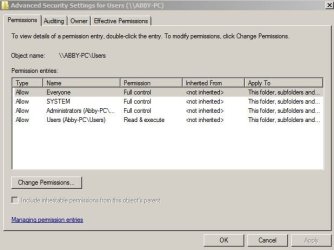
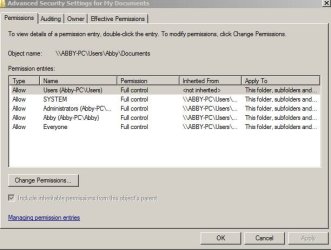
The security settings for the User folder lists -
Everyone
System
Administrators (Abby-PC\Administrators)
Users (Abby-PC\Users)
All have full control with the exception of Users (Abby-PC\Users) which has read and execute.
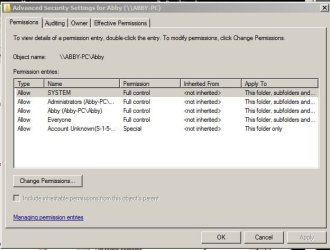
The security settings for the Abby folder lists -
Everyone
System
Abby (Abby-PC\Abby)
Administrators (Abby-PC\Administrators).
All have full control. In addition, the Abby folder checks the box to include inheritable permissions.
When I open the Abby folder, I find that I have read only access to its documents. I am unable to either edit, create, or delete individual files.
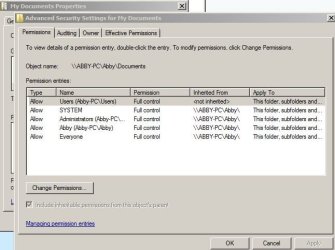
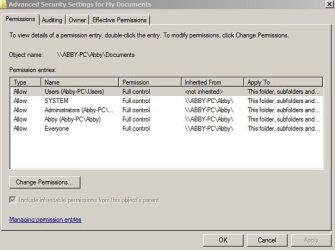
When I open the User folder, however, and navigate to Abby's documents, I find that I have full access and can edit, create, and delete individual files.
I am at a loss to explain why I am restricted when I open Abby's folder and what accounts for the discrepancy between the two.
Any suggestions would be appreciated,
Thanks,
s660117
I have run up against an issue where I'm not sure whether things are working as designed. I have a home network - not a homegroup - that is composed of three machines, two running Windows 7 SP1 and one running Windows 8.1.
I login on the Windows 7 desktop and click on Network in Internet Explorer. I then choose to open the Windows 7 laptop, which presents two two network folders - one for all Users and the other for the one user on the machine, who is Abby.
The security settings for the User folder lists -
Everyone
System
Administrators (Abby-PC\Administrators)
Users (Abby-PC\Users)
All have full control with the exception of Users (Abby-PC\Users) which has read and execute.
The security settings for the Abby folder lists -
Everyone
System
Abby (Abby-PC\Abby)
Administrators (Abby-PC\Administrators).
All have full control. In addition, the Abby folder checks the box to include inheritable permissions.
When I open the Abby folder, I find that I have read only access to its documents. I am unable to either edit, create, or delete individual files.
When I open the User folder, however, and navigate to Abby's documents, I find that I have full access and can edit, create, and delete individual files.
I am at a loss to explain why I am restricted when I open Abby's folder and what accounts for the discrepancy between the two.
Any suggestions would be appreciated,
Thanks,
s660117
My Computer
- Computer Manufacturer/Model Number
- Dell Inspiron 537s
- OS
- vista 64 bit
- CPU
- Intel Core(TM)2 Duo 3.00 GHz
- Motherboard
- ?
- Memory
- 4 Gig
- Graphics Card(s)
- Internal
- Sound Card
- Creative Sound Blaster
- Monitor(s) Displays
- Samsung SyncMaster 2253BW
- Hard Drives
- WDC ATA Device 500 GB Fixed Disk
WD Ext HDD 1.5 TB Usb Device
- PSU
- ?
- Case
- ?
- Cooling
- ?