
Solved Can't enter BIOS settings on new SSD

threein99

New member
Local time
6:52 PM
Messages
24
Hi

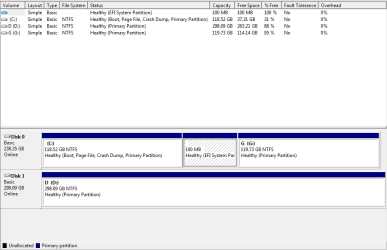
I recently moved to an SSD, I installed Windows 7 and it runs fine but today I wanted to dual boot with Ubuntu, so I made a bootable USB and when I tried to access the boot order settings at startup so I could boot from the USB I cant enter it, I press f2 and nothing happens
 

Attachments
  • Capture.PNG
    Capture.PNG
    11.3 KB · Views: 2
Last edited:

My Computer My Computer

Computer Manufacturer/Model Number
Samsung RV511
OS
Windows 7 64 bit
CPU
ntel Core i3 380M @ 2.53GHz Arrandale 32nm Technology
Motherboard
SAMSUNG ELECTRONICS CO., LTD. RV411/RV511/E3511/S3511/RV711/
Memory
6.00 GB Dual-Channel DDR3 @ 532MHz (8-8-8-20)
Graphics Card(s)
Generic PnP Monitor (1366x768@60Hz) Intel(R) HD Graphics
Sound Card
Realtek High Definition Audio High Definition Audio Device B
Internet Speed
7MB
According to the Users Guide, F2 is the right key. I think you need to keep trying as you may be hitting it at the wrong time.

Manual says as soon as the Samsung logo appears.
 

My Computer My Computer

Computer type
PC/Desktop
Computer Manufacturer/Model Number
Lenovo IdeaCenter 450
OS
Windows 10 Pro X64
CPU
Intel Quad Core i7-4770 @ 3.4Ghz
Memory
16.0GB PC3-12800 DDR3 SDRAM 1600 MHz
Graphics Card(s)
Intel Integrated HD Graphics
Sound Card
Realtek HD Audio
Monitor(s) Displays
HP 22" LCD
Screen Resolution
1680 x 1050
Hard Drives
250GB Samsung EVO SATA-3 SSD
2TB Seagate ST2000DM001 SATA-2
1.5TB Seagate ST3150041AS SATA
Keyboard
Dell USB
Mouse
Lenovo USB
Internet Speed
Cable via Road Runner 3MB Upload, 30MB Download
Antivirus
Windows Defender, MBAM Pro, MBAE
Browser
Seamonkey
Other Info
UEFI/GPT
PLDS DVD-RW DH16AERSH
According to the Users Guide, F2 is the right key. I think you need to keep trying as you may be hitting it at the wrong time.

Manual says as soon as the Samsung logo appears.

It goes into the windows boot manager but I cant get into the BIOS options ot change the boot order, it worked before I switched over to an SSD
 

My Computer My Computer

Computer Manufacturer/Model Number
Samsung RV511
OS
Windows 7 64 bit
CPU
ntel Core i3 380M @ 2.53GHz Arrandale 32nm Technology
Motherboard
SAMSUNG ELECTRONICS CO., LTD. RV411/RV511/E3511/S3511/RV711/
Memory
6.00 GB Dual-Channel DDR3 @ 532MHz (8-8-8-20)
Graphics Card(s)
Generic PnP Monitor (1366x768@60Hz) Intel(R) HD Graphics
Sound Card
Realtek High Definition Audio High Definition Audio Device B
Internet Speed
7MB
Do you have a Fn key that will take you to the one time boot menu where you can select what you want to boot from?

It's often F12.
 

My Computer My Computer

Computer type
PC/Desktop
Computer Manufacturer/Model Number
Lenovo IdeaCenter 450
OS
Windows 10 Pro X64
CPU
Intel Quad Core i7-4770 @ 3.4Ghz
Memory
16.0GB PC3-12800 DDR3 SDRAM 1600 MHz
Graphics Card(s)
Intel Integrated HD Graphics
Sound Card
Realtek HD Audio
Monitor(s) Displays
HP 22" LCD
Screen Resolution
1680 x 1050
Hard Drives
250GB Samsung EVO SATA-3 SSD
2TB Seagate ST2000DM001 SATA-2
1.5TB Seagate ST3150041AS SATA
Keyboard
Dell USB
Mouse
Lenovo USB
Internet Speed
Cable via Road Runner 3MB Upload, 30MB Download
Antivirus
Windows Defender, MBAM Pro, MBAE
Browser
Seamonkey
Other Info
UEFI/GPT
PLDS DVD-RW DH16AERSH
Do you have a Fn key that will take you to the one time boot menu where you can select what you want to boot from?

It's often F12.

I do but any of those keys just take to the windows boot manager where I can only select safe mode/safe mode with networking etc etc
 

My Computer My Computer

Computer Manufacturer/Model Number
Samsung RV511
OS
Windows 7 64 bit
CPU
ntel Core i3 380M @ 2.53GHz Arrandale 32nm Technology
Motherboard
SAMSUNG ELECTRONICS CO., LTD. RV411/RV511/E3511/S3511/RV711/
Memory
6.00 GB Dual-Channel DDR3 @ 532MHz (8-8-8-20)
Graphics Card(s)
Generic PnP Monitor (1366x768@60Hz) Intel(R) HD Graphics
Sound Card
Realtek High Definition Audio High Definition Audio Device B
Internet Speed
7MB

My Computer My Computer

Computer type
PC/Desktop
Computer Manufacturer/Model Number
home built
OS
Multi-Boot W7_Pro_x64 W8.1_Pro_x64 W10_Pro_x64 +Linux_VMs +Chromium_VM
CPU
AMD Athlon II x4 620
Motherboard
Gigabyte GA-MA785G-UD3H
Memory
6GB GSkill DDR2 800
Graphics Card(s)
AMD 4670 GPU + AMD 4200 IGP
Sound Card
on board Realtek ALC889A
Monitor(s) Displays
RCA 40" LCD TV, Insignia 32" LCD TV, HP 15" LCD monitor
Screen Resolution
1680 x 1050
Hard Drives
OCZ Vertex 3 120GB,
Samsung F3 1TB (3),
Several others - WD, Seagate, Hitachi, ...
PSU
Corsair 500 W
Case
Rosewill mid tower
Cooling
CM 90mm rifle
Keyboard
Gyration wireless, Logitech wireless, Dell USB wired
Mouse
Gyration wireless, Logitech wireless, V7 USB wired
Internet Speed
Spectrum - 100Mbps D / 10Mbps U
Antivirus
Avast, MBAM3, EMET, WinPatrol
Browser
Pale Moon, Firefox, IE
Other Info
2 multi-boot PC's
Mainly HTPC/Office/Gen purpose (no gaming).
Trendnet USB KVM.
LG DVD burner/Blue Ray Player.
Tray system for removable SATA backup drives.

Not currently OCd, under-volted.
I use Hybrid sleep, rarely re-boot or shutdown.

Hauppauge HD-PVR, Avermedia PCIe TV Tuner, Hauppauge PCI TV Tuner.
Post a screen print of your disk management
http://www.sevenforums.com/tutorials/274797-disk-management-post-screen-capture-image.html

Hi
I recently moved to an SSD, I installed Windows 7

Can you explain exactly what you did to "move to an SSD and install Windows 7" ?

i.e.
Did you disconnect the HD with Win 7 BEFORE installing Win 7 on the SSD ???

I just replaced the HDD with the SSD, I then wiped the old HDD and replaced my optical drive with it, I will post a screen shot when I get home
 

My Computer My Computer

Computer Manufacturer/Model Number
Samsung RV511
OS
Windows 7 64 bit
CPU
ntel Core i3 380M @ 2.53GHz Arrandale 32nm Technology
Motherboard
SAMSUNG ELECTRONICS CO., LTD. RV411/RV511/E3511/S3511/RV711/
Memory
6.00 GB Dual-Channel DDR3 @ 532MHz (8-8-8-20)
Graphics Card(s)
Generic PnP Monitor (1366x768@60Hz) Intel(R) HD Graphics
Sound Card
Realtek High Definition Audio High Definition Audio Device B
Internet Speed
7MB
I don't think your problem has anything to do with the SSD. Just keep tapping F12 (or F10 - not sure for a Samsung) from the minute you hit power-on.
 

My Computer My Computer

Computer Manufacturer/Model Number
HP, Dell, Gateway, Toshiba - 4 laptops and 2 desktops
OS
Vista, Windows7, Mint Mate, Zorin, Windows 8
CPU
from 1.6GHz Duo to i7
Monitor(s) Displays
2x HP w2207
Hard Drives
5x HDD, 7x SSD, 12x Externals
Keyboard
with trackball - no mices
Mouse
Trackball mice
Internet Speed
DSL 6000
I have added a screen shot to my original post
 

My Computer My Computer

Computer Manufacturer/Model Number
Samsung RV511
OS
Windows 7 64 bit
CPU
ntel Core i3 380M @ 2.53GHz Arrandale 32nm Technology
Motherboard
SAMSUNG ELECTRONICS CO., LTD. RV411/RV511/E3511/S3511/RV711/
Memory
6.00 GB Dual-Channel DDR3 @ 532MHz (8-8-8-20)
Graphics Card(s)
Generic PnP Monitor (1366x768@60Hz) Intel(R) HD Graphics
Sound Card
Realtek High Definition Audio High Definition Audio Device B
Internet Speed
7MB
Did you install Win7 in UEFI mode as you have the EFI System partition, although it is strangely located after the OS partition which is highly unusual. So how exactly did you install Win7?

If you installed to UEFI then you would have selected your Win7 installation media as a UEFI device. Is this what you did?

I do not know how Linux distros react to UEFI so you'll have to try and report back.

I have used F12 to access Samsung one-time BIOS Boot Menu. But if you can't access BIOS setup you have other problems. I'd read your Manual on the Samsung Support Downloads webpage to make sure there isn't a hybrid method to access the menu on your model.

If the PC is still under one year tech support warranty I'd chat or call them to find out exactly how to access this and ask about the strange EFI partition position.

If not you can research how to reset the CMOS on your model PC to see if that resolves it as it often does: How To Clear CMOS (Reset BIOS) [Easy, 10 to 15 Min]
 
Did you install Win7 in UEFI mode as you have the EFI System partition, although it is strangely located after the OS partition which is highly unusual. So how exactly did you install Win7?

If you installed to UEFI then you would have selected your Win7 installation media as a UEFI device. Is this what you did?

I do not know how Linux distros react to UEFI so you'll have to try and report back.

I have used F12 to access Samsung one-time BIOS Boot Menu. But if you can't access BIOS setup you have other problems. I'd read your Manual on the Samsung Support Downloads webpage to make sure there isn't a hybrid method to access the menu on your model.

If the PC is still under one year tech support warranty I'd chat or call them to find out exactly how to access this and ask about the strange EFI partition position.

If not you can research how to reset the CMOS on your model PC to see if that resolves it as it often does: How To Clear CMOS (Reset BIOS) [Easy, 10 to 15 Min]

I reinstalled it using the cd that came with the laptop, I don't recall being asked to install it as UEFI device, I've reinstalled it before using the the cd and never had this problem
 

My Computer My Computer

Computer Manufacturer/Model Number
Samsung RV511
OS
Windows 7 64 bit
CPU
ntel Core i3 380M @ 2.53GHz Arrandale 32nm Technology
Motherboard
SAMSUNG ELECTRONICS CO., LTD. RV411/RV511/E3511/S3511/RV711/
Memory
6.00 GB Dual-Channel DDR3 @ 532MHz (8-8-8-20)
Graphics Card(s)
Generic PnP Monitor (1366x768@60Hz) Intel(R) HD Graphics
Sound Card
Realtek High Definition Audio High Definition Audio Device B
Internet Speed
7MB
90% of the time failure to boot into BIOS setup or BIOS Boot menu is due to bad timing or other User failure. Try holding the F2 after reboot.

I gave you the other things to try so let us know how they go. You have a UEFI install judging by the labels on your Disk Mgmt which we read here by the thousands.
 
Greg,
Do you think it would be a good idea to disconnect the SSD and try to boot that way ?
The PC shouldn't be able to boot.
Maybe that would "force a change" to allow accessing the BIOS setup ???
 

My Computer My Computer

Computer type
PC/Desktop
Computer Manufacturer/Model Number
home built
OS
Multi-Boot W7_Pro_x64 W8.1_Pro_x64 W10_Pro_x64 +Linux_VMs +Chromium_VM
CPU
AMD Athlon II x4 620
Motherboard
Gigabyte GA-MA785G-UD3H
Memory
6GB GSkill DDR2 800
Graphics Card(s)
AMD 4670 GPU + AMD 4200 IGP
Sound Card
on board Realtek ALC889A
Monitor(s) Displays
RCA 40" LCD TV, Insignia 32" LCD TV, HP 15" LCD monitor
Screen Resolution
1680 x 1050
Hard Drives
OCZ Vertex 3 120GB,
Samsung F3 1TB (3),
Several others - WD, Seagate, Hitachi, ...
PSU
Corsair 500 W
Case
Rosewill mid tower
Cooling
CM 90mm rifle
Keyboard
Gyration wireless, Logitech wireless, Dell USB wired
Mouse
Gyration wireless, Logitech wireless, V7 USB wired
Internet Speed
Spectrum - 100Mbps D / 10Mbps U
Antivirus
Avast, MBAM3, EMET, WinPatrol
Browser
Pale Moon, Firefox, IE
Other Info
2 multi-boot PC's
Mainly HTPC/Office/Gen purpose (no gaming).
Trendnet USB KVM.
LG DVD burner/Blue Ray Player.
Tray system for removable SATA backup drives.

Not currently OCd, under-volted.
I use Hybrid sleep, rarely re-boot or shutdown.

Hauppauge HD-PVR, Avermedia PCIe TV Tuner, Hauppauge PCI TV Tuner.
Good thinking, David. It could be either the SSD or flash media blocking access to BIOS, providing it is being accessed correctly. Try without each and both to see.

Is this what you'd do?
 
Yea, I would disconnect everything not needed (Mouse + Keyboard) and see what that does.
I would want to see BIOS settings BEFORE doing a BIOS RESET if at all possible.

Your idea to contact Samsung support is excellent.
I don't have UEFI, Ubuntu, but I've never not been able to get into BIOS (Legacy) setup ...
 

My Computer My Computer

Computer type
PC/Desktop
Computer Manufacturer/Model Number
home built
OS
Multi-Boot W7_Pro_x64 W8.1_Pro_x64 W10_Pro_x64 +Linux_VMs +Chromium_VM
CPU
AMD Athlon II x4 620
Motherboard
Gigabyte GA-MA785G-UD3H
Memory
6GB GSkill DDR2 800
Graphics Card(s)
AMD 4670 GPU + AMD 4200 IGP
Sound Card
on board Realtek ALC889A
Monitor(s) Displays
RCA 40" LCD TV, Insignia 32" LCD TV, HP 15" LCD monitor
Screen Resolution
1680 x 1050
Hard Drives
OCZ Vertex 3 120GB,
Samsung F3 1TB (3),
Several others - WD, Seagate, Hitachi, ...
PSU
Corsair 500 W
Case
Rosewill mid tower
Cooling
CM 90mm rifle
Keyboard
Gyration wireless, Logitech wireless, Dell USB wired
Mouse
Gyration wireless, Logitech wireless, V7 USB wired
Internet Speed
Spectrum - 100Mbps D / 10Mbps U
Antivirus
Avast, MBAM3, EMET, WinPatrol
Browser
Pale Moon, Firefox, IE
Other Info
2 multi-boot PC's
Mainly HTPC/Office/Gen purpose (no gaming).
Trendnet USB KVM.
LG DVD burner/Blue Ray Player.
Tray system for removable SATA backup drives.

Not currently OCd, under-volted.
I use Hybrid sleep, rarely re-boot or shutdown.

Hauppauge HD-PVR, Avermedia PCIe TV Tuner, Hauppauge PCI TV Tuner.
Another note.

I never wipe the HD I am "replacing" before confirming everything works correctly.
I have 2 PCs, a dual-boot and a triple-boot.
I've "migrated" these OSs several times to different HDs, SSD, etc. ...
If anything goes wrong, I remove the new HD/SSD, reconnect the OLD working HD/SSD, and start over ...
This does mean having an extra "HD", but the cost is well worth it to me ... to be able to "recover" .
 

My Computer My Computer

Computer type
PC/Desktop
Computer Manufacturer/Model Number
home built
OS
Multi-Boot W7_Pro_x64 W8.1_Pro_x64 W10_Pro_x64 +Linux_VMs +Chromium_VM
CPU
AMD Athlon II x4 620
Motherboard
Gigabyte GA-MA785G-UD3H
Memory
6GB GSkill DDR2 800
Graphics Card(s)
AMD 4670 GPU + AMD 4200 IGP
Sound Card
on board Realtek ALC889A
Monitor(s) Displays
RCA 40" LCD TV, Insignia 32" LCD TV, HP 15" LCD monitor
Screen Resolution
1680 x 1050
Hard Drives
OCZ Vertex 3 120GB,
Samsung F3 1TB (3),
Several others - WD, Seagate, Hitachi, ...
PSU
Corsair 500 W
Case
Rosewill mid tower
Cooling
CM 90mm rifle
Keyboard
Gyration wireless, Logitech wireless, Dell USB wired
Mouse
Gyration wireless, Logitech wireless, V7 USB wired
Internet Speed
Spectrum - 100Mbps D / 10Mbps U
Antivirus
Avast, MBAM3, EMET, WinPatrol
Browser
Pale Moon, Firefox, IE
Other Info
2 multi-boot PC's
Mainly HTPC/Office/Gen purpose (no gaming).
Trendnet USB KVM.
LG DVD burner/Blue Ray Player.
Tray system for removable SATA backup drives.

Not currently OCd, under-volted.
I use Hybrid sleep, rarely re-boot or shutdown.

Hauppauge HD-PVR, Avermedia PCIe TV Tuner, Hauppauge PCI TV Tuner.
It's working fine just can't access the boot order. I hadn't noticed it before as it's not something I look to change much. I will try those suggestions later when I get home
 

My Computer My Computer

Computer Manufacturer/Model Number
Samsung RV511
OS
Windows 7 64 bit
CPU
ntel Core i3 380M @ 2.53GHz Arrandale 32nm Technology
Motherboard
SAMSUNG ELECTRONICS CO., LTD. RV411/RV511/E3511/S3511/RV711/
Memory
6.00 GB Dual-Channel DDR3 @ 532MHz (8-8-8-20)
Graphics Card(s)
Generic PnP Monitor (1366x768@60Hz) Intel(R) HD Graphics
Sound Card
Realtek High Definition Audio High Definition Audio Device B
Internet Speed
7MB

My Computer My Computer

Computer Manufacturer/Model Number
Samsung RV511
OS
Windows 7 64 bit
CPU
ntel Core i3 380M @ 2.53GHz Arrandale 32nm Technology
Motherboard
SAMSUNG ELECTRONICS CO., LTD. RV411/RV511/E3511/S3511/RV711/
Memory
6.00 GB Dual-Channel DDR3 @ 532MHz (8-8-8-20)
Graphics Card(s)
Generic PnP Monitor (1366x768@60Hz) Intel(R) HD Graphics
Sound Card
Realtek High Definition Audio High Definition Audio Device B
Internet Speed
7MB
How did you boot it?


Also do you know how C partition got put in first position because EFI System partition which boots the OS is normally always firs?
 
Back
Top