Solved Cannot enter BIOS for SSD recognition

kevtherev

New member
Local time
6:46 AM
Messages
21
I have a PC from Medion, the Microstar. Recently purchased a SSD Hard Drive from Samsung SSD 850 EVO 120GB. On my PC there is a compartment already fitted out with the necessary SATA connections. Installed the SSD and started my PC (OS is Windows 7 Home Edition already installed by the manufacturer). After startup OS reported that the SSD was recognised.
Searched for this in Windows Explorer/Computer but could not find the drive letter, the only ones indicated were HARD DISK DRIVES Boot (C) and Recover (D), Devices with Removable Storage DVD RW Drive (E), Removable Disk (F), Removable Disk (G), Removable Disk (H) and Removable Disk (I).
I then closed the PC and restarted going into BIOS with the F8 key. There I was shown a blue screen menu with the options of selecting a BOOT drive Disk. Among those shown were the SSD and a HDD the latter which I presumed is my Boot (C) drive. No other options were indicated, no Menu etc. I tried many keys, F1 through to F10 but all with the same result, nada. Exited the 'BIOS' ? and booted normally.
The non recognition of the SSD and the inability to enter further into the BIOS is puzzling to say the least. As I do not have a great deal of knowledge concerning computers I would be most gratefull of any help in this direction.
 

My Computer

Computer Manufacturer/Model Number
Medion
OS
Microsoft Windows 7 Home Premium 64-Bit 7601 Multiprocessor Free Service Pack 1
CPU
AMD Phenom(tm) II X6 1055T Processor
Motherboard
MEDIONPC MS-7646
Memory
8,00 GB
Graphics Card(s)
AMD Radeon HD 6570
Sound Card
(1) Realtek High Definition Audio (2) AMD High Definition
Monitor(s) Displays
Acer AL1716 / NEC Multisync LCD1770NX
Screen Resolution
Both 1280 X 1024
Hard Drives
ST310005 28AS SATA Disk Device Fixed hard disk media 931,51 GB
Keyboard
Medion
Mouse
Medion
There is no reason to go into the Bios.

You have to format the ssd and give it a letter for it to show up. (Common knowledge)

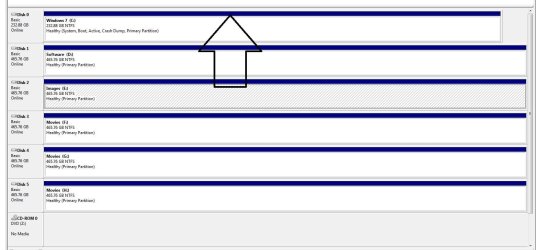
If you go into disk management you will see it as unallocated.

Right click on it to format it as a primary partition.

Start Button>Right click computer>click manage>click disk management

maximize the window and you`ll see the ssd.

Example here but the bar across the top of it will be black
 

Attachments

  • Disk Management.jpg
    Disk Management.jpg
    109.8 KB · Views: 2

My Computer

Computer type
PC/Desktop
Computer Manufacturer/Model Number
Skylake Special #666
OS
Windows 10 Pro x64
CPU
Intel Core i7 6700K
Motherboard
Asus Sabertooth Z170 Mark 1
Memory
GSkill TridentZ RGB 16GB 3600 16-16-16-36
Graphics Card(s)
EVGA GTX 980 Ti SC x2
Sound Card
Realtek High Definition
Monitor(s) Displays
AOC G2460PG
Screen Resolution
1920 x 1080 144Hz
Hard Drives
Samsung 860 Pro 256GB, Seagate Barracuda 4TB x2
PSU
EVGA 1000 P2, EVGA White Custom Braided Cables
Case
Corsair Vengeance C70 Gunmetal Black
Cooling
Corsair H100i v2, Corsair ML120 x2, Thermal Grizzly Kryonaut
Keyboard
Logitech G910 Orion Spectrum
Mouse
Logitech G700s
Internet Speed
Verizon Fios Quantum Gateway 75/75
Antivirus
Windows Defender, Malwarebytes Free 3.8.3
Browser
Chrome
Other Info
Corsair SP120 x4, LG Blu-ray Drive, Durabrand HT-395 100 Watt Dolby Digital Amp, Corsair H2100 Wireless 7.1 Headset
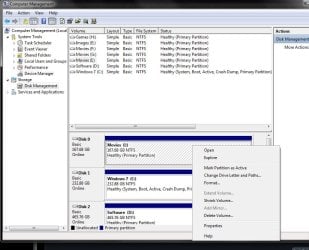
o/k I have reached the location you said. There I have the black bar above Disk 0 Basic 111.79 GB Online with 111.97 GB Unallocated in the window below the black bar. What should I do next as I cannot see any formatting or other command.. If I right click on the bar I get a drop down with:- New Simple Volume, Properties and Help.
 

My Computer

Computer Manufacturer/Model Number
Medion
OS
Microsoft Windows 7 Home Premium 64-Bit 7601 Multiprocessor Free Service Pack 1
CPU
AMD Phenom(tm) II X6 1055T Processor
Motherboard
MEDIONPC MS-7646
Memory
8,00 GB
Graphics Card(s)
AMD Radeon HD 6570
Sound Card
(1) Realtek High Definition Audio (2) AMD High Definition
Monitor(s) Displays
Acer AL1716 / NEC Multisync LCD1770NX
Screen Resolution
Both 1280 X 1024
Hard Drives
ST310005 28AS SATA Disk Device Fixed hard disk media 931,51 GB
Keyboard
Medion
Mouse
Medion
You right click on it, the white space, not the bar, and create a new simple volume.

All the options should be here. An unallocated drive will show different options, but they are there.
 

Attachments

  • Capture.JPG
    Capture.JPG
    90.1 KB · Views: 0

My Computer

Computer type
PC/Desktop
Computer Manufacturer/Model Number
Skylake Special #666
OS
Windows 10 Pro x64
CPU
Intel Core i7 6700K
Motherboard
Asus Sabertooth Z170 Mark 1
Memory
GSkill TridentZ RGB 16GB 3600 16-16-16-36
Graphics Card(s)
EVGA GTX 980 Ti SC x2
Sound Card
Realtek High Definition
Monitor(s) Displays
AOC G2460PG
Screen Resolution
1920 x 1080 144Hz
Hard Drives
Samsung 860 Pro 256GB, Seagate Barracuda 4TB x2
PSU
EVGA 1000 P2, EVGA White Custom Braided Cables
Case
Corsair Vengeance C70 Gunmetal Black
Cooling
Corsair H100i v2, Corsair ML120 x2, Thermal Grizzly Kryonaut
Keyboard
Logitech G910 Orion Spectrum
Mouse
Logitech G700s
Internet Speed
Verizon Fios Quantum Gateway 75/75
Antivirus
Windows Defender, Malwarebytes Free 3.8.3
Browser
Chrome
Other Info
Corsair SP120 x4, LG Blu-ray Drive, Durabrand HT-395 100 Watt Dolby Digital Amp, Corsair H2100 Wireless 7.1 Headset
Wonderfull, many many thanks, I was about to give up on it, you have saved my day.
 

My Computer

Computer Manufacturer/Model Number
Medion
OS
Microsoft Windows 7 Home Premium 64-Bit 7601 Multiprocessor Free Service Pack 1
CPU
AMD Phenom(tm) II X6 1055T Processor
Motherboard
MEDIONPC MS-7646
Memory
8,00 GB
Graphics Card(s)
AMD Radeon HD 6570
Sound Card
(1) Realtek High Definition Audio (2) AMD High Definition
Monitor(s) Displays
Acer AL1716 / NEC Multisync LCD1770NX
Screen Resolution
Both 1280 X 1024
Hard Drives
ST310005 28AS SATA Disk Device Fixed hard disk media 931,51 GB
Keyboard
Medion
Mouse
Medion
That`s kids stuff, now let`s do something hard, glad to help :)

Enjoy the ssd :D
 

My Computer

Computer type
PC/Desktop
Computer Manufacturer/Model Number
Skylake Special #666
OS
Windows 10 Pro x64
CPU
Intel Core i7 6700K
Motherboard
Asus Sabertooth Z170 Mark 1
Memory
GSkill TridentZ RGB 16GB 3600 16-16-16-36
Graphics Card(s)
EVGA GTX 980 Ti SC x2
Sound Card
Realtek High Definition
Monitor(s) Displays
AOC G2460PG
Screen Resolution
1920 x 1080 144Hz
Hard Drives
Samsung 860 Pro 256GB, Seagate Barracuda 4TB x2
PSU
EVGA 1000 P2, EVGA White Custom Braided Cables
Case
Corsair Vengeance C70 Gunmetal Black
Cooling
Corsair H100i v2, Corsair ML120 x2, Thermal Grizzly Kryonaut
Keyboard
Logitech G910 Orion Spectrum
Mouse
Logitech G700s
Internet Speed
Verizon Fios Quantum Gateway 75/75
Antivirus
Windows Defender, Malwarebytes Free 3.8.3
Browser
Chrome
Other Info
Corsair SP120 x4, LG Blu-ray Drive, Durabrand HT-395 100 Watt Dolby Digital Amp, Corsair H2100 Wireless 7.1 Headset
Back
Top