
Can't get Office 07 Enterprise to Work

0Gravity

New member
Member
Local time
6:16 PM
Messages
31
Hi All,
Let me start by saying.....Why is it EVERYTHING in Windows 7 seems to be a hassle...I can't even install one of Microsoft's own programs without having issues!
This all started when I decided to upgrade from Office 03 because I could not get Windows mobile device center(Another Microsoft Application) to sync my PDA to Outlook, So I figured maybe it was due to an outdated office suite! Now I installed Office 07 Ent. Ed. using the "Run as admin" option on the setup (Even though I am installing from an admin account....Why did MS make things this difficult in Win7?)
So now when I click on ANY of the office apps I get...

"Microsoft Office XXXX has not been installed for the current user. Please run setup to install the application."

I don't understand this....The current user is THE ONLY USER and it is the admin account....I have tried taking "Ownership...another lovely hoop Win 7 seems to like to make you jump through!" I have made sure that the current USER has any and all "Permissions" granted.....The only way I can seem to get any of them to work is by going into compatibility mode and checking the "Run as Administrator" option, and then some of the apps wont run in compatibility mode, and I should not have too use this mode anyway, from what I understand!

I apologize for the rant, but I REALLY am about ready to give up on Win 7 and go back to XP, and I really like 7, when it works! These are NOT the first programs I have had issues with and I am really tired of having to use "Workarounds" to get programs to run!
Please Help me figure out what I am doing wrong? Do I need to have more then one account set up, an Administrator ONLY account and then My everyday use account? The way I have it setup now is when I fire up my PC it boots and goes strait into my "Mikes" account without any password....Is this my problem? Does the admin account HAVE to be passworded? IDK...
Thanks in advance for any help,
Mike
 

My Computer My Computer

Computer Manufacturer/Model Number
HomeBrew
OS
Windows 7 Pro 64
CPU
AMD Athlon 64 X2 6000+
Motherboard
ASUS M2N32-SLI Deluxe
Memory
4 GB OCZ DDR2 800 Dual Channel
Graphics Card(s)
Dual NVidea 8800's
Sound Card
Onboard
Monitor(s) Displays
Sceptre 24"
Hard Drives
500 GB Seagate
PSU
750 watt
Case
Antec 850
Cooling
Processor = Thermaltake Bigwater 760i Rest = Air Cooled
The way I have it setup now is when I fire up my PC it boots and goes strait into my "Mikes" account without any password....Is this my problem? Does the admin account HAVE to be passworded? IDK...
Thanks in advance for any help,
Mike

no that shouldn't be a problem, in fact I have my win7 install set this way and I have never had the issue your experiencing :confused:

there is something wrong with your install and or office, I don't think I installed my versions using right click as admin and i think it was allow these settings for all users (can't remember).

I would try a full unninstall reeboot then full install, this sounds like a user problem on your PC, have you changed any user folder settings ?
 

My Computer My Computer

Computer Manufacturer/Model Number
built my own
OS
win7 ultimate / virtual box
CPU
Intel Core i7 3770K,1155, Ivy Bridge
Motherboard
MSI Z77A-G43
Memory
GSkill Ripjaws Z Series 1600 CL 9.0 16GB
Graphics Card(s)
KFA2 GeForce GTX 670 EX OC 2048MB GDDR5 PCI-E gfx card
Sound Card
onboard Nvidia HDMI audio
Monitor(s) Displays
ASUS VK222H 22" widescreen LCD monitor
Screen Resolution
1680x1050
Hard Drives
Kingston 128gb SSD
OCZ Vertex 90gb SSD
500GB WDCaviar 16mb 5000KS
320GB WDCaviar 16mb 3200AAKS sata 2
1TB Samsung 16mb HD103SJ sata 2
PSU
Corsair HX 750W ATX2.2 Modular
Cooling
Antec 25 Kuhler H2O 620
Keyboard
logitech
Mouse
logitech MX518
Internet Speed
7mb adsl
I would try a full unninstall reeboot then full install, this sounds like a user problem on your PC, have you changed any user folder settings ?

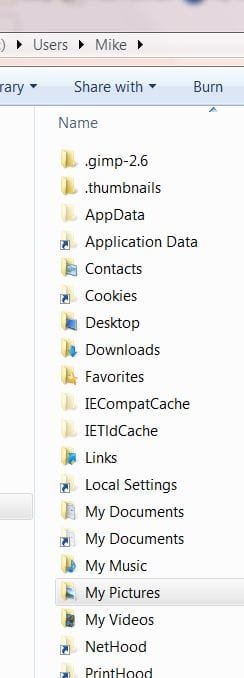
I completely uninstalled and reinstalled last night and finished patching to SP2 and I still have the same problem....As far as I know I have not changed any settings for my user folder. The only thing I am wondering if it has effected my Win7 install is that I did a clean install of Windows 7 but I used the "Files and Settings Wizard" to get settings from my XP install to Win7, and both systems Use the same User account name, so I have noticed, (as seen in the attached picture), in my C:/users folder in both my "mikes" account and the "All Users" account I have, what appear to be folders or possibly "Shortcuts to folders" from my XP install, that I cannot gain access too....Does anyone know if this is normal?

In this pic notice the "application data" and Duplicate "My Documents" and other folders with the little arrow on their Icon's, these are the folders I am refering to...when I try to open them I get a message saying the folder is not accesable Access Denied....are these remnents of my old XP install? If so can they be safely deleted?
Also could I start from scratch and create a new "User" and delete this current "Mike" user profile and somehow transfer or activate programs I already installed to the "Mike" profile? I'm thinking the XP files and settings somehow corrupted my user profile of the same name on Win7, but I dont neccesarily want to do a whole "Fresh Install" again!
Thanks again,
Mike
 

Attachments

  • UsersFolder.JPG
    UsersFolder.JPG
    28.2 KB · Views: 8

My Computer My Computer

Computer Manufacturer/Model Number
HomeBrew
OS
Windows 7 Pro 64
CPU
AMD Athlon 64 X2 6000+
Motherboard
ASUS M2N32-SLI Deluxe
Memory
4 GB OCZ DDR2 800 Dual Channel
Graphics Card(s)
Dual NVidea 8800's
Sound Card
Onboard
Monitor(s) Displays
Sceptre 24"
Hard Drives
500 GB Seagate
PSU
750 watt
Case
Antec 850
Cooling
Processor = Thermaltake Bigwater 760i Rest = Air Cooled
Ok I finaly got All the Office Apps to stop giving me the "Not installed for the current user" Message!
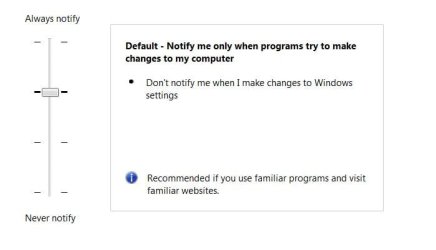
What I ended up doing is Shut Off the UAC for my user account and everything works fine now! For those that might not know, this is found in Control Panel/User Accounts/Change user account control settings and it looks like the picture below....I took it off the Default setting and set it to NEVER NOTIFY! I have no idea why the default setting would not let me use Microsoft Office but I stopped trying to figure out Microsofts thinking! So now I guess my system is less secure because the policys set for these settings are too strict!
But if it stops all the problems I have been having getting programs to work....I am a happy camper!

Thanks Again for the suggestions,
Mike
 

Attachments

  • UAC.JPG
    UAC.JPG
    23.4 KB · Views: 17

My Computer My Computer

Computer Manufacturer/Model Number
HomeBrew
OS
Windows 7 Pro 64
CPU
AMD Athlon 64 X2 6000+
Motherboard
ASUS M2N32-SLI Deluxe
Memory
4 GB OCZ DDR2 800 Dual Channel
Graphics Card(s)
Dual NVidea 8800's
Sound Card
Onboard
Monitor(s) Displays
Sceptre 24"
Hard Drives
500 GB Seagate
PSU
750 watt
Case
Antec 850
Cooling
Processor = Thermaltake Bigwater 760i Rest = Air Cooled
Ok I finaly got All the Office Apps to stop giving me the "Not installed for the current user" Message!
What I ended up doing is Shut Off the UAC for my user account and everything works fine now! For those that might not know, this is found in Control Panel/User Accounts/Change user account control settings and it looks like the picture below....I took it off the Default setting and set it to NEVER NOTIFY! I have no idea why the default setting would not let me use Microsoft Office but I stopped trying to figure out Microsofts thinking! So now I guess my system is less secure because the policys set for these settings are too strict!
But if it stops all the problems I have been having getting programs to work....I am a happy camper!

Thanks Again for the suggestions,
Mike

that would suggest it's about permissions, if you have a look at the folders you imported with the transfer wizard by right clicking properties, then the security tab, you will likely find you need to edit the permissions for your user name ?
 

My Computer My Computer

Computer Manufacturer/Model Number
built my own
OS
win7 ultimate / virtual box
CPU
Intel Core i7 3770K,1155, Ivy Bridge
Motherboard
MSI Z77A-G43
Memory
GSkill Ripjaws Z Series 1600 CL 9.0 16GB
Graphics Card(s)
KFA2 GeForce GTX 670 EX OC 2048MB GDDR5 PCI-E gfx card
Sound Card
onboard Nvidia HDMI audio
Monitor(s) Displays
ASUS VK222H 22" widescreen LCD monitor
Screen Resolution
1680x1050
Hard Drives
Kingston 128gb SSD
OCZ Vertex 90gb SSD
500GB WDCaviar 16mb 5000KS
320GB WDCaviar 16mb 3200AAKS sata 2
1TB Samsung 16mb HD103SJ sata 2
PSU
Corsair HX 750W ATX2.2 Modular
Cooling
Antec 25 Kuhler H2O 620
Keyboard
logitech
Mouse
logitech MX518
Internet Speed
7mb adsl
that would suggest it's about permissions, if you have a look at the folders you imported with the transfer wizard by right clicking properties, then the security tab, you will likely find you need to edit the permissions for your user name ?

You would think that, but I tried it a while ago and I have the permissions for the folders and for my Username set to "Full Control" Everything kind of points to this whole problem being about an Admin/Permission thing.....but I have only one User set up on this system and it is set as Administrator....so I dont know!

Thanks,
Mike
 

My Computer My Computer

Computer Manufacturer/Model Number
HomeBrew
OS
Windows 7 Pro 64
CPU
AMD Athlon 64 X2 6000+
Motherboard
ASUS M2N32-SLI Deluxe
Memory
4 GB OCZ DDR2 800 Dual Channel
Graphics Card(s)
Dual NVidea 8800's
Sound Card
Onboard
Monitor(s) Displays
Sceptre 24"
Hard Drives
500 GB Seagate
PSU
750 watt
Case
Antec 850
Cooling
Processor = Thermaltake Bigwater 760i Rest = Air Cooled
Back
Top