Solved Can't get wifi driver to work on Asus K55A laptop

Well now I can boot from Realtek PXE B03 D00, but that is not my USB ...
well if it is it doesn't work.
 

My Computer My Computer

At a glance

7 64 bits
Computer type
PC/Desktop
OS
7 64 bits
Alright so I got it to work, but when the installation is completed, it boot again on the USB and the installation start up again and again ... What's the next step ? Do I need to get back in the bios and change the boot options so window is gonna start normally ?
 

My Computer My Computer

At a glance

7 64 bits
Computer type
PC/Desktop
OS
7 64 bits
Yes go back into the BIOS and set in to boot from the Hard Drive
 

My Computer My Computer

At a glance

windows 7 home 64bitINTEL-CORE I716GB
Computer Manufacturer/Model Number
W530-3630QM1
OS
windows 7 home 64bit
CPU
INTEL-CORE I7
Memory
16GB
Hard Drives
750GB
Browser
Chrome
Alright it's working, now I need to get all the drivers, what do you recommend me to install at first ?
 

My Computer My Computer

At a glance

7 64 bits
Computer type
PC/Desktop
OS
7 64 bits
When you have finished with the Install run Windows Updates ...


After of course you are able to get on the Internet ...


If that is not possible Install the Chipset Driver ... And we shall take things from there ..
 

My Computer My Computer

At a glance

windows 7 home 64bitINTEL-CORE I716GB
Computer Manufacturer/Model Number
W530-3630QM1
OS
windows 7 home 64bit
CPU
INTEL-CORE I7
Memory
16GB
Hard Drives
750GB
Browser
Chrome
Still does the same thing ... When I open setup.exe from the chipset file there's this message:
This computer does not meet the minimum requirements for installing this software. Setup will exit.

And with the wireless driver's file, for some reason I can't open it because it tells me thats its a multi-file so I think I need the other part of the file, but what part ?
I'm stuck ...

 

My Computer My Computer

At a glance

7 64 bits
Computer type
PC/Desktop
OS
7 64 bits
Which Version of Windows did your Laptop originally have ? ...
 

My Computer My Computer

At a glance

windows 7 home 64bitINTEL-CORE I716GB
Computer Manufacturer/Model Number
W530-3630QM1
OS
windows 7 home 64bit
CPU
INTEL-CORE I7
Memory
16GB
Hard Drives
750GB
Browser
Chrome
Window 8
 

My Computer My Computer

At a glance

7 64 bits
Computer type
PC/Desktop
OS
7 64 bits
64 Bit OS
 

My Computer My Computer

At a glance

windows 7 home 64bitINTEL-CORE I716GB
Computer Manufacturer/Model Number
W530-3630QM1
OS
windows 7 home 64bit
CPU
INTEL-CORE I7
Memory
16GB
Hard Drives
750GB
Browser
Chrome
Nothing really happen, there's only the CMD page that appears for a second
 

My Computer My Computer

At a glance

7 64 bits
Computer type
PC/Desktop
OS
7 64 bits

My Computer My Computer

At a glance

windows 7 home 64bitINTEL-CORE I716GB
Computer Manufacturer/Model Number
W530-3630QM1
OS
windows 7 home 64bit
CPU
INTEL-CORE I7
Memory
16GB
Hard Drives
750GB
Browser
Chrome
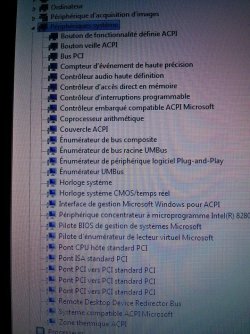
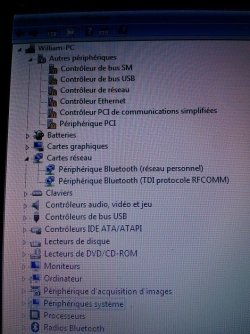
It's the only way I could do it since I can't access to internet from my PC.
Sorry if it's in french...
 

Attachments

  • 10303746_10203109825974777_6371814366969214571_n.jpg
    10303746_10203109825974777_6371814366969214571_n.jpg
    149.4 KB · Views: 1
  • 10361373_10203109826494790_6079428981071077108_n.jpg
    10361373_10203109826494790_6079428981071077108_n.jpg
    146.4 KB · Views: 1

My Computer My Computer

At a glance

7 64 bits
Computer type
PC/Desktop
OS
7 64 bits
There's really something wrong with my PC right now ... last two links you gave me didn't launch when I run them.
I just double click on them and nothing happens, I restarted my PC and that didn't change anything...
 

My Computer My Computer

At a glance

7 64 bits
Computer type
PC/Desktop
OS
7 64 bits
This is the link where I downloaded my drivers at first, this is where I get that :
This computer does not meet the minimum requirements for installing this software. Setup will exit.

And with the wireless driver's file, for some reason I can't open it because it tells me thats its a multi-file so I think I need the other part of the file, but what part ?
I'm stuck ...
 

My Computer My Computer

At a glance

7 64 bits
Computer type
PC/Desktop
OS
7 64 bits
Back
Top