can't initialize to MBR!

Alsenor

New member
Local time
7:29 AM
Messages
119
I just managed to install a second HDD, and my OS sees it.
However, Partition Wizard does not let me initialize to MBR.
When I go to "Disc" on the top bar, everything in the drop down menu is grayed out. It is NTFS formatted, made Primary, Status is "none". I want to prepare it to install Windows XP. What do I have to do to make this work?
 

My Computer

Computer Manufacturer/Model Number
HP p6347c
OS
W7
CPU
AMD Athlon(tm) II X4 630 Processor
Motherboard
AMD RS780/RS880
Memory
8 GB
Graphics Card(s)
ATI Radeon HD 4200
Sound Card
Realtek High Definition Audio
Monitor(s) Displays
HP w2338h (HP w2338h Wide LCD Monitor)
Hard Drives
WDC WD6400AAKS-65A7B SCSI Disk Device
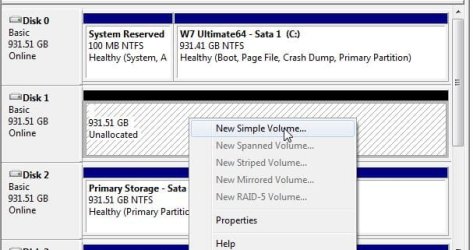
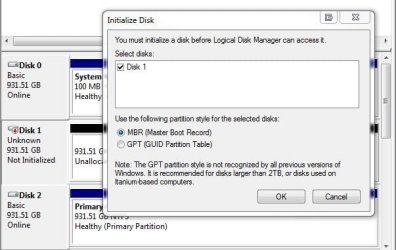
Forget using Partition Wizard and take a fast trip into the the Disk Management tool there to simply delete the present volume to see a new replacement using the add new volume wizard. The default option will be MBR automatically not the second GUID option you wouldn't use.

One possible problem for running into this would be a bad burn for a live cd for the PW program. This is one reason I have GParted on both live cds as well as written on a small bootable flash drive since the drive tool never seems to run into problems like this. That's another free option to consider besides going into the DM tool.
 

My Computers

System One System Two

  • Computer type
    PC/Desktop
    Computer Manufacturer/Model Number
    Custom builds = 2
    OS
    W7 Ultimate x64/W10 Pro x64/W11 Pro Triple Boot - Main PC W7 Remote PC Micro ATX W7 Pro x64/W11 Pro
    CPU
    AMD Phenom II X4 975 Deneb 3.6ghz - 965 2nd remote pc
    Motherboard
    Gigabyte GA-790XTA-UD4-Gigabyte GA-880GM-D2H remote pc
    Memory
    Kingston Hyper X DDR3 1600 1.5v 16gb - Hyper X Fury 8gb 2nd
    Graphics Card(s)
    MSI HD Radeon 5750 1gb - MSI HD Radeon 6450 on mini tower
    Sound Card
    Creative Labs X-Fi Xtreme Audio P - Realtek onooard 2nd case
    Monitor(s) Displays
    ASUS VW199T-P 19" HP 2082a Main-HP 2082a 20" remote pc
    Screen Resolution
    Asus 1440x900 - HP 1600x900
    Hard Drives
    WD Black 1TB HD per OS W7, W10, and pending W11 presently on 500gb OS Drive - Pending Triple 1TB HDs for Spanned Storage/backup volume
    Single 2TB external USB enclosure, single 1TB System 7 Host/Boot drive, Pending 8TB external HD for system image b
    PSU
    Corsair 750TX - primary / Corsair CX600 - second
    Case
    Antec 900-2 - SSD compatible / NZXT Vulcan mini tower
    Cooling
    Zalman CNPS9900A
    Keyboard
    AZIO L70 Backlit Letters Gaming - ONN Cordless/USB
    Mouse
    MSI DS200 Programmable, Logitech Cordless
    Internet Speed
    30mbps upgrade - primary hard wired - mini tower usb WiFi
    Antivirus
    GFI VIPRE Internet Security 2014 on W7 2016 beta on W10,
    Browser
    Cyberfox, WaterFox 64bit FF variants, FireFox x64, Pale Moon
    Other Info
    Accomdata fan cooled usb 2.0 PIDE/Sata II, III external enclosure.
    Sambient usb/eSata PATA/Sata II, III external enclosure.
  • Computer type
    PC/Desktop
    System Manufacturer/Model Number
    CUSTOM ASSEMBLY
    OS
    W7 Pro x64/W11 Pro
    CPU
    AMD Deneb 3.6ghz - 965
    Motherboard
    Gigabyte GA-880GM-D2H remote pc
    Memory
    Kingston Hyper X Fury 8gb
    Graphics Card(s)
    MSI HD Radeon 6450 DVI Output
    Sound Card
    Realtek onooard Creative or Other separate PENDING
    Monitor(s) Displays
    VIZIO 32" LCD TV Separate LCD Pending
    Screen Resolution
    1600x1080
    Hard Drives
    WD 500GB OS Host/Boot WD Green 1TB Storage/Backup
    PSU
    Corsair 600W - THERMALTAKE 600W spare case
    Case
    NZXT Vulcan mini tower
    Cooling
    Twin 120mm Top Fans - 240mm Side Cover
    Keyboard
    ONN Cordless/USB Logitech Cordless
    Mouse
    ONN USB/Cordless - Logitech Cordless
    Internet Speed
    DSL 5G
    Browser
    MS Edge, FireFox, WaterFox x64, FireFox Nightly
    Other Info
    OS Testing-Remote Access to Main TeamViewer
Thanks, Night Hawk! I did what you wrote with the Disk Management tool. It did not offer to initialize to MBR - is that automatic?
Is the drive ready now for XP installation?
 

My Computer

Computer Manufacturer/Model Number
HP p6347c
OS
W7
CPU
AMD Athlon(tm) II X4 630 Processor
Motherboard
AMD RS780/RS880
Memory
8 GB
Graphics Card(s)
ATI Radeon HD 4200
Sound Card
Realtek High Definition Audio
Monitor(s) Displays
HP w2338h (HP w2338h Wide LCD Monitor)
Hard Drives
WDC WD6400AAKS-65A7B SCSI Disk Device
If you deleted the first and simply went ahead and created the new one the XP installer will format it for you during the custom install as well as place it's own mbr entries in. You should be set.

To avoid the need to repair the 7 boot information as mentioned in the Method Two for seeing XP installed after 7, http://www.sevenforums.com/tutorials/8057-dual-boot-installation-windows-7-xp.html you may want to first unplug the 7 drive to prepare for a stand alone install of XP.

Once XP is on you can simply copy the boot files over to the root of the 7 host drive and edit the boot.ini file(copy of) there to point at the second drive as well as use EasyBCD to add a new boot entry into the 7 boot options. Instead of "rdisk(0)partition 1)" you would see "rdisk(1)partition 1" making that small change using NotePad and use the "save as all files" option not txt to see that taken care of.

You usually have to take ownership if you unable to uncheck the "read only" box on the copy however. Another tip is simply lowering the default 30 seconds for seeing the boot options screen displayed way down to only 5 seconds. Here I have lowered down to only 3. That will speed up the boot time quite a bit!
 

My Computers

System One System Two

  • Computer type
    PC/Desktop
    Computer Manufacturer/Model Number
    Custom builds = 2
    OS
    W7 Ultimate x64/W10 Pro x64/W11 Pro Triple Boot - Main PC W7 Remote PC Micro ATX W7 Pro x64/W11 Pro
    CPU
    AMD Phenom II X4 975 Deneb 3.6ghz - 965 2nd remote pc
    Motherboard
    Gigabyte GA-790XTA-UD4-Gigabyte GA-880GM-D2H remote pc
    Memory
    Kingston Hyper X DDR3 1600 1.5v 16gb - Hyper X Fury 8gb 2nd
    Graphics Card(s)
    MSI HD Radeon 5750 1gb - MSI HD Radeon 6450 on mini tower
    Sound Card
    Creative Labs X-Fi Xtreme Audio P - Realtek onooard 2nd case
    Monitor(s) Displays
    ASUS VW199T-P 19" HP 2082a Main-HP 2082a 20" remote pc
    Screen Resolution
    Asus 1440x900 - HP 1600x900
    Hard Drives
    WD Black 1TB HD per OS W7, W10, and pending W11 presently on 500gb OS Drive - Pending Triple 1TB HDs for Spanned Storage/backup volume
    Single 2TB external USB enclosure, single 1TB System 7 Host/Boot drive, Pending 8TB external HD for system image b
    PSU
    Corsair 750TX - primary / Corsair CX600 - second
    Case
    Antec 900-2 - SSD compatible / NZXT Vulcan mini tower
    Cooling
    Zalman CNPS9900A
    Keyboard
    AZIO L70 Backlit Letters Gaming - ONN Cordless/USB
    Mouse
    MSI DS200 Programmable, Logitech Cordless
    Internet Speed
    30mbps upgrade - primary hard wired - mini tower usb WiFi
    Antivirus
    GFI VIPRE Internet Security 2014 on W7 2016 beta on W10,
    Browser
    Cyberfox, WaterFox 64bit FF variants, FireFox x64, Pale Moon
    Other Info
    Accomdata fan cooled usb 2.0 PIDE/Sata II, III external enclosure.
    Sambient usb/eSata PATA/Sata II, III external enclosure.
  • Computer type
    PC/Desktop
    System Manufacturer/Model Number
    CUSTOM ASSEMBLY
    OS
    W7 Pro x64/W11 Pro
    CPU
    AMD Deneb 3.6ghz - 965
    Motherboard
    Gigabyte GA-880GM-D2H remote pc
    Memory
    Kingston Hyper X Fury 8gb
    Graphics Card(s)
    MSI HD Radeon 6450 DVI Output
    Sound Card
    Realtek onooard Creative or Other separate PENDING
    Monitor(s) Displays
    VIZIO 32" LCD TV Separate LCD Pending
    Screen Resolution
    1600x1080
    Hard Drives
    WD 500GB OS Host/Boot WD Green 1TB Storage/Backup
    PSU
    Corsair 600W - THERMALTAKE 600W spare case
    Case
    NZXT Vulcan mini tower
    Cooling
    Twin 120mm Top Fans - 240mm Side Cover
    Keyboard
    ONN Cordless/USB Logitech Cordless
    Mouse
    ONN USB/Cordless - Logitech Cordless
    Internet Speed
    DSL 5G
    Browser
    MS Edge, FireFox, WaterFox x64, FireFox Nightly
    Other Info
    OS Testing-Remote Access to Main TeamViewer
I just managed to install a second HDD, and my OS sees it.
However, Partition Wizard does not let me initialize to MBR.
When I go to "Disc" on the top bar, everything in the drop down menu is grayed out. It is NTFS formatted, made Primary, Status is "none". I want to prepare it to install Windows XP. What do I have to do to make this work?

Could you write data on that HDD?
You can try with Disk Management in Windows. Just open Computer Management in Administrative Tools, then select Disk Management. Note the middle-bottom area. All your storage device (including optical drives, USB flash drives, external HDDs) are listed here. Drive 0 is your main HDD that current Windows version is installed on. And drive 1 is your second HDD (if you have only 2 HDDs). Right-click on drive 1 and select "Initialize Disk", then follow on-screen instructions :).
 

My Computer

Computer Manufacturer/Model Number
Asus Notebook F80L Series
OS
Windows 7 Professional (x86)
CPU
Intel Core2 Duo T5750 @ 2.00 GHz
Motherboard
Asus Notebook F80L
Memory
2x 1GB DDR2-SDRAM @ 667 MHz (dual channel)
Graphics Card(s)
Intel GMA X3100
Sound Card
Realtek High Definition Audio
Monitor(s) Displays
Generic 14.1" Notebook LCD
Screen Resolution
1280x800
Hard Drives
Hitachi 160 GB SATA 1.5 Gbps hard disk drive
Keyboard
Generic Notebook keyboard
Mouse
Synaptic Touchpad
If you deleted the first and simply went ahead and created the new one the XP installer will format it for you during the custom install as well as place it's own mbr entries in. You should be set.
Ok, I loaded the XP CD, and it started loading its files, but then the blue screen appeared and the message that something went wrong (too much text to remember). "If this is the first time this happened, turn off computer and try again ..." was part of that message. It didn't even let me restart with Ctr-Alt_Del, and I had to cut the power.
To avoid the need to repair the 7 boot information as mentioned in the Method Two for seeing XP installed after 7, http://www.sevenforums.com/tutorials/8057-dual-boot-installation-windows-7-xp.html you may want to first unplug the 7 drive to prepare for a stand alone install of XP.

Once XP is on you can simply copy the boot files over to the root of the 7 host drive and edit the boot.ini file(copy of) there to point at the second drive as well as use EasyBCD to add a new boot entry into the 7 boot options. Instead of "rdisk(0)partition 1)" you would see "rdisk(1)partition 1" making that small change using NotePad and use the "save as all files" option not txt to see that taken care of.
You usually have to take ownership if you unable to uncheck the "read only" box on the copy however. Another tip is simply lowering the default 30 seconds for seeing the boot options screen displayed way down to only 5 seconds. Here I have lowered down to only 3. That will speed up the boot time quite a bit!
This is a bit too technical for me to follow!
 

My Computer

Computer Manufacturer/Model Number
HP p6347c
OS
W7
CPU
AMD Athlon(tm) II X4 630 Processor
Motherboard
AMD RS780/RS880
Memory
8 GB
Graphics Card(s)
ATI Radeon HD 4200
Sound Card
Realtek High Definition Audio
Monitor(s) Displays
HP w2338h (HP w2338h Wide LCD Monitor)
Hard Drives
WDC WD6400AAKS-65A7B SCSI Disk Device
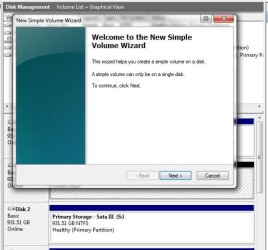
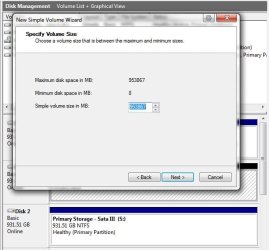
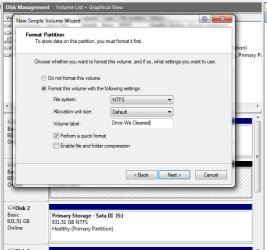
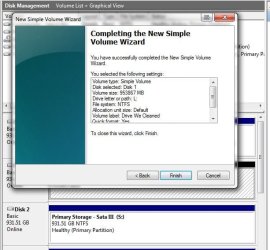
Here's a few screens that show how the add new volume wizard works. DiskPart was used at the time to clean the drive off followed by the trip into the DM.
 

Attachments

  • DiskPart New Volume.jpg
    DiskPart New Volume.jpg
    53.7 KB · Views: 42
  • DiskPart6b GUID Partition Table or MBR.jpg
    DiskPart6b GUID Partition Table or MBR.jpg
    52.4 KB · Views: 39
  • DiskPart New Volume Wizard.jpg
    DiskPart New Volume Wizard.jpg
    63.6 KB · Views: 32
  • DiskPart New Volume Wizard2.jpg
    DiskPart New Volume Wizard2.jpg
    58.1 KB · Views: 34
  • DiskPart New Volume Format Label.jpg
    DiskPart New Volume Format Label.jpg
    71.2 KB · Views: 28
  • DiskPart New Volume Drive Letter.jpg
    DiskPart New Volume Drive Letter.jpg
    63.3 KB · Views: 24
  • DiskPart New Volume Click Finish.jpg
    DiskPart New Volume Click Finish.jpg
    71.1 KB · Views: 23

My Computers

System One System Two

  • Computer type
    PC/Desktop
    Computer Manufacturer/Model Number
    Custom builds = 2
    OS
    W7 Ultimate x64/W10 Pro x64/W11 Pro Triple Boot - Main PC W7 Remote PC Micro ATX W7 Pro x64/W11 Pro
    CPU
    AMD Phenom II X4 975 Deneb 3.6ghz - 965 2nd remote pc
    Motherboard
    Gigabyte GA-790XTA-UD4-Gigabyte GA-880GM-D2H remote pc
    Memory
    Kingston Hyper X DDR3 1600 1.5v 16gb - Hyper X Fury 8gb 2nd
    Graphics Card(s)
    MSI HD Radeon 5750 1gb - MSI HD Radeon 6450 on mini tower
    Sound Card
    Creative Labs X-Fi Xtreme Audio P - Realtek onooard 2nd case
    Monitor(s) Displays
    ASUS VW199T-P 19" HP 2082a Main-HP 2082a 20" remote pc
    Screen Resolution
    Asus 1440x900 - HP 1600x900
    Hard Drives
    WD Black 1TB HD per OS W7, W10, and pending W11 presently on 500gb OS Drive - Pending Triple 1TB HDs for Spanned Storage/backup volume
    Single 2TB external USB enclosure, single 1TB System 7 Host/Boot drive, Pending 8TB external HD for system image b
    PSU
    Corsair 750TX - primary / Corsair CX600 - second
    Case
    Antec 900-2 - SSD compatible / NZXT Vulcan mini tower
    Cooling
    Zalman CNPS9900A
    Keyboard
    AZIO L70 Backlit Letters Gaming - ONN Cordless/USB
    Mouse
    MSI DS200 Programmable, Logitech Cordless
    Internet Speed
    30mbps upgrade - primary hard wired - mini tower usb WiFi
    Antivirus
    GFI VIPRE Internet Security 2014 on W7 2016 beta on W10,
    Browser
    Cyberfox, WaterFox 64bit FF variants, FireFox x64, Pale Moon
    Other Info
    Accomdata fan cooled usb 2.0 PIDE/Sata II, III external enclosure.
    Sambient usb/eSata PATA/Sata II, III external enclosure.
  • Computer type
    PC/Desktop
    System Manufacturer/Model Number
    CUSTOM ASSEMBLY
    OS
    W7 Pro x64/W11 Pro
    CPU
    AMD Deneb 3.6ghz - 965
    Motherboard
    Gigabyte GA-880GM-D2H remote pc
    Memory
    Kingston Hyper X Fury 8gb
    Graphics Card(s)
    MSI HD Radeon 6450 DVI Output
    Sound Card
    Realtek onooard Creative or Other separate PENDING
    Monitor(s) Displays
    VIZIO 32" LCD TV Separate LCD Pending
    Screen Resolution
    1600x1080
    Hard Drives
    WD 500GB OS Host/Boot WD Green 1TB Storage/Backup
    PSU
    Corsair 600W - THERMALTAKE 600W spare case
    Case
    NZXT Vulcan mini tower
    Cooling
    Twin 120mm Top Fans - 240mm Side Cover
    Keyboard
    ONN Cordless/USB Logitech Cordless
    Mouse
    ONN USB/Cordless - Logitech Cordless
    Internet Speed
    DSL 5G
    Browser
    MS Edge, FireFox, WaterFox x64, FireFox Nightly
    Other Info
    OS Testing-Remote Access to Main TeamViewer
I ran it again and wrote down that text on the blue screen:
A problem has been detected and Windows has been shut down to prevent damage to your computer.
If this is the first time you've seen this screen, restart your computer. If it happens again, do the following:
Check for viruses on your computer.
Remove newly installed hard drives or hard drive controllers.
Run CHKDSK /F to check for HD corruption, then restart.
My repeated tries made no difference, it keeps happening.
I have no viruses (AVG installed).
Should I really pull out my new drive, after it is recognized?
Should I run CHKDSK /F?
 

My Computer

Computer Manufacturer/Model Number
HP p6347c
OS
W7
CPU
AMD Athlon(tm) II X4 630 Processor
Motherboard
AMD RS780/RS880
Memory
8 GB
Graphics Card(s)
ATI Radeon HD 4200
Sound Card
Realtek High Definition Audio
Monitor(s) Displays
HP w2338h (HP w2338h Wide LCD Monitor)
Hard Drives
WDC WD6400AAKS-65A7B SCSI Disk Device
Yes, my trip to the DM looked the same as your images. But I still can't install XP.
 

My Computer

Computer Manufacturer/Model Number
HP p6347c
OS
W7
CPU
AMD Athlon(tm) II X4 630 Processor
Motherboard
AMD RS780/RS880
Memory
8 GB
Graphics Card(s)
ATI Radeon HD 4200
Sound Card
Realtek High Definition Audio
Monitor(s) Displays
HP w2338h (HP w2338h Wide LCD Monitor)
Hard Drives
WDC WD6400AAKS-65A7B SCSI Disk Device
I ran it again and wrote down that text on the blue screen:
A problem has been detected and Windows has been shut down to prevent damage to your computer.
If this is the first time you've seen this screen, restart your computer. If it happens again, do the following:
Check for viruses on your computer.
Remove newly installed hard drives or hard drive controllers.
Run CHKDSK /F to check for HD corruption, then restart.
My repeated tries made no difference, it keeps happening.
I have no viruses (AVG installed).
Should I really pull out my new drive, after it is recognized?
Should I run CHKDSK /F?

We just missed each other on the last post I see! :D Now are you trying this with the partition created with the PW program or did you create a new primary before booting from the XP cd?
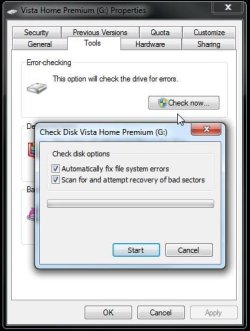
While booted in 7 you can schedule another run another run of checkdisk with the /r switch but may want to start off with a second fresh primary once the problem partition is gone. Simply right click on the drive in the DM in order to see it deleted. You can then create a new primary with the wizard or when going to boot from the XP cd the next time allowing the XP installer to format it during the next attempt.

By first using the DM to see the new one created and formatted there you can try copying some files over to it to see if the drive itself has any defects like bad sectors however. That will save you some time as well.
 

Attachments

  • CheckDIsk in W7.jpg
    CheckDIsk in W7.jpg
    45.3 KB · Views: 14

My Computers

System One System Two

  • Computer type
    PC/Desktop
    Computer Manufacturer/Model Number
    Custom builds = 2
    OS
    W7 Ultimate x64/W10 Pro x64/W11 Pro Triple Boot - Main PC W7 Remote PC Micro ATX W7 Pro x64/W11 Pro
    CPU
    AMD Phenom II X4 975 Deneb 3.6ghz - 965 2nd remote pc
    Motherboard
    Gigabyte GA-790XTA-UD4-Gigabyte GA-880GM-D2H remote pc
    Memory
    Kingston Hyper X DDR3 1600 1.5v 16gb - Hyper X Fury 8gb 2nd
    Graphics Card(s)
    MSI HD Radeon 5750 1gb - MSI HD Radeon 6450 on mini tower
    Sound Card
    Creative Labs X-Fi Xtreme Audio P - Realtek onooard 2nd case
    Monitor(s) Displays
    ASUS VW199T-P 19" HP 2082a Main-HP 2082a 20" remote pc
    Screen Resolution
    Asus 1440x900 - HP 1600x900
    Hard Drives
    WD Black 1TB HD per OS W7, W10, and pending W11 presently on 500gb OS Drive - Pending Triple 1TB HDs for Spanned Storage/backup volume
    Single 2TB external USB enclosure, single 1TB System 7 Host/Boot drive, Pending 8TB external HD for system image b
    PSU
    Corsair 750TX - primary / Corsair CX600 - second
    Case
    Antec 900-2 - SSD compatible / NZXT Vulcan mini tower
    Cooling
    Zalman CNPS9900A
    Keyboard
    AZIO L70 Backlit Letters Gaming - ONN Cordless/USB
    Mouse
    MSI DS200 Programmable, Logitech Cordless
    Internet Speed
    30mbps upgrade - primary hard wired - mini tower usb WiFi
    Antivirus
    GFI VIPRE Internet Security 2014 on W7 2016 beta on W10,
    Browser
    Cyberfox, WaterFox 64bit FF variants, FireFox x64, Pale Moon
    Other Info
    Accomdata fan cooled usb 2.0 PIDE/Sata II, III external enclosure.
    Sambient usb/eSata PATA/Sata II, III external enclosure.
  • Computer type
    PC/Desktop
    System Manufacturer/Model Number
    CUSTOM ASSEMBLY
    OS
    W7 Pro x64/W11 Pro
    CPU
    AMD Deneb 3.6ghz - 965
    Motherboard
    Gigabyte GA-880GM-D2H remote pc
    Memory
    Kingston Hyper X Fury 8gb
    Graphics Card(s)
    MSI HD Radeon 6450 DVI Output
    Sound Card
    Realtek onooard Creative or Other separate PENDING
    Monitor(s) Displays
    VIZIO 32" LCD TV Separate LCD Pending
    Screen Resolution
    1600x1080
    Hard Drives
    WD 500GB OS Host/Boot WD Green 1TB Storage/Backup
    PSU
    Corsair 600W - THERMALTAKE 600W spare case
    Case
    NZXT Vulcan mini tower
    Cooling
    Twin 120mm Top Fans - 240mm Side Cover
    Keyboard
    ONN Cordless/USB Logitech Cordless
    Mouse
    ONN USB/Cordless - Logitech Cordless
    Internet Speed
    DSL 5G
    Browser
    MS Edge, FireFox, WaterFox x64, FireFox Nightly
    Other Info
    OS Testing-Remote Access to Main TeamViewer
We just missed each other on the last post I see! :D Now are you trying this with the partition created with the PW program or did you create a new primary before booting from the XP cd?
I did the DM trip as you suggested.
While booted in 7 you can schedule another run another run of checkdisk with the /r switch but may want to start off with a second fresh primary once the problem partition is gone.
Simply right click on the drive in the DM in order to see it deleted.
So we should do the DM trip over, the same as before? Assuming it did not work properly the first time.
You can then create a new primary with the wizard or when going to boot from the XP cd the next time allowing the XP installer to format it during the next attempt.
But the installation CD never gets to that point!
By first using the DM to see the new one created and formatted there you can try copying some files over to it to see if the drive itself has any defects like bad sectors however. That will save you some time as well.
Maybe this is what I should try next.
 

My Computer

Computer Manufacturer/Model Number
HP p6347c
OS
W7
CPU
AMD Athlon(tm) II X4 630 Processor
Motherboard
AMD RS780/RS880
Memory
8 GB
Graphics Card(s)
ATI Radeon HD 4200
Sound Card
Realtek High Definition Audio
Monitor(s) Displays
HP w2338h (HP w2338h Wide LCD Monitor)
Hard Drives
WDC WD6400AAKS-65A7B SCSI Disk Device
Formatted in DM and put a file in it. Result is the same blue screen text. But I did not delete the drive and run the wizard to create it new. Will do that now.
 

My Computer

Computer Manufacturer/Model Number
HP p6347c
OS
W7
CPU
AMD Athlon(tm) II X4 630 Processor
Motherboard
AMD RS780/RS880
Memory
8 GB
Graphics Card(s)
ATI Radeon HD 4200
Sound Card
Realtek High Definition Audio
Monitor(s) Displays
HP w2338h (HP w2338h Wide LCD Monitor)
Hard Drives
WDC WD6400AAKS-65A7B SCSI Disk Device
I would try that first to make sure the drive is working as it should. You may have to run a diagnostics tool from the manufacturer if you are having problems in order to determine if it needs to be returned or sent back. Dumping a likely corrupted partition table would be the first thought however if PW saw a glitch of some type when used.
 

My Computers

System One System Two

  • Computer type
    PC/Desktop
    Computer Manufacturer/Model Number
    Custom builds = 2
    OS
    W7 Ultimate x64/W10 Pro x64/W11 Pro Triple Boot - Main PC W7 Remote PC Micro ATX W7 Pro x64/W11 Pro
    CPU
    AMD Phenom II X4 975 Deneb 3.6ghz - 965 2nd remote pc
    Motherboard
    Gigabyte GA-790XTA-UD4-Gigabyte GA-880GM-D2H remote pc
    Memory
    Kingston Hyper X DDR3 1600 1.5v 16gb - Hyper X Fury 8gb 2nd
    Graphics Card(s)
    MSI HD Radeon 5750 1gb - MSI HD Radeon 6450 on mini tower
    Sound Card
    Creative Labs X-Fi Xtreme Audio P - Realtek onooard 2nd case
    Monitor(s) Displays
    ASUS VW199T-P 19" HP 2082a Main-HP 2082a 20" remote pc
    Screen Resolution
    Asus 1440x900 - HP 1600x900
    Hard Drives
    WD Black 1TB HD per OS W7, W10, and pending W11 presently on 500gb OS Drive - Pending Triple 1TB HDs for Spanned Storage/backup volume
    Single 2TB external USB enclosure, single 1TB System 7 Host/Boot drive, Pending 8TB external HD for system image b
    PSU
    Corsair 750TX - primary / Corsair CX600 - second
    Case
    Antec 900-2 - SSD compatible / NZXT Vulcan mini tower
    Cooling
    Zalman CNPS9900A
    Keyboard
    AZIO L70 Backlit Letters Gaming - ONN Cordless/USB
    Mouse
    MSI DS200 Programmable, Logitech Cordless
    Internet Speed
    30mbps upgrade - primary hard wired - mini tower usb WiFi
    Antivirus
    GFI VIPRE Internet Security 2014 on W7 2016 beta on W10,
    Browser
    Cyberfox, WaterFox 64bit FF variants, FireFox x64, Pale Moon
    Other Info
    Accomdata fan cooled usb 2.0 PIDE/Sata II, III external enclosure.
    Sambient usb/eSata PATA/Sata II, III external enclosure.
  • Computer type
    PC/Desktop
    System Manufacturer/Model Number
    CUSTOM ASSEMBLY
    OS
    W7 Pro x64/W11 Pro
    CPU
    AMD Deneb 3.6ghz - 965
    Motherboard
    Gigabyte GA-880GM-D2H remote pc
    Memory
    Kingston Hyper X Fury 8gb
    Graphics Card(s)
    MSI HD Radeon 6450 DVI Output
    Sound Card
    Realtek onooard Creative or Other separate PENDING
    Monitor(s) Displays
    VIZIO 32" LCD TV Separate LCD Pending
    Screen Resolution
    1600x1080
    Hard Drives
    WD 500GB OS Host/Boot WD Green 1TB Storage/Backup
    PSU
    Corsair 600W - THERMALTAKE 600W spare case
    Case
    NZXT Vulcan mini tower
    Cooling
    Twin 120mm Top Fans - 240mm Side Cover
    Keyboard
    ONN Cordless/USB Logitech Cordless
    Mouse
    ONN USB/Cordless - Logitech Cordless
    Internet Speed
    DSL 5G
    Browser
    MS Edge, FireFox, WaterFox x64, FireFox Nightly
    Other Info
    OS Testing-Remote Access to Main TeamViewer
Now I deleted the volume, ran the wizard to create it new, and formatted it. Result of XP installation was the same text on blue screen as before.
 

My Computer

Computer Manufacturer/Model Number
HP p6347c
OS
W7
CPU
AMD Athlon(tm) II X4 630 Processor
Motherboard
AMD RS780/RS880
Memory
8 GB
Graphics Card(s)
ATI Radeon HD 4200
Sound Card
Realtek High Definition Audio
Monitor(s) Displays
HP w2338h (HP w2338h Wide LCD Monitor)
Hard Drives
WDC WD6400AAKS-65A7B SCSI Disk Device
Currently I am running a surface test in PW.
 

My Computer

Computer Manufacturer/Model Number
HP p6347c
OS
W7
CPU
AMD Athlon(tm) II X4 630 Processor
Motherboard
AMD RS780/RS880
Memory
8 GB
Graphics Card(s)
ATI Radeon HD 4200
Sound Card
Realtek High Definition Audio
Monitor(s) Displays
HP w2338h (HP w2338h Wide LCD Monitor)
Hard Drives
WDC WD6400AAKS-65A7B SCSI Disk Device
OUCH! Something is certainly wrong somewhere!

With a fresh primary to work with XP as well as any other version should go on without problems unless you are looking at a hardware fault with the drive or possible memory problem now being realized.

A run of memtest or the option seen for that on the 7 disk as well as at startup would be a thought to rule out any possible problem there. I suspect you may have a drive problem of some type like bad sectrors or worse having defective read/write heads if you are not able to simply copy any files over to it once partitioned and formatted.

Unfortunately that sounds a bit too more likely then the first assumption of problems seen with PW since many here seem to have good results but couldn't be ruled out either until seeing this. The test results may show the worst of course.
 

My Computers

System One System Two

  • Computer type
    PC/Desktop
    Computer Manufacturer/Model Number
    Custom builds = 2
    OS
    W7 Ultimate x64/W10 Pro x64/W11 Pro Triple Boot - Main PC W7 Remote PC Micro ATX W7 Pro x64/W11 Pro
    CPU
    AMD Phenom II X4 975 Deneb 3.6ghz - 965 2nd remote pc
    Motherboard
    Gigabyte GA-790XTA-UD4-Gigabyte GA-880GM-D2H remote pc
    Memory
    Kingston Hyper X DDR3 1600 1.5v 16gb - Hyper X Fury 8gb 2nd
    Graphics Card(s)
    MSI HD Radeon 5750 1gb - MSI HD Radeon 6450 on mini tower
    Sound Card
    Creative Labs X-Fi Xtreme Audio P - Realtek onooard 2nd case
    Monitor(s) Displays
    ASUS VW199T-P 19" HP 2082a Main-HP 2082a 20" remote pc
    Screen Resolution
    Asus 1440x900 - HP 1600x900
    Hard Drives
    WD Black 1TB HD per OS W7, W10, and pending W11 presently on 500gb OS Drive - Pending Triple 1TB HDs for Spanned Storage/backup volume
    Single 2TB external USB enclosure, single 1TB System 7 Host/Boot drive, Pending 8TB external HD for system image b
    PSU
    Corsair 750TX - primary / Corsair CX600 - second
    Case
    Antec 900-2 - SSD compatible / NZXT Vulcan mini tower
    Cooling
    Zalman CNPS9900A
    Keyboard
    AZIO L70 Backlit Letters Gaming - ONN Cordless/USB
    Mouse
    MSI DS200 Programmable, Logitech Cordless
    Internet Speed
    30mbps upgrade - primary hard wired - mini tower usb WiFi
    Antivirus
    GFI VIPRE Internet Security 2014 on W7 2016 beta on W10,
    Browser
    Cyberfox, WaterFox 64bit FF variants, FireFox x64, Pale Moon
    Other Info
    Accomdata fan cooled usb 2.0 PIDE/Sata II, III external enclosure.
    Sambient usb/eSata PATA/Sata II, III external enclosure.
  • Computer type
    PC/Desktop
    System Manufacturer/Model Number
    CUSTOM ASSEMBLY
    OS
    W7 Pro x64/W11 Pro
    CPU
    AMD Deneb 3.6ghz - 965
    Motherboard
    Gigabyte GA-880GM-D2H remote pc
    Memory
    Kingston Hyper X Fury 8gb
    Graphics Card(s)
    MSI HD Radeon 6450 DVI Output
    Sound Card
    Realtek onooard Creative or Other separate PENDING
    Monitor(s) Displays
    VIZIO 32" LCD TV Separate LCD Pending
    Screen Resolution
    1600x1080
    Hard Drives
    WD 500GB OS Host/Boot WD Green 1TB Storage/Backup
    PSU
    Corsair 600W - THERMALTAKE 600W spare case
    Case
    NZXT Vulcan mini tower
    Cooling
    Twin 120mm Top Fans - 240mm Side Cover
    Keyboard
    ONN Cordless/USB Logitech Cordless
    Mouse
    ONN USB/Cordless - Logitech Cordless
    Internet Speed
    DSL 5G
    Browser
    MS Edge, FireFox, WaterFox x64, FireFox Nightly
    Other Info
    OS Testing-Remote Access to Main TeamViewer
OUCH! Something is certainly wrong somewhere!

With a fresh primary to work with XP as well as any other version should go on without problems unless you are looking at a hardware fault with the drive or possible memory problem now being realized.

A run of memtest or the option seen for that on the 7 disk as well as at startup would be a thought to rule out any possible problem there. I suspect you may have a drive problem of some type like bad sectrors or worse having defective read/write heads if you are not able to simply copy any files over to it once partitioned and formatted.

Unfortunately that sounds a bit too more likely then the first assumption of problems seen with PW since many here seem to have good results but couldn't be ruled out either until seeing this. The test results may show the worst of course.
But I am able to copy files over to it!
 

My Computer

Computer Manufacturer/Model Number
HP p6347c
OS
W7
CPU
AMD Athlon(tm) II X4 630 Processor
Motherboard
AMD RS780/RS880
Memory
8 GB
Graphics Card(s)
ATI Radeon HD 4200
Sound Card
Realtek High Definition Audio
Monitor(s) Displays
HP w2338h (HP w2338h Wide LCD Monitor)
Hard Drives
WDC WD6400AAKS-65A7B SCSI Disk Device
Night Hawk, I appreciate your help, but can't keep up with you! My 71-year-old eyes are ON FIRE! I will check in the morning for new ideas, thanks for now!
 

My Computer

Computer Manufacturer/Model Number
HP p6347c
OS
W7
CPU
AMD Athlon(tm) II X4 630 Processor
Motherboard
AMD RS780/RS880
Memory
8 GB
Graphics Card(s)
ATI Radeon HD 4200
Sound Card
Realtek High Definition Audio
Monitor(s) Displays
HP w2338h (HP w2338h Wide LCD Monitor)
Hard Drives
WDC WD6400AAKS-65A7B SCSI Disk Device
So now you know the heads are working as well as seeing a working partition you can access on the drive. The next steps would be inspecting the XP disk for any scratches or smudge marks from handling and if you have one onhand a drive lens cleaner.

One other thing I could ask here would be if you were attempting to install XP while booted in 7? That would immediately run into problems from the start. You have to be booted live from the XP disk itself in order to run the installer.

The only time you can be booted in 7 and run the older version's installer is when setting up a custom install on a virtual machine where the program(VBox, VM ware, etc.) requires bootable media be inserted in the optical drive.

Also to prevent seeing the 7 drive made bootable to XP only you would need to shutdown and simply unplug the host drive's data cable until XP is on and running. Then you would replug the data cable back in once powered down the second time. The guide will cover the rest as far as seeing it turned into a dual boot as far as copying the XP boot files over.

Missed each other's posts again! Take your time and go over things carefully.
 

My Computers

System One System Two

  • Computer type
    PC/Desktop
    Computer Manufacturer/Model Number
    Custom builds = 2
    OS
    W7 Ultimate x64/W10 Pro x64/W11 Pro Triple Boot - Main PC W7 Remote PC Micro ATX W7 Pro x64/W11 Pro
    CPU
    AMD Phenom II X4 975 Deneb 3.6ghz - 965 2nd remote pc
    Motherboard
    Gigabyte GA-790XTA-UD4-Gigabyte GA-880GM-D2H remote pc
    Memory
    Kingston Hyper X DDR3 1600 1.5v 16gb - Hyper X Fury 8gb 2nd
    Graphics Card(s)
    MSI HD Radeon 5750 1gb - MSI HD Radeon 6450 on mini tower
    Sound Card
    Creative Labs X-Fi Xtreme Audio P - Realtek onooard 2nd case
    Monitor(s) Displays
    ASUS VW199T-P 19" HP 2082a Main-HP 2082a 20" remote pc
    Screen Resolution
    Asus 1440x900 - HP 1600x900
    Hard Drives
    WD Black 1TB HD per OS W7, W10, and pending W11 presently on 500gb OS Drive - Pending Triple 1TB HDs for Spanned Storage/backup volume
    Single 2TB external USB enclosure, single 1TB System 7 Host/Boot drive, Pending 8TB external HD for system image b
    PSU
    Corsair 750TX - primary / Corsair CX600 - second
    Case
    Antec 900-2 - SSD compatible / NZXT Vulcan mini tower
    Cooling
    Zalman CNPS9900A
    Keyboard
    AZIO L70 Backlit Letters Gaming - ONN Cordless/USB
    Mouse
    MSI DS200 Programmable, Logitech Cordless
    Internet Speed
    30mbps upgrade - primary hard wired - mini tower usb WiFi
    Antivirus
    GFI VIPRE Internet Security 2014 on W7 2016 beta on W10,
    Browser
    Cyberfox, WaterFox 64bit FF variants, FireFox x64, Pale Moon
    Other Info
    Accomdata fan cooled usb 2.0 PIDE/Sata II, III external enclosure.
    Sambient usb/eSata PATA/Sata II, III external enclosure.
  • Computer type
    PC/Desktop
    System Manufacturer/Model Number
    CUSTOM ASSEMBLY
    OS
    W7 Pro x64/W11 Pro
    CPU
    AMD Deneb 3.6ghz - 965
    Motherboard
    Gigabyte GA-880GM-D2H remote pc
    Memory
    Kingston Hyper X Fury 8gb
    Graphics Card(s)
    MSI HD Radeon 6450 DVI Output
    Sound Card
    Realtek onooard Creative or Other separate PENDING
    Monitor(s) Displays
    VIZIO 32" LCD TV Separate LCD Pending
    Screen Resolution
    1600x1080
    Hard Drives
    WD 500GB OS Host/Boot WD Green 1TB Storage/Backup
    PSU
    Corsair 600W - THERMALTAKE 600W spare case
    Case
    NZXT Vulcan mini tower
    Cooling
    Twin 120mm Top Fans - 240mm Side Cover
    Keyboard
    ONN Cordless/USB Logitech Cordless
    Mouse
    ONN USB/Cordless - Logitech Cordless
    Internet Speed
    DSL 5G
    Browser
    MS Edge, FireFox, WaterFox x64, FireFox Nightly
    Other Info
    OS Testing-Remote Access to Main TeamViewer
So now you know the heads are working as well as seeing a working partition you can access on the drive. The next steps would be inspecting the XP disk for any scratches or smudge marks from handling and if you have one onhand a drive lens cleaner.
I can inspect the CD and wipe it manually, but I don't have a drive lens cleaner.
One other thing I could ask here would be if you were attempting to install XP while booted in 7? That would immediately run into problems from the start. You have to be booted live from the XP disk itself in order to run the installer.
Yes, I definitely "hit any key to" go to CD first, as it offers on reboot. My BIOS is set for CD priority.
Also to prevent seeing the 7 drive made bootable to XP only you would need to shutdown and simply unplug the host drive's data cable until XP is on and running. Then you would replug the data cable back in once powered down the second time. The guide will cover the rest as far as seeing it turned into a dual boot as far as copying the XP boot files over.
So, first thing is unplugging the data cable from drive 0, then wipe the CD, then kneel in a corner to pray a little, then try installing XP.
And then give up on computers?
Missed each other's posts again! Take your time and go over things carefully.
No matter, I read everything in my thread. Have a good day's sleep, Night Hawk, you deserve it!
Anyone else up yet to guide me on during the day? :confused:
 

My Computer

Computer Manufacturer/Model Number
HP p6347c
OS
W7
CPU
AMD Athlon(tm) II X4 630 Processor
Motherboard
AMD RS780/RS880
Memory
8 GB
Graphics Card(s)
ATI Radeon HD 4200
Sound Card
Realtek High Definition Audio
Monitor(s) Displays
HP w2338h (HP w2338h Wide LCD Monitor)
Hard Drives
WDC WD6400AAKS-65A7B SCSI Disk Device
Back
Top