There is a supposedly open-source free download site which says it has the full Win7 driverpack for your model for download after watching a 60 second ad. Since I'd not seen it before I decided to try it and downloaded their 7 Driver Pack Downloader for your model. I then test-downloaded the two listed WLAN (Wireless) drivers and have uploaded them for you to download, extract and try installing now:
https://onedrive.live.com/redir?resid=365EA77F74A302F6!1081956&authkey=!AHUr17aldbTROPM&ithint=folder%2c
If this works then
Enable hardware auto-updating via Windows Update (Step 3), connect to the internet to Check for Windows Updates, install all Important and Optional Updates until no more are offered. This should deliver most drivers that Win7 wants. Any missing can then be imported from the same place:
Ultrabook Asus X550LC. Download drivers for Windows 7 / Windows 8 (32/64-bit) – DriversFree.org
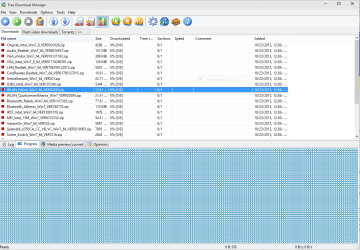
Otherwise If you don't have network connectivity now,
Enable hardware auto-updating via Windows Update (Step 3), plug in by ethernet cable to see if it loads the driver in bottom right system tray since more Ethernet drivers are in the Win7 driverstore than wireless.
If not then trace the
Hardware Identification in Device Manager for both network adapters, google for the exact make and model adapters + WIndows 7 drivers. If nothing turns up then post back the Hardware ID's for us to help you find those drivers.
Once you connect, immediately Check for Updates and install all Important and Optional Updates, with requested reboots, until no more are offered.
For the few remaining missing drivers then in Device Manager, google or trace their hardware ID to find the Win7 driver, or ask back here for help.
More information on how to get and then keep a perfect Win7 install in
Clean Reinstall Windows 7 where the driver steps are so important they are printed in red, and have worked for 1.4+ million consumers without a single complaint.



