Can't join Homegroup

Just a tip (which you can also conclude from the last two posts).

When setting up a network, always, always, ALWAYS uninstall 3rd party firewalls, or at the least make sure you know how to configure it properly.

After everything works, install one 3rd party firewall at a time and make sure it is configured properly.

The windows firewall is more than enough to protect you while setting up your network.

People try an endless string of troubleshooting, installing new drivers etc.. while it was the firewall that blocked proper network functioning all the time.

Greetings.
 

My Computer

OS
Win7 Build 7600 x86
CPU
Pentium II 300MHz
Motherboard
Asus
Memory
32mb EDO RAM
Graphics Card(s)
Diamond Viper
Sound Card
Soundblaster 16
Monitor(s) Displays
14" AOC CRT 16K color
Screen Resolution
800x600
Hard Drives
300mb Quantum fireball
PSU
110 Watts
Cooling
Passive
Keyboard
Trust Ergonomic
Mouse
Generic
Internet Speed
256K u 128K d
I do not see a JOIN option on either computer wether I set up the homegroup on either machine. This is driving me nuts.
 

My Computer

Computer Manufacturer/Model Number
CC Supplies
OS
Windows 7
CPU
AMD X2 7800+
Motherboard
Gigabite MA8G-DS3H
Memory
4gb Kingston
Graphics Card(s)
Onboard
Sound Card
Onboard
Monitor(s) Displays
INC LCD
Hard Drives
500GB Seagate
PSU
450W
Case
Metal
Cooling
Fans
....I am having the same friggin' problem.I have no problem with booting up in xp to share the printer with my Win 7 laptop though.This home group was working at one time!All I get now is ':mad:Cannot create home group on this computer:mad:' when using the password from my desktops home group.Really don't care but it bugs the hell out of me.
 

My Computer

Computer Manufacturer/Model Number
MEMEMEMEMEME
OS
XP,Windows 7,Fedora,Ubuntu,Open Solaris
CPU
Processor AMD Athlon(tm) 64 X2 Dual Core Processor 3800+, 20
Motherboard
Biostar-K8M800 Micro AM2
Memory
Total Physical Memory-2.00 GB__Max. Supports up to 2GB Memor
Graphics Card(s)
NVIDIA GeForce 6200
Sound Card
Manufacturer Creative Labs - kX Project
Monitor(s) Displays
Sceptre-19"___Acer-22"
Hard Drives
Seagate-250gig
Maxtor-80gig
WesternDigital-80gig
PSU
FSP-BlueStorm 500watt
Maybe it's the original Network setup problem?

I have Windows 7 on 3 machines. I have Created the Homegroup on computer 1 (for the example it is called Caillah) and attempted to Join the Homegroup with computer 2 (called Test - PC). The second computer does not recognize the Homegroup being set up on the network.

I have checked the Peer Networking, Local internet connection, shut down the third party firewall and I still can't get it to work.

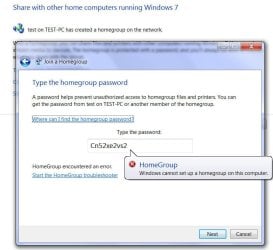
I tried the "trick" mentioned in this thread. I created the Homegroup on Comp 1 and then did the troubleshoot on Comp 2. I then created on Comp 2 and attempted to Join on Comp 1. For some reason Comp 1 now recognized that Comp 2 had created a Homegroup and gave me a join button and a place to enter the password. I did this and received an error message that a Homegroup could not be created on this computer.

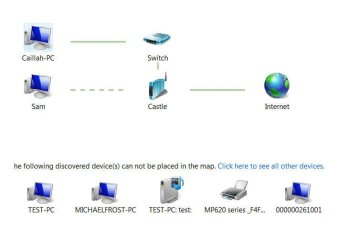
I am wondering now if in fact it is a Network issue. When I go in to Network Sharing and click on Map, not all computers are properly recognized but I am not sure how to go about fixing that. I have done all the troubleshoot options but it can't find the error.

Both computer 1 and computer 2 are connected to the internet by ethernet. The third computer (Michael-Frost) is wireless and is also Windows 7 and at this point we have made not attempt to link it. The other computer (Sam) is a laptop, wireless but is still on Vista and I understand that Homegroup function with it (or at least not easily and the "easy" connect isn't working anyway :mad:). We have a wireless printer and it works with both wired computers as well as the wireless laptop.

In the "My Computer" area Homegroup shows no other computers but in Network both Comp 1 and Comp 2 are visible as is the printer memory.

The network maps for Computer 1 (known as Caillah)and Computer 2 (known as Test - PC) are as attached. I have also included the error message on Computer 1 which I got when I attempted to "trick" it in to setting up from computer 2.

I hope you are able to follow what I have done. I see that many people are struggling with the same issue and I am hoping that my including my response we might all figure out what the glitch is.
 

Attachments

  • Network Map - Caillah.jpg
    Network Map - Caillah.jpg
    31.1 KB · Views: 40
  • Network Map - Test PC.jpg
    Network Map - Test PC.jpg
    31.2 KB · Views: 36
  • Screen Cap 1.jpg
    Screen Cap 1.jpg
    63 KB · Views: 307

My Computer

Computer Manufacturer/Model Number
ACPI x86-based PC
OS
Windows 7
CPU
Intel (R) Core(TM)2
Motherboard
ASUSTeK Computer INC. P5N-E SLI 1.XX
Memory
6400 @ 2.13GHz installed memory 2.00 GB
Graphics Card(s)
NVIDIA GeForce 8800 GTS
Sound Card
Hauppauge WinTV PVR PCI II (26xxx)
Monitor(s) Displays
BenZ FP202W
Hard Drives
820.18 Gigabytes Usable Hard Drive Capacity
487.05 Gigabytes Hard Drive Free Space
Resolved my Issue of not being able to JOIN

I found a thread somewhere that suggested it might be the third party firewall.

I disabled my third party firewall on both machines and was able to join and be seen. I then enabled the firewall and it shut down. So I disabled the firewall again and switched to the Windows Firewall and had to do a troubleshoot for it "fix" it and it works fine now.

Hope this might help someone else. :D
 

My Computer

Computer Manufacturer/Model Number
ACPI x86-based PC
OS
Windows 7
CPU
Intel (R) Core(TM)2
Motherboard
ASUSTeK Computer INC. P5N-E SLI 1.XX
Memory
6400 @ 2.13GHz installed memory 2.00 GB
Graphics Card(s)
NVIDIA GeForce 8800 GTS
Sound Card
Hauppauge WinTV PVR PCI II (26xxx)
Monitor(s) Displays
BenZ FP202W
Hard Drives
820.18 Gigabytes Usable Hard Drive Capacity
487.05 Gigabytes Hard Drive Free Space

My Computer

Computer type
PC/Desktop
Computer Manufacturer/Model Number
Bruce ... somewhere in his 40's
OS
Windows 7 Ultimate 32bit SP1
CPU
Intel(R) Core(TM)2 Quad CPU @ 2.40GHz, 2400 MHz
Motherboard
INTEL/D975XBX2
Memory
4 GB
Graphics Card(s)
ATI Radeon HD 2600 Pro
Monitor(s) Displays
Samsung SyncMaster 914v
Screen Resolution
1280 x 1024
Hard Drives
2/500GB each ... ST3500630AS ATA Device.
One is not connected
PSU
Rocketfish 700 W
Case
G.Skill Gigabyte Chassis
Keyboard
Standard PS/2 Keyboard
Mouse
Microsoft PS/2 Mouse
Internet Speed
DSL
Antivirus
Avira Internet Security
Browser
IE 11
Other Info
ATI HDMI Audio
.....My fix was to leave Home-group on both my desktop and laptop then create the home-group on my laptop and join home-group from my desktop.Really doesn't make sense to me.My desktop is the one with the printer.
 

My Computer

Computer Manufacturer/Model Number
MEMEMEMEMEME
OS
XP,Windows 7,Fedora,Ubuntu,Open Solaris
CPU
Processor AMD Athlon(tm) 64 X2 Dual Core Processor 3800+, 20
Motherboard
Biostar-K8M800 Micro AM2
Memory
Total Physical Memory-2.00 GB__Max. Supports up to 2GB Memor
Graphics Card(s)
NVIDIA GeForce 6200
Sound Card
Manufacturer Creative Labs - kX Project
Monitor(s) Displays
Sceptre-19"___Acer-22"
Hard Drives
Seagate-250gig
Maxtor-80gig
WesternDigital-80gig
PSU
FSP-BlueStorm 500watt
Head Ache has ended...

Well folks... I had similar problems that led me to this blog. I have found the Home Group creation to be a pain as well. I have a Toshiba a505 running Win7 Home and an AMD PC running Win7 Ultimate; both in 64bit. I was having fits because I could create the groups ok on the two systems and I could see the shared folders from each, but could not open them. Additionally, on my Home Group status screen I saw that there was a network printer available. I clicked the "install printer" button and nothing happened. If I clicked on any folder on the network I would get a message saying either system was unavailable. Thanks to one gentleman poster on this blog, I thought of my firewalls. I have installed Kapersky 2010 on my laptop and Vipre on my PC. My Vipre does not have a 64bit compatible firewall so I have to use Windows firewall, however I forgot that Kapersky has a firewall. DUH! Anyway... I went into my firewall settings for Kapersky and allowed my Home Group (which was listed) in the "Trusted" area, and bingo! Just goes to show sometimes the most obvious things can keep you up all night (or for days). Hope this helps someone such as I. Happy New Year... Swed :)
 

My Computer

OS
Windows 7 Ultimate
Homegroup on wireless computers

After weeks of frustration I finally was able to join a homegroup between two wireless computers. The frustrating part was the laptop would only join when physically plugged into the router - which led me to believe the drivers in the laptop were outdated. But that wasn't the case. It's because I used the "guest password" on the laptop that only connects to the internet. The guest password was setup when I installed my Belkin router. So instead I used the crazy long "network security key" and now everything works fine!
 

My Computer

OS
windows 7
One thing I have noticed with homegroup is that it is very aware of what other networks the machines are connected to.

I have found that a perfectly working Homegroup will refuse to connect if it discovers a connection, on one of the systems, to an open public network.

Not something that will apply to everyone but is more likely with the use of mobile broadband "dongles" and the like.

Something to be aware of anyway
 

My Computers

System One System Two

  • Computer type
    PC/Desktop
    Computer Manufacturer/Model Number
    ChillBlast - Custom to my design
    OS
    Windows 11 Pro x64 [Latest Release and Release Preview]
    CPU
    Ryzen 9 5950X, 3.8 - 5.2 MHz
    Motherboard
    Asus Prime X570-Pro
    Memory
    64GB [2 x 32GB] DDR4 3200MHz
    Graphics Card(s)
    4GB NVIDIA GEFORCE GTX 1650 Ti
    Sound Card
    On-board SPDIF to 5.1 System + HDMI [5.1 system]
    Monitor(s) Displays
    32" UHD 32 Bit HDR Monitor + 43" UHD 4K 32Bit HDR TV
    Screen Resolution
    2 x 3840 x 2160 @60Hz
    Hard Drives
    1TB M2 SSD OS, 500GB Fast Access SSD, 2 x 8TB Data + Various Externals from 1TB to 4TB, 10TB NAS
    PSU
    NZXT C750 80 PLUS Gold 750W Modular PSU
    Case
    Workstation Case [Matt Black]
    Cooling
    NZXT Kraken X63 280mm CPU Cooler +2x Quiet Case fans
    Keyboard
    Logitech Wireless MX Keys & K400 + others
    Mouse
    Logitech Wireless MX Master 3S
    Internet Speed
    920 MB Down 50 MB Up
    Antivirus
    BitDefender Total Security Pro
    Browser
    Chrome (always run latest Non-Beta)
    Other Info
    Also run ...
    Laptop - Quad 8GB - Windows 10 Pro x64
    Nexus 7 Android tablet x2
    Samsung 10.2" tablet
    Blackview TAB 8 4G Android Tablet c/w Keyboard
    Wacom Intuos Pro Medium Pen Pad
    Wacom Intuos Pro Small Pen Pad
    Wacom Expresskeys Remote
    Loopdeck+ Graphics Controller
    Shuttle Pro v2 Control
  • Computer type
    Laptop
    System Manufacturer/Model Number
    Dell XPS 17 10750H
    OS
    Windows 11 Pro x64 Latest RP
    CPU
    Intel I7 10750H 5.0GHz
    Motherboard
    Dell XPS
    Memory
    32GB [2x16GB] DDR4 2933 MHz
    Graphics Card(s)
    nVidia GTX1650Ti 4 GB GDDR6
    Sound Card
    Stock [Realtek] 4 Speaker
    Monitor(s) Displays
    17" IPS UHD+ Infinity Edge Touchscreen
    Screen Resolution
    3840 x 2400
    Hard Drives
    2TB M2 NVMe, 4TB External + various 500GB & 1TB External NVMe (also have access to spinner HDD from
    PSU
    Stock
    Case
    Stock XPS Aluminium & Carbon Fibre
    Cooling
    Stock - Active Fan Control
    Keyboard
    Backlit + Various Logitech
    Mouse
    Stock Track Pad + Logitech MX Trackball
    Internet Speed
    72 MB Down 18MB Up
    Browser
    Chrome
    Other Info
    Also run ...
    Laptop - Quad 8GB - Windows 10 Pro x64
    Nexus 7 Android tablet x2
    10.2" tablet
    Sony Z3 Android Smartphone
    Wacom Intuos Pro Medium Pen Pad
    Wacom Intuos Pro Small Pen Pad
    Wacom Expresskeys Remote
    Loopdeck+ Graphics Controller
    Shuttle Pro v2 Control Pad
    10TB NAS
I too have been fighting the HomeGroup battle. I finally contacted Netgear and found out that my Netgear WNR3500 doe NOT support IPv6, therefore HomeGroup will never work. I suggest any of you guys fighting this problem find out if your router will forward IPv6 packets.:(
 

My Computer

Computer Manufacturer/Model Number
Dale's Hummer built and changed many times over the past years
OS
Windows 7 64 Home Premium
CPU
AMD Phenom-II X4 970
Motherboard
Gigabyte 890GPA-UD3H Vers 2.1
Memory
4 gig
Graphics Card(s)
Nvidia GeForce 9400 GT
Sound Card
mb
Monitor(s) Displays
Samsung 245bw
Screen Resolution
1920x1200
Hard Drives
1 SSD 120 gig Corsair C: & E:
2 HDD 500gigs each F: &
PSU
450w
Case
Thermaltake many fans
Cooling
many fans
Keyboard
Microsoft 1031
Mouse
Logitech Wireless
Internet Speed
Cox Cable
This is the solution!!!! Thanks Shawn!! :D:D

Hey everyone! I was having the same problem but I found a solution. Apparently, not sure why, but Windows did not change the settings in the registry after enabling IPv6. I found a solution over here.

For anyone else having this problem:


1. Click Start. Search for run and press enter. In the field, type regedit and press OK.

2. In the registry, navigate to the following key.
[HKEY_LOCAL_MACHINE\SYSTEM\CurrentControlSet\Services\Tcpip6\Parameters]
HKEY_LOCAL_MACHINE
\SYSTEM
\CurrentControlSet
\Services
\Tcpip6
\Parameters

3. In the right pane, right-click on “DisabledComponents” and select modify. In the value data field, type “0″ (without quotations) and press OK. If the value was set to ``FF``, it was turned off.
4. Reboot your computer and it should work. It did for me.
 

My Computer

Computer Manufacturer/Model Number
Home Build
OS
Windows 7 Home Premium
CPU
Intel Core2 Duo E8400
Motherboard
ABIT IX38 QuadGT
Memory
4GB
Graphics Card(s)
Nvidia GEForce 9600GT
Sound Card
on board
Monitor(s) Displays
LaCie 324
Hard Drives
2 raid5 configurations with 4 Terabytes
PSU
no
Case
Coolmaster Cosmos S
Cooling
Toughpower 850W
DISABLE FIREWALLS!!! Firewalls will block other computers from attempting to connect. Try disabling your Anti-virus software FIREWALL only. EX: Norton, McAfee etc. Worked for me! Good luck.
 

My Computer

OS
Windows 7 home
Home Group

I have a Net Gear WNR 3500 router also and have homegroup up and working. It is not the router's problem. My problem early on was with the firewalls. I had to delete McAfee which left only Microsoft. After setting up the homegroup, I re-installed McAfee and all is well in network land.
Thanks,
Mike:p
 

My Computer

OS
windows 7 ultimate
The problem I'm having is that I can access the "Home Group" file sharing folder in the Control Panel, but no where does it give me the option to create or join the "Home Group".

I'm trying to network an HP Pavilion desktop connected to my router via patch cable to an HP laptop and having the same problems on both ends.
 

My Computer

Computer Manufacturer/Model Number
HP Pavilian
OS
Windows 7
CPU
AMD Semprron Dual Core Processor 2200 2.00 GHz
Motherboard
32 bit
Memory
2.00 GB (1.87 GB Usable)
Graphics Card(s)
NVIDIA GeForce 6150SE nForce 430
Sound Card
High Definition Audio Controller
Monitor(s) Displays
Generic PnP Monitor
Hard Drives
Hitachi HDP725016GLA SCSI Disk Device
SanDisk Cruzer USB Device
WD 10EAVS External USB Device
AVG free

If anyone is using AVG free anti-virus that will be causing the problem. It makes homegroup very inconsistent and it would be trying homegroup with it uninstalled.

Hope this helps.
 

My Computer

OS
Windows 7: Home Premium
CPU
AMD Quad Core Phenom II X4 965
Motherboard
AMD 770 and SB710 Chipset Motherboard
Memory
2 x 2Gb PC-10666 Memory
Graphics Card(s)
Sapphire Radeon HD 5850 1GB
Monitor(s) Displays
Dell
Screen Resolution
1280 x 1024
Hard Drives
Western Digital Caviar Blue 500GB
PSU
Corsair 750Watt
Case
ATX Black Gaming Tower Case
Keyboard
Dell
Mouse
Logitech
Internet Speed
10 Meg
The problem I'm having is that I can access the "Home Group" file sharing folder in the Control Panel, but no where does it give me the option to create or join the "Home Group".

I'm trying to network an HP Pavilion desktop connected to my router via patch cable to an HP laptop and having the same problems on both ends.


I don't have AVG or a third party firewall; is there a solution out there for the problem I'm experiencing?
 

My Computer

Computer Manufacturer/Model Number
HP Pavilian
OS
Windows 7
CPU
AMD Semprron Dual Core Processor 2200 2.00 GHz
Motherboard
32 bit
Memory
2.00 GB (1.87 GB Usable)
Graphics Card(s)
NVIDIA GeForce 6150SE nForce 430
Sound Card
High Definition Audio Controller
Monitor(s) Displays
Generic PnP Monitor
Hard Drives
Hitachi HDP725016GLA SCSI Disk Device
SanDisk Cruzer USB Device
WD 10EAVS External USB Device
The problem I'm having is that I can access the "Home Group" file sharing folder in the Control Panel, but no where does it give me the option to create or join the "Home Group".

I'm trying to network an HP Pavilion desktop connected to my router via patch cable to an HP laptop and having the same problems on both ends.


I don't have AVG or a third party firewall; is there a solution out there for the problem I'm experiencing?

You can only create a Homegroup with Windows 7 Home Premium or above. I'm not sure what you mean by patch cable? You should be using a standard eithernet cable to the router.

You might want to go down this Homegroup check list and make sure everything is correct.
http://helpdeskgeek.com/windows-7/windows-7-cannot-connect-to-homegroup/
 

My Computer

Computer type
PC/Desktop
Computer Manufacturer/Model Number
Home built
OS
Windows 7 Ult, Windows 8.1 Pro,
CPU
Q9650-4.275GHz, E8600 4.5GHz, E6750-3.8GHz
Motherboard
Evga 780i FTW
Memory
G.Skill PC2 9600 1200Mhz 5 5 5 15 2T
Graphics Card(s)
GTX480
Sound Card
Asus Xonar D2
Monitor(s) Displays
HannsG
Screen Resolution
1680X1050
Hard Drives
GSkill Phoenix Pro 120GB SSD
PSU
ThermalTake Toughpower 1000Watt modular
Case
ThermalTake XaserV
Cooling
Xigmatek S1283
Keyboard
Logitech G15
Mouse
Logitech G9
Internet Speed
T1
Well, I also had the same problem but now my problem is solved! I have a desktop and laptop. When I create a homegroup on one computer, the other computer has no "ready to join" button since no homegroup is detected.

After trying various ways mentioned in this thread and some others, I still didn't solve the problem. Then I noticed the computer name on my desktop and laptop are the same. So I just tried to change the computer name on my laptop so that the two computers have different names, and guess what? It just detected the homegroup immediately. So now I can join the homegroup.

How I did to change computer name (Win 7):

1. Go to Control Panel\System and Security\System
2. In Computer name, domain, and workgroup settings, click on "Change settings" you'll get system properties window.
3. Under the "Computer name" tag, click on "change" button, you'll be able to change your computer name.

Hope this will work for you!
 

My Computer

OS
Win 7
Yes indeed your networked machines need to use a different machine name or one of them simply will not show up and because you can't create a Homegroup with only one machine you were unable to create the Homegroup. Thanks for reporting in fingkunliu.

Other relivant links below about Homegroup connection problems.

Windows 7 Homegroup Invalid Passwords Because of Date and Time Settings - Resolve the issue with a simple workaround - Softpedia

http://www.sevenforums.com/network-sharing/55781-cannot-leave-homegroup.html

Windows 7 HomeGroup: Walkthrough

Homegroup Password is incorrect?

Cannot change active network from public to home in Windows 7

HomeGroup get an error of must have IPv6 enabled

If one of these links helped you fix your problem don't forget to Rep. :)
 
Last edited:

My Computer

Computer type
PC/Desktop
Computer Manufacturer/Model Number
Home built
OS
Windows 7 Ult, Windows 8.1 Pro,
CPU
Q9650-4.275GHz, E8600 4.5GHz, E6750-3.8GHz
Motherboard
Evga 780i FTW
Memory
G.Skill PC2 9600 1200Mhz 5 5 5 15 2T
Graphics Card(s)
GTX480
Sound Card
Asus Xonar D2
Monitor(s) Displays
HannsG
Screen Resolution
1680X1050
Hard Drives
GSkill Phoenix Pro 120GB SSD
PSU
ThermalTake Toughpower 1000Watt modular
Case
ThermalTake XaserV
Cooling
Xigmatek S1283
Keyboard
Logitech G15
Mouse
Logitech G9
Internet Speed
T1
Back
Top