Can't join Homegroup

A possible fix

Make sure all the clocks on the PC's are synchronized. This worked for me. I was getting "Incorrect Password" when trying to join a Homegroup. Believe it or not, I found this fix in the Homegroup troubleshooter.


I've seen that others are having problems similar to mine. This brings a certain peace to my life.

Problem: I'm unable to join my computers to a homegroup. The problem exists in both directions. If either one has a homegroup, the other cannot see it. When I go to network and sharing center, I can see the option: "HomeGroup: Ready to Create" but I do not see an option to join. If a homegroup exists on the computer, I see "joined".

Current Configuration:
PC (home grown AMD Athlon)
Laptop (Dell Latitude E5500).

Users:
administrator account on both computers, same password
user account on both computers, same password

Network Configuration: Verizon FIOS Router/WAP combo. Laptop is using cable to connect. Wireless is currently turned off on laptop.
Both computers are in the same "workgroup". Both computers are set to "Home network".

Symptoms:
1. Unable to see homegroup on network in order to join it.

2: in network status, in the map at the top of the screen, on the PC it is called "Network" and on the laptop it is the same name as my SSID.

3: from time to time, as I'm troubleshooting, I observe that the link between my network icon and the internet icon, within the status map, shows a red X, and "connections" will only show "local", and yet I'm still able to surf the internet.

Troubleshooting steps taken:
1. chose "leave the homegroup" on the PC and create it on Laptop. fail.
2. performed the old and faithful "share" and was able to share an entire disk (e:) from the PC and see it, and manipulate it from the laptop. (ping also works, but that's obvious now). Shared a folder on the Laptop and was able to access it from PC. PCs show up in "computer / network" on both computers, and shares are visible there also.
3. On another forum post came a suggestion to disable IPv6.
- Went to properties for the LAN connection on both computers and unchecked "Internet Protocol Version 6 (TCP/IPv6).
- restarted both PCs. (unnecessary, I know now)
- tried to create homegroup and received error: "a homegroup can only be created on a home network". Repeated this, and the result on both machines.
- checked IPv6 box back on in connection settings.
- repeated steps again and created homegroups with same being that I cannot join the newly created from from other other computer.

I've tried to provide a comprehensive set of the experience.

Your help is appreciated!
 

My Computer

OS
Windows 7
My version

I have a very similar problem. I upgraded a second computer to Windows 7 to create a Homegroup and simplify sharing. Original Win 7 machine has Homegroup. Attempts to join second machine gives message "IPv6 needs to be enabled". IPv6 is enabled on both machines. Network topology includes NIC cards, Motorola router, D-Link switch, all IPv6 capable. But, I keep getting a message to enable IPv6. ????
 

My Computer

OS
Windows 7 32 bit
What helped me

I also had the same issues (PC and laptop sees eachother on network but won't see either homegroup) and went through all the same troubleshooting that everyone else has. I found out that the problem was due to both PC and laptop having the same computer name (in hindsight it made sense and was kicking my own butt for it). As soon as I changed the laptop name and restarted it, it got the option to join. Hope it helps (and hope I'm not the only one making such a simple mistake >.>)
 

My Computer

OS
Windows 7 Home Premium 64bit
I had this problem again 2 weeks ago when I reinstalled Windows on 2 of my computer. But my issue is with the DIR-601 Firmware. When plugging my old DIR-524 I have no issue and this was my solution.

Fortunately, DD-WRT just released a new firmware that is compatible with the DIR-601. Did the upgrade yesterday, I should not have any issue anymore ! Alleluia !
 

My Computer

OS
Win7 64 bits FR
CPU
2500K @ 4.5 GHz
Motherboard
Asrock Z68 Gen3 Extreme3
Memory
4x4GB 1600MHz GSkill CL9.
Graphics Card(s)
HD6850 Powercolor stock
Sound Card
Integrated
Monitor(s) Displays
Samsung 2343 + Dell 20in 4/3
Screen Resolution
2048x1152, 1600x1200
Hard Drives
OCZ Vertex LE SSD, 50GB
OCZ Solid 3 120GB
OCZ Vertex 2 240GB
Western Digital Scorpio 320GB 5400 rpm
PSU
KingWin Lazer Platinum (90+) 550Watts
Case
HAF912
Cooling
CPU: OCZ Vendetta 2
Keyboard
MX5500 revolution bluetooth
Mouse
MX5500 revolution bluetooth
Internet Speed
Cable 7 Mbps
Holy Threadcromancy Batman!

Wynlorn I suggest you make a new thread so we can help you :)
 

My Computer

Computer type
PC/Desktop
Computer Manufacturer/Model Number
Medion Erazer (note to self: insert model number) - with custom additions
OS
Windows 10 Pro x64
CPU
Intel Core i5 7400 @ 3.00GHz
Motherboard
OEM supllied with PC
Memory
8GB 2133Mhz DDR4 (OEM supplied)
Graphics Card(s)
Gygabyte Windforce GTX 1050Ti (Factory Overclocked)
Sound Card
Realtek
Monitor(s) Displays
Acer Al1980 + HKC
Screen Resolution
1360*768(HKC) / 1280*1024(Acer)
Hard Drives
1TB Toshiba
1TB WD Caviar Green
120GB Samsung Evo 840
PSU
OEM supplied (no power rating on case)
Case
OEM Supplied
Cooling
Stock
Keyboard
Logitech Wireless
Mouse
Logitect Wireless
Internet Speed
40Mb/s Down 10Mb/s Up
Antivirus
Defender
Browser
Firefox
Hi Wynlorn

No, you are not the only one making this error, had exactly the same issue. I consider myself well experienced with PC's so just goes to show how you can easily fall for something so basic!
Just adding a procedure below for anyone unsure of how to check and solve the problem of having the same computer names:
To do a check on this click on Start and Right-click on 'My Computer' and click 'Properties'. This will bring up the 'View Basic Information about your computer' dialogue box. You will see the Computer name under 'Computer name, domain, and Workgroup settings'. Take a note of the Computer name and then do the same procedure on the other PC's on the desired HomeGroup. If they happen to have the same name then this is your problem - or certainly one of them! To solve this problem just change the name on one of the PC's. This can be done quite easily by clicking the 'Change Settings' option to the right of the 'Computer name' in the 'View Basic Information about your computer' dialogue box. Clicking on this option will bring up the 'System Properties' . To rename the computer click 'Change' and then type in a new name for the PC or Laptop and then click 'OK'.
You will need to 'Re-boot' for the changes to take effect. Once this is done you should be able to add this PC to the HomeGroup as you will have the option of 'Join' in 'Control Panel/Network and Sharing Centre/Choose HomeGroup and sharing options'.
Hope this helps some of you.
 

My Computer

Computer Manufacturer/Model Number
PCSpecialist
OS
Win 7 Home Premium 64bit
Just change the Date

Just Make sure that the date and time for all PC connected to the network are the same. :D
 

My Computer

OS
window
Solution found. I fixed this problem by replacing my Linksys WiFi network extenders with Netgear Powerline network extenders. It was a flaky network issue.
 

My Computer

OS
Win7 64-bit
Solution found to problem joining Homegroup Win7

Solution found. I fixed this problem by replacing my Linksys WiFi network extenders with Netgear Powerline network extenders. It was a flaky network issue.
 

My Computer

OS
Win7 64-bit
Solved my Problem

Make sure that none of the PC's you are trying to add to homegroup have the same name! This solved my issue of being unable to connect them!
 

My Computer

Computer Manufacturer/Model Number
Self-built
OS
Windows 7 Home Premium
CPU
Core i7 920
Motherboard
eVGA X58 SLI
Memory
6GB Corsair 1600mhz
Graphics Card(s)
Sapphire HD 4870 (x2) Crossfire
Sound Card
onboard
Monitor(s) Displays
Asus 1080p
Hard Drives
Crucial m4 60gb SSD
G.Skill 64gb SSD
WD Raptor 10k 300gb
PSU
Silverstone 850w
Case
Hyper Osiris
Cooling
Thermaltake
I've heard a lot of people say how easy and simple it is to join computers to a home group. However, I see here that a lot of other people are having similar problems to mine.

Problem: Unable to join any of my computers to a home group. The problem exists in both directions. I can create the home group on either computer; the other computers can detect the home group, but cannot join. “Windows cannot create Home Group on this computer.”
PC1 HP Pavilion DV6000 Laptop | Windows 7 Home Premium 32 Bit Service Pack 1
PC2 Dell Inspiron620 Desktop | Windows 7 Home Premium 64 Bit Service Pack 1
PC3 Dell XPS 410 Desktop | Windows 7 Home Premium 32 Bit Service Pack 1

Users:
administrator account on both computers, same password

Network Configuration: D-Link DIR 825 Wireless Router
All computers are in the same "workgroup" and set to "Home network".

Symptoms:
1. Home Group is detected on all computers, but none of the computers are able to join it. For the most part, I receive the ‘Windows cannot create home group on this computer.
Currently, the Dell Inspiron is displaying an ‘incorrect password’ message. I made sure that the password is exactly the same as the computer where the home group was created.
I’ve deleted the idstor.sst file with no results. I’ve stopped and started the home group services to no avail.
I appreciate all of the suggestions in advance.
 

My Computer

Computer Manufacturer/Model Number
Dell CPS 410
OS
Windows 7 Home Premium 32 and 64 biit systems
My issue was caused by my router. Replacing the router was my solution until dd-wrt firmware was compatible with DIR-601. You may have the same issue with your d-link router.
 

My Computer

OS
Win7 64 bits FR
CPU
2500K @ 4.5 GHz
Motherboard
Asrock Z68 Gen3 Extreme3
Memory
4x4GB 1600MHz GSkill CL9.
Graphics Card(s)
HD6850 Powercolor stock
Sound Card
Integrated
Monitor(s) Displays
Samsung 2343 + Dell 20in 4/3
Screen Resolution
2048x1152, 1600x1200
Hard Drives
OCZ Vertex LE SSD, 50GB
OCZ Solid 3 120GB
OCZ Vertex 2 240GB
Western Digital Scorpio 320GB 5400 rpm
PSU
KingWin Lazer Platinum (90+) 550Watts
Case
HAF912
Cooling
CPU: OCZ Vendetta 2
Keyboard
MX5500 revolution bluetooth
Mouse
MX5500 revolution bluetooth
Internet Speed
Cable 7 Mbps
Guys, I don't know if this was actually answered, but there's also a problem with the PC names. (I didn't want to read 11 pages :p)

You must have different PC names.
For changing this or verify go to :

Computer>System Properties>Advanced System Settings.

Under the tab "Computer Name" you should see the Full computer Name. This MUST NOT match the other computer which you were trying to access. If they do, just change one of them by clicking "Change..." and writing a different name where it says "Computer name"

Reboot, and that shall do it :p.
 

My Computer

Computer Manufacturer/Model Number
Dell XPS M1530 - Lenovo Y510p
OS
Windows 8.1 (Update 1) Both Machines
CPU
Intel Core 2 Duo T8300 - 2.4GHZ & Intel Core i7 4700MQ
Memory
4GB @ 800 MHz DDR2 & 16GB @ 1600 MHz DDR3
Graphics Card(s)
Nvidia Geforce 8600m GT & 750m SLI
Sound Card
Sigmatel High Definition Audio 5.1
Monitor(s) Displays
Samsung SyncMaster 2494
Screen Resolution
1680 x 1050 (Laptop) && 1920 x 1080
Hard Drives
Hitachi 320 GB, @7200 RPM
Internet Speed
480/100 KB/s DL/UP
Browser
Opera, Palemoon, Chrome, Internet Explorer 11
I've heard a lot of people say how easy and simple it is to join computers to a home group. However, I see here that a lot of other people are having similar problems to mine.

Problem: Unable to join any of my computers to a home group. The problem exists in both directions. I can create the home group on either computer; the other computers can detect the home group, but cannot join. “Windows cannot create Home Group on this computer.”
PC1 HP Pavilion DV6000 Laptop | Windows 7 Home Premium 32 Bit Service Pack 1
PC2 Dell Inspiron620 Desktop | Windows 7 Home Premium 64 Bit Service Pack 1
PC3 Dell XPS 410 Desktop | Windows 7 Home Premium 32 Bit Service Pack 1

Users:
administrator account on both computers, same password

Network Configuration: D-Link DIR 825 Wireless Router
All computers are in the same "workgroup" and set to "Home network".

Symptoms:
1. Home Group is detected on all computers, but none of the computers are able to join it. For the most part, I receive the ‘Windows cannot create home group on this computer.
Currently, the Dell Inspiron is displaying an ‘incorrect password’ message. I made sure that the password is exactly the same as the computer where the home group was created.
I’ve deleted the idstor.sst file with no results. I’ve stopped and started the home group services to no avail.
I appreciate all of the suggestions in advance.

Make sure to read the post I just made. You need to verify that the three computers you are using have different PC names. This happened with my laptop and netbook. Hope that it helps :p.
 

My Computer

Computer Manufacturer/Model Number
Dell XPS M1530 - Lenovo Y510p
OS
Windows 8.1 (Update 1) Both Machines
CPU
Intel Core 2 Duo T8300 - 2.4GHZ & Intel Core i7 4700MQ
Memory
4GB @ 800 MHz DDR2 & 16GB @ 1600 MHz DDR3
Graphics Card(s)
Nvidia Geforce 8600m GT & 750m SLI
Sound Card
Sigmatel High Definition Audio 5.1
Monitor(s) Displays
Samsung SyncMaster 2494
Screen Resolution
1680 x 1050 (Laptop) && 1920 x 1080
Hard Drives
Hitachi 320 GB, @7200 RPM
Internet Speed
480/100 KB/s DL/UP
Browser
Opera, Palemoon, Chrome, Internet Explorer 11
This worked for me!

Windows 7 HomeGroup not working? Try these quick fixes | News | TechRadar UK

Number 9
on the list worked for me. I tried it on my laptop which couldn't see my desktop, then once I was finished it worked just fine.

Be sure to leave the Homegroup first, then clear the folder contents. Join the Homegroup again, give it a minute to share it's contents, and then give it a shot. Hopefully this works for others!! Took me a few days to find it. :party: :grouphug: :thumbsup::doh:
 

My Computer

Computer Manufacturer/Model Number
Toshiba Qosmio X505-805
OS
Windows 7 Ultimate x64
I was unable to join a Homegroup on my netbook, and found no help anywhere, but stumbled on a solution. on my own. Here is what fixed my homegroup problem.


Go to Control Panel and click on Adminstrative Tools
Scroll down and click on Services
Scroll down and right click on Homegroup Provider Service.
Click on Start the Service....

If got this messsage:


“Windows could not start Homegroup Provider Service on Local Computer.
Error 1079: The account specified for this service is different from the account specificied for other services running the same process.”


Here is what I did next....


Cancel error message and right click on Homegroup Provider Service again.
Scroll down and click on Properties
Click on Logon tab
Click on This Account button
Click on Browse
Click on Advanced
Click on Find Now
Double Click on Local Service
Click on OK
[Local Service then appears in a box on the Logon tab. Beneath it are two boxes with rows of asterixes.]
Delete all of the asterixes then click on Apply, then click on OK.
Right click on Homegroup Provider Service
Click on Start


Homegroup Provider Service then started, and I was able to join a homegroup.
 

My Computer

Computer Manufacturer/Model Number
HP various
OS
Windows 7 Home Premium 32bit
I know this sounds like a crock of crap, but if the times on the Computers you are linking up are not the same time and date the Homegroup will reject you without any will and will give you the, "Invalid password, password is case-sentive."


I had the problem for a while and Troubleshoot said to change the Date and Time Accordingly, and waaalaaa.
 

My Computer

Computer Manufacturer/Model Number
HP 120-1130
OS
64 bit
Motherboard
AMD E2-1800 APU with Radeon(tm) Graphics 1.70GHz
Memory
6.00 GB
Graphics Card(s)
AMD E2-1800 APU with Radeon(tm) Graphics 1.70GHz
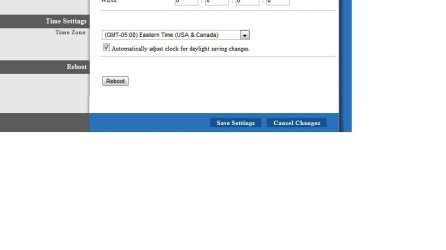
just thought id mention...all computers that are accessing the homegroup must be on the same time zone as well as the router you are using with the homegroup...i had to login to my routers config and change the time zone...here is a pic:
 

Attachments

  • oh.jpg
    oh.jpg
    31.1 KB · Views: 81

My Computer

OS
windows 7 home premium 64 bit
simple fix

In the 'network and sharing center' screen, look on the right hand side where it says Access type, and next to the HomeGroup: it should say 'Available to Join', click on that.

I tried to join network but nothing worked for me until I saw the above option, it works for me now.
 

My Computer

OS
win 7 64bit
I'm going to read this whole thread but first I want to tell you how I solved it. I got a new mini itx build that I just finished last night and it was running Windows 7 x64. I ran the troubleshooter a million times and it didn't detect any problems with the ip6 protocol (I know that's not the name but I can't remember what its called) or any other problems other than an IP conflict. The solution was easy. I was trying to connect a CAT5e cable to the laptop and the laptop has built in wifi and was connected to my home network. the Mitx desktop I built has no onboard wifi and only the direct connection to the laptop. when I disconnected from the wifi on the laptop the thing worked.

before I was getting a prompt for a username and password even though that setting was turned off. I also could only create a homegroup on the desktop pc but not join anyone else's homegroup. when I did finally was able to create the homegroup on the desktop pc I would try to share a folder on the desktop pc but trying to access it on the laptop would say access denied for whatever reason. what's weird is that I could copy a file from the desktop from the latop from the "public" folder, nothing else. anyways if you have a wifi connection and trying to network with the other pc via cat5 disable your wifi so that the only connection is through cable, I did not have to reboot.
 

My Computer

Computer type
PC/Desktop
OS
windows 7 64
Back
Top