
You are using an out of date browser. It may not display this or other websites correctly.
You should upgrade or use an alternative browser.
You should upgrade or use an alternative browser.
Can't join Homegroup
- Thread starter megreen831
- Start date
GreekJulius
New member
Yeah I cant Connect to home group. there both Cable but laptop uses my cable Wi-Fi
and other uses Cable, they both use the same router but no home group ...
and other uses Cable, they both use the same router but no home group ...
My Computer
At a glance
Windows 7
- OS
- Windows 7
- Local time
- 4:11 AM
- Messages
- 12
Welcome to the club. I'm still stuck. The IPv6 fix didn't work for me, but have you tried it?
My Computer
At a glance
Windows 7
- OS
- Windows 7
GreekJulius
New member
GreekJulius
New member
Plus on the Network Folder it doesnt show my pc on my Laptop and it doesnt show my laptop on my pc...
My Computer
At a glance
Windows 7
- OS
- Windows 7
- Local time
- 4:11 AM
- Messages
- 12
Plus on the Network Folder it doesnt show my pc on my Laptop and it doesnt show my laptop on my pc...
I feel so not alone. I'm sorry you're having the same problem, but it's nice to finally see that I'm not crazy.
Are you using Verizon FIOS? I ask because I'm suspecting the router.
My Computer
At a glance
Windows 7
- OS
- Windows 7
GreekJulius
New member

- Local time
- 5:11 AM
- Messages
- 995
everyone entered the homegroup network key? same key on all computers that want to share same homegroup
My Computer
At a glance
XP/win7 x86 build 7127Athlon64 X2 DUAL 4200+ 2.21ghz2GB Dual Chan DDR2 CorsairNvidia 6800GT
- Computer Manufacturer/Model Number
- CUSTOM
- OS
- XP/win7 x86 build 7127
- CPU
- Athlon64 X2 DUAL 4200+ 2.21ghz
- Motherboard
- ASUS K8 PRO SLI
- Memory
- 2GB Dual Chan DDR2 Corsair
- Graphics Card(s)
- Nvidia 6800GT
- Sound Card
- nvidia
- Monitor(s) Displays
- 19' LCD
- Screen Resolution
- 1280x1024
- Hard Drives
- WD 250, 2x500, 2x1TB IDE/USB
WD 250 SATA (system)
SEAGATE 120 Sata
- PSU
- coolermaster 450
- Case
- SUPERFLOWER
- Cooling
- 1 HDD bay fan, 5x80mm Case Fans, AEROGATE II Fan/Temp
- Keyboard
- MS wireless
- Mouse
- MS Wireless
- Internet Speed
- fassssssssst
- Local time
- 4:11 AM
- Messages
- 12
everyone entered the homegroup network key? same key on all computers that want to share same homegroup
In my case, I'm not reaching the point to enter a key. On computer A I create a homegroup and get a password/key. A also reports that there are no other computers in the group. On computer B I click on homegroup and am only presented the option to create a homegroup. It doesn't see that there is a homegroup on computer A.
My Computer
At a glance
Windows 7
- OS
- Windows 7

Checking the Peer Infrastructure Common Return Codes Reference at Common Return Codes (Windows) we find the description of this error:
PEER_E_NO_MEMBERS_FOUND A connection to a group has failed because there are no active members in the group. Value: 0x80632094
The Windows Peer-to-Peer Networking Infrastructure that Homegroup network discovery is based on has found a published Homegroup on your network but when it tries to join this Homegroup no members can be found.
I went to my other computer that created the Homegroup, opened Network and Sharing Center and next to Homegroup I clicked Joined. I then selected Leave the Homegroup thinking I'd just set it up again. Well, leaving the homegrop worked but when I tried to create it again it failed with error 0x8007012F. Consulting the all-knowing Google we find Software Sleuthing : Errors (007) FACILITY_WIN32 which describes this error as:
ERROR_DELETE_PENDING The file cannot be opened because it is in the process of being deleted. Value: 0x8007012F
Nice. So I go back to the first machine and open Network and Sharing Center again. Next to Homegroup I see "Ready to Create". I'm thinking if it's ready then I'm ready too. So I jot down the password and go back to the other computer, open Network and Sharing Center again.
No joy. It's "Ready to Create" too! Having worked with Microsoft products since before Windows was developed and thinking that if "The file cannot be opened because it is in the process of being deleted." maybe it was reboot time. Well, no.
Still "Ready to Create". I'm thinking if it's ready then I'm ready too. So I jot down the password and go back to the other computer, open Network and Sharing Center again. (Haven't we heard this before? )
)
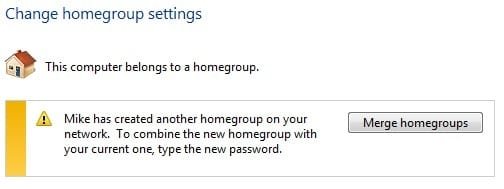
0x8007012FThe file cannot be opened because it is in the process of being deleted.ERROR_DELETE_PENDING
So I do and

I'm not saying this is the best way to fix it. Maybe if I rebooted right after I saw the 0x8007012F error things might have been different but I do have a working Homegroup...
Hey check out the similar threads at the bottom of the page here
PEER_E_NO_MEMBERS_FOUND A connection to a group has failed because there are no active members in the group. Value: 0x80632094
The Windows Peer-to-Peer Networking Infrastructure that Homegroup network discovery is based on has found a published Homegroup on your network but when it tries to join this Homegroup no members can be found.
I went to my other computer that created the Homegroup, opened Network and Sharing Center and next to Homegroup I clicked Joined. I then selected Leave the Homegroup thinking I'd just set it up again. Well, leaving the homegrop worked but when I tried to create it again it failed with error 0x8007012F. Consulting the all-knowing Google we find Software Sleuthing : Errors (007) FACILITY_WIN32 which describes this error as:
ERROR_DELETE_PENDING The file cannot be opened because it is in the process of being deleted. Value: 0x8007012F
Nice. So I go back to the first machine and open Network and Sharing Center again. Next to Homegroup I see "Ready to Create". I'm thinking if it's ready then I'm ready too. So I jot down the password and go back to the other computer, open Network and Sharing Center again.
No joy. It's "Ready to Create" too! Having worked with Microsoft products since before Windows was developed and thinking that if "The file cannot be opened because it is in the process of being deleted." maybe it was reboot time. Well, no.
Still "Ready to Create". I'm thinking if it's ready then I'm ready too. So I jot down the password and go back to the other computer, open Network and Sharing Center again. (Haven't we heard this before?
) 0x8007012FThe file cannot be opened because it is in the process of being deleted.ERROR_DELETE_PENDING
So I do and
I'm not saying this is the best way to fix it. Maybe if I rebooted right after I saw the 0x8007012F error things might have been different but I do have a working Homegroup...
Hey check out the similar threads at the bottom of the page here
My Computer
At a glance
El Capitan / Windows 10i7-4980HQ16GBIris 5200
- Computer type
- Laptop
- Computer Manufacturer/Model Number
- Apple
- OS
- El Capitan / Windows 10
- CPU
- i7-4980HQ
- Memory
- 16GB
- Graphics Card(s)
- Iris 5200
Yes, Ive been fighting with the same issues for over a week now. I did at one stage manage to a get shared internet connection with my other 3 home computers. (1.running xpsp3 2.running xpsp3 3.running ubuntu 8 4. running Win7(host)) although I was not able to greate a sharing network with any of them the internet worked fine. Now that I fixed it so they all talk to each other, I can no longer share the internet connection. (wierd)
Hear is what i did so far to get home network talking.
My host laptop is using win 7, and two xpsp3 machines are laptops also (Im not using wireless though) and my PC is using Linux Ubuntu 8. All feed through a Linksys router BEFW11S4
Changed all computer Workgroups/Homegroup to the same name. (not needed in Ubuntu) In win xp, Set up a home network on all and select "this computer connects through other computers internet connection" and select "share folders" etc.
Check that all TCP/IP's on all amchines are set to automaticly detect. For some reason win 7 was using some settigns it picked up.
Next, there is also no sharing tab on the "local area network connection properties" window, and until I added this and ticked share, would the network find all other computers.( I had to enable the wireless network on my Win7 laptop becasue unless there are two available network connections there, then the tab is not there either) As soon as that was done and I set this to auto detect in 4vtcp/ip, then could find all the other machines.
All computers are using standard LAN cables into the router (none are using cross link cables however when i did use the cross link lan cable from the hoste win7 machine the first time, I could get itnernet sharing, but not network sharing)
Now i am still stuck on two things. Getting all the share the internet from my win 7 machine and although I can see the home groups it keeps saying I havent joined a home group..
Ill keep you posted... ( PS. MS need a good kick on this. my Ubuntu found all the networks without doing anything. As far back as I can remeber, Win 95 - Vista, setting up home networks on MS OS's has always been a real head ache, and Win 7 isnt any better or probably worse)
Hear is what i did so far to get home network talking.
My host laptop is using win 7, and two xpsp3 machines are laptops also (Im not using wireless though) and my PC is using Linux Ubuntu 8. All feed through a Linksys router BEFW11S4
Changed all computer Workgroups/Homegroup to the same name. (not needed in Ubuntu) In win xp, Set up a home network on all and select "this computer connects through other computers internet connection" and select "share folders" etc.
Check that all TCP/IP's on all amchines are set to automaticly detect. For some reason win 7 was using some settigns it picked up.
Next, there is also no sharing tab on the "local area network connection properties" window, and until I added this and ticked share, would the network find all other computers.( I had to enable the wireless network on my Win7 laptop becasue unless there are two available network connections there, then the tab is not there either) As soon as that was done and I set this to auto detect in 4vtcp/ip, then could find all the other machines.
All computers are using standard LAN cables into the router (none are using cross link cables however when i did use the cross link lan cable from the hoste win7 machine the first time, I could get itnernet sharing, but not network sharing)
Now i am still stuck on two things. Getting all the share the internet from my win 7 machine and although I can see the home groups it keeps saying I havent joined a home group..
Ill keep you posted... ( PS. MS need a good kick on this. my Ubuntu found all the networks without doing anything. As far back as I can remeber, Win 95 - Vista, setting up home networks on MS OS's has always been a real head ache, and Win 7 isnt any better or probably worse)
My Computer
At a glance
win 7
- OS
- win 7
Yes, Ive been fighting with the same issues for over a week now. I did at one stage manage to a get shared internet connection with my other 3 home computers. (1.running xpsp3 2.running xpsp3 3.running ubuntu 8 4. running Win7(host)) although I was not able to greate a sharing network with any of them the internet worked fine. Now that I fixed it so they all talk to each other, I can no longer share the internet connection. (wierd)
Hear is what i did so far to get home network talking.
My host laptop is using win 7, and two xpsp3 machines are laptops also (Im not using wireless though) and my PC is using Linux Ubuntu 8. All feed through a Linksys router BEFW11S4
Changed all computer Workgroups/Homegroup to the same name. (not needed in Ubuntu) In win xp, Set up a home network on all and select "this computer connects through other computers internet connection" and select "share folders" etc.
Check that all TCP/IP's on all amchines are set to automaticly detect. For some reason win 7 was using some settigns it picked up.
Next, there is also no sharing tab on the "local area network connection properties" window, and until I added this and ticked share, would the network find all other computers.( I had to enable the wireless network on my Win7 laptop becasue unless there are two available network connections there, then the tab is not there either) As soon as that was done and I set this to auto detect in 4vtcp/ip, then could find all the other machines.
All computers are using standard LAN cables into the router (none are using cross link cables however when i did use the cross link lan cable from the hoste win7 machine the first time, I could get itnernet sharing, but not network sharing)
Now i am still stuck on two things. Getting all the share the internet from my win 7 machine and although I can see the home groups it keeps saying I havent joined a home group..
Ill keep you posted... ( PS. MS need a good kick on this. my Ubuntu found all the networks without doing anything. As far back as I can remeber, Win 95 - Vista, setting up home networks on MS OS's has always been a real head ache, and Win 7 isnt any better or probably worse)
Hear is what i did so far to get home network talking.
My host laptop is using win 7, and two xpsp3 machines are laptops also (Im not using wireless though) and my PC is using Linux Ubuntu 8. All feed through a Linksys router BEFW11S4
Changed all computer Workgroups/Homegroup to the same name. (not needed in Ubuntu) In win xp, Set up a home network on all and select "this computer connects through other computers internet connection" and select "share folders" etc.
Check that all TCP/IP's on all amchines are set to automaticly detect. For some reason win 7 was using some settigns it picked up.
Next, there is also no sharing tab on the "local area network connection properties" window, and until I added this and ticked share, would the network find all other computers.( I had to enable the wireless network on my Win7 laptop becasue unless there are two available network connections there, then the tab is not there either) As soon as that was done and I set this to auto detect in 4vtcp/ip, then could find all the other machines.
All computers are using standard LAN cables into the router (none are using cross link cables however when i did use the cross link lan cable from the hoste win7 machine the first time, I could get itnernet sharing, but not network sharing)
Now i am still stuck on two things. Getting all the share the internet from my win 7 machine and although I can see the home groups it keeps saying I havent joined a home group..
Ill keep you posted... ( PS. MS need a good kick on this. my Ubuntu found all the networks without doing anything. As far back as I can remeber, Win 95 - Vista, setting up home networks on MS OS's has always been a real head ache, and Win 7 isnt any better or probably worse)
My Computer
At a glance
win 7
- OS
- win 7

Hi,
I think it is important to realise that Homegroup is a new networking technology and is, as far as I know at the moment, not backwardly compatible with previous windows versions.
Windows 7 also supports the classic windows networking methods using the advance sharing option on the sharing tab.
I have used this method to share with XP and Vista without problems.
I am sure that M$ will issue updates to allow older OS's to participate in a homegroup , in time, but at the moment would advise anyone to use the classic sharing method
I think it is important to realise that Homegroup is a new networking technology and is, as far as I know at the moment, not backwardly compatible with previous windows versions.
Windows 7 also supports the classic windows networking methods using the advance sharing option on the sharing tab.
I have used this method to share with XP and Vista without problems.
I am sure that M$ will issue updates to allow older OS's to participate in a homegroup , in time, but at the moment would advise anyone to use the classic sharing method
My Computers
-
At a glance
Windows 11 Pro x64 [Latest Release and Releas...Ryzen 9 5950X, 3.8 - 5.2 MHz64GB [2 x 32GB] DDR4 3200MHz4GB NVIDIA GEFORCE GTX 1650 Ti- Computer type
- PC/Desktop
- Computer Manufacturer/Model Number
- ChillBlast - Custom to my design
- OS
- Windows 11 Pro x64 [Latest Release and Release Preview]
- CPU
- Ryzen 9 5950X, 3.8 - 5.2 MHz
- Motherboard
- Asus Prime X570-Pro
- Memory
- 64GB [2 x 32GB] DDR4 3200MHz
- Graphics Card(s)
- 4GB NVIDIA GEFORCE GTX 1650 Ti
- Sound Card
- On-board SPDIF to 5.1 System + HDMI [5.1 system]
- Monitor(s) Displays
- 32" UHD 32 Bit HDR Monitor + 43" UHD 4K 32Bit HDR TV
- Screen Resolution
- 2 x 3840 x 2160 @60Hz
- Hard Drives
- 1TB M2 SSD OS, 500GB Fast Access SSD, 2 x 8TB Data + Various Externals from 1TB to 4TB, 10TB NAS
- PSU
- NZXT C750 80 PLUS Gold 750W Modular PSU
- Case
- Workstation Case [Matt Black]
- Cooling
- NZXT Kraken X63 280mm CPU Cooler +2x Quiet Case fans
- Keyboard
- Logitech Wireless MX Keys & K400 + others
- Mouse
- Logitech Wireless MX Master 3S
- Internet Speed
- 920 MB Down 50 MB Up
- Antivirus
- BitDefender Total Security Pro
- Browser
- Chrome (always run latest Non-Beta)
- Other Info
- Also run ...
Laptop - Quad 8GB - Windows 10 Pro x64
Nexus 7 Android tablet x2
Samsung 10.2" tablet
Blackview TAB 8 4G Android Tablet c/w Keyboard
Wacom Intuos Pro Medium Pen Pad
Wacom Intuos Pro Small Pen Pad
Wacom Expresskeys Remote
Loopdeck+ Graphics Controller
Shuttle Pro v2 Control
-
At a glance
Windows 11 Pro x64 Latest RPIntel I7 10750H 5.0GHz32GB [2x16GB] DDR4 2933 MHznVidia GTX1650Ti 4 GB GDDR6- Computer type
- Laptop
- System Manufacturer/Model Number
- Dell XPS 17 10750H
- OS
- Windows 11 Pro x64 Latest RP
- CPU
- Intel I7 10750H 5.0GHz
- Motherboard
- Dell XPS
- Memory
- 32GB [2x16GB] DDR4 2933 MHz
- Graphics Card(s)
- nVidia GTX1650Ti 4 GB GDDR6
- Sound Card
- Stock [Realtek] 4 Speaker
- Monitor(s) Displays
- 17" IPS UHD+ Infinity Edge Touchscreen
- Screen Resolution
- 3840 x 2400
- Hard Drives
- 2TB M2 NVMe, 4TB External + various 500GB & 1TB External NVMe (also have access to spinner HDD from
- PSU
- Stock
- Case
- Stock XPS Aluminium & Carbon Fibre
- Cooling
- Stock - Active Fan Control
- Keyboard
- Backlit + Various Logitech
- Mouse
- Stock Track Pad + Logitech MX Trackball
- Internet Speed
- 72 MB Down 18MB Up
- Browser
- Chrome
- Other Info
- Also run ...
Laptop - Quad 8GB - Windows 10 Pro x64
Nexus 7 Android tablet x2
10.2" tablet
Sony Z3 Android Smartphone
Wacom Intuos Pro Medium Pen Pad
Wacom Intuos Pro Small Pen Pad
Wacom Expresskeys Remote
Loopdeck+ Graphics Controller
Shuttle Pro v2 Control Pad
10TB NAS
- Local time
- 5:11 AM
- Messages
- 995
my first thought is why are you sharing the inet connection ICS thru your win7 laptop? You already have the router to share the inet connection, why use ICS? If you would just setup each pc as a static from the router, setup DNS as router ip. Then from there just setup normal file sharing.
But like Barman mentioned, and as i havent gotten around to testing backward compatibility OS sharing, i think there are problems there. Get rid of ICS... atleast run the inet connection thru unbuntu if you insist on running your lan setup that way.
But like Barman mentioned, and as i havent gotten around to testing backward compatibility OS sharing, i think there are problems there. Get rid of ICS... atleast run the inet connection thru unbuntu if you insist on running your lan setup that way.
My Computer
At a glance
XP/win7 x86 build 7127Athlon64 X2 DUAL 4200+ 2.21ghz2GB Dual Chan DDR2 CorsairNvidia 6800GT
- Computer Manufacturer/Model Number
- CUSTOM
- OS
- XP/win7 x86 build 7127
- CPU
- Athlon64 X2 DUAL 4200+ 2.21ghz
- Motherboard
- ASUS K8 PRO SLI
- Memory
- 2GB Dual Chan DDR2 Corsair
- Graphics Card(s)
- Nvidia 6800GT
- Sound Card
- nvidia
- Monitor(s) Displays
- 19' LCD
- Screen Resolution
- 1280x1024
- Hard Drives
- WD 250, 2x500, 2x1TB IDE/USB
WD 250 SATA (system)
SEAGATE 120 Sata
- PSU
- coolermaster 450
- Case
- SUPERFLOWER
- Cooling
- 1 HDD bay fan, 5x80mm Case Fans, AEROGATE II Fan/Temp
- Keyboard
- MS wireless
- Mouse
- MS Wireless
- Internet Speed
- fassssssssst
- Local time
- 5:11 AM
- Messages
- 995
Yeah I cant Connect to home group. there both Cable but laptop uses my cable Wi-Fi
and other uses Cable, they both use the same router but no home group ...
You have to have the homegroup in order to share on win7
secondly to see your pc under "network" in the navi pane you have to do the following steps from my thread/reply (if i'm on the same page as you).
http://www.sevenforums.com/network-...showing-network-attached-drives-explorer.html
My Computer
At a glance
XP/win7 x86 build 7127Athlon64 X2 DUAL 4200+ 2.21ghz2GB Dual Chan DDR2 CorsairNvidia 6800GT
- Computer Manufacturer/Model Number
- CUSTOM
- OS
- XP/win7 x86 build 7127
- CPU
- Athlon64 X2 DUAL 4200+ 2.21ghz
- Motherboard
- ASUS K8 PRO SLI
- Memory
- 2GB Dual Chan DDR2 Corsair
- Graphics Card(s)
- Nvidia 6800GT
- Sound Card
- nvidia
- Monitor(s) Displays
- 19' LCD
- Screen Resolution
- 1280x1024
- Hard Drives
- WD 250, 2x500, 2x1TB IDE/USB
WD 250 SATA (system)
SEAGATE 120 Sata
- PSU
- coolermaster 450
- Case
- SUPERFLOWER
- Cooling
- 1 HDD bay fan, 5x80mm Case Fans, AEROGATE II Fan/Temp
- Keyboard
- MS wireless
- Mouse
- MS Wireless
- Internet Speed
- fassssssssst
I am having a similar issue. Not sure if it is different enough to warrant a seperate thread. So, I will start here.
I have an HTPC and a laptop both running win7 build 7022. They have both been upgraded from differing previous builds. Lappy was running a beta most recently and the htpc was running 7000. I hadn't really played with homegroup previously so I cannot answer to functionality in the past.
Now, I upgraded both machines to build 7022. I had a few issues getting them connected to the homegroup because of user error (I misplaced the password). However, I was finally able to start a new homegroup and get both machines connected.
Here is where it gets odd. In the explorer, both machines show a homegroup group. However, when I open that, I am told that there are no available homegroup computers to connect to. In Network and Sharing Settings both machines are on the Home network and they both actually say they are connected to the homegroup. On the HTPC, I can view shared video from the laptop. However, if I try to play any of it, the HTPC locks up. This did work yesterday as I as watching video streaming from the laptop through the htpc. Granted, this video issue could be something completely seperate.
Anyway, that is where I am stuck. I have tried creating a new homegroup from both machines. I played with the IPv6 settings for giggles. As a note, but machines were upgraded and not clean installs. However, both are running fairly clean with minimal apps installed.
Any suggestions are appreciated. Thanks.
I have an HTPC and a laptop both running win7 build 7022. They have both been upgraded from differing previous builds. Lappy was running a beta most recently and the htpc was running 7000. I hadn't really played with homegroup previously so I cannot answer to functionality in the past.
Now, I upgraded both machines to build 7022. I had a few issues getting them connected to the homegroup because of user error (I misplaced the password). However, I was finally able to start a new homegroup and get both machines connected.
Here is where it gets odd. In the explorer, both machines show a homegroup group. However, when I open that, I am told that there are no available homegroup computers to connect to. In Network and Sharing Settings both machines are on the Home network and they both actually say they are connected to the homegroup. On the HTPC, I can view shared video from the laptop. However, if I try to play any of it, the HTPC locks up. This did work yesterday as I as watching video streaming from the laptop through the htpc. Granted, this video issue could be something completely seperate.
Anyway, that is where I am stuck. I have tried creating a new homegroup from both machines. I played with the IPv6 settings for giggles. As a note, but machines were upgraded and not clean installs. However, both are running fairly clean with minimal apps installed.
Any suggestions are appreciated. Thanks.
My Computer
At a glance
Windows 7 Build 7057Phenom 96008GB CorsairOnboard graphics
- OS
- Windows 7 Build 7057
- CPU
- Phenom 9600
- Motherboard
- EVGA 730a
- Memory
- 8GB Corsair
- Graphics Card(s)
- Onboard graphics
- Monitor(s) Displays
- Samsung LN-46a650
- Screen Resolution
- 1080p
- Hard Drives
- Seagate 1.5TB
Colonel,
Leave the homegroup using Network and Sharing Center. Do it for both computers. Reboot both computers. Return to Network and Sharing and make sure they both want you to create a homegroup. Do so on only one computer. Reboot it. Check to make sure the homegroup is still there in Network and Sharing Center.
Go to the other computer. Check to make sure the new homegroup is visible in Networking and Sharing Center. If not report back here.
If it is just join it and report the exact error message if any.
Homegroups are not completely plug and play yet -- reboots are required to stabilize the network.
Leave the homegroup using Network and Sharing Center. Do it for both computers. Reboot both computers. Return to Network and Sharing and make sure they both want you to create a homegroup. Do so on only one computer. Reboot it. Check to make sure the homegroup is still there in Network and Sharing Center.
Go to the other computer. Check to make sure the new homegroup is visible in Networking and Sharing Center. If not report back here.
If it is just join it and report the exact error message if any.
Homegroups are not completely plug and play yet -- reboots are required to stabilize the network.
My Computer
At a glance
El Capitan / Windows 10i7-4980HQ16GBIris 5200
- Computer type
- Laptop
- Computer Manufacturer/Model Number
- Apple
- OS
- El Capitan / Windows 10
- CPU
- i7-4980HQ
- Memory
- 16GB
- Graphics Card(s)
- Iris 5200
Thanks for the suggestions. I will run through all of that this evening and report back.
My Computer
At a glance
Windows 7 Build 7057Phenom 96008GB CorsairOnboard graphics
- OS
- Windows 7 Build 7057
- CPU
- Phenom 9600
- Motherboard
- EVGA 730a
- Memory
- 8GB Corsair
- Graphics Card(s)
- Onboard graphics
- Monitor(s) Displays
- Samsung LN-46a650
- Screen Resolution
- 1080p
- Hard Drives
- Seagate 1.5TB
That was it . Thanks for the help. Patience and reboots was the key.
On a side note, I still can no longer play shared video through Media Center. It just causes WMC to lock-up and restart (after prompting to send error information). I can use WMP to play shared video fine though. I guess this may be more of a question for the Media Center forum.
. Thanks for the help. Patience and reboots was the key.On a side note, I still can no longer play shared video through Media Center. It just causes WMC to lock-up and restart (after prompting to send error information). I can use WMP to play shared video fine though. I guess this may be more of a question for the Media Center forum.
My Computer
At a glance
Windows 7 Build 7057Phenom 96008GB CorsairOnboard graphics
- OS
- Windows 7 Build 7057
- CPU
- Phenom 9600
- Motherboard
- EVGA 730a
- Memory
- 8GB Corsair
- Graphics Card(s)
- Onboard graphics
- Monitor(s) Displays
- Samsung LN-46a650
- Screen Resolution
- 1080p
- Hard Drives
- Seagate 1.5TB
That was it
On a side note, I still can no longer play shared video through Media Center. It just causes WMC to lock-up and restart (after prompting to send error information). I can use WMP to play shared video fine though. I guess this may be more of a question for the Media Center forum.
There's a guy here who decodes that error dump stuff and can tell you whats wrong. Can you post what it's trying to send please?
My Computer
At a glance
El Capitan / Windows 10i7-4980HQ16GBIris 5200
- Computer type
- Laptop
- Computer Manufacturer/Model Number
- Apple
- OS
- El Capitan / Windows 10
- CPU
- i7-4980HQ
- Memory
- 16GB
- Graphics Card(s)
- Iris 5200
Similar threads

- Replies
- 0
- Views
- 1K
- Replies
- 6
- Views
- 987

- Replies
- 4
- Views
- 1K