Can't Open Certain .EXE Files In Windows 7

kdar

New member
Local time
1:32 AM
Messages
22
I seem to be having a problem where I can't seem to open certain .exe files that I've downloaded. For e.g. Samsung Kies, SPSS Statistics.

InstallShield Wizard will just hang and not do anything.

I tried doing Right-Clicking and "Run as Administrator" but it doesn't do anything.
I have tried opening the .exe in SAFE mode. But I just got "Error 1719. Windows Installer could not be accessed."

I've tried re-registering Windows Installer and followed the instructions to this link: (http://support.microsoft.com/kb/315346) but I'm still having problems with opening these .exe files.

I've done antivirus/malware/infection scans, and there is nothing wrong with my laptop.

I don't really understand what is wrong.
When going on Windows Task Manager, I can see in the Processes tab that the software is there, but it's not doing anything.

Would love to hear from anyone who has any advice on what to do! This is driving me crazy.

Thanks in advance!
 

My Computer My Computer

OS
Windows 7 Home Premium
OK. First of all, just to make sure, download and run this;

Malwarebytes

Run a full scan please, and then post the log here.

Regards....Mike Connor
 

My Computer My Computer

OS
Several, including Windows 7 x64 Ultimate
Do you have this problem with installing software in general or just these apps? Just to be sure, can you download some other program, something that's known to be safe and working nicely on Windows 7, e.g. VLC player or something like that and install it?

If you can install other software, then the problem is with these particular apps, what you can do it do make sure you meet the minimum requirements.

If you can't install anything at all, then maybe your Windows Installer is corrupted. Try these instructions and let us know if this fixes your problem.
 

My Computer My Computer

Computer Manufacturer/Model Number
Dell Inspiron 530
OS
Windows 7 Ultimate (x64)
CPU
Q6600
Memory
8 GB
Graphics Card(s)
ATI Radeon HD 2600 XT
Monitor(s) Displays
Samsung Syncmaster P2450
Screen Resolution
1920x1080
Hard Drives
Samsung HD103UJ
Samsung HD501LJ
Internet Speed
25 Mb/s
You may want to try running the installer in Compatibility Mode for Vista or even XP. I've had similar issues with installers hanging and CM seems to work for me.

Additional:

Are you running 32 or 64Bit? If 64Bit you may need to Disable Driver Sinature Enforcement using the Advanced Boot Options.


OS
 

My Computer My Computer

Computer Manufacturer/Model Number
Compaq Desktop
OS
Windows 7 Ultimate x64
CPU
AMD Sempron Dual Core
Memory
3GB
Graphics Card(s)
NVIDIA GeForce 6150SE nForce 430
Screen Resolution
1024x768
Hard Drives
150GB Sata
I just installed MalwareBytes as suggested, and it installed perfectly fine. But every time when I tried to run the scan, it suddenly stopped responding. I don't know whether this is related to anything?
It appears to only be happening to certain/if not most software that I have recently tried installing because I already have VLC player, and that works fine.
I tried installing Trend Micro Housecall.exe and that seems to be working fine (and found no threats by the way).

My laptop fits the system requirements for the software that is not working, so I don't really understand what the problem is.

Will try the Windows Installer instructions and get back to you.
 

My Computer My Computer

OS
Windows 7 Home Premium
I am running on a 64-bit system.
I just tried the instructions on this link about fixing a corrupted Windows Installer, but access was denied when I entered the commands in the script...
 

My Computer My Computer

OS
Windows 7 Home Premium
Filling in the rest of your specs might help.
 

My Computer My Computer

Computer type
PC/Desktop
Computer Manufacturer/Model Number
Home made Desktop
OS
Windows 10 Pro. 64/ version 1709 Windows 7 Pro/64
CPU
Intel i7-6800K @ 4.3
Motherboard
ASUS X-99 Deluxe II
Memory
Corsair Platinum 16 gig @2400
Graphics Card(s)
EVGA GTX 1070 OC
Monitor(s) Displays
Asus 27" LED LCD/VE278Q
Screen Resolution
1920-1080 or 1280-720 HDMI
Hard Drives
INTEL SSD 730-240 Gb Sata 3.0/
PSU
EVGA Platium 1200W
Case
Phanteks Luxe Tempered Glass 8 fans/ one radiator
Cooling
XSPC/ Water Cooled CPU
Keyboard
Das 4 Professional
Mouse
Logitech M705/MX Anywhere 2-S
Internet Speed
100 mbits
Antivirus
Microsoft Security Essentials/ Malwarebytes Premium 3.0/ SAS
Browser
I.E. 11 default/Firefox/ ISP Time Warner Cable/Spectrum
Other Info
LG BluRay Burner/
Sound system-KLipsch-THX/
Icy Dock ssd Hot Swap bays.
Laptop: Sony Vaio E Series
Windows Edition:Windows 7 Home Premium

System:
Processor: Intel (R) Core (TM) i5 CPU M450 @ 2.40GHz
Installed memory (RAM): 4.00GB (3.86 GB usable)
System type: 64-bit Operating System
 

My Computer My Computer

OS
Windows 7 Home Premium
Hi,

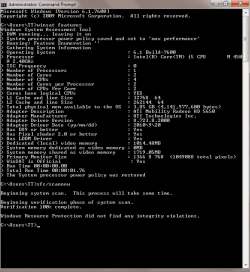
I wonder if there is an issue with the integrity of the system files? Can you please run the following commands from an elevated CMD prompt, and post the results here:

winsat features

and also

sfc /scannow

To open a an elevated cmd prompt, do this:

1. Click Start Orb, and in the search box type cmd
2. Right click on cmd, and choose "Run as administrator"
3. The elevated cmd window will now open.

Regards,
Golden
 

My Computer My Computer

Computer type
PC/Desktop
Computer Manufacturer/Model Number
Golden Mk. I.4
OS
Windows 10 Pro x64 ; Xubuntu x64
CPU
Intel i7 860 @ 2.80 GHz O/C'ed to 4.0GHz
Motherboard
Gigabyte P55A-UD3R Rev.1. Award BIOS F13
Memory
16GB Corsair Vengance DDR3 @ 661 MHz Dual Channel (9-9-9-24)
Graphics Card(s)
EVGA NVidia GTX 560 1024MB
Sound Card
Realtek Integrated
Monitor(s) Displays
Dual Samsung SyncMaster 2494HS
Screen Resolution
1920*1080 and 1920*1080
Hard Drives
1*Samsung 840 EVO 120GB SSD;
1*OCZ Vertex 2 60GB SSD;
2*Samsung F3 SpinPoint 1TB in RAID0;
1*Samsung F1 SpinPoint 1TB;
2*Western Digital 1TB External USB 3.0
1*Western Digital 500GB External USB 3.0
1*Seagate 500GB External USB 2.0
PSU
Thermaltake ToughPower QFan 750W
Case
Thermaltake Element S VK60001W2Z
Cooling
Corsair H60 Water Cooling, 2*230mm and 2*80mm case fans
Keyboard
Logitech G110
Mouse
Logitech MX518
Attached is the print screen shot of the results of the command script.
 

Attachments

  • COMMAND.png
    COMMAND.png
    16.4 KB · Views: 223

My Computer My Computer

OS
Windows 7 Home Premium
When you ran the commands to replace the Windows Installer, did you run them from the elevated prompt? If that makes no difference, check the permissions on the files in question, make sure you have permissions to edit the files and write to folders they are in.
 

My Computer My Computer

Computer Manufacturer/Model Number
Dell Inspiron 530
OS
Windows 7 Ultimate (x64)
CPU
Q6600
Memory
8 GB
Graphics Card(s)
ATI Radeon HD 2600 XT
Monitor(s) Displays
Samsung Syncmaster P2450
Screen Resolution
1920x1080
Hard Drives
Samsung HD103UJ
Samsung HD501LJ
Internet Speed
25 Mb/s
Even when I run it under elevated prompt, access is still denied.
How do I check the permissions on the file to allow myself to edit the files?
 

My Computer My Computer

OS
Windows 7 Home Premium
Does anyone else have any advise?
 

My Computer My Computer

OS
Windows 7 Home Premium
Even when I run it under elevated prompt, access is still denied.
How do I check the permissions on the file to allow myself to edit the files?

Navigate to the folder the files are in. Enable hidden files (Folder Options -> View -> untick Hide protected system files and tick Show hidden files). Right-click on the file in question, choose Properties -> Security. This will show you the list of permissions. To change permissions you have to be running an account with administrative rights, i.e. an account that belongs to the Administrators group. If you're running the account that was created during Windows install, you're ok.

If you see your account in the list, then click Edit and add the missing permissions. Otherwise, you need to click Advanced -> Change Permissions -> Add and add your account to the list. Sometimes this won't work. This is because you are not the "owner" of the files and the "owner" did not give you permissions.

As an example, let's look at the first file in those instructions, msi.dll. The owner of this file is "TrustedInstaller". So, you will have to take ownership in order to change permissions. Thus in the Advanced window you click the Owner tab and click Edit. Another Window pops up and you have a choice of changing ownership to yourself or the Administrators group. Since you're about to get rid of this file, choose yourself. Click Apply, close all tabs and popped up windows, go to the security tab in file properties again and repeat the above procedure to add yourself to the list. Once on the list, give yourself full access in the Change Permissions window.

now you have all permissions to do what you want - namely, rename the file. Once this is done, do the same to the other files and go ahead to download and install Windows Installer.
 

My Computer My Computer

Computer Manufacturer/Model Number
Dell Inspiron 530
OS
Windows 7 Ultimate (x64)
CPU
Q6600
Memory
8 GB
Graphics Card(s)
ATI Radeon HD 2600 XT
Monitor(s) Displays
Samsung Syncmaster P2450
Screen Resolution
1920x1080
Hard Drives
Samsung HD103UJ
Samsung HD501LJ
Internet Speed
25 Mb/s
Does anyone know where Windows Installer 5.0 can be downloaded? I can't seem to find it.
 

My Computer My Computer

OS
Windows 7 Home Premium
Does anyone know where Windows Installer 5.0 can be downloaded? I can't seem to find it.

As far as I am aware it is not available as a separate downloadable package.

It is part of the Windows 7 operating system.

Regards....Mike Connor
 

My Computer My Computer

OS
Several, including Windows 7 x64 Ultimate
The only safe way to get it back is to re-install windows. The most recent Installer download as a package is 4.5 and that wont work on Windows 7.

I suppose it would be possible to copy the relevant files from another installation, but I have not tried it, and I would not rely on it.

Regards....Mike Connor
 

My Computer My Computer

OS
Several, including Windows 7 x64 Ultimate
Anyone who has ideas & can help me getting back msihnd.dll, msiexec.exe & msi.dll would be much appreciated!
Since I'm now having problems with opening everything :(
 

My Computer My Computer

OS
Windows 7 Home Premium
Anyone who has ideas & can help me getting back msihnd.dll, msiexec.exe & msi.dll would be much appreciated!
Since I'm now having problems with opening everything :(

Why can't you run a restore, a repair-install, or a re-install?

Regards....Mike Connor
 

My Computer My Computer

OS
Several, including Windows 7 x64 Ultimate
Back
Top