Can't partition unalloted space

kumaramesh

New member
Local time
1:06 PM
Messages
2
I am a novice (well,almost). I recently upgraded to Windows 7 from Vista on my Dell Inspiron 11z and used the Dell Upgrade Disks for it. But I went into the advance tabs, repartitioned the disk and performed a clean install so that I could get two partitions instead of the default one which my Dell Inspiron 11z came with. To put it simply, I wanted a main partition for my programs, and one more partition for storing data.
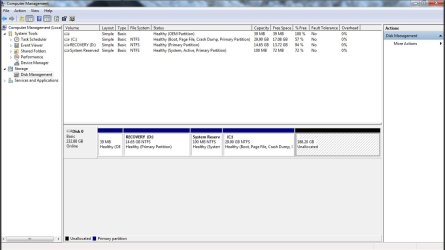
I don't know where I went wrong, but I now have 4 partitions: one with Windows 7, and three more recovery and system partitions (I'm guessing one of the recovery partitions is for Vista courtesy Dell, while the other two were created during the upgrade). Two of these four show up in My Computer (primary and recovery). And I also have unalloted space in place of the second partition I created (or so I thought). See the attached screenshot.
The problem is that I get a warning if I try to create a new simple volume on it, which says something about converting the basic disk to a dynamic disk. See screenshot 2.
Some basic research revealed that I can only have only up to 4 basic disks, and therefore the warning box.
My question: It is safe for me to just make the unalloted space into a dynamic disk and let the recovery partitions remain as they are? As I mentioned, I just need the new partition for storing files and not for installing another OS.
If not, then should I delete one of the system or recovery partitions so that I do not exceed the limit of four basic disks? Which one is the safest to delete? I don't really intend to roll back to Vista, but don't mind keeping it since space is not really a concern.
 

Attachments

  • Warning box.jpg
    Warning box.jpg
    15.8 KB · Views: 16
  • Untitled.jpg
    Untitled.jpg
    82.1 KB · Views: 100

My Computer

OS
Windows 7 32 bit
Hi and welcome to SevenForums,

What i would advise is this.
Download Partiton Wizard Home Edition and Boot Disc (Burn and keep the boot disc,very handy to have)
Free Download Partition Wizard

Now open PW Home Edition.
Right click on Recovery(: D) and click delete.Click Apply
Your 15GB should now be added to the other Unallocated space.
If not,right click your 15GB of Unallocated space and click Move/Resize and drag it over beside your other unallocated Space.Click Apply

Now Right click on the Unallocated Space and click Create
Make it a primary Partition and NTFS and give it a label (i.e Data) Click Apply
Right click your new partition>Modify>Mark as Active
Please Click Apply when i say above,its important.Apply is on the top left and bottom left of the screen.

Job done.

I wouldnt delete the OEM partition as it probably has the Dell Recovery options and if you delete it ,it may void your warranty.
Your Recovery partiton has very little data on it,hence why i think it is best ot delete it.
 

My Computer

Computer Manufacturer/Model Number
Blue Shards 1.0
OS
Windows 7 Ultimate 64bit
CPU
AMD Phenom II 555 Black Edition Quad Core OC'd to 4.0GHz
Motherboard
ASUS M4A88T-M
Memory
G Skill RipJaw 1333MHz 4GB
Graphics Card(s)
ATI raideon 4250 HD/XFX ATI Radeon 1GB HD4650
Sound Card
Realteck HD Audio
Monitor(s) Displays
2x 22" Widescreen HD Monitors
Hard Drives
500GB Sata 7500RPM
80GB IDE
PSU
850W OCUK Modular
Case
Antec Dark Fleet DF-30
Cooling
Titan Fenrir Pro (CPU)
Keyboard
Logitech Wireless
Mouse
Logitech Wireless
Internet Speed
24Meg
Other Info
Getting soon-
2TB 7200RPM HDD
+8GB RAM
30GB SSD
HD6950/70
Reading from left to right on your partition map in disk management:

39 mb OEM: created by Dell for support of some kind. May be needed for warranty or support, but not needed by Windows 7.

Recovery D: You would use this if you wanted to go back to Vista. May pertain to your warranty also—if you had problems and called Dell, they might tell you to go back to Vista at least temporarily and if you did not have this partition, you may not be able to comply unless you had separate DVD recovery disks.

System reserved 100 mb: Created by Windows 7 install. Used primarily to help with Windows 7 system recovery, but it is not needed if you have access to a Windows 7 disk. Most people have it and just ignore it.

C: this is Windows 7. Most people would make this 40 to 60 gigs rather than 29.

188.20 unallocated. This is not yet part of any partition, but could easily be added to C if desired. It cannot be easily added to any other partition unless you use certain free third party tools (Paragon, Partition Wizard, etc)

I would get this down to no more than 4 partitions and avoid dynamic disks.

If this machine is out of warranty and support from Dell or you don’t care about either of those things, you can eliminate all that stuff to the left of C with third party tools.

Another possibility is to simply reinstall 7. Depending on what kind of disks you have from Dell, you may be able to dive into that now, or you may have to first restore to Vista. Certain people on this forum can help with that.

So—decide on these issues:

Do you care about Dell warranty or support?

Are you willing to give up on Vista entirely?

Would you consider a reinstall of Windows 7 or do you dread having to reinstall your programs etc?

Are you willing to get involved with third party programs such as recommended by Minotar? If you do this, you may not have to reinstall at all.
 

My Computer

Computer type
PC/Desktop
Computer Manufacturer/Model Number
Ignatz Special; 4 speed manual gearbox; factory air conditioning; one of one
OS
Windows 7 Home Premium SP1, 64-bit
CPU
Intel Skylake i5-6600K, not overclocked
Motherboard
AsRock Z170M Extreme 4, micro ATX
Memory
8 GB HyperX DDR4-2666 (2 x 4 GB)
Graphics Card(s)
none; graphics are integrated on CPU
Sound Card
onboard: Realtek ALC1150; external: USB Behringer UF0-202
Monitor(s) Displays
Dell S2340M 23 inch IPS
Screen Resolution
1600 x 900
Hard Drives
System: Crucial MX100 series SSD, 128 GB;
Data: Samsung Spinpoint 103SJ, 1 TB;
Backup: WD Caviar Green WD30EZRX-00D8PB0, 3 TB
PSU
Rosewill SilentNight 500 watt fanless, semi-modular
Case
Antec Solo II
Cooling
Noctua NH-U12S; Noctua F12 intake, Noctua S12A exhaust
Keyboard
Microsoft 200 6JH-00001 USB
Mouse
Dell or Microsoft optical wired; USB
Antivirus
Microsoft Security Essentials and Malwarebytes Premium
Browser
Pale Moon
Other Info
All fans PWM; speeds at idle: CPU circa 500 rpm; intake circa 600 rpm; exhaust circa 600 rpm; CPU temps 27 idle and 47 C load in a warm room (27 C/81 F) when running Intel Extreme Tuning Utility stress test.
Reading from left to right on your partition map in disk management:

Recovery D: You would use this if you wanted to go back to Vista. May pertain to your warranty also—if you had problems and called Dell, they might tell you to go back to Vista at least temporarily and if you did not have this partition, you may not be able to comply unless you had separate DVD recovery disks.
I could be wrong,but i doubt that is infact a back up of vista,as i t has less than 1GB used of space?
 

My Computer

Computer Manufacturer/Model Number
Blue Shards 1.0
OS
Windows 7 Ultimate 64bit
CPU
AMD Phenom II 555 Black Edition Quad Core OC'd to 4.0GHz
Motherboard
ASUS M4A88T-M
Memory
G Skill RipJaw 1333MHz 4GB
Graphics Card(s)
ATI raideon 4250 HD/XFX ATI Radeon 1GB HD4650
Sound Card
Realteck HD Audio
Monitor(s) Displays
2x 22" Widescreen HD Monitors
Hard Drives
500GB Sata 7500RPM
80GB IDE
PSU
850W OCUK Modular
Case
Antec Dark Fleet DF-30
Cooling
Titan Fenrir Pro (CPU)
Keyboard
Logitech Wireless
Mouse
Logitech Wireless
Internet Speed
24Meg
Other Info
Getting soon-
2TB 7200RPM HDD
+8GB RAM
30GB SSD
HD6950/70
Minotar:

I don't think it is a direct backup either--Vista would obviously occupy more than 1 gig. I'd guess whatever is in it can be used to make DVDs which can then be used to restore Vista. Haven't had a Dell in a long time or ever had a PC with a partition like that, but that is my understanding of how they work.

I could be wrong and not for the first time.

Assuming discs can be made from it, I'd guess it could then be deleted and not disqualify the user from any Dell support or warranty?
 

My Computer

Computer type
PC/Desktop
Computer Manufacturer/Model Number
Ignatz Special; 4 speed manual gearbox; factory air conditioning; one of one
OS
Windows 7 Home Premium SP1, 64-bit
CPU
Intel Skylake i5-6600K, not overclocked
Motherboard
AsRock Z170M Extreme 4, micro ATX
Memory
8 GB HyperX DDR4-2666 (2 x 4 GB)
Graphics Card(s)
none; graphics are integrated on CPU
Sound Card
onboard: Realtek ALC1150; external: USB Behringer UF0-202
Monitor(s) Displays
Dell S2340M 23 inch IPS
Screen Resolution
1600 x 900
Hard Drives
System: Crucial MX100 series SSD, 128 GB;
Data: Samsung Spinpoint 103SJ, 1 TB;
Backup: WD Caviar Green WD30EZRX-00D8PB0, 3 TB
PSU
Rosewill SilentNight 500 watt fanless, semi-modular
Case
Antec Solo II
Cooling
Noctua NH-U12S; Noctua F12 intake, Noctua S12A exhaust
Keyboard
Microsoft 200 6JH-00001 USB
Mouse
Dell or Microsoft optical wired; USB
Antivirus
Microsoft Security Essentials and Malwarebytes Premium
Browser
Pale Moon
Other Info
All fans PWM; speeds at idle: CPU circa 500 rpm; intake circa 600 rpm; exhaust circa 600 rpm; CPU temps 27 idle and 47 C load in a warm room (27 C/81 F) when running Intel Extreme Tuning Utility stress test.
Minotar:

I don't think it is a direct backup either--Vista would obviously occupy more than 1 gig. I'd guess whatever is in it can be used to make DVDs which can then be used to restore Vista. Haven't had a Dell in a long time or ever had a PC with a partition like that, but that is my understanding of how they work.

I could be wrong and not for the first time.
True,perhaps an exploration of the partition could explain:)


I could be wrong and not for the first time
Nor for myself,but we learn what we can and move on:)
 

My Computer

Computer Manufacturer/Model Number
Blue Shards 1.0
OS
Windows 7 Ultimate 64bit
CPU
AMD Phenom II 555 Black Edition Quad Core OC'd to 4.0GHz
Motherboard
ASUS M4A88T-M
Memory
G Skill RipJaw 1333MHz 4GB
Graphics Card(s)
ATI raideon 4250 HD/XFX ATI Radeon 1GB HD4650
Sound Card
Realteck HD Audio
Monitor(s) Displays
2x 22" Widescreen HD Monitors
Hard Drives
500GB Sata 7500RPM
80GB IDE
PSU
850W OCUK Modular
Case
Antec Dark Fleet DF-30
Cooling
Titan Fenrir Pro (CPU)
Keyboard
Logitech Wireless
Mouse
Logitech Wireless
Internet Speed
24Meg
Other Info
Getting soon-
2TB 7200RPM HDD
+8GB RAM
30GB SSD
HD6950/70
So—decide on these issues:

Do you care about Dell warranty or support?

Are you willing to give up on Vista entirely?

Would you consider a reinstall of Windows 7 or do you dread having to reinstall your programs etc?

Are you willing to get involved with third party programs such as recommended by Minotar? If you do this, you may not have to reinstall at all.

Once you have decided on these issues, there will be some here to help.
 

My Computer

OS
ME/XP/Vista/Win7
Thank you for all the replies, and my apologies for the delay in writing back. To answer your questions:

1. Yes I do care about Dell support because the notebook is just a three months old.
2. Yes I am willing to give up on Vista entirely. I have the Windows 7 installation disks.
3. I rather not reinstall Windows 7 if that can be managed.
4. I can use third party programs, and had in fact tried EASEUS Partition Master which would not allow me to create another partition on the unallocated space, and wouldn't tell me why. Which is when I posted this thread.

To sum it up, I don't mind losing D or any other partition that would not void the Dell support. I have already got into trouble with them because they refused to help me with webcam drivers for my notebook since I had performed a clean install. Its working through Skype though, which is enough for me. But this also means that I don't know if I really have the support any more.
D has a handful of folders named Dell, Program Files, Sources, Tools, Users and Windows. I can easily burn them to a disk if needed.

Thanks!
 

My Computer

OS
Windows 7 32 bit
Thank you for all the replies, and my apologies for the delay in writing back. To answer your questions:

1. Yes I do care about Dell support because the notebook is just a three months old.
2. Yes I am willing to give up on Vista entirely. I have the Windows 7 installation disks.
3. I rather not reinstall Windows 7 if that can be managed.
4. I can use third party programs, and had in fact tried EASEUS Partition Master which would not allow me to create another partition on the unallocated space, and wouldn't tell me why. Which is when I posted this thread.

To sum it up, I don't mind losing D or any other partition that would not void the Dell support. I have already got into trouble with them because they refused to help me with webcam drivers for my notebook since I had performed a clean install. Its working through Skype though, which is enough for me. But this also means that I don't know if I really have the support any more.
D has a handful of folders named Dell, Program Files, Sources, Tools, Users and Windows. I can easily burn them to a disk if needed.

Thanks!
Nice of them eh
If your willing to lose D i would follow my first post (post #2)

If your worried about having a back up ,you can use Paragon to make a back up disc,i've used it myself and had no errors to date.

Heres a link:
Free Backup Software: Paragon Backup & Recovery Free Edition - Overview
 

My Computer

Computer Manufacturer/Model Number
Blue Shards 1.0
OS
Windows 7 Ultimate 64bit
CPU
AMD Phenom II 555 Black Edition Quad Core OC'd to 4.0GHz
Motherboard
ASUS M4A88T-M
Memory
G Skill RipJaw 1333MHz 4GB
Graphics Card(s)
ATI raideon 4250 HD/XFX ATI Radeon 1GB HD4650
Sound Card
Realteck HD Audio
Monitor(s) Displays
2x 22" Widescreen HD Monitors
Hard Drives
500GB Sata 7500RPM
80GB IDE
PSU
850W OCUK Modular
Case
Antec Dark Fleet DF-30
Cooling
Titan Fenrir Pro (CPU)
Keyboard
Logitech Wireless
Mouse
Logitech Wireless
Internet Speed
24Meg
Other Info
Getting soon-
2TB 7200RPM HDD
+8GB RAM
30GB SSD
HD6950/70
Backup first.

Then do a clean install with your Dell recovery DVD.
 

My Computer

OS
ME/XP/Vista/Win7
Back
Top