Can't pin anything to taskbar

pk7677

New member
Local time
12:29 AM
Messages
11
I did my research, a few people had this problem but mine is different from theirs. I have my IsShortcut in lnkfile, I replaced it again just to make sure, I also have the shortcut arrow in my desktop Icons. My problem is when I do shift-rightclick on a application I only see "Pin to start menu" unlike other people who also see "Pin to taskbar". I also tried to go to c:\program files and drag those application directly from there to taskbar but no matter what I get a red circle with a \ in it.

*The application I tried to add is Chrome

any idea on how to fix this?
 
Last edited:

My Computer

OS
Windows 7
Hello pk7677, welcome to Seven Forums!


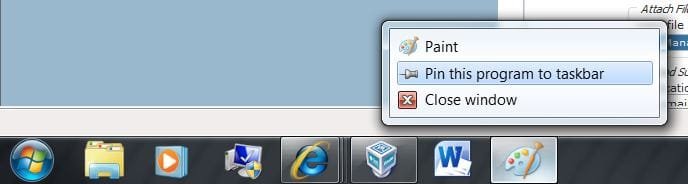
Maybe I just miss-read the OP, when you have Chrome open have you tried to right click the icon in the taskbar to see it you get this option?

click this image to enlarge
Pin.JPG
 

My Computer

Computer Manufacturer/Model Number
* BFK Customs *
OS
W 7 64-bit Ultimate
CPU
Intel Q9550 Yorkfield
Motherboard
ASUS P5Q Pro
Memory
8GB Dominator 8500C5D
Graphics Card(s)
ATI : XFX 5870
Sound Card
Realtek HD Audio 7-1
Monitor(s) Displays
1x 47" LCD HDMI & 3x 26" LCD HDMI
Screen Resolution
1920x1080P & 1920x1200
Hard Drives
1x 80GB Intel X25-M G2 SSD : 1x 500GB & 1x 640GB WD Caviar Black(s)
PSU
Corsair 620HX
Case
Cooler Master RC-690
Cooling
Tuniq Tower 120, 2x 140mm and 3x 120mm case fans
Keyboard
Microsoft 500
Mouse
Razer Diamondback 3G
Internet Speed
14 Mb/s
Other Info
1x Koutech 3Gb/s SATA HDD Hot Swap Rack
Yea I see those options when I have chrome open, but when I click on Pin program to taskbar nothing happens.
 

My Computer

OS
Windows 7
Have a good look at the tutorial at the link below to see if you're missing anything.

Also look through the "Related Tutorials" links at the bottom of the tutorial.


Taskbar - Pin or Unpin Program Links
 

My Computer

Computer Manufacturer/Model Number
* BFK Customs *
OS
W 7 64-bit Ultimate
CPU
Intel Q9550 Yorkfield
Motherboard
ASUS P5Q Pro
Memory
8GB Dominator 8500C5D
Graphics Card(s)
ATI : XFX 5870
Sound Card
Realtek HD Audio 7-1
Monitor(s) Displays
1x 47" LCD HDMI & 3x 26" LCD HDMI
Screen Resolution
1920x1080P & 1920x1200
Hard Drives
1x 80GB Intel X25-M G2 SSD : 1x 500GB & 1x 640GB WD Caviar Black(s)
PSU
Corsair 620HX
Case
Cooler Master RC-690
Cooling
Tuniq Tower 120, 2x 140mm and 3x 120mm case fans
Keyboard
Microsoft 500
Mouse
Razer Diamondback 3G
Internet Speed
14 Mb/s
Other Info
1x Koutech 3Gb/s SATA HDD Hot Swap Rack
Have a good look at the tutorial at the link below to see if you're missing anything.

Also look through the "Related Tutorials" links at the bottom of the tutorial.


Taskbar - Pin or Unpin Program Links

Tutorial is not working for me. When I right click chrome(when its not open) I don't see Pin program to taskbar or startmenu, but when I shift-rightclick on chrome I only see pin program to start menu...

I also tried Enable_Taskbar_Pinned_Programs.zip from Related Tutorials before I made this thread.
 
Last edited:

My Computer

OS
Windows 7
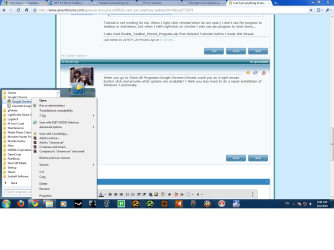
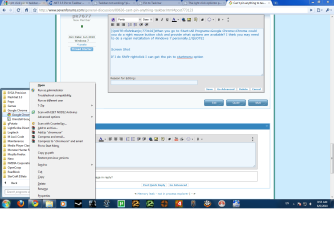
When you go to Start>All Programs>Google Chrome>Chrome could you do a right mouse button click and provide what options are available? I think you may need to do a repair installation of Windows 7 personally.
 

My Computer

Computer Manufacturer/Model Number
DELL XPS Studio 435T
OS
Vista 64 Ultimate, Windows 7 64 Ultimate, Ubuntu 9.10
CPU
i7 975 3.3 GHz Extreme (Factory OC'd to 3.6 GHz)
Motherboard
DELL provided
Memory
18 Gb Tri-Channel 1066
Graphics Card(s)
ATI 5970 2048 Mb
Sound Card
X-Fi Extreme Gamer
Monitor(s) Displays
Vizio 37" HD-TV
Screen Resolution
1920 x 1080
Hard Drives
1.5 Tb HDD
1.5 Tb HDD
2.0 Tb Network Drive
512 Gb Crucial SSD
PSU
DELL Provided 475 watts
Case
DELL
Cooling
3 fans
Keyboard
Logitech Performance K350 Wireless
Mouse
Logitech Performance MX Wireless
Internet Speed
3 Mb up 750 Kb down
Other Info
Bamboo Fun Tablet, Belkin N+ Wireless router, Pioneer Dolby System Wireless Headphones, Bose 5.1 Dolby Surround Sound System, LifeCam VX 3000 Webcam, Blu-Ray/Hi Def DVD +RW combo and Blu-ray +RW,l 15 in 1 media card reader, Logitech Rumblepad 2, Hauppauge 2250 DTV Tuner with MS Media Center Remote

Laptop:Alienware M17x, Q9100 CPU, 8Gb RAM, 1920x1200 WUXGA LCD driven by 4870's in CrossFireX, Bl
When you go to Start>All Programs>Google Chrome>Chrome could you do a right mouse button click and provide what options are available? I think you may need to do a repair installation of Windows 7 personally.


Screen Shot

If I do Shift-rightclick I can get the pin to startmenu option. I got my windows 7 online legit copy I don't have the disk so how can I do a repair install? Also does repair install take up a lot of space? My HD is kinda full.
 

Attachments

  • win7.png
    win7.png
    81.2 KB · Views: 35
  • win7-2.png
    win7-2.png
    69.5 KB · Views: 19

My Computer

OS
Windows 7
A repair install doesn't take up any space it simply reinstalls any corrupted files thereby repairing what is bad, did you place your Windows 7 on a DVD to have as backup?

Another thought is do all your programs do this or just Chrome? If all then a repair install is what I would do, if just Chrome I'd reload that.
 
Last edited by a moderator:

My Computer

Computer Manufacturer/Model Number
DELL XPS Studio 435T
OS
Vista 64 Ultimate, Windows 7 64 Ultimate, Ubuntu 9.10
CPU
i7 975 3.3 GHz Extreme (Factory OC'd to 3.6 GHz)
Motherboard
DELL provided
Memory
18 Gb Tri-Channel 1066
Graphics Card(s)
ATI 5970 2048 Mb
Sound Card
X-Fi Extreme Gamer
Monitor(s) Displays
Vizio 37" HD-TV
Screen Resolution
1920 x 1080
Hard Drives
1.5 Tb HDD
1.5 Tb HDD
2.0 Tb Network Drive
512 Gb Crucial SSD
PSU
DELL Provided 475 watts
Case
DELL
Cooling
3 fans
Keyboard
Logitech Performance K350 Wireless
Mouse
Logitech Performance MX Wireless
Internet Speed
3 Mb up 750 Kb down
Other Info
Bamboo Fun Tablet, Belkin N+ Wireless router, Pioneer Dolby System Wireless Headphones, Bose 5.1 Dolby Surround Sound System, LifeCam VX 3000 Webcam, Blu-Ray/Hi Def DVD +RW combo and Blu-ray +RW,l 15 in 1 media card reader, Logitech Rumblepad 2, Hauppauge 2250 DTV Tuner with MS Media Center Remote

Laptop:Alienware M17x, Q9100 CPU, 8Gb RAM, 1920x1200 WUXGA LCD driven by 4870's in CrossFireX, Bl
A repair install doesn't take up any space it simply reinstalls any corrupted files thereby repairing what is bad, did you place your Windows 7 on a DVD to have as backup?

Another thought is do all your programs do this or just Chrome? If all then a repair install is what I would do, if just Chrome I'd reload that.

Its all my programs, and yea I think im going to do a repair install. Thanks for the replies.
 

My Computer

OS
Windows 7

My Computer

Computer Manufacturer/Model Number
* BFK Customs *
OS
W 7 64-bit Ultimate
CPU
Intel Q9550 Yorkfield
Motherboard
ASUS P5Q Pro
Memory
8GB Dominator 8500C5D
Graphics Card(s)
ATI : XFX 5870
Sound Card
Realtek HD Audio 7-1
Monitor(s) Displays
1x 47" LCD HDMI & 3x 26" LCD HDMI
Screen Resolution
1920x1080P & 1920x1200
Hard Drives
1x 80GB Intel X25-M G2 SSD : 1x 500GB & 1x 640GB WD Caviar Black(s)
PSU
Corsair 620HX
Case
Cooler Master RC-690
Cooling
Tuniq Tower 120, 2x 140mm and 3x 120mm case fans
Keyboard
Microsoft 500
Mouse
Razer Diamondback 3G
Internet Speed
14 Mb/s
Other Info
1x Koutech 3Gb/s SATA HDD Hot Swap Rack
Back
Top