Can't remove bios supervisor password, please HELP ME!

Strahinja

New member
Local time
4:04 PM
Messages
6
Location
Serbia
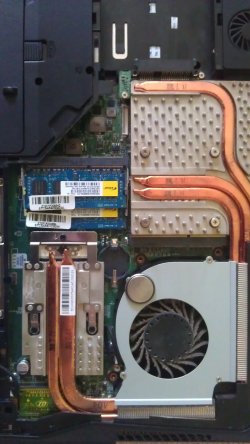
Please, help me guys i have one big problem.Half year ago i set bios supervisor password because of my roommates.Now when i want to delete the password i can't :( Only ask for pass when i want to go on bios setup...Bad is that i can't do anything in my bios and i can't remove my password.Nothing! I removed batery from my laptop motherboard and nothing happens :cry: MSi GX660 btw...Is there any type of software to remove password?
Sorry for my bad english...http://www.english-test.net/forum/ftopic152.htmlThanks in advancehttp://www.english-test.net/forum/ftopic152.html
 

Attachments

  • IMAG0413.jpg
    IMAG0413.jpg
    997.3 KB · Views: 10
  • IMAG0414.jpg
    IMAG0414.jpg
    445.7 KB · Views: 11

My Computer My Computer

OS
Windows 7 Ultimate SP1 x64
CPU
Inte Core 2 Duo E4400 2000MHz @ 2500MHz
Motherboard
Asus P5E
Memory
Kingstone 4Gb (2x2Gb)DDR 2 800MHz @ 1000MHz
Graphics Card(s)
GeForce Asus FX 8600GT 256Mb
Sound Card
SupremeFX II
Monitor(s) Displays
Samsung BW2032
Screen Resolution
1680x1050
Hard Drives
Maxtor 300Gb 7200 rpm
Maxtor 750Gb 7200 rpm
PSU
Cooler Master 600w
Case
Thermal Take Soprano RS
Keyboard
Genius Slim Star
Mouse
A4 Tech X7
Internet Speed
1Mb ADSL
Other Info
EPSON Stylus SX105
Leadtek WinFast TV2000 XP Expert
Please, help me guys i have one big problem.Half year ago i set bios supervisor password because of my roommates.Now when i want to delete the password i can't :( Only ask for pass when i want to go on bios setup...Bad is that i can't do anything in my bios and i can't remove my password.Nothing! I removed batery from my laptop motherboard and nothing happens :cry: MSi GX660 btw...Is there any type of software to remove password?
Sorry for my bad english...http://www.english-test.net/forum/ftopic152.htmlThanks in advancehttp://www.english-test.net/forum/ftopic152.html

Does this help;
 

Attachments

My Computer My Computer

Computer type
PC/Desktop
Computer Manufacturer/Model Number
Custom Built
OS
Windows 7 Professional x64
CPU
Intel i5 quad processor
Motherboard
DP67BG
Memory
16 GB
Graphics Card(s)
Radeon HD 5770
Sound Card
Realtek High Definition Audio
Monitor(s) Displays
Samsung SyncMaster
Screen Resolution
1920X1080
Hard Drives
WD 2TB (SATA Internal)
WD 1TB (USB External)
PSU
Corsair GS800
Case
Tower (Generic)
Cooling
3 Internal Fans
Keyboard
MS Wireless
Mouse
MS Optical Wired
Internet Speed
54 mbps
Antivirus
Emsisoft
Browser
IE-Version 9, Palemoon-Version 24.2.0
This is for P5E but the problem is with my laptop msi gx660
 

My Computer My Computer

OS
Windows 7 Ultimate SP1 x64
CPU
Inte Core 2 Duo E4400 2000MHz @ 2500MHz
Motherboard
Asus P5E
Memory
Kingstone 4Gb (2x2Gb)DDR 2 800MHz @ 1000MHz
Graphics Card(s)
GeForce Asus FX 8600GT 256Mb
Sound Card
SupremeFX II
Monitor(s) Displays
Samsung BW2032
Screen Resolution
1680x1050
Hard Drives
Maxtor 300Gb 7200 rpm
Maxtor 750Gb 7200 rpm
PSU
Cooler Master 600w
Case
Thermal Take Soprano RS
Keyboard
Genius Slim Star
Mouse
A4 Tech X7
Internet Speed
1Mb ADSL
Other Info
EPSON Stylus SX105
Leadtek WinFast TV2000 XP Expert
Scroll down to the middle of this page and select your language.> MSI Global ? Notebook - GX660

Then download the manual. It should tell you exactly how to change the password.
 

My Computer My Computer

Computer Manufacturer/Model Number
Hopalong/ Godzilla
OS
Windows7 Pro 64bit SP-1; Windows XP Pro 32bit
CPU
Intel Core i7-870 Lynnfield 2.93GHz LGA 1156 95W Quad-Core
Motherboard
ASUS P7P55D-E PRO
Memory
8GB@1400MHz Crucial Ballistix DDR3-1600 4x2GB
Graphics Card(s)
ASUS ENGTX460 DirectCU/2DI/1GD5 1GB 256-bit GDDR5
Sound Card
VIA Onboard
Monitor(s) Displays
Asus VS248H-P 24"; Samsung SyncMaster 941BW 19"ws
Screen Resolution
1920x1080; 1440x900
Hard Drives
Samsung 830 120GB SSD
Intel 320 120GB SSD
Western Digital Caviar Black WD7501AALS 750GB 7200 RPM SATA 3.0Gb/s
Western Digital Caviar Black WD6401AALS 640GB 7200 RPM SATA 3.0Gb/s
PSU
COOLER MASTER Silent Pro RS850-AMBAJ3-US 850W Modular
Case
COOLER MASTER HAF 932 RC-932-KKN5-GP Black
Cooling
Scythe "Mugen-2 Rev.B" (2 ScytheKaze-Jyuni PWM fans)
Keyboard
Logitech K-320
Mouse
Kensington
Antivirus
Avast Inernet Suite
Browser
IE 9 ; Chrome

My Computer My Computer

Computer type
PC/Desktop
Computer Manufacturer/Model Number
Custom Built
OS
Windows 7 Professional x64
CPU
Intel i5 quad processor
Motherboard
DP67BG
Memory
16 GB
Graphics Card(s)
Radeon HD 5770
Sound Card
Realtek High Definition Audio
Monitor(s) Displays
Samsung SyncMaster
Screen Resolution
1920X1080
Hard Drives
WD 2TB (SATA Internal)
WD 1TB (USB External)
PSU
Corsair GS800
Case
Tower (Generic)
Cooling
3 Internal Fans
Keyboard
MS Wireless
Mouse
MS Optical Wired
Internet Speed
54 mbps
Antivirus
Emsisoft
Browser
IE-Version 9, Palemoon-Version 24.2.0
Thanks, i will try now :) @Sir George thanks anyway ;-)
 

My Computer My Computer

OS
Windows 7 Ultimate SP1 x64
CPU
Inte Core 2 Duo E4400 2000MHz @ 2500MHz
Motherboard
Asus P5E
Memory
Kingstone 4Gb (2x2Gb)DDR 2 800MHz @ 1000MHz
Graphics Card(s)
GeForce Asus FX 8600GT 256Mb
Sound Card
SupremeFX II
Monitor(s) Displays
Samsung BW2032
Screen Resolution
1680x1050
Hard Drives
Maxtor 300Gb 7200 rpm
Maxtor 750Gb 7200 rpm
PSU
Cooler Master 600w
Case
Thermal Take Soprano RS
Keyboard
Genius Slim Star
Mouse
A4 Tech X7
Internet Speed
1Mb ADSL
Other Info
EPSON Stylus SX105
Leadtek WinFast TV2000 XP Expert
Nothing that can be solved my problem...Just written about led indicators, raid0 etc...I know how to change my password and i know my password but i cannot change because in my bios everything is grey colour which means no changing settings which is weird.First time i see that.Like on my pictures (scroll up). Anyone help me? :((
 

My Computer My Computer

OS
Windows 7 Ultimate SP1 x64
CPU
Inte Core 2 Duo E4400 2000MHz @ 2500MHz
Motherboard
Asus P5E
Memory
Kingstone 4Gb (2x2Gb)DDR 2 800MHz @ 1000MHz
Graphics Card(s)
GeForce Asus FX 8600GT 256Mb
Sound Card
SupremeFX II
Monitor(s) Displays
Samsung BW2032
Screen Resolution
1680x1050
Hard Drives
Maxtor 300Gb 7200 rpm
Maxtor 750Gb 7200 rpm
PSU
Cooler Master 600w
Case
Thermal Take Soprano RS
Keyboard
Genius Slim Star
Mouse
A4 Tech X7
Internet Speed
1Mb ADSL
Other Info
EPSON Stylus SX105
Leadtek WinFast TV2000 XP Expert
Nothing that can be solved my problem...Just written about led indicators, raid0 etc...I know how to change my password and i know my password but i cannot change because in my bios everything is grey colour which means no changing settings which is weird.First time i see that.Like on my pictures (scroll up). Anyone help me? :((

Then you have not used the correct password. If you read the manual from the link that was posted it says there are 2 Passwords. A User password that only allows Viewing of the BIOS settings and a Supervisor password that allows changes. Use the Supervisor password. you are now using the User Password.
 

My Computer My Computer

OS
7 x64
Laptop BIOS passwords are stored differently than on desktops. They are not erased by removing the BIOS battery. They use a different chip that doesn't require power to maintain whats written to it. Removing the BIOS battery will just mess up the date and time, and maybe the boot order, etc. Its done that way on purpose so that the password can't be easily bypassed if its lost or stolen. If you call the manufacturer and can prove ownership, they may be able to help you reset it. Otherwise you need to know what the password is to be able to change it. There are other ways but forum rules prevent prevent me from discussing them, as they could be used to hack into a laptop.
 

My Computer My Computer

Computer type
PC/Desktop
Computer Manufacturer/Model Number
Home Built
OS
Windows 10 Education 64 bit
CPU
AMD Phenom II X4 980 Black Edition Deneb 3.7GHz
Motherboard
Asus M4N68T-M V2 µATX Motherboard
Memory
8GB 4GBx2 Kingston PC10600 DDR3 1333 Memory
Graphics Card(s)
Zotac NVIDIA Geforce GT640 2 Gig DDR3 PCIe
Sound Card
VIA VT1708s High Definition Audio 8-channel Onboard
Monitor(s) Displays
22" LG E2242 1080p and 2 19" I-INC AG191D
Screen Resolution
1280x1024 - 1920x1080 - 1280x1024
Hard Drives
Crucial M100 256 GB SSD and 500 GB WD Blue SATA
PSU
Thermaltake TR 620
Case
Power Up Black ATX Mid-Tower Case
Cooling
Stock heatsink and fan
Keyboard
Logitech Wireless K350 Wave
Mouse
Logitech Wireless M570 Trackman Wheel
Internet Speed
80 Mbps Down 30 Mbps Up
Antivirus
Windows Defender
Browser
Internet Explorer 11
Other Info
HP DVD1040e Lightscribe - External USB2
Back
Top