Solved Can't resize my partition

Nayr747

Banned
Local time
4:14 PM
Messages
8
I'm trying to resize my C: partition so that I can create a separate 160 GB partition, but all of the options on MiniTool Partition Wizard are greyed out. And Disk manager is reporting 40 GB of possible space to shrink even though there's 259 GB free. I've reinstalled Wizard, defragged, and nothing works. The computer came with a backup partition that I incorporated into a single partition a long time ago, so that's the only thing I can think of that could have screwed something up.

Here's a screenshot of Wizard and disk manager if it helps:

ve5h4.jpg


2lrp5x.jpg


Thanks for any help!
 
Last edited by a moderator:

My Computer My Computer

Computer Manufacturer/Model Number
Samsung QX410-S02US
OS
Windows 7 Home Premium 64bit
CPU
Intel Core i5 M480
As far as Disk manager goes, it has to be continuous free space for it to be able to use it.
It sounds like you have [Files]{free space}[files]{free space}. The last free space being 40 GB. And depending on what the files are the standard windows defrag won't always move them. If they are in use and locked by a program it won't touch them. You'll likely have to boot up to a utility to do it and not run it from Windows. I'm not that familiar with the Mini tool so I can't tell if you are running it from Windows or bootable media.
 

My Computer My Computer

Computer type
PC/Desktop
Computer Manufacturer/Model Number
Home Built
OS
Windows 10 Education 64 bit
CPU
AMD Phenom II X4 980 Black Edition Deneb 3.7GHz
Motherboard
Asus M4N68T-M V2 µATX Motherboard
Memory
8GB 4GBx2 Kingston PC10600 DDR3 1333 Memory
Graphics Card(s)
Zotac NVIDIA Geforce GT640 2 Gig DDR3 PCIe
Sound Card
VIA VT1708s High Definition Audio 8-channel Onboard
Monitor(s) Displays
22" LG E2242 1080p and 2 19" I-INC AG191D
Screen Resolution
1280x1024 - 1920x1080 - 1280x1024
Hard Drives
Crucial M100 256 GB SSD and 500 GB WD Blue SATA
PSU
Thermaltake TR 620
Case
Power Up Black ATX Mid-Tower Case
Cooling
Stock heatsink and fan
Keyboard
Logitech Wireless K350 Wave
Mouse
Logitech Wireless M570 Trackman Wheel
Internet Speed
80 Mbps Down 30 Mbps Up
Antivirus
Windows Defender
Browser
Internet Explorer 11
Other Info
HP DVD1040e Lightscribe - External USB2
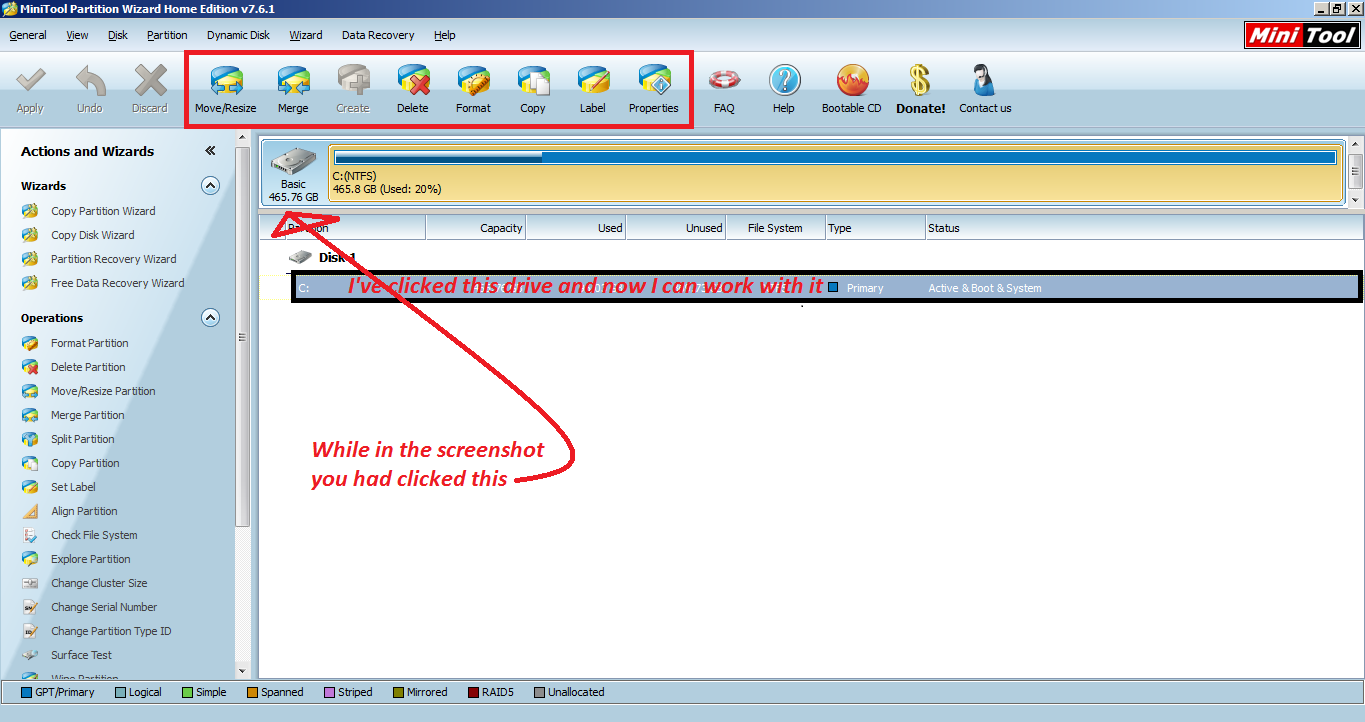
You just made a mistake, click the drive that needs extend from the list and all options should become available.
Without clicking:
9bd6570109174ed99db56c8.png

As you can see all options are greyed out, but after clicking they are all available.
iW8ps.png
 

My Computer My Computer

Computer type
Laptop
OS
Windows
When I click the 100 MB or the C: partitions, the only options available are Delete, Copy, and Properties. The 17.7 GB partition (which now shows up as "Samsung_Rec") does have all options other than Create available though. Btw, can I get rid of this last partition, or is it necessary?

I'm not using Wizard from boot. Would that help? I used Auslogics Disk Defrag, but I didn't do the optimization option. I couldn't find any options in that programs for degrag from boot. Do you know of any good programs that can do that?

I was starting to think the problem was caused by Trucrypt, but their documentation says that you can resize a partition on an encrypted system so it shouldn't be a problem. I'll decrypt it if I have to but it will take almost a day to complete so I'd love for that to not be the problem.
 

My Computer My Computer

Computer Manufacturer/Model Number
Samsung QX410-S02US
OS
Windows 7 Home Premium 64bit
CPU
Intel Core i5 M480
Have you tried to right click the drive > extend? If it's greyed out again then I would suggest that you delete the partition, extend the primary partition and re-split it
2.I got rid of the System Reserved partition and then I had to reinstall windows, I wouldn't advise you to do it.
3.I'd suggest trying out Iobit Smart Defrag it has boot time defrag for pagefile, hibernation file, MFT and system files.
 

My Computer My Computer

Computer type
Laptop
OS
Windows
Booting from what ever program you want to use to resize the partition will definitely help. If windows isn't running none of the files will be in use. If they are not in use they are not locked out and can be moved. Most portioning utilities are quit capable of moving files to free up space, provided the OS doesn't have them locked out.
 

My Computer My Computer

Computer type
PC/Desktop
Computer Manufacturer/Model Number
Home Built
OS
Windows 10 Education 64 bit
CPU
AMD Phenom II X4 980 Black Edition Deneb 3.7GHz
Motherboard
Asus M4N68T-M V2 µATX Motherboard
Memory
8GB 4GBx2 Kingston PC10600 DDR3 1333 Memory
Graphics Card(s)
Zotac NVIDIA Geforce GT640 2 Gig DDR3 PCIe
Sound Card
VIA VT1708s High Definition Audio 8-channel Onboard
Monitor(s) Displays
22" LG E2242 1080p and 2 19" I-INC AG191D
Screen Resolution
1280x1024 - 1920x1080 - 1280x1024
Hard Drives
Crucial M100 256 GB SSD and 500 GB WD Blue SATA
PSU
Thermaltake TR 620
Case
Power Up Black ATX Mid-Tower Case
Cooling
Stock heatsink and fan
Keyboard
Logitech Wireless K350 Wave
Mouse
Logitech Wireless M570 Trackman Wheel
Internet Speed
80 Mbps Down 30 Mbps Up
Antivirus
Windows Defender
Browser
Internet Explorer 11
Other Info
HP DVD1040e Lightscribe - External USB2
MiniTool partition wizard asks you to restart in order to split or resize the partition, It doesn't process live, after you restart it enters a boot mode and performs the actions there, Nayr747's problem is that the options are greyed out.Unselectable.
 

My Computer My Computer

Computer type
Laptop
OS
Windows
Extend is greyed out. Delete the samsung_rec partition? Will that affect anything negatively?

Yeah like Emoclaw said, they're all greyed out so I can't do anything. I guess I'll give Iobit a shot and report back.
 

My Computer My Computer

Computer Manufacturer/Model Number
Samsung QX410-S02US
OS
Windows 7 Home Premium 64bit
CPU
Intel Core i5 M480
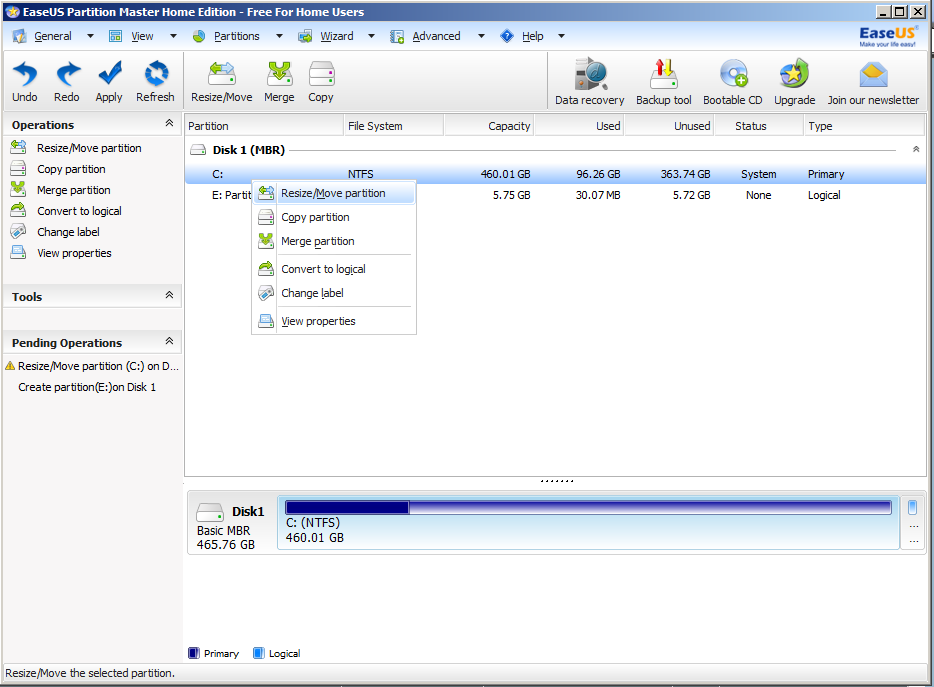
I believe that partition exists incase you want to backup, if there is no data in it then no, it wont affect anything.But if there is, I'd suggest that you keep it as it may contain important data from your manufacturer.If it has data I would suggest that you use EaseUS Partition Master Home Edition.Instructions with screenshots below.

1.In EaseUS, right click the C: drive and click Resize/Move
4G4Hr.png

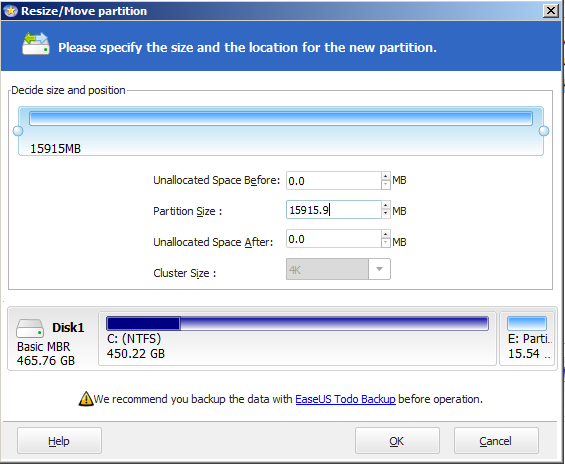
Edit the Partition Size according to how much you want the C: drive to have remained(Example, I have 470 GB and I want to extend the second partition by 10GB, I will change the Partition Size to 460)
lxhsc.png

And click ok
Now, right click the partition you want to extend(not the unallocated) and click Move/Resize
4CoeC.png

Now set Partition Size to the max(click the top arrow next to the white box)Till the blue bar above reaches the end
41PSz.png

And you are done.
 

My Computer My Computer

Computer type
Laptop
OS
Windows
Ok I just tried EaseUS and it won't let me resize either. And for some reason it's saying C: is unformatted.


My Computer My Computer

Computer Manufacturer/Model Number
Samsung QX410-S02US
OS
Windows 7 Home Premium 64bit
CPU
Intel Core i5 M480

My Computer My Computer

Computer type
PC/Desktop
Computer Manufacturer/Model Number
Built them myself, Science Experiments !
OS
Win7 Enterprise, Win7 x86 (Ult 7600), Win7 x64 Ult 7600, TechNet RTM on AMD x64 (2.8Ghz)
CPU
AMD fx8350 4ghz, AMD-32 2400mhz, AMD-64 3200mhz, AMDx64 2.8G
Motherboard
SIS 755, ECS-K8M890M-M (Ult 7600), GigaByte & others
Memory
2gb, 4gb on the Ult 7600, 4gb on Technet RTM, 32gb on FX8350
Graphics Card(s)
Draw my own Graphics, several nVidia cards
Sound Card
on motherboard
Monitor(s) Displays
19" flat scr, 28" I-Inc widescr,22" Emprex Widescr, 23" Acer
Screen Resolution
1280 x 1024, 1440 x 900, 1920 x 1080
Hard Drives
6 pata Ide HD's & 2 Sata HD's
added 80gb external on Ult 7600 computer,
numerous extra 1tb, 2TB, 3Tb SATA HD's
A collection of ext HD Docks w/ HDs
PSU
430w, 550w, 600w, 700, 800, etc
Case
All Generic Full Towers
Cooling
Open Air & a few fans, some w/ colored LEDs
Keyboard
Compaq & Dell recycled from GoodWill
Mouse
Made in China Optical Wired Mouse
Internet Speed
Fast Cable InterNet
Antivirus
AVG Free on 24 different Desktops, NO Problems!
Browser
IE 8 is preferred, but use FireFox sometimes
Other Info
Linksys Routers, switches, & Hubs
Too Many USB Flash Drives to count, Biggest is 64GB !
Eight computers in my home network.
Sixteen computers at my business network.
Linked via TeamViewer !
Lots of old used spare computer parts everywhere!

My Computer My Computer

Computer type
PC/Desktop
Computer Manufacturer/Model Number
Skylake Special #666
OS
Windows 10 Pro x64
CPU
Intel Core i7 6700K
Motherboard
Asus Sabertooth Z170 Mark 1
Memory
GSkill TridentZ RGB 16GB 3600 16-16-16-36
Graphics Card(s)
EVGA GTX 980 Ti SC x2
Sound Card
Realtek High Definition
Monitor(s) Displays
AOC G2460PG
Screen Resolution
1920 x 1080 144Hz
Hard Drives
Samsung 860 Pro 256GB, Seagate Barracuda 4TB x2
PSU
EVGA 1000 P2, EVGA White Custom Braided Cables
Case
Corsair Vengeance C70 Gunmetal Black
Cooling
Corsair H100i v2, Corsair ML120 x2, Thermal Grizzly Kryonaut
Keyboard
Logitech G910 Orion Spectrum
Mouse
Logitech G700s
Internet Speed
Verizon Fios Quantum Gateway 75/75
Antivirus
Windows Defender, Malwarebytes Free 3.8.3
Browser
Chrome
Other Info
Corsair SP120 x4, LG Blu-ray Drive, Durabrand HT-395 100 Watt Dolby Digital Amp, Corsair H2100 Wireless 7.1 Headset
Once you have the PW Boot disk, follow these steps for Partition Wizard Resize Partition Video Help.

I would keep the Samsung Recovery partition if you are still under warranty and might need to recover a Clean Reinstall to factory condition to ship it back for repairs as they sometimes require. If not under warranty and you have no interest in the Samsung bloatware, then you can delete it. This is best done during a Clean Reinstall - Factory OEM Windows 7 to reinstall just the OS without the crap.
 
With the bootable Partition Wizard disk I'm still only getting the Delete, Copy, and Properties options. All the other options are greyed out on all three partitions. I'll try a bootable defrag program, but is there anything else I could try? What about the rebuild MBR option?
 

My Computer My Computer

Computer Manufacturer/Model Number
Samsung QX410-S02US
OS
Windows 7 Home Premium 64bit
CPU
Intel Core i5 M480
I tried IObit Smart Defrag pre-boot and I still can't resize the partitions. Any other ideas?

Also just wanted to warn anyone that might be thinking of trying Smart Defrag that it installs malware no matter what you do during installation. I've been trying to get rid of it all for 2 days now and I still haven't gotten it all off. And don't download it from Cnet because that installs an adware called Coupon Companion. Will be using Softpedia from now on.
 

My Computer My Computer

Computer Manufacturer/Model Number
Samsung QX410-S02US
OS
Windows 7 Home Premium 64bit
CPU
Intel Core i5 M480
. The computer came with a backup partition that I incorporated into a single partition a long time ago, so that's the only thing I can think of that could have screwed something up.

Exactly what did you do with the Recovery partition? It must have messed up the partition table badly because I've never seen this type of failure before.

It's very unlikely Recovery will any longer run so I hope you made your Recovery media before ruining the partitioning. What I would do at this point is wipe the HD with Diskpart Clean Command to clear the partition table and boot sector of all code, then Clean Reinstall - Factory OEM Windows 7 which is a vastly superior install to the factory preinstall which no tech enthusiast would run.
 
It installed coupon companion because you didn`t uncheck it. You need to pay more attention to what you`re doing. Slow down :)
 

My Computer My Computer

Computer type
PC/Desktop
Computer Manufacturer/Model Number
Skylake Special #666
OS
Windows 10 Pro x64
CPU
Intel Core i7 6700K
Motherboard
Asus Sabertooth Z170 Mark 1
Memory
GSkill TridentZ RGB 16GB 3600 16-16-16-36
Graphics Card(s)
EVGA GTX 980 Ti SC x2
Sound Card
Realtek High Definition
Monitor(s) Displays
AOC G2460PG
Screen Resolution
1920 x 1080 144Hz
Hard Drives
Samsung 860 Pro 256GB, Seagate Barracuda 4TB x2
PSU
EVGA 1000 P2, EVGA White Custom Braided Cables
Case
Corsair Vengeance C70 Gunmetal Black
Cooling
Corsair H100i v2, Corsair ML120 x2, Thermal Grizzly Kryonaut
Keyboard
Logitech G910 Orion Spectrum
Mouse
Logitech G700s
Internet Speed
Verizon Fios Quantum Gateway 75/75
Antivirus
Windows Defender, Malwarebytes Free 3.8.3
Browser
Chrome
Other Info
Corsair SP120 x4, LG Blu-ray Drive, Durabrand HT-395 100 Watt Dolby Digital Amp, Corsair H2100 Wireless 7.1 Headset
Trucrypt < maybe messing things up?
 

My Computer My Computer

Computer type
PC/Desktop
Computer Manufacturer/Model Number
Home Built
OS
Windows 10 Education 64 bit
CPU
AMD Phenom II X4 980 Black Edition Deneb 3.7GHz
Motherboard
Asus M4N68T-M V2 µATX Motherboard
Memory
8GB 4GBx2 Kingston PC10600 DDR3 1333 Memory
Graphics Card(s)
Zotac NVIDIA Geforce GT640 2 Gig DDR3 PCIe
Sound Card
VIA VT1708s High Definition Audio 8-channel Onboard
Monitor(s) Displays
22" LG E2242 1080p and 2 19" I-INC AG191D
Screen Resolution
1280x1024 - 1920x1080 - 1280x1024
Hard Drives
Crucial M100 256 GB SSD and 500 GB WD Blue SATA
PSU
Thermaltake TR 620
Case
Power Up Black ATX Mid-Tower Case
Cooling
Stock heatsink and fan
Keyboard
Logitech Wireless K350 Wave
Mouse
Logitech Wireless M570 Trackman Wheel
Internet Speed
80 Mbps Down 30 Mbps Up
Antivirus
Windows Defender
Browser
Internet Explorer 11
Other Info
HP DVD1040e Lightscribe - External USB2

My Computer My Computer

Computer type
Laptop
Computer Manufacturer/Model Number
Dell \ Lenovo\ HP \ Toshiba
OS
W7, W8.1
Antivirus
MSE, Malwarebytes
Browser
FF
Exactly what did you do with the Recovery partition? It must have messed up the partition table badly because I've never seen this type of failure before.

From what I remember, it was just a backup partition for Samsung Backup (or something like that), which was one of the bloadwares from the factory. Since I already backup to an external hard drive, I didn't need the backup partition taking up about half the space on my HDD. So I think I just used disk manager or one of those partition programs to delete the partiton and increase the main partition's space. Or maybe I just combined them somehow. I can't really remember.

It's very unlikely Recovery will any longer run so I hope you made your Recovery media before ruining the partitioning. What I would do at this point is wipe the HD with Diskpart Clean Command to clear the partition table and boot sector of all code, then Clean Reinstall - Factory OEM Windows 7 which is a vastly superior install to the factory preinstall which no tech enthusiast would run.

I know it would be better for a lot of good reasons, but it just seems like a huge nightmare. I had to do that once on my old laptop and it took days to reinstall Windows, then try to find all the right drivers, etc., then reinstall all my many many programs, then redo all my customizations. And I'm worried that it still won't work right after all that. If I go that route, should I create a disk image in case it doesn't work?

Trucrypt < maybe messing things up?

If Truecrypt is in use, take a look in TrueCrypt - Free Open-Source Disk Encryption Software - Documentation - Issues & Limitations
Encrypted partitions cannot be resized except partitions on an entirely encrypted system drive that are resized while the encrypted operating system is running.

I do use TrueCrypt, but my entire system is encrypted rather than a particular partition so it shouldn't be a problem according to that. I would decrypt but it takes about 15 straight hours, so I'm trying to find an easier solution before I try that.
 

My Computer My Computer

Computer Manufacturer/Model Number
Samsung QX410-S02US
OS
Windows 7 Home Premium 64bit
CPU
Intel Core i5 M480
Back
Top