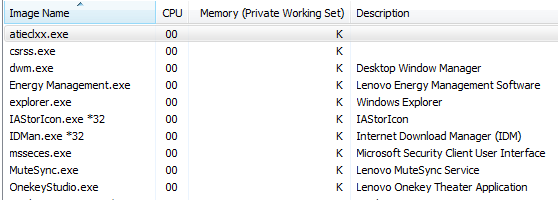
A auroraBorealis New member Local time 2:55 AM Messages 4 Oct 3, 2012 #1 I can't see some numbers in my task manager. May it be a serious malware etc. or is it an awkward malfunction? My Computer OSWindows 7 Home Premium 64bit
I can't see some numbers in my task manager. May it be a serious malware etc. or is it an awkward malfunction?
NoN New member Guru Gold Member VIP Local time 8:55 AM Messages 4,101 Location LostInSpace, Vol15 - Cool It Oct 3, 2012 #2 auroraBorealis said: I can't see some numbers in my task manager. May it be a serious malware etc. or is it an awkward malfunction? Click to expand... You can try those both tutorial first to see if it does fix the missing numbers... SFC /Scannow or SFC /SCANNOW : Run in Command Prompt at Boot My Computer Computer typePC/DesktopComputer Manufacturer/Model NumberCustom BuildOSWindows 7 Professional SP1 - x64 [Non-UEFI Boot]CPUIvy Bridge Core i5 3570K (Delidded)MotherboardAsus P8Z77-V LE PLUSMemoryG.Skill "Ares" DDR3 PC3-12800 - 1600MHz (16Gb)Graphics Card(s)Asus Dual-RX480-O4GSound CardCreative Sound Blaster Z w/5.1 sound systemMonitor(s) DisplaysAsus IPS 23"Screen Resolution16/9Hard DrivesInternal: 500Go Sata 6Gb/s (x2) 500Go Sata 3Gb/s (x2) SSD 60Go Sata 6Gb/sPSUIn Win C 900W Series 80+ PlatinumCaseThermaltake Chaser A71CoolingCustom Water Cooling LoopKeyboardCooler Master QuickFire XTiMouseRazer Imperator 2012 (4G)AntivirusMSEBrowserIE 11.0.xxx RtmOther Info"Raid0" with Intel Smart Response Technology (HDD/SSD)
auroraBorealis said: I can't see some numbers in my task manager. May it be a serious malware etc. or is it an awkward malfunction? Click to expand... You can try those both tutorial first to see if it does fix the missing numbers... SFC /Scannow or SFC /SCANNOW : Run in Command Prompt at Boot