Can't see updates in Windows Update.

bakalhau

New member
Local time
6:56 PM
Messages
1
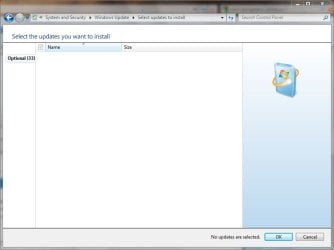
I've updated and selected updates in this window before, suddenly I can't see any updates there at all. WU tells me there's 33 optional updates available, when I click and the window to select those and install them appears I can't see any of them. =/ Check the attachment to see what I'm talking about. I've changed setting in Windows Update to see if that was the cause of the problem but it didn't help. Important updates (when I had them) weren't showing either... Help is appreciated. Thanks in advance.
 

Attachments
  • Capture.JPG
    Capture.JPG
    34.8 KB · Views: 1,266

My Computer My Computer

At a glance

Windows 7Old 1,1Ghz512mnRadeon 9600Pro
Computer Manufacturer/Model Number
HP
OS
Windows 7
CPU
Old 1,1Ghz
Motherboard
No idea
Memory
512mn
Graphics Card(s)
Radeon 9600Pro
Sound Card
Onboard
Monitor(s) Displays
Laptop, 1400x1050
Hard Drives
1x 40gb
I am having exactly the same problem.
Anyone?
 

My Computer My Computer

At a glance

WIN 7 x64E84004gb Corsair9800gtx+
Computer Manufacturer/Model Number
ASUS
OS
WIN 7 x64
CPU
E8400
Motherboard
P5Bdlx
Memory
4gb Corsair
Graphics Card(s)
9800gtx+
Sound Card
X-Fi
Monitor(s) Displays
samsung 22
PSU
tagan 600W
You guys might want to check the date in Windows and also in bios. Make sure the dates are current or the updates won't work correctly.
 

My Computer My Computer

At a glance

Windows 7 Ult, Windows 8.1 Pro,Q9650-4.275GHz, E8600 4.5GHz, E6750-3.8GHzG.Skill PC2 9600 1200Mhz 5 5 5 15 2TGTX480
Computer type
PC/Desktop
Computer Manufacturer/Model Number
Home built
OS
Windows 7 Ult, Windows 8.1 Pro,
CPU
Q9650-4.275GHz, E8600 4.5GHz, E6750-3.8GHz
Motherboard
Evga 780i FTW
Memory
G.Skill PC2 9600 1200Mhz 5 5 5 15 2T
Graphics Card(s)
GTX480
Sound Card
Asus Xonar D2
Monitor(s) Displays
HannsG
Screen Resolution
1680X1050
Hard Drives
GSkill Phoenix Pro 120GB SSD
PSU
ThermalTake Toughpower 1000Watt modular
Case
ThermalTake XaserV
Cooling
Xigmatek S1283
Keyboard
Logitech G15
Mouse
Logitech G9
Internet Speed
T1
I also experienced the same.
Restarted and all was good.
 

My Computer My Computer

At a glance

Win 7 Ultimate | 32 BitIntel Core 2 Duo T7400@2167 MHz2 GBnVIDIA GeForce Go 7400 128 MB
Computer Manufacturer/Model Number
Samsung X11 Pro Bennett
OS
Win 7 Ultimate | 32 Bit
CPU
Intel Core 2 Duo T7400@2167 MHz
Memory
2 GB
Graphics Card(s)
nVIDIA GeForce Go 7400 128 MB
Mouse
Logitech V470 Bluetooth Mouse
I restarted several times since yesterday and it suddenly started working..
strange.
anyway thanks for the help
 

My Computer My Computer

At a glance

WIN 7 x64E84004gb Corsair9800gtx+
Computer Manufacturer/Model Number
ASUS
OS
WIN 7 x64
CPU
E8400
Motherboard
P5Bdlx
Memory
4gb Corsair
Graphics Card(s)
9800gtx+
Sound Card
X-Fi
Monitor(s) Displays
samsung 22
PSU
tagan 600W
Finally I found this thread, I'm having the same problem here. After restarting the system everything is fine. But after a while (I don't know what triggers the problem) the updates are not visible again (like in the screenshot above).

So any idea what causes the problem and how to fix it? Could it be possible to reinstall the Update agent?

I use Win7 Pro final.
 

My Computer My Computer

At a glance

Windows 7 Professional (32bit)3GBATi Mobility Radeon X1300
Computer Manufacturer/Model Number
Thinkpad T60
OS
Windows 7 Professional (32bit)
Memory
3GB
Graphics Card(s)
ATi Mobility Radeon X1300
Hard Drives
200GB
You guys might want to check the date in Windows and also in bios. Make sure the dates are current or the updates won't work correctly.
Anyone posting that they are experiencing the same problem MUST clarify if they have attempted any of the known fixes or suggestions.

I discovered yesterday that the Windows Time service on my fresh install was disabled.
 
Ok, how do I check this? Of course, time and date displayed in the systray are correct. On the next reboot I can check Bios time although I don't see how this could be wrong time since I never changed it and I think it was ok before.

What services exactly do I have to check? I use a German Win7 version. Unfortunately the service names are German. But in their properties I can see the english name I think. There is a service called "Windows-Zeitgeber" (something like Windows-TimeGenerator in english), the name in properties is "W32Time". It is set to start "manually" (not automatically...?). But it IS started... so is here a problem?
 

My Computer My Computer

At a glance

Windows 7 Professional (32bit)3GBATi Mobility Radeon X1300
Computer Manufacturer/Model Number
Thinkpad T60
OS
Windows 7 Professional (32bit)
Memory
3GB
Graphics Card(s)
ATi Mobility Radeon X1300
Hard Drives
200GB
No ideas? Could someone answer my last questions?
 

My Computer My Computer

At a glance

Windows 7 Professional (32bit)3GBATi Mobility Radeon X1300
Computer Manufacturer/Model Number
Thinkpad T60
OS
Windows 7 Professional (32bit)
Memory
3GB
Graphics Card(s)
ATi Mobility Radeon X1300
Hard Drives
200GB
By the way: I checked the time in BIOS. As I expected there is nothing wrong, time and date are correct. So there has to be another explanation.
 

My Computer My Computer

At a glance

Windows 7 Professional (32bit)3GBATi Mobility Radeon X1300
Computer Manufacturer/Model Number
Thinkpad T60
OS
Windows 7 Professional (32bit)
Memory
3GB
Graphics Card(s)
ATi Mobility Radeon X1300
Hard Drives
200GB
You guys might want to check the date in Windows and also in bios. Make sure the dates are current or the updates won't work correctly.
Anyone posting that they are experiencing the same problem MUST clarify if they have attempted any of the known fixes or suggestions.

I discovered yesterday that the Windows Time service on my fresh install was disabled.

I had to suggest that because when the time is off those updates won't work at all. I've seen the time service flake out before also.

Thanks for pointing this out Antman. ;)

By the way guys, those 33 updates are only the language packs so if you don't need the language pack don't bother with those.
 

My Computer My Computer

At a glance

Windows 7 Ult, Windows 8.1 Pro,Q9650-4.275GHz, E8600 4.5GHz, E6750-3.8GHzG.Skill PC2 9600 1200Mhz 5 5 5 15 2TGTX480
Computer type
PC/Desktop
Computer Manufacturer/Model Number
Home built
OS
Windows 7 Ult, Windows 8.1 Pro,
CPU
Q9650-4.275GHz, E8600 4.5GHz, E6750-3.8GHz
Motherboard
Evga 780i FTW
Memory
G.Skill PC2 9600 1200Mhz 5 5 5 15 2T
Graphics Card(s)
GTX480
Sound Card
Asus Xonar D2
Monitor(s) Displays
HannsG
Screen Resolution
1680X1050
Hard Drives
GSkill Phoenix Pro 120GB SSD
PSU
ThermalTake Toughpower 1000Watt modular
Case
ThermalTake XaserV
Cooling
Xigmatek S1283
Keyboard
Logitech G15
Mouse
Logitech G9
Internet Speed
T1
You guys might want to check the date in Windows and also in bios. Make sure the dates are current or the updates won't work correctly.
Anyone posting that they are experiencing the same problem MUST clarify if they have attempted any of the known fixes or suggestions.

I discovered yesterday that the Windows Time service on my fresh install was disabled.

I had to suggest that because when the time is off those updates won't work at all. I've seen the time service flake out before also.

Thanks for pointing this out Antman. ;)

By the way guys, those 33 updates are only the language packs so if you don't need the language pack don't bother with those.

Yeah all nice. But basically you didn't read the OP. Problem is that updates are detected as available but their descriptions do not show up in the list in Windows Update. I have a really hard time seeing that time settings has anything to do with that. So you answers is basically noise.
 

My Computer My Computer

At a glance

Vista
OS
Vista
Experiencing the same problem. X available updates but the descriptions are not showing.
I'm not about to blindly install any updates on my system. Resetting the Update components can work, but I understand the problem reoccurs after a while for users who have tried this. Any leads on a permanent fix?
 

My Computer My Computer

At a glance

Windows 7 x64
OS
Windows 7 x64
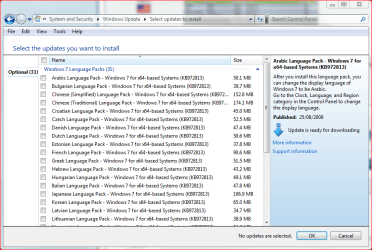
Those optional updates are LIP's (Windows Language Interface Pack). LIP's should only be available as optional updates if you are running Vista / Seven Ultimate or Enterprise editions. Other editions should not see these updates.

Currently there are 35 languages available, a normal one-language installation of Vista or Seven should therefore see 34 LIP's. The OP shows 32 available which is a bit curious; it basically indicates that one LIP is already installed on top of the original installation language.

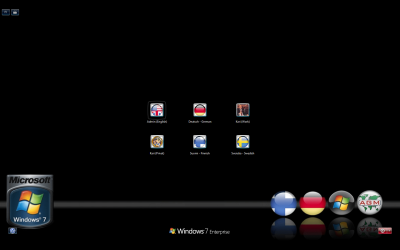
My Windows Update shows 31 available because I have installed German, Finnish and Swedish languages on top of my English Win7, thus making a system where user can login in four different languages:

LIP.PNG

kari_logonscreen.PNG

Kari
 

My Computer My Computer

At a glance

Windows 10 Pro x64 EN-GB1.6 GHz Intel Core i7-720QM Processor6 GBATI Mobility Radeon HD 5850 Graphics
Computer type
Laptop
Computer Manufacturer/Model Number
HP ENVY 17-1150eg
OS
Windows 10 Pro x64 EN-GB
CPU
1.6 GHz Intel Core i7-720QM Processor
Memory
6 GB
Graphics Card(s)
ATI Mobility Radeon HD 5850 Graphics
Sound Card
Beats sound system with integrated subwoofer
Monitor(s) Displays
17" laptop display, 22" LED and 32" Full HD TV through HDMI
Screen Resolution
1600*900 (1), 1920*1080 (2&3)
Hard Drives
Internal: 2 x 500 GB SATA Hard Disk Drive 7200 rpm
External: 2TB for backups, 3TB USB3 network drive for media
Cooling
As Envy runs a bit warm, I have it on a Cooler Master pad
Keyboard
Logitech diNovo Media Desktop Laser (bluetooth)
Mouse
Logitech Performance Mouse MX
Internet Speed
50/10 Mbps VDSL
Antivirus
Windows Defender 4.3.9431.0
Browser
Maxthon 3.5.2., IE11
Anyone posting that they are experiencing the same problem MUST clarify if they have attempted any of the known fixes or suggestions.

I discovered yesterday that the Windows Time service on my fresh install was disabled.

I had to suggest that because when the time is off those updates won't work at all. I've seen the time service flake out before also.

Thanks for pointing this out Antman. ;)

By the way guys, those 33 updates are only the language packs so if you don't need the language pack don't bother with those.

Yeah all nice. But basically you didn't read the OP. Problem is that updates are detected as available but their descriptions do not show up in the list in Windows Update. I have a really hard time seeing that time settings has anything to do with that. So you answers is basically noise.

His reply which, by the way, was given help with a problem is valid, not "noise". The time settings also include the date settings. From my own past experience, if the windows time is turned off, not working properly, or if there is a mismatch, update will not work properly.

Make sure the Windows time service is running.
 

My Computer My Computer

At a glance

Windows 7 Ultimate 32 bitIntel(R) Pentium(R) 4 CPU 3.00GHz2.50 GB RAMNVIDIA GeForce 7600 GS
Computer Manufacturer/Model Number
Home built
OS
Windows 7 Ultimate 32 bit
CPU
Intel(R) Pentium(R) 4 CPU 3.00GHz
Motherboard
ASUS P4P800-VM Motherboard Chipset: Intel 865G + ICH5
Memory
2.50 GB RAM
Graphics Card(s)
NVIDIA GeForce 7600 GS
Sound Card
SoundMax Integrated Digital Audio (Chip)
Monitor(s) Displays
ViewSonic VX 1962 wm
Screen Resolution
1680 X 1050
Hard Drives
Seagate Barracuda 7200.10 80 GB
ST380215A ATA Device 18.6 GB
Western Digital "My Book" external hard drive 750 GB
Cooling
Fan based
Keyboard
Microsoft Comfort Curve Keyboard 2000 v10 USB
Mouse
Logitec optic USB
Internet Speed
3.01 Mb/s download 0.64 Mb/s upload
@ Kari : Theese are "Important Updates", as one can see from the attached screenshot.
noupdates.png
 

My Computer My Computer

At a glance

Windows 7 x64
OS
Windows 7 x64
@ Kari : Theese are "Important Updates", as one can see from the attached screenshot.

My bad. Sorry. My post only explains those 30+ optional updates.

Kari
 

My Computer My Computer

At a glance

Windows 10 Pro x64 EN-GB1.6 GHz Intel Core i7-720QM Processor6 GBATI Mobility Radeon HD 5850 Graphics
Computer type
Laptop
Computer Manufacturer/Model Number
HP ENVY 17-1150eg
OS
Windows 10 Pro x64 EN-GB
CPU
1.6 GHz Intel Core i7-720QM Processor
Memory
6 GB
Graphics Card(s)
ATI Mobility Radeon HD 5850 Graphics
Sound Card
Beats sound system with integrated subwoofer
Monitor(s) Displays
17" laptop display, 22" LED and 32" Full HD TV through HDMI
Screen Resolution
1600*900 (1), 1920*1080 (2&3)
Hard Drives
Internal: 2 x 500 GB SATA Hard Disk Drive 7200 rpm
External: 2TB for backups, 3TB USB3 network drive for media
Cooling
As Envy runs a bit warm, I have it on a Cooler Master pad
Keyboard
Logitech diNovo Media Desktop Laser (bluetooth)
Mouse
Logitech Performance Mouse MX
Internet Speed
50/10 Mbps VDSL
Antivirus
Windows Defender 4.3.9431.0
Browser
Maxthon 3.5.2., IE11
Im also having this issue with windows updates. I have tried restarting several times, including going into windows updates as the first thing when the computer is done and there is still nothing there. So I am running sfc now and if that turns up empty then what??
 

My Computer My Computer

At a glance

Windows 7 Ultimate EditionAMD64 3500+2 gigs of memory (4 banks of 512 in DualChannel)Galaxy GF6600
Computer Manufacturer/Model Number
Homebuild
OS
Windows 7 Ultimate Edition
CPU
AMD64 3500+
Motherboard
Asus A8V-E Deluxe
Memory
2 gigs of memory (4 banks of 512 in DualChannel)
Graphics Card(s)
Galaxy GF6600
Sound Card
Soundblaster Live 1024
Monitor(s) Displays
Acer AL1717 & Packard Bell 24" WS
Hard Drives
Seagate and Western Digital
PSU
ThermalTake
Case
Codegen
Cooling
Regular Air Cooling
Possible Answer To No Windows 7 updates - Router

I've updated and selected updates in this window before, suddenly I can't see any updates there at all. WU tells me there's 33 optional updates available, when I click and the window to select those and install them appears I can't see any of them. =/ Check the attachment to see what I'm talking about. I've changed setting in Windows Update to see if that was the cause of the problem but it didn't help. Important updates (when I had them) weren't showing either... Help is appreciated. Thanks in advance.

I know this is an old thread, but given I have not seen a good response I will throw my 2 cents out there in hopes that it helps someone. I had a similar issue with updates that it was not allowing Win7 to download updates and was giving me the timeout error code. After further investigation I found that my anti-virus and malware programs were not able to update. Not sure if or how I may have obtained a virus I ran some offline virus packages to find nothing. I tested my firewall and found nothing. After some deep thought I stated to look at my hardware. The first thing I did was removed my router from the chain and direct connected my cable modem to my computer. Tested the update on Win 7 and presto it updated without a hitch, also my anti virus programs as well. Now, I'm getting with Linksys(Cisco) concerning my router to figure out where the denial of connection could be. I may update this thread when that is found. I hope this helps some one.

The Dawg
 

My Computer My Computer

At a glance

Windows 7 X64
OS
Windows 7 X64
Back
Top