Solved Caught a fakerean virus...

Jessicka

New member
Local time
3:13 AM
Messages
37
Location
Japan and Chicago
Hi, I have a little problem and I want to make sure my system is okay. I already had some help over here in a thread that was initially related to something totally different.

So taken from that thread, the steps I've done so far were:


  • Ran rkill - didn't help
  • ran unhide
  • was able to run rkill finally, it did something but the problem wasn't corrected
  • ran Malwarebytes and tdss and it found nothing
  • was able to run Fakerean removal tool (thanks to writhziden)
  • ran Malwarebytes again, didn't find anything
  • Ran sfc /scannow several times and it did not find any integrity violations

So at this point I am just wondering if I should run anything else, to make sure my system is clear of any further problems?

Looks like most of my icons are back but I want to make sure, but maybe some other scan will help remove any possible left over issues.

Thanks to whoever ends up helping me.
 

My Computer My Computer

OS
Windows 7 x64
CPU
Intel 3.5-3.9GHz Turbo LGA 115 Quad-Core Processor
Motherboard
Asus P8Z77-V Deluxe
Memory
16GB Kingston HyperX DDR3
Graphics Card(s)
Nvidia GTX 690 (not overclocked)
Sound Card
Creative SoundBlaster Recon3D
Monitor(s) Displays
Dell
Screen Resolution
1920x1200
Hard Drives
2TB
PSU
1.2 Kilowatt Corsair AX1200
Case
BitFenix
Cooling
Origin FrostByte 120 Sealed Liquid Cooling
Other Info
nothing is overclocked
Well your System appears to be OK for now.

However if you want to make 200% sure that all traces of the virus are gone then do a clean reinstall of Windows.
 

My Computer My Computer

Computer Manufacturer/Model Number
Custom Built
OS
Windows 7 Pro with SP1 32bit
Motherboard
Intel D845GVS1 X86-based PC
Memory
2 gigs of RAM
Graphics Card(s)
Intel(R) 82845G/GL/GE/PE/GV Graphics Controller
Sound Card
Realtek AC'97 Audio
Monitor(s) Displays
Samsung SyncMaster 931BF Black 19" LCD Monitor
Screen Resolution
1280X960
Hard Drives
1. SAMSUNG SP0822N ATA Device ~ 80 GigaBytes

2. Seagate FreeAgent Go USB Device ~ 500 GigaBytes
Keyboard
COMPAQ Standard PS/2 Keyboard
Mouse
iBall Laser Precise Speedster
Internet Speed
4 mb/sec
Hi Wanchoo,

Okay. I don't want to do a reinstall Windows 7 right now because I need it for work, but if you think it probably is clear, that's good enough. I was going to run rogue killer for any bad registry entries it might make, something I read on another site, but maybe it's not a wise idea?
 

My Computer My Computer

OS
Windows 7 x64
CPU
Intel 3.5-3.9GHz Turbo LGA 115 Quad-Core Processor
Motherboard
Asus P8Z77-V Deluxe
Memory
16GB Kingston HyperX DDR3
Graphics Card(s)
Nvidia GTX 690 (not overclocked)
Sound Card
Creative SoundBlaster Recon3D
Monitor(s) Displays
Dell
Screen Resolution
1920x1200
Hard Drives
2TB
PSU
1.2 Kilowatt Corsair AX1200
Case
BitFenix
Cooling
Origin FrostByte 120 Sealed Liquid Cooling
Other Info
nothing is overclocked
Sandboxie is your friend;)

I never have heard of it, how does that work? does it conflict with gaming or MSE. Would I need MSE still?
 

My Computer My Computer

OS
Windows 7 x64
CPU
Intel 3.5-3.9GHz Turbo LGA 115 Quad-Core Processor
Motherboard
Asus P8Z77-V Deluxe
Memory
16GB Kingston HyperX DDR3
Graphics Card(s)
Nvidia GTX 690 (not overclocked)
Sound Card
Creative SoundBlaster Recon3D
Monitor(s) Displays
Dell
Screen Resolution
1920x1200
Hard Drives
2TB
PSU
1.2 Kilowatt Corsair AX1200
Case
BitFenix
Cooling
Origin FrostByte 120 Sealed Liquid Cooling
Other Info
nothing is overclocked
Sandboxie plus vistas or 7s built in firewall will be strong enough to protect you without MSE if you so choose. But you might as well keep MSE since you have it.
WWW.SANDBOXIE.COM or youtube will explain how it works;)
 

My Computer My Computer

OS
win 7 64
Jessicka,

As for RogueKiller please don't install it. i have seen some bad press about it on the Net.

The only Registry Cleaner that is supported by the majority on these Forums is a part of cCleaner. You try that. Personally I jvPowerTools for cleaning the Registry and find it superb but it is a shareware program.
 

My Computer My Computer

Computer Manufacturer/Model Number
Custom Built
OS
Windows 7 Pro with SP1 32bit
Motherboard
Intel D845GVS1 X86-based PC
Memory
2 gigs of RAM
Graphics Card(s)
Intel(R) 82845G/GL/GE/PE/GV Graphics Controller
Sound Card
Realtek AC'97 Audio
Monitor(s) Displays
Samsung SyncMaster 931BF Black 19" LCD Monitor
Screen Resolution
1280X960
Hard Drives
1. SAMSUNG SP0822N ATA Device ~ 80 GigaBytes

2. Seagate FreeAgent Go USB Device ~ 500 GigaBytes
Keyboard
COMPAQ Standard PS/2 Keyboard
Mouse
iBall Laser Precise Speedster
Internet Speed
4 mb/sec
Jessicka,

As for RogueKiller please don't install it. i have seen some bad press about it on the Net.

The only Registry Cleaner that is supported by the majority on these Forums is a part of cCleaner. You try that. Personally I jvPowerTools for cleaning the Registry and find it superb but it is a shareware program.


Do you think I should try jvPowerTools then? I've never used a registry cleaner but I assume it is fairly straightforward?
 

My Computer My Computer

OS
Windows 7 x64
CPU
Intel 3.5-3.9GHz Turbo LGA 115 Quad-Core Processor
Motherboard
Asus P8Z77-V Deluxe
Memory
16GB Kingston HyperX DDR3
Graphics Card(s)
Nvidia GTX 690 (not overclocked)
Sound Card
Creative SoundBlaster Recon3D
Monitor(s) Displays
Dell
Screen Resolution
1920x1200
Hard Drives
2TB
PSU
1.2 Kilowatt Corsair AX1200
Case
BitFenix
Cooling
Origin FrostByte 120 Sealed Liquid Cooling
Other Info
nothing is overclocked
You can certainly try jvPowerTools. It is shareware but it works great.

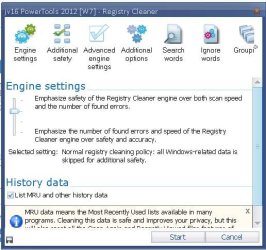
I have just started it and opened its Registry Cleaner for a screen-shot which is below.

Capture.JPG

As you can see it can clean the Registry at four levels of aggression. Level 2, which is the default is absolutely safe. I have tried the Level 4 for the heck of it and it did no damage to the system but I had as a precaution imaged the system beforehand in case anything went wrong. That is what I would advise you to do if you clean above the Level 2. I am saying this because if you did have a virus then it would have attacked the system related Registry entries and you may have to try cleaning above level 2 after you are confident about the use of the software. In that case please do make an image.

Good luck.
 

My Computer My Computer

Computer Manufacturer/Model Number
Custom Built
OS
Windows 7 Pro with SP1 32bit
Motherboard
Intel D845GVS1 X86-based PC
Memory
2 gigs of RAM
Graphics Card(s)
Intel(R) 82845G/GL/GE/PE/GV Graphics Controller
Sound Card
Realtek AC'97 Audio
Monitor(s) Displays
Samsung SyncMaster 931BF Black 19" LCD Monitor
Screen Resolution
1280X960
Hard Drives
1. SAMSUNG SP0822N ATA Device ~ 80 GigaBytes

2. Seagate FreeAgent Go USB Device ~ 500 GigaBytes
Keyboard
COMPAQ Standard PS/2 Keyboard
Mouse
iBall Laser Precise Speedster
Internet Speed
4 mb/sec
Thank you, I got it and am using it. This site and everyone on it is suprising me with alot of things I never even knew existed, so thanks for that, I really appreciate it. I hope to learn something here just hanging out in the shadows.
 
Last edited:

My Computer My Computer

OS
Windows 7 x64
CPU
Intel 3.5-3.9GHz Turbo LGA 115 Quad-Core Processor
Motherboard
Asus P8Z77-V Deluxe
Memory
16GB Kingston HyperX DDR3
Graphics Card(s)
Nvidia GTX 690 (not overclocked)
Sound Card
Creative SoundBlaster Recon3D
Monitor(s) Displays
Dell
Screen Resolution
1920x1200
Hard Drives
2TB
PSU
1.2 Kilowatt Corsair AX1200
Case
BitFenix
Cooling
Origin FrostByte 120 Sealed Liquid Cooling
Other Info
nothing is overclocked
Do not use registry cleaners or system tune up utilities. If you dont know what your doing , sooner or later there will be problems.
 

My Computer My Computer

OS
win 7 64
Back
Top