
Certain actions that require administrator permission don't work

IceEnderman

New member
Local time
11:45 PM
Messages
3
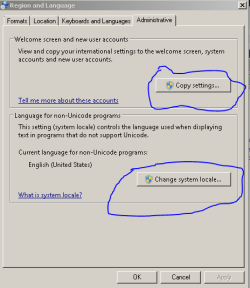
some actions that are on the control panel that require administrator permission simply don't work i just click the action or option and nothing happens i have been having this problem for a while now please help
note:this picture is an action that when i click it nothing happens
 

Attachments
  • help.PNG
    help.PNG
    8.4 KB · Views: 34

My Computer My Computer

Computer type
Laptop
Computer Manufacturer/Model Number
hp
OS
Windows ultimate x64
CPU
amd e-450
Motherboard
dont know
Memory
4 gb
Graphics Card(s)
amd
Hard Drives
500 gb
Antivirus
dont have
Browser
google chrome
Welcome to the forum. Are you logged in as an admin? If you right click on control panel and choose run as administrator does it work. Create a new admin user login and see if it works then this will tell us if your profile is corrupted
 

My Computer My Computer

Computer type
PC/Desktop
OS
win 8 32 bit
Welcome to the forum. Are you logged in as an admin? If you right click on control panel and choose run as administrator does it work. Create a new admin user login and see if it works then this will tell us if your profile is corrupted

I did all that and still not working
also not sure if it has anything to do with this but when I try to install languages instead of nothing happening it shows an error message that says "invalid syntax"
 

My Computer My Computer

Computer type
Laptop
Computer Manufacturer/Model Number
hp
OS
Windows ultimate x64
CPU
amd e-450
Motherboard
dont know
Memory
4 gb
Graphics Card(s)
amd
Hard Drives
500 gb
Antivirus
dont have
Browser
google chrome
Try from an administrative CMD prompt


Sfc /scannow
Chkdsk c: /f


It will say locked test on start say yes and reboot
 

My Computer My Computer

Computer type
PC/Desktop
OS
win 8 32 bit
If User Account Control (UAC) was set to a maximum setting: It's difficult to fix and will cause bizarre issues like yours.

If you are logged in as an Administrator and are unable to access UAC: That's a huge sign that UAC was set to the max.

You should be able to boot up to safe mode and open the registry to either disable UAC (quick fix) or reduce it's 'level.'
 

My Computer My Computer

Computer type
Laptop
OS
Windows 7 Lite: Professional 64-bit
CPU
Intel amd64
Memory
4GB DDR3
Screen Resolution
1366 x 768
Hard Drives
5400 RPM
Browser
Google Chrome
Other Info
Computer programmer enthusiast and hobbyist
Try running these two commands from an administrative CMD prompt:
- sfc /scannow
- chkdsk c: /f

It will say locked test on start say yes and reboot

A slight variation of these (and preferably in this order) would be:
  • chkdsk C: /F /R /X
  • sfc /scannow /offbootdir=C:\ /offwindir=C:\Windows

You should restart your machine into "Windows Recovery Environment" (WinRE) or "Windows Setup" (from a USB/CD/DVD/whatever medium source) in order to execute these.

The first program (chkdsk - Check Disk) will scan the harddrive (in this case: the C drive) and attempt to 'fix it' and recover lost/damaged data.
The second program (sfc - System File Checker) will check the integrity of the currently loaded file system (everything) against a clean copy (from your specified offline directory of Windows).

From Windows setup: SHIFT + F10 will open a command prompt.
From there: You can use diskpart and then enter the command: list disk to see which disk # is the USB/CD-ROM/etc that the Windows setup is stored on.

If you need a better explanation or just want one to try it out (for whatever reason): Feel free to reply.
 

My Computer My Computer

Computer type
Laptop
OS
Windows 7 Lite: Professional 64-bit
CPU
Intel amd64
Memory
4GB DDR3
Screen Resolution
1366 x 768
Hard Drives
5400 RPM
Browser
Google Chrome
Other Info
Computer programmer enthusiast and hobbyist
If User Account Control (UAC) was set to a maximum setting: It's difficult to fix and will cause bizarre issues like yours.

If you are logged in as an Administrator and are unable to access UAC: That's a huge sign that UAC was set to the max.

You should be able to boot up to safe mode and open the registry to either disable UAC (quick fix) or reduce it's 'level.'

how do I disable it using the registry?
 

My Computer My Computer

Computer type
Laptop
Computer Manufacturer/Model Number
hp
OS
Windows ultimate x64
CPU
amd e-450
Motherboard
dont know
Memory
4 gb
Graphics Card(s)
amd
Hard Drives
500 gb
Antivirus
dont have
Browser
google chrome
how do I disable it using the registry?

Here's a cut-dry set of topical steps:
  • Reboot into Safe Mode
  • Open the registry editor
  • Navigate to: HKEY_LOCAL_MACHINE\SOFTWARE\Microsoft\Windows\CurrentVersion\Policies\System
  • Set the DWORD key EnableLUA to 0
  • Reboot

If for some reason the paths/keys do not exist: Create them.
 

My Computer My Computer

Computer type
Laptop
OS
Windows 7 Lite: Professional 64-bit
CPU
Intel amd64
Memory
4GB DDR3
Screen Resolution
1366 x 768
Hard Drives
5400 RPM
Browser
Google Chrome
Other Info
Computer programmer enthusiast and hobbyist
Here's a cut-dry set of topical steps:
  • Reboot into Safe Mode
  • Open the registry editor
  • Navigate to: HKEY_LOCAL_MACHINE\SOFTWARE\Microsoft\Windows\CurrentVersion\Policies\System
  • Set the DWORD key EnableLUA to 0
  • Reboot

If for some reason the paths/keys do not exist: Create them.
Also, Option Two in the below link allows you to do the above with one click. The files work in Win10 or Win7
Enable or Disable User Account Control (UAC) in Windows | Tutorials
 

My Computer My Computer

Computer type
PC/Desktop
Computer Manufacturer/Model Number
diy
OS
Win7 pro x64
CPU
stock i7 7700k
Motherboard
Gigabyte Z270N-WIFI mini-ITX
Memory
Corsair Vengeance LPX 16GB (2x8GB) DDR4 @ 3200MHz
Graphics Card(s)
integrated Intel HD 630
Sound Card
onboard Realtek ALC1220
Monitor(s) Displays
two vertically mounted samsung 55" 4k un55mu8000
Screen Resolution
1920x1280
Hard Drives
256GB Samsung EVO 960 M.2 pci-e NVMe SSD
PSU
SilverStone Nightjar ST45NF 450Watt Fanless
Case
No case. Motherboard is mounted directly onto power supply
Cooling
Evercool low profile 815EP with Panaflow 12L fan at 7v
Keyboard
Ortek MCK-86 mini
Mouse
Belkin 5-button USB
Internet Speed
spectrum 400mbps

My Computer My Computer

Computer type
Laptop
OS
Windows 7 Lite: Professional 64-bit
CPU
Intel amd64
Memory
4GB DDR3
Screen Resolution
1366 x 768
Hard Drives
5400 RPM
Browser
Google Chrome
Other Info
Computer programmer enthusiast and hobbyist
Back
Top