change font problem

polare

New member
Local time
5:31 PM
Messages
7
How to change font size in windows 7, I can't see all options on some programs.
I have already tried Adjust screen resolution / Adjust font size (DPI) but no luck there. And I have tried Change color scheme, no luck there either.. :mad::mad:

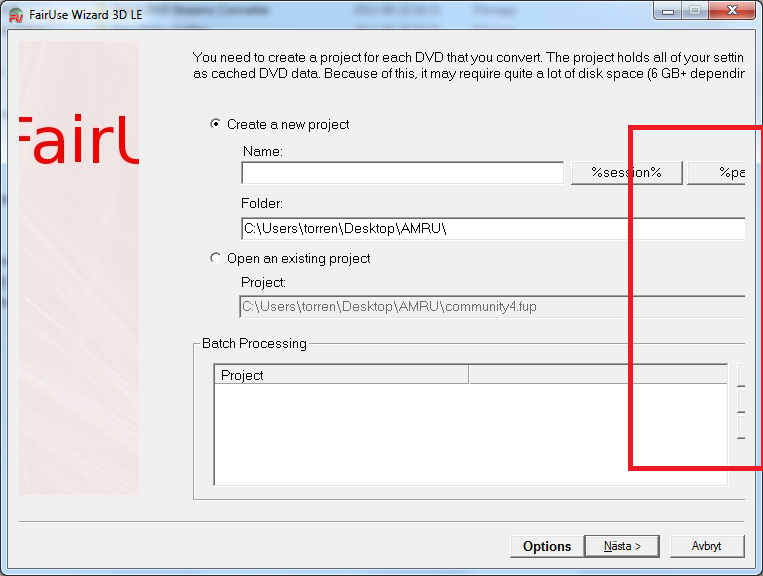
This is how it looks like when I open the program, as you can see there are some buttons missing like "Open Video File button", "Output Folder button" because the File Info is overlapping the buttons.
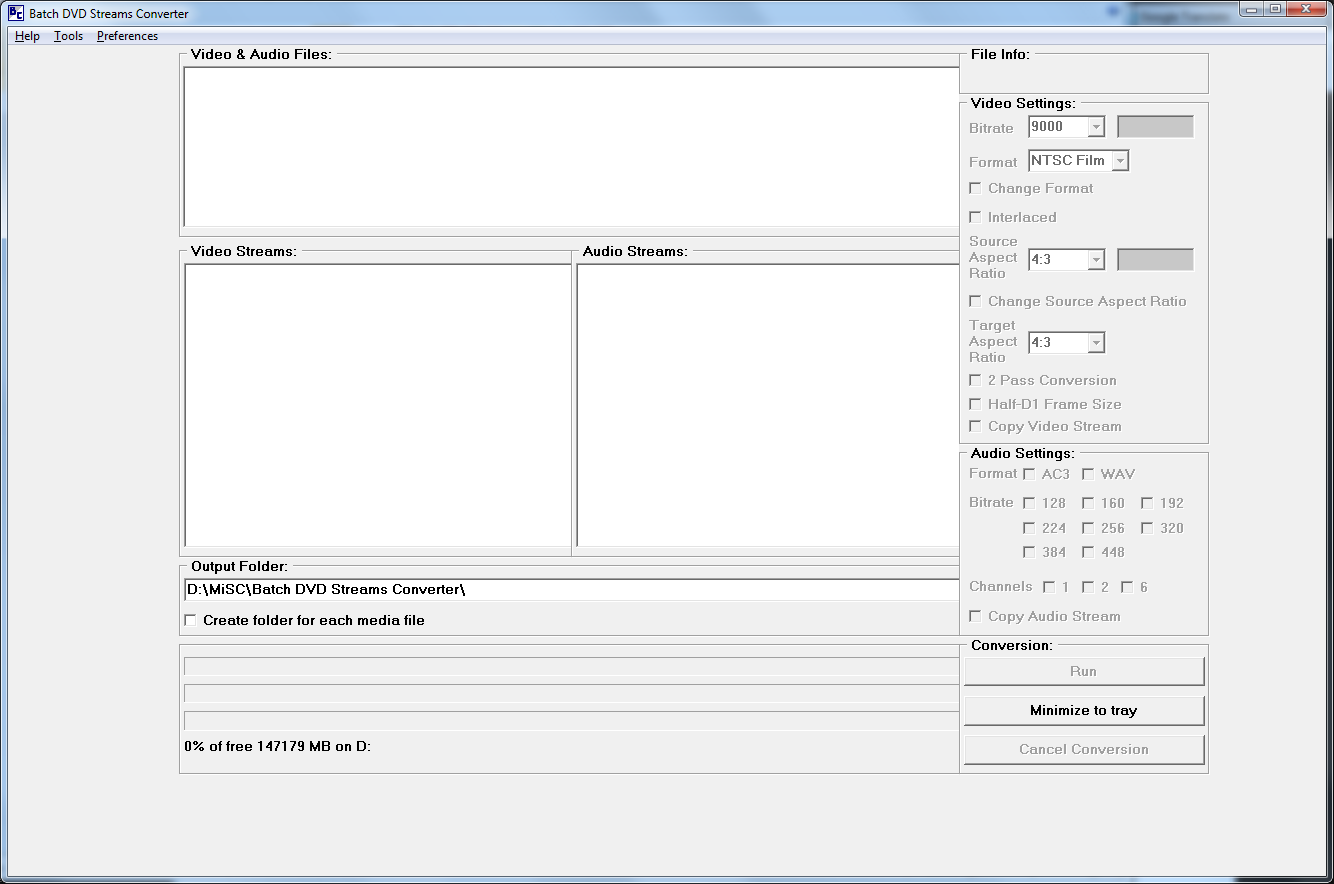

Please help me!
 

My Computer

OS
google
Welcome to Seven Forums polare. It's hard to say from your picture because it looks normal. You say some buttons are missing, so I will assume you are right. Assuming this is a font size issue, have a look at this and see if you find any help:

http://www.sevenforums.com/tutorials/1175-fonts-change.html

Otherwise, the settings are set by the individual program.

A Guy
 

My Computer

Computer type
PC/Desktop
OS
Windows 10 Home x64
CPU
INTEL Core i5-750 Quad-Core 3.37GHz
Motherboard
ASUS P7P55D
Memory
HyperX Fury Black Series 8GB (2 x 4GB) 1866Mhz
Graphics Card(s)
EVGA GeForce GTX 750 Superclocked 1GB 128-Bit GDDR5
Monitor(s) Displays
LG 32MA68HY 32" IPS
Screen Resolution
1920 x 1080
Hard Drives
Samsung 840 Evo 120GB, SEAGATE 500GB Barracuda® 7200.12, SATA 3 Gb/s, 7200 RPM, 16MB cache
PSU
ANTEC TruePower New TP-550, 80 PLUS, 550W
Case
ANTEC Three Hundred Illusion
Cooling
COOLER MASTER Hyper 212 Plus, 4 x 120mm 1 x 140mm Noctua's
Internet Speed
85 + Mbps
Antivirus
Avast
Browser
Vivaldi
Unfortunately it did not fix the problem. Took a new picture of the program where it is clearly visible. It's the same problem in all programs.. :(

As you can see It cuts off some options.

RZoUk.png
 

My Computer

OS
google
have you got clear type turned on .
in the start search box type "adjust clear Type text" and see if it is turned on, there should be a checkbox that says turn it off,(if it is on ) and vice versa.
if it is on turn it off and see if that helps.
 

My Computer

Computer Manufacturer/Model Number
Hewlett packard/p6512uk
OS
Microsoft Windows 7 Home Premium 64-bit 7600
CPU
IIx4 amd athelon 635 processor
Motherboard
FOXCONN 2AA9
Memory
2x2gb
Graphics Card(s)
ati radeon HD 5450
Sound Card
(1) Realtek High Definition Audio (2) AMD High Definition
Monitor(s) Displays
samsung lcd tv 32"
Screen Resolution
1360x 768
Hard Drives
(1) WDC WD10 01FAES-60Z2A0 SATA Disk Device (2) Maxtor OneTouch USB Device (3) ST310003 33AS USB Device (4) WD My Book 1111 USB Device
PSU
?
Cooling
air!
Keyboard
wireless hp
Mouse
wireless Hp,optical
Internet Speed
1.10mb/s
Antivirus
MSE
Browser
Firefox
have you got clear type turned on .
in the start search box type "adjust clear Type text" and see if it is turned on, there should be a checkbox that says turn it off,(if it is on ) and vice versa.
if it is on turn it off and see if that helps.

It was on, but still no changes..
 

My Computer

OS
google
That doesn't look like a font issue, looks more like a resoultion/DPI issue?

A Guy
 

My Computer

Computer type
PC/Desktop
OS
Windows 10 Home x64
CPU
INTEL Core i5-750 Quad-Core 3.37GHz
Motherboard
ASUS P7P55D
Memory
HyperX Fury Black Series 8GB (2 x 4GB) 1866Mhz
Graphics Card(s)
EVGA GeForce GTX 750 Superclocked 1GB 128-Bit GDDR5
Monitor(s) Displays
LG 32MA68HY 32" IPS
Screen Resolution
1920 x 1080
Hard Drives
Samsung 840 Evo 120GB, SEAGATE 500GB Barracuda® 7200.12, SATA 3 Gb/s, 7200 RPM, 16MB cache
PSU
ANTEC TruePower New TP-550, 80 PLUS, 550W
Case
ANTEC Three Hundred Illusion
Cooling
COOLER MASTER Hyper 212 Plus, 4 x 120mm 1 x 140mm Noctua's
Internet Speed
85 + Mbps
Antivirus
Avast
Browser
Vivaldi
have you rebooted since turning off the clear type text?
 

My Computer

Computer Manufacturer/Model Number
Hewlett packard/p6512uk
OS
Microsoft Windows 7 Home Premium 64-bit 7600
CPU
IIx4 amd athelon 635 processor
Motherboard
FOXCONN 2AA9
Memory
2x2gb
Graphics Card(s)
ati radeon HD 5450
Sound Card
(1) Realtek High Definition Audio (2) AMD High Definition
Monitor(s) Displays
samsung lcd tv 32"
Screen Resolution
1360x 768
Hard Drives
(1) WDC WD10 01FAES-60Z2A0 SATA Disk Device (2) Maxtor OneTouch USB Device (3) ST310003 33AS USB Device (4) WD My Book 1111 USB Device
PSU
?
Cooling
air!
Keyboard
wireless hp
Mouse
wireless Hp,optical
Internet Speed
1.10mb/s
Antivirus
MSE
Browser
Firefox
have you rebooted since turning off the clear type text?

Yes, no luck..

That doesn't look like a font issue, looks more like a resoultion/DPI issue?

A Guy

I think so too, but I can't find any "guide" on how to fix It. As I said in the first post, I have already tried Adjust screen resolution / Adjust font size (DPI) but no luck there. And I have tried Change color scheme, no luck there either.
 

My Computer

OS
google
Is this one particular program? If so, and it is a free download, let us know the info, and I will install it and look. A Guy
 

My Computer

Computer type
PC/Desktop
OS
Windows 10 Home x64
CPU
INTEL Core i5-750 Quad-Core 3.37GHz
Motherboard
ASUS P7P55D
Memory
HyperX Fury Black Series 8GB (2 x 4GB) 1866Mhz
Graphics Card(s)
EVGA GeForce GTX 750 Superclocked 1GB 128-Bit GDDR5
Monitor(s) Displays
LG 32MA68HY 32" IPS
Screen Resolution
1920 x 1080
Hard Drives
Samsung 840 Evo 120GB, SEAGATE 500GB Barracuda® 7200.12, SATA 3 Gb/s, 7200 RPM, 16MB cache
PSU
ANTEC TruePower New TP-550, 80 PLUS, 550W
Case
ANTEC Three Hundred Illusion
Cooling
COOLER MASTER Hyper 212 Plus, 4 x 120mm 1 x 140mm Noctua's
Internet Speed
85 + Mbps
Antivirus
Avast
Browser
Vivaldi
Is this one particular program? If so, and it is a free download, let us know the info, and I will install it and look. A Guy


No I have the same problem with 70% of all programs I have to use for my work and I can't do a thing.. Try download the one I show in the pic here: FairUse Wizard
(Trialware)
 

My Computer

OS
google

My Computer

Computer type
PC/Desktop
OS
Windows 10 Home x64
CPU
INTEL Core i5-750 Quad-Core 3.37GHz
Motherboard
ASUS P7P55D
Memory
HyperX Fury Black Series 8GB (2 x 4GB) 1866Mhz
Graphics Card(s)
EVGA GeForce GTX 750 Superclocked 1GB 128-Bit GDDR5
Monitor(s) Displays
LG 32MA68HY 32" IPS
Screen Resolution
1920 x 1080
Hard Drives
Samsung 840 Evo 120GB, SEAGATE 500GB Barracuda® 7200.12, SATA 3 Gb/s, 7200 RPM, 16MB cache
PSU
ANTEC TruePower New TP-550, 80 PLUS, 550W
Case
ANTEC Three Hundred Illusion
Cooling
COOLER MASTER Hyper 212 Plus, 4 x 120mm 1 x 140mm Noctua's
Internet Speed
85 + Mbps
Antivirus
Avast
Browser
Vivaldi
Downloaded and installed, and it does display ok on my system.

View attachment 219743

Can you grab a corner of the window and drag the display bigger?

What is your DPI and resolution? We have no specs for you, only Google OS??

http://www.sevenforums.com/tutorials/180324-system-info-see-your-system-specs.html

A Guy

No It's a non-resizable window, my DPI is set on 100% 1920x1080.

CPU: Intel(R) Core(TM) i7-3610QM CPU @ 2.30GHz
Motherboard: Micro-Star International Co., Ltd. MS-1756
BIOS: MSI GE70 0NC E1756IMS Ver:1.05 MSI-Notebook
SOUND CARD: (1) Realtek High Definition Audio (2) Intel(R)
GRAPHICS CARD: (1) Intel(R) HD Graphics 4000 (2) NVIDIA GeForce GT 650M
OS: Microsoft Windows 7 Home Premium 64-bit 7601 Multiprocessor Free Service Pack 1
 

My Computer

OS
google
Very odd, I have my DPI at 125%, but you say you tried that, and it really shouldn't make a difference. It isn't an individual program issue...I'm a bit stumped. I'll see if anyone else has any ideas for you. hang in there.

Have you played with the advanced appearance items?

http://www.sevenforums.com/tutorials/282-window-color-appearance-change.html

Border padding, menu or message box fonts? It will affect the whole system, so not original settings. It shouldn't be necessary, but it may lend some clues.

A Guy
 

My Computer

Computer type
PC/Desktop
OS
Windows 10 Home x64
CPU
INTEL Core i5-750 Quad-Core 3.37GHz
Motherboard
ASUS P7P55D
Memory
HyperX Fury Black Series 8GB (2 x 4GB) 1866Mhz
Graphics Card(s)
EVGA GeForce GTX 750 Superclocked 1GB 128-Bit GDDR5
Monitor(s) Displays
LG 32MA68HY 32" IPS
Screen Resolution
1920 x 1080
Hard Drives
Samsung 840 Evo 120GB, SEAGATE 500GB Barracuda® 7200.12, SATA 3 Gb/s, 7200 RPM, 16MB cache
PSU
ANTEC TruePower New TP-550, 80 PLUS, 550W
Case
ANTEC Three Hundred Illusion
Cooling
COOLER MASTER Hyper 212 Plus, 4 x 120mm 1 x 140mm Noctua's
Internet Speed
85 + Mbps
Antivirus
Avast
Browser
Vivaldi
What is the native resolution of your laptop?
How and when did this issue start?
 

My Computer

Computer type
PC/Desktop
Computer Manufacturer/Model Number
Home Built Desktop By DataTech
OS
Windows 7 Ultimate X64 SP1
CPU
Intel i5-2550K, Differing ~4.4-4.8GHz No built in GPU
Motherboard
ASUS P8Z68-V PRO/GEN3
Memory
16GB G.Skill Sniper 1866MHz @ 2133MHz 2x8GB
Graphics Card(s)
ASUS GTX650TIB-DC2OC-2GD5, (650TI Boost)
Sound Card
Onboard Realtek 5-1
Monitor(s) Displays
Samsung P2570HD
Screen Resolution
1920x1080
Hard Drives
Samsung 840 Pro 256GB SSD for OS, 500GB Seagate Constellation (Enterprise drive) for Data
PSU
Corsair HX650W
Case
Inwin Dragon Rider
Cooling
Hyper 212 EVO w/two Noctua fans, push-pull, @1300 RPM
Keyboard
E-Z Eyes, bright yellow keys with large characters
Mouse
steelseries SENSEI Laser Pro Gaming
Internet Speed
48-51Mbs Mbs down, 11 Mbs up Xfinity Cable
Antivirus
Norton Internet Security 2013
Browser
IE 10, Opera, Pale Moon if needed
Other Info
4 case fans, LG BluRay-RE, ASUS DVD-RW, Mr. Fusion power supply, 1.21 gigawatts.
Have you played with the advanced appearance items?

Border padding, menu or message box fonts? It will affect the whole system, so not original settings. It shouldn't be necessary, but it may lend some clues.

A Guy

Yes I have..

What is the native resolution of your laptop?
How and when did this issue start?

1920 x 1080 Full HD

http://www.bhphotovideo.com/c/product/854484-REG/MSI_GE70_0N_003US_GE70_0N_003US_17_3_Notebook.html

It was like this from start. Have tryed asking MSI but nothing..
 

My Computer

OS
google
Back
Top