Change shortcuts from library to real folder

grantemsley

New member
Local time
2:54 AM
Messages
3
Is there any way to change the shortcuts on the right side of the start menu (Documents, Pictures, Music) to use the real folders instead of the libraries?
 

My Computer My Computer

OS
Windows 7

My Computers My Computers

System One System Two

  • Computer type
    PC/Desktop
    Computer Manufacturer/Model Number
    The Beast Model A (homebrew)
    OS
    Windows 11 21H2 Current build
    CPU
    AMD Ryzen 9 3950X
    Motherboard
    MSI MEG X570 GODLIKE
    Memory
    4 * 32 GB - Corsair Vengeance 3600 MHz
    Graphics Card(s)
    EVGA GeForce RTX 3080 Ti XC3 ULTRA GAMING (12G-P5-3955-KR)
    Sound Card
    Realtek® ALC1220 Codec
    Monitor(s) Displays
    2x Eve Spectrum ES07D03 4K Gaming Monitor (Matte) | Eve Spec
    Screen Resolution
    3x 3840 x 2160
    Hard Drives
    3x Samsung 980 Pro NVMe PCIe 4 M.2 2 TB SSD (MZ-V8P2T0B/AM) } 3x Sabrent Rocket NVMe 4.0 1 TB SSD
    PSU
    PC Power & Cooling’s Silencer Series 1050 Watt, 80 Plus Plat
    Case
    Fractal Design Define 7 XL Dark ATX Full Tower Case
    Cooling
    SteelSeries Apex Pro Wired Gaming Keyboard
    Keyboard
    SteelSeries Apex Pro
    Mouse
    Logitech MX Master 3S | MX Master 3 for business
    Internet Speed
    AT&T LightSpeed Gigabit Duplex Ftth
    Antivirus
    Windows Defender + MB 3
    Browser
    Nightly (default) + Firefox (stable),Chrome, Edge
  • Computer type
    PC/Desktop
    System Manufacturer/Model Number
    Dell Latitude E5470
    OS
    ChromeOS Flex Dev Channel (current)
    CPU
    Intel(R) Core(TM) i5-6300U CPU @ 2.40GHz, 2501 Mhz, 2 Core(s), 4 Logical Processor(s)
    Motherboard
    Dell
    Memory
    16 GB
    Graphics Card(s)
    Intel(R) HD Graphics 520
    Sound Card
    Intel(R) HD Graphics 520 + RealTek Audio
    Monitor(s) Displays
    Dell laptop display 15"
    Screen Resolution
    1920 * 1080
    Hard Drives
    Toshiba 128GB M.2 22300 drive
    INTEL Cherryville 520 Series SSDSC2CW180A 180 GB SATA III SSD
    PSU
    Dell
    Case
    Dell
    Cooling
    Dell
    Keyboard
    Dell
    Mouse
    Logitech MX Master 3S (shared w. Sys 1) | Dell TouchPad
    Internet Speed
    AT&T LightSpeed Gigabit Duplex Ftth
Thank you. I've read through those, but none of them have what I would like (unless I am missing something).

I want to restore the old behavior of linking to the actual folder, not libraries. (Basically, I want to remove as much of the libraries functions as possible, because I like to manage files myself and it messes up the way I navigate through folders).
 

My Computer My Computer

OS
Windows 7
I made it easy, in that I just moved all my folders to appropriate locations underneath the libraries- so that all document related stuff (all 75 folders) are under Documents, all my file DLs go under Downloads, etc.

however, if you read them carefully, those tutorials show you how to modify the icons and what not - and explain they are just plain old .XML files. If you edit the XML files directly you should be able to get a *semblance* of what you want.

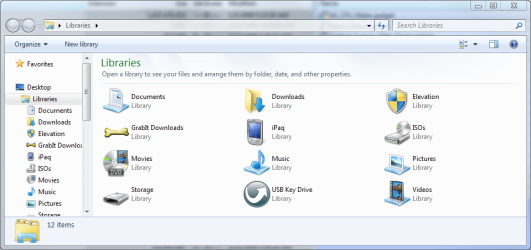
For example, in my Win7 Install, I have made many more libraries that link to a direct folder:

Libraries.PNG

in the pic above, each of those non-system standard folders points to 1 folder and one folder only - and most are named exactly as they appear.

Oh, and I did this using *strictly* the info in those tutorials.
 
Last edited:

My Computers My Computers

System One System Two

  • Computer type
    PC/Desktop
    Computer Manufacturer/Model Number
    The Beast Model A (homebrew)
    OS
    Windows 11 21H2 Current build
    CPU
    AMD Ryzen 9 3950X
    Motherboard
    MSI MEG X570 GODLIKE
    Memory
    4 * 32 GB - Corsair Vengeance 3600 MHz
    Graphics Card(s)
    EVGA GeForce RTX 3080 Ti XC3 ULTRA GAMING (12G-P5-3955-KR)
    Sound Card
    Realtek® ALC1220 Codec
    Monitor(s) Displays
    2x Eve Spectrum ES07D03 4K Gaming Monitor (Matte) | Eve Spec
    Screen Resolution
    3x 3840 x 2160
    Hard Drives
    3x Samsung 980 Pro NVMe PCIe 4 M.2 2 TB SSD (MZ-V8P2T0B/AM) } 3x Sabrent Rocket NVMe 4.0 1 TB SSD
    PSU
    PC Power & Cooling’s Silencer Series 1050 Watt, 80 Plus Plat
    Case
    Fractal Design Define 7 XL Dark ATX Full Tower Case
    Cooling
    SteelSeries Apex Pro Wired Gaming Keyboard
    Keyboard
    SteelSeries Apex Pro
    Mouse
    Logitech MX Master 3S | MX Master 3 for business
    Internet Speed
    AT&T LightSpeed Gigabit Duplex Ftth
    Antivirus
    Windows Defender + MB 3
    Browser
    Nightly (default) + Firefox (stable),Chrome, Edge
  • Computer type
    PC/Desktop
    System Manufacturer/Model Number
    Dell Latitude E5470
    OS
    ChromeOS Flex Dev Channel (current)
    CPU
    Intel(R) Core(TM) i5-6300U CPU @ 2.40GHz, 2501 Mhz, 2 Core(s), 4 Logical Processor(s)
    Motherboard
    Dell
    Memory
    16 GB
    Graphics Card(s)
    Intel(R) HD Graphics 520
    Sound Card
    Intel(R) HD Graphics 520 + RealTek Audio
    Monitor(s) Displays
    Dell laptop display 15"
    Screen Resolution
    1920 * 1080
    Hard Drives
    Toshiba 128GB M.2 22300 drive
    INTEL Cherryville 520 Series SSDSC2CW180A 180 GB SATA III SSD
    PSU
    Dell
    Case
    Dell
    Cooling
    Dell
    Keyboard
    Dell
    Mouse
    Logitech MX Master 3S (shared w. Sys 1) | Dell TouchPad
    Internet Speed
    AT&T LightSpeed Gigabit Duplex Ftth
Yes, I've already changed them much like you have.

But when I click up a directory, I can't go above Libraries...where as in vista I could keep clicking up a directory to my computer.

I can live with it, but I'd love to be able to change it.
 

My Computer My Computer

OS
Windows 7
I did not realize from any of your posts that you were trying that....

Best bet would be to make favorites out of your favorite folders and use that interface, I think....but that I have not done as I use a third party file manager to begin with - xplorer² Windows File Manager (Explorer replacement)
 

My Computers My Computers

System One System Two

  • Computer type
    PC/Desktop
    Computer Manufacturer/Model Number
    The Beast Model A (homebrew)
    OS
    Windows 11 21H2 Current build
    CPU
    AMD Ryzen 9 3950X
    Motherboard
    MSI MEG X570 GODLIKE
    Memory
    4 * 32 GB - Corsair Vengeance 3600 MHz
    Graphics Card(s)
    EVGA GeForce RTX 3080 Ti XC3 ULTRA GAMING (12G-P5-3955-KR)
    Sound Card
    Realtek® ALC1220 Codec
    Monitor(s) Displays
    2x Eve Spectrum ES07D03 4K Gaming Monitor (Matte) | Eve Spec
    Screen Resolution
    3x 3840 x 2160
    Hard Drives
    3x Samsung 980 Pro NVMe PCIe 4 M.2 2 TB SSD (MZ-V8P2T0B/AM) } 3x Sabrent Rocket NVMe 4.0 1 TB SSD
    PSU
    PC Power & Cooling’s Silencer Series 1050 Watt, 80 Plus Plat
    Case
    Fractal Design Define 7 XL Dark ATX Full Tower Case
    Cooling
    SteelSeries Apex Pro Wired Gaming Keyboard
    Keyboard
    SteelSeries Apex Pro
    Mouse
    Logitech MX Master 3S | MX Master 3 for business
    Internet Speed
    AT&T LightSpeed Gigabit Duplex Ftth
    Antivirus
    Windows Defender + MB 3
    Browser
    Nightly (default) + Firefox (stable),Chrome, Edge
  • Computer type
    PC/Desktop
    System Manufacturer/Model Number
    Dell Latitude E5470
    OS
    ChromeOS Flex Dev Channel (current)
    CPU
    Intel(R) Core(TM) i5-6300U CPU @ 2.40GHz, 2501 Mhz, 2 Core(s), 4 Logical Processor(s)
    Motherboard
    Dell
    Memory
    16 GB
    Graphics Card(s)
    Intel(R) HD Graphics 520
    Sound Card
    Intel(R) HD Graphics 520 + RealTek Audio
    Monitor(s) Displays
    Dell laptop display 15"
    Screen Resolution
    1920 * 1080
    Hard Drives
    Toshiba 128GB M.2 22300 drive
    INTEL Cherryville 520 Series SSDSC2CW180A 180 GB SATA III SSD
    PSU
    Dell
    Case
    Dell
    Cooling
    Dell
    Keyboard
    Dell
    Mouse
    Logitech MX Master 3S (shared w. Sys 1) | Dell TouchPad
    Internet Speed
    AT&T LightSpeed Gigabit Duplex Ftth

My Computer My Computer

Computer Manufacturer/Model Number
Gateway P7801
OS
7 x64 + XP Pro x86
CPU
Undervolted T9900 3.06 GHz Core2Duo
Memory
4GB DDR3 1066MHz
Graphics Card(s)
NVIDIA 9800M GTS 1GB DDR3 1066 MHz
Monitor(s) Displays
17" WUXGA
Screen Resolution
1920x1200
Hard Drives
32GB Patriot V2 SSD w/ Hyperfast
PSU
9-cell Lithium Ion
Keyboard
Logitech Classic
Mouse
Logitech MX310
Internet Speed
slow AT&T
Other Info
Nlited XP x86 (540MB C:) locked with EWF
I like it!

I Think it is a great way to manage your stuff
 

My Computer My Computer

OS
Windows 7 Ultimate 32bit, Mac OS Snow Leopard 10.6
CPU
P4 2.4ghz @ 2.56Ghz
Memory
1gb DDR
Graphics Card(s)
7600GT AGP 4X
Sound Card
Onboard
Monitor(s) Displays
19LG
Screen Resolution
1280x1024
Hard Drives
120GB WD Caviar
80 Seagate Barracuda
PSU
430W Thermaltake
Keyboard
Logitech Media Keyboard
Internet Speed
1.5MB
It is, if all your stuff is scattered all over your Hardrive, mines always in one spot, so the library is pointless..

Enzo.
 

My Computer My Computer

Computer Manufacturer/Model Number
Custom Build
OS
W7 RTM Ultimate x64
CPU
Intel Q8400 @ 2.66GHZ
Motherboard
Gigabyte GA-EG45M-UD2H
Memory
4GB DDR2-800
Graphics Card(s)
Gainward GTS 450 GLH 1GB Edition
Sound Card
Integrated 8 Channel
Monitor(s) Displays
AOC 23.6 Inch Widescreen LCD
Screen Resolution
1920x1080
Hard Drives
Seagate 500GB Internal
Western Digital 1TB Internal

Hitachi 1TB External
PSU
Apevia Java Power 500W
Case
Cooler Master HAF 922 Black
Cooling
Stock Intel CPU Fan
Keyboard
HP SK-2960 Multimedia Keyboard
Mouse
Logitech M350 Wireless Gaming Mouse
Internet Speed
1.5MB
The double-menu is completely redundant and unnecessary for myself and everyone else I associate with. Nobody I know has any use for it. Obviously some people will find a use for it, but for the rest of us, we should at least be able to use the OLD style that worked perfect, or at least be able to move the folder so we cant point it INSIDE the My Documents folder, instead of outside.
 

My Computer My Computer

Computer Manufacturer/Model Number
Gateway P7801
OS
7 x64 + XP Pro x86
CPU
Undervolted T9900 3.06 GHz Core2Duo
Memory
4GB DDR3 1066MHz
Graphics Card(s)
NVIDIA 9800M GTS 1GB DDR3 1066 MHz
Monitor(s) Displays
17" WUXGA
Screen Resolution
1920x1200
Hard Drives
32GB Patriot V2 SSD w/ Hyperfast
PSU
9-cell Lithium Ion
Keyboard
Logitech Classic
Mouse
Logitech MX310
Internet Speed
slow AT&T
Other Info
Nlited XP x86 (540MB C:) locked with EWF
In your User folder, in the Properties of the Documents, Pictures, etc folders you can change the target folder, just like you could with the old My Documents. I pointed Documents to where I keep My Documents (on another drive), and I point Pictures to the My Pictures inside the old My Documents. It works fine, and the Libraries will then see the new locations.
But yea, I agree. I would prefer the good old fashioned My Documents over the libraries.
 

My Computer My Computer

OS
Windows 7
In your User folder, in the Properties of the Documents, Pictures, etc folders you can change the target folder, just like you could with the old My Documents. I pointed Documents to where I keep My Documents (on another drive), and I point Pictures to the My Pictures inside the old My Documents. It works fine, and the Libraries will then see the new locations.
But yea, I agree. I would prefer the good old fashioned My Documents over the libraries.

Nice idea but that still doesn't work for the start menu, which is what we're trying to fix.

We can move the folder, but there is still a redundant double menu to get to the new folder's files.
 

My Computer My Computer

Computer Manufacturer/Model Number
Gateway P7801
OS
7 x64 + XP Pro x86
CPU
Undervolted T9900 3.06 GHz Core2Duo
Memory
4GB DDR3 1066MHz
Graphics Card(s)
NVIDIA 9800M GTS 1GB DDR3 1066 MHz
Monitor(s) Displays
17" WUXGA
Screen Resolution
1920x1200
Hard Drives
32GB Patriot V2 SSD w/ Hyperfast
PSU
9-cell Lithium Ion
Keyboard
Logitech Classic
Mouse
Logitech MX310
Internet Speed
slow AT&T
Other Info
Nlited XP x86 (540MB C:) locked with EWF
Nice idea but that still doesn't work for the start menu, which is what we're trying to fix.

We can move the folder, but there is still a redundant double menu to get to the new folder's files.

I don't follow. What's double? You click on the Library in the Start menu and it goes right to it. Or are you saying you want the Start menu to go to the folders and not Library, otherwise you have to go to the User folder, the My Documents?
 

My Computer My Computer

OS
Windows 7
Currently the menus are like this

Start > Documents > My Documents > Files Here

I want them to be the old style, pre-library

Start > My Documents > Files Here

This is what I have now:

b45b448d13.png


This is what I want (This picture has been edited to show what I want):

7944aedac8.png


I don't want to have to go into Documents then My Documents. I want Documents to go straight INTO my documents. I don't understand why M$ doesn't allow a simple change to the old style, or make it user defined so it will automatically show you the files of whoever is logged on, rather than going to the libraries first.

I hate the damn libraries. Why did M$ have to change this with no way to change it back!?

I'm never going to have MULTIPLE document libraries, and the same goes for music, pics, and videos. It is a completely redundant double menu for me and many others.

Things like this will definitely keep me from using 7 on my personal computers.
 

My Computer My Computer

Computer Manufacturer/Model Number
Gateway P7801
OS
7 x64 + XP Pro x86
CPU
Undervolted T9900 3.06 GHz Core2Duo
Memory
4GB DDR3 1066MHz
Graphics Card(s)
NVIDIA 9800M GTS 1GB DDR3 1066 MHz
Monitor(s) Displays
17" WUXGA
Screen Resolution
1920x1200
Hard Drives
32GB Patriot V2 SSD w/ Hyperfast
PSU
9-cell Lithium Ion
Keyboard
Logitech Classic
Mouse
Logitech MX310
Internet Speed
slow AT&T
Other Info
Nlited XP x86 (540MB C:) locked with EWF

My Computer My Computer

Computer Manufacturer/Model Number
Apple Macbook Pro (April 2009)
OS
W7 Ult. x64 | OS X
CPU
Intel Mobile Core 2 Duo 2.93Ghz [T9800 Penryn]
Motherboard
NVIDIA nForce 730i Rev. B1 [Mac-F2268EC8 (U2E1)]
Memory
4096MB Samsung DDR3 Dual Channel [PC3-8500F 1066Mhz]
Graphics Card(s)
NVIDIA GeForce 9600M GT 512MB [G96M Rev. C1]
Sound Card
SB X-Fi Surround 5.1 USB | Onboard Realtek (Disabled)
Monitor(s) Displays
Acer x223wbd 22" | Apple Anti-Glare 17" (Disabled)
Screen Resolution
{Current} 1440x900 {Acer} 1680x1050 {Apple} 1920x1200
Hard Drives
{Internal}
Seagate Momentus 320GB 2.5" 7200RPM [ST9320421AS]

{Externals}
LaCie 320GB USB 2.0 HDD [301284UR]
LaCie 750GB USB 2.0 FW400 eSATA HDD [301314U]
LaCie 1TB USB 2.0 HDD [301304UR]
PSU
Magsafe
Case
Aluminum/Unibody (MBP52)
Cooling
2 x 6000 RPM Fans
Keyboard
Logitech G-15v2 [PN 920-000379]
Mouse
Logitech G-9 [PN 910-000338]
Internet Speed
12Mbps/2.5Mbps w/ 24Mbps Speed Boost [Comcast]
Other Info
Logitech X-540 Speakers [PN 970223-0122]
Sennheiser PC-151 Headset
Back
Top