Solved Changing Excel 2010 default save folder location

Trucidation

Sister Complex
Hi folks, got a question re: Excel 2010, running on win7 Pro 32-bit (it's not the machine in my stats).

I looked up tutorials to change the default save folder location for MS Office, and pretty much all of them reference MS Word 2010. Like for example the one in this forum, http://www.sevenforums.com/tutorials/87274-ms-office-word-set-default-save-location.html -- which works fine when I try it, no problem with Word 2010. However, Excel 2010 is being a **** and refuses to following spec.

Consider:
When I click on File -> Options, then navigate to the "Save" tab, it displays a screen similar to the equivalent one in Word... except that the "Browse" button to change the folders is missing.
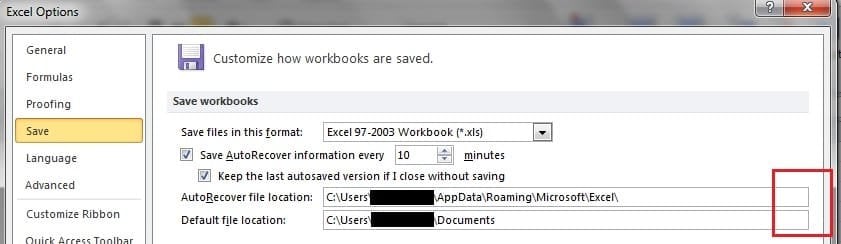
excel2010_save1.jpg

No big deal, plus the default file location is already pointing to my user folder: that's fine. However, when I go to save or save-as, this is what pops up:
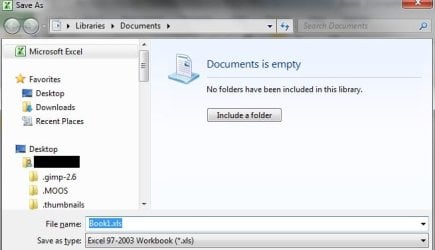
excel2010_save2.jpg

Yea-- no. Why is Excel showing libraries? I don't want to use libraries. I don't want to see libraries. I've used the registry hack from this forum to remove libraries from showing up in the left pane of Explorer.

How do I get Excel to use my documents folder as the default?
 

My Computer

Computer Manufacturer/Model Number
Self-built rig
OS
Win7 Pro x64
CPU
Koa i5-2550K
Memory
8 GB
Graphics Card(s)
Sapphire ATI 6870 1GB GDDR5
Sound Card
RealTek HD Audio / ATI HDMI Audio
Monitor(s) Displays
Samsung HDTV Monitor T23A350
Screen Resolution
1920 x 1080
Hard Drives
- SSD (C:)
- HDD (D:)
- BD-ROM (E:)
Keyboard
Logitech G110
Internet Speed
Unifi home (5mbps)
After changing the location in the Excel Options --> Save tab... did you reboot?
 

My Computer

Computer Manufacturer/Model Number
Homebrew PC - "Alpha_Dawg"
OS
Windows 7 Ultimate 64 bit Steve Ballmer Signature Edition
CPU
Intel Core 2 Quad - Q9550 - 2.83GHz stock - OC'd to 3.6GHz
Motherboard
Gigabyte EP45-UD3P
Memory
4GB DDR2 800MHz (PC6400) OCZ Reaper
Graphics Card(s)
Nvidia GE Force 8800 GTS
Sound Card
Asus Xonar DX
Monitor(s) Displays
Samsung SyncMaster 2333HD
Screen Resolution
1920 x 1080
Hard Drives
WD Caviar Black 750GB - 7200RPM - 32MB cache
WD Caviar Green 1.5TB - 5400RPM - 64MB cache
WD Caviar Green 2.0TB - 5400RPM - 64MB cache
PSU
PC Power & Cooling Silencer 750
Case
Gigabyte 3D Aurora
Cooling
Case is Air - 5ea. 120mm fans (mix of Arctic and Xigmatec)
Keyboard
MS Natural Wireless KB
Mouse
MS Wireless Mouse
Internet Speed
50 mbps down/5 mbps up
Other Info
AVerMedia - AVerTVHD G2 Dual Tuner Card
No, I didn't change the folder; it was already pointing to my documents folder. Haven't rebooted, will try that in a sec - gotta wait for a download to finish.

Edit:
Nope, still opens Libraries first. Tried changing the folder to C:\; huh, that worked, didn't have to reboot. Restarted Excel, yep, save-as goes to C:\. Changed it to another folder, also worked.

Changed it to my documents folder - blam, back to the Library. Changed it to another folder, it goes to that folder. Oookay...

Well, I can accept that - I don't mind pointing Excel elsewhere (my original problem is solved). This however still leaves the fact that if you point it to your user document folder, Excel will automatically jump to the library.
 
Last edited:

My Computer

Computer Manufacturer/Model Number
Self-built rig
OS
Win7 Pro x64
CPU
Koa i5-2550K
Memory
8 GB
Graphics Card(s)
Sapphire ATI 6870 1GB GDDR5
Sound Card
RealTek HD Audio / ATI HDMI Audio
Monitor(s) Displays
Samsung HDTV Monitor T23A350
Screen Resolution
1920 x 1080
Hard Drives
- SSD (C:)
- HDD (D:)
- BD-ROM (E:)
Keyboard
Logitech G110
Internet Speed
Unifi home (5mbps)
One small point - in your illustration it states "Save as" Excel 97-2003 (*.xls).

Maybe that was intentional, but Excel 2010 is usually the first in the list, Excel Workbook (*.xlsx).
 

My Computer

Computer type
PC/Desktop
Computer Manufacturer/Model Number
Packard Bell
OS
Windows 7 Home Premium 64bit
CPU
Intel(R) Core(TM) i3-2120 CPU @ 3.30GHz
Motherboard
Packard Bell IPISB-AG
Memory
3.00 GB
Graphics Card(s)
(1) Intel(R) HD Graphics (2) VNC Mirror Driver
Sound Card
Realtek High Definition Audio
Monitor(s) Displays
AIO LCD
Screen Resolution
1920 x 1080
Hard Drives
WDC WD10EADX-22TDHB0 ATA Device
Fixed hard disk media
4 partitions
931.51 GB
Keyboard
Wireless
Mouse
Wireless
Antivirus
Microsoft Security Essentials
Browser
IE; Firefox
Other Info
Also:
Samsung N220 Plus Netbook - Windows 7 Home
HP laptop
iPad 5
Yes, that was intentionally changed previously - many of the people I liaise with have older versions of MS Office.
 

My Computer

Computer Manufacturer/Model Number
Self-built rig
OS
Win7 Pro x64
CPU
Koa i5-2550K
Memory
8 GB
Graphics Card(s)
Sapphire ATI 6870 1GB GDDR5
Sound Card
RealTek HD Audio / ATI HDMI Audio
Monitor(s) Displays
Samsung HDTV Monitor T23A350
Screen Resolution
1920 x 1080
Hard Drives
- SSD (C:)
- HDD (D:)
- BD-ROM (E:)
Keyboard
Logitech G110
Internet Speed
Unifi home (5mbps)
If it is any help to you, I don't use libraries either.

I have created a data partition and sub-divided that with separate folders for personal data such as MS Office docs, digital images, music and video files.

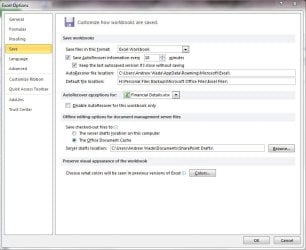
The folders are then configured with sub-folders as shown in the screenshot below.

Excel.JPG

I have a separate sub-folder for each Office application whose default Save filepath points to their respective sub-folder within H:\Personal Files Backup\Microsoft Office Files\

This way, all my personal stuff is kept well away from the Windows partition and makes backing up so much easier and quicker.
 

My Computer

Computer Manufacturer/Model Number
HP Pavilion Elite 495UK
OS
Windows 7 Ultimate SP1 64-Bit
CPU
Intel Core i7 870 @ 2.93GHz
Motherboard
MSI 2A9C (CPU1)
Memory
8Gb Dual-Channel DDR3 @ 664MHz
Graphics Card(s)
nVidia GeForce GTX 460 1024MB dedicated RAM
Sound Card
Realtek HD Audio
Monitor(s) Displays
HP2310i
Screen Resolution
1920 x 1080
Hard Drives
1x1954GB Hitachi HDS22020ALA 330 (RAID), 1x1954GB Hitachi External for backup and storage
PSU
460W
Case
HP Elite
Cooling
Air cooled
Keyboard
Logitech K750 solar-powered keyboard
Mouse
Logitech Wireless M180 mouse
Internet Speed
2Mb
Other Info
Pure Avanti Flow Internet Radio with iPod Dock, 64Gb iPod, HP USB Speakers, Sony MDR-V500 Headphones, Sony Vaio F-Series Laptop
Some random suggestions that might work:

How to Change the Default Save Location for Word 2010 - I think it may work for Excel also.

Microsoft Office Compatibility Pack for Word, Excel, and PowerPoint - Products - Office.com

If all else fails, here are a couple of Work-Arounds:

This is not exactly the same thing, because you're not saving THE file/folder to a different location, but you can use these Keyboard shortcuts in Windows Explorer to take you to your last 'saved location'

Clicking Alt + Left Arrow takes you back to your last location

Clicking Alt + Right Arrow –after you’ve gone back to your last location, it takes you back to where you originally were.
 

My Computer

Computer Manufacturer/Model Number
HP Pavillion dv5t (generation 1)
OS
Vista 64 bit and 32 bit (SP2)
CPU
Intel(R) Core(TM)2 Duo Processor T9400 (2.53 GHz
Memory
4GB DDR2 System Memory (2 Dimm)
Graphics Card(s)
512 MB NVIDIA GeForce 9600M GT
Monitor(s) Displays
15.4" diagonal WSXGA+ High-Definition HP BrightView Widescre
Screen Resolution
1680 x 1050
Hard Drives
320GB 5400RPM SATA Hard Drive with HP ProtectSmart Hard Drive Protection
Keyboard
Built-in HP
Mouse
Built in - Synaptics TouchPad V6.5 on PS/2 Port
Internet Speed
Max
Other Info
~ Intel Next-Gen Wireless-N Mini-card w/Bluetooth ~ Blu-Ray ROM DVD+/-R/RW ~ Integ. HDTV Hybrid Tuner ~ 12 Cell Battery ~ MS Office (Home Premium) 2007 ~
I see this thread is now marked as solved, but I do not see where the OP states it is fixed... WHY???
 

My Computer

Computer Manufacturer/Model Number
Homebrew PC - "Alpha_Dawg"
OS
Windows 7 Ultimate 64 bit Steve Ballmer Signature Edition
CPU
Intel Core 2 Quad - Q9550 - 2.83GHz stock - OC'd to 3.6GHz
Motherboard
Gigabyte EP45-UD3P
Memory
4GB DDR2 800MHz (PC6400) OCZ Reaper
Graphics Card(s)
Nvidia GE Force 8800 GTS
Sound Card
Asus Xonar DX
Monitor(s) Displays
Samsung SyncMaster 2333HD
Screen Resolution
1920 x 1080
Hard Drives
WD Caviar Black 750GB - 7200RPM - 32MB cache
WD Caviar Green 1.5TB - 5400RPM - 64MB cache
WD Caviar Green 2.0TB - 5400RPM - 64MB cache
PSU
PC Power & Cooling Silencer 750
Case
Gigabyte 3D Aurora
Cooling
Case is Air - 5ea. 120mm fans (mix of Arctic and Xigmatec)
Keyboard
MS Natural Wireless KB
Mouse
MS Wireless Mouse
Internet Speed
50 mbps down/5 mbps up
Other Info
AVerMedia - AVerTVHD G2 Dual Tuner Card
Sorry for the confusion, but in my second post I mentioned that I am able to get Excel to use a different folder. That is an acceptable solution for me hence I marked my thread solved.

However it doesn't work (still goes to Libraries) if I point it at my user documents folder. As long as you point it elsewhere, Excel will obey you.
 

My Computer

Computer Manufacturer/Model Number
Self-built rig
OS
Win7 Pro x64
CPU
Koa i5-2550K
Memory
8 GB
Graphics Card(s)
Sapphire ATI 6870 1GB GDDR5
Sound Card
RealTek HD Audio / ATI HDMI Audio
Monitor(s) Displays
Samsung HDTV Monitor T23A350
Screen Resolution
1920 x 1080
Hard Drives
- SSD (C:)
- HDD (D:)
- BD-ROM (E:)
Keyboard
Logitech G110
Internet Speed
Unifi home (5mbps)
Back
Top