Windows 7 doesn't save folder view settings

The2nd

New member
Member
Local time
4:47 PM
Messages
57
Hello,

So here's my problem when I start my laptop the wallpaper is black and never uses the wallpaper i have saved. The real problem I'm having is in Explorer windows, when I change the display "icon size" or "sort by" settings they go back to default once I reopen the folder again. For example in my "Music" folder I'll have them sorted out by artist then when I leave and come back to the "Music" folder it's no longer sorted by artist. But 1 outta 10 times when i start my laptop I can change the folder view and it saves like it used to before but this happens rarely.

Any help please?
 

My Computer

Computer type
PC/Desktop
Computer Manufacturer/Model Number
HP Presario SR5302FR
OS
Windows 7 Ultimate 32bit
CPU
Intel(R) Pentium(R) Dual CPU E2140 @ 1.60GHz
Motherboard
ECS
Memory
2,00 GB
Graphics Card(s)
ATI Radeon HD 2350
Sound Card
Realtek High Definition Audio
This batch file from the tutorial should set them back to the default. Then when you customize them Explorer should remember the customizations for awhile. It seems nothing forces Explorer to remember for very long. A work-around rather than a fix.
 

My Computer

Computer Manufacturer/Model Number
HP Media Center
OS
Windows 7 32 bit
CPU
AMD 5200+ dual core
Memory
2 GB
Graphics Card(s)
NVidia GeForce 6150SE 128 MB
Monitor(s) Displays
CRT
Screen Resolution
1280x1024
Hard Drives
500 GB Sata internal :

SIIG USB 3.0 docking stations w/WD Caviar Black 6 Gb/s drives
Keyboard
PS/2
Mouse
PS/2 Wheel Mouse
Other Info
SIIG USB 3.0 PCIexpress card.
This batch file from the tutorial should set them back to the default. Then when you customize them Explorer should remember the customizations for awhile. It seems nothing forces Explorer to remember for very long. A work-around rather than a fix.
It didn't work
 

My Computer

Computer type
PC/Desktop
Computer Manufacturer/Model Number
HP Presario SR5302FR
OS
Windows 7 Ultimate 32bit
CPU
Intel(R) Pentium(R) Dual CPU E2140 @ 1.60GHz
Motherboard
ECS
Memory
2,00 GB
Graphics Card(s)
ATI Radeon HD 2350
Sound Card
Realtek High Definition Audio
Error

Got the
This version of windows is not genuine,
in the lower right hand corner.

Roy
 

My Computer

Computer type
PC/Desktop
Computer Manufacturer/Model Number
medionl/Aspire 6930G/acer x55a
OS
W7 home premium 32bit/W7HP 64bit/w10 tp insider ring
CPU
E5300 dual core
Motherboard
medion MS7366
Memory
3gb
Graphics Card(s)
Nvidia Geforce 7100 Nforce 630i
Monitor(s) Displays
avixc
Internet Speed
n (isp resticted to 72)
Antivirus
mse/pands
Browser
palemoon
Other Info
Belkin Fd7050 n USB using Railink RT2870 drivers, more upto date
You can't Personalize W7, unless it is activated and detected as genuine.
 

My Computer

Computer type
PC/Desktop
Computer Manufacturer/Model Number
n/a
OS
W7 Ultimate SP1, LM19.2 MATE, W10 Home 1703, W10 Pro 1703 VM, #All 64 bit
CPU
AMD Phenom II x6 1100T, 3.3 GHz
Motherboard
ASUS M4A88T-M/USB3 (AM3)
Memory
12GB DDR3 1333 G-Skill (4GB x 2), G-Skill (2GB x 2)
Graphics Card(s)
NVIDIA GeForce GTX 660
Sound Card
Realtek?
Monitor(s) Displays
Samsung S23B350
Screen Resolution
1920x1080
Hard Drives
WD Green 2TB (SATA), WD Green 3TB (SATA), WD Blue 4TB (SATA), WD Blue 6TB (SATA)
PSU
Cooler Master
Case
Antec GX300 Tower
Cooling
3x Antec TRICOOL 120mm Fans
Mouse
Wired Optical
Internet Speed
DSL
Antivirus
Avast
Browser
Pale Moon (64 bit)
Other Info
2018-12-27 Upgraded HDDs
2015-12-10 Upgraded case, graphics card, storage
2015-08-15 Upgraded motherboard & RAM
2015-07-15 Upgraded LM17.1 to LM17.2
You can't Personalize W7, unless it is activated and detected as genuine.
I used to be able to so idk what happened and like I said sometimes (rarely) it works fine
 

My Computer

Computer type
PC/Desktop
Computer Manufacturer/Model Number
HP Presario SR5302FR
OS
Windows 7 Ultimate 32bit
CPU
Intel(R) Pentium(R) Dual CPU E2140 @ 1.60GHz
Motherboard
ECS
Memory
2,00 GB
Graphics Card(s)
ATI Radeon HD 2350
Sound Card
Realtek High Definition Audio

My Computer

Computer type
PC/Desktop
Computer Manufacturer/Model Number
medionl/Aspire 6930G/acer x55a
OS
W7 home premium 32bit/W7HP 64bit/w10 tp insider ring
CPU
E5300 dual core
Motherboard
medion MS7366
Memory
3gb
Graphics Card(s)
Nvidia Geforce 7100 Nforce 630i
Monitor(s) Displays
avixc
Internet Speed
n (isp resticted to 72)
Antivirus
mse/pands
Browser
palemoon
Other Info
Belkin Fd7050 n USB using Railink RT2870 drivers, more upto date
It seems nothing forces Explorer to remember for very long.
Really ? Is that an established fact ?

Is it also true when you use the Customize this folder option, or the Folder options / Apply to folders button ?

I also experienced some folder view un-stickiness, and thought I was doing something wrong.
 

My Computer

Computer type
PC/Desktop
Computer Manufacturer/Model Number
Custom build
OS
Windows 7 Home Premium 64-bit (OEM)
CPU
AMD Athlon II X4 640 (3 GHz, 4 cores)
Motherboard
Asus M4A 89 GTD Pro/USB3
Memory
Patriot 16Gb DDR3 1600 (2 kits of 2)
Graphics Card(s)
ATI Radeon HD 4290 (integrated)
Sound Card
AMD + Realtek HD Audio (integrated)
Monitor(s) Displays
Hewlett-Packard ZR2440w (24")
Screen Resolution
1920 x 1200
Hard Drives
Internal : Samsung SSD 860 EVO 250 Gb (system), Seagate Barrcuda 1 Tb (data), Western Digital Caviar Blue 500 Gb (archives).
External (USB) : 2 x 1 Tb 2,5" Seagate Barracuda (backups).
PSU
Corsair VX 450 W
Case
Antec Solo
Cooling
Cooler Master Hyper 212 Plus, 2 Nexus Real Silent Case fans
Keyboard
Cherry KC 1000
Mouse
Logitech M 90
Internet Speed
Fiber, 300 Mbit/s down, 200 Mbit/s up
Antivirus
Microsoft Security Essentials
Browser
Vivaldi, Tor
Other Info
BIOS Date: 07/18/11 Ver: 08.00.15.
Modem-router : provided by ISP
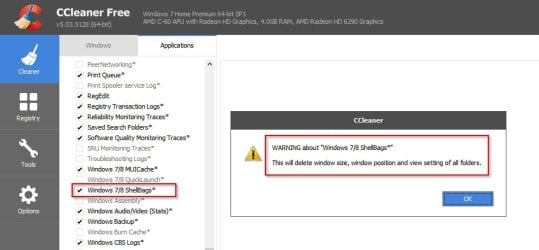
Well if you run Ccleaner or any similar program with the option to clean "Shell Bags" checked it will reset all folder views to default.

CCleaner.jpg
 

My Computer

Computer type
Laptop
Computer Manufacturer/Model Number
ASUS
OS
Microsoft Windows 7 Home Premium 64-bit 7601 Multiprocessor Free Service Pack 1
CPU
AMD C-60 APU with Radeon(tm) HD Graphics
Motherboard
ASUSTeK COMPUTER INC. X501U
Memory
4.00 GB
Graphics Card(s)
AMD Radeon HD 6290 Graphics
Sound Card
(1) AMD High Definition Audio Device (2) Realtek High Defi
Screen Resolution
1366 x 768 x 32 bits (4294967296 colors) @ 60 Hz
Hard Drives
Hitachi HTS545050A7E380 SATA Disk Device
Antivirus
Comodo CIS & FW, SecureAplus App Whitelisting, Threatfire
Browser
Cyberfox 64bit, Opera 64bit, Airfox
Other Info
Spy-The-Spy, HitmanPro.Alert, Norton Connect Safe, MJRegWatcher, BitDefender TrafficLight, Voodoo Shield, Zemana AntiMalware
You can't Personalize W7, unless it is activated and detected as genuine.
I used to be able to so idk what happened and like I said sometimes (rarely) it works fine
Have you tried running SFC?

Tutorial
http://www.sevenforums.com/tutorials/1538-sfc-scannow-command-system-file-checker.html

A couple of years ago I saw a message stating that an OS Service had crashed.
I ignored it as it didn't affect what I was doing at the time.

Later (when I looked at my desktop) I noticed that there was a message saying my version of Windows wasn't genuine.
Luckily after a restart the message disappeared and I've never seen it again.

I have no idea which Service crashed (or why it crashed) as I wasn't doing anything unusual at the time. :confused:
 

My Computer

Computer type
PC/Desktop
Computer Manufacturer/Model Number
n/a
OS
W7 Ultimate SP1, LM19.2 MATE, W10 Home 1703, W10 Pro 1703 VM, #All 64 bit
CPU
AMD Phenom II x6 1100T, 3.3 GHz
Motherboard
ASUS M4A88T-M/USB3 (AM3)
Memory
12GB DDR3 1333 G-Skill (4GB x 2), G-Skill (2GB x 2)
Graphics Card(s)
NVIDIA GeForce GTX 660
Sound Card
Realtek?
Monitor(s) Displays
Samsung S23B350
Screen Resolution
1920x1080
Hard Drives
WD Green 2TB (SATA), WD Green 3TB (SATA), WD Blue 4TB (SATA), WD Blue 6TB (SATA)
PSU
Cooler Master
Case
Antec GX300 Tower
Cooling
3x Antec TRICOOL 120mm Fans
Mouse
Wired Optical
Internet Speed
DSL
Antivirus
Avast
Browser
Pale Moon (64 bit)
Other Info
2018-12-27 Upgraded HDDs
2015-12-10 Upgraded case, graphics card, storage
2015-08-15 Upgraded motherboard & RAM
2015-07-15 Upgraded LM17.1 to LM17.2
Please follow the directions in the link below and we will know for sure.

http://www.sevenforums.com/windows-...ne-activation-issue-posting-instructions.html

Roy
Code:
Diagnostic Report (1.9.0027.0):
-----------------------------------------
Windows Validation Data-->

Validation Code: 0
Cached Online Validation Code: 0x0
Windows Product Key: *****-*****-GK4PY-FDWYH-7TP9F
Windows Product Key Hash: u3xU6PnmumgYLgUpnmbqEw9Q2OA=
Windows Product ID: 00371-OEM-8992671-00004
Windows Product ID Type: 2
Windows License Type: OEM SLP
Windows OS version: 6.1.7601.2.00010100.1.0.048
ID: {8E732C3F-1CA2-4361-B142-4CF3293EDDC8}(1)
Is Admin: Yes
TestCab: 0x0
LegitcheckControl ActiveX: N/A, hr = 0x80070002
Signed By: N/A, hr = 0x80070002
Product Name: Windows 7 Professional
Architecture: 0x00000000
Build lab: 7601.win7sp1_gdr.151019-1254
TTS Error: 
Validation Diagnostic: 
Resolution Status: N/A

Vista WgaER Data-->
ThreatID(s): N/A, hr = 0x80070002
Version: N/A, hr = 0x80070002

Windows XP Notifications Data-->
Cached Result: N/A, hr = 0x80070002
File Exists: No
Version: N/A, hr = 0x80070002
WgaTray.exe Signed By: N/A, hr = 0x80070002
WgaLogon.dll Signed By: N/A, hr = 0x80070002

OGA Notifications Data-->
Cached Result: N/A, hr = 0x80070002
Version: N/A, hr = 0x80070002
OGAExec.exe Signed By: N/A, hr = 0x80070002
OGAAddin.dll Signed By: N/A, hr = 0x80070002

OGA Data-->
Office Status: 100 Genuine
Microsoft Office Word 2007 - 100 Genuine
OGA Version: N/A, 0x80070002
Signed By: N/A, hr = 0x80070002
Office Diagnostics: 025D1FF3-364-80041010_025D1FF3-229-80041010_025D1FF3-230-1_025D1FF3-517-80040154_025D1FF3-237-80040154_025D1FF3-238-2_025D1FF3-244-80070002_025D1FF3-258-3_E2AD56EA-765-d003_E2AD56EA-766-0_E2AD56EA-134-80004005_E2AD56EA-765-b01a_E2AD56EA-766-0_E2AD56EA-148-80004005_16E0B333-89-80004005_B4D0AA8B-1029-80004005

Browser Data-->
Proxy settings: N/A
User Agent: Mozilla/4.0 (compatible; MSIE 8.0; Win32)
Default Browser: C:\Program Files\Internet Explorer\iexplore.exe
Download signed ActiveX controls: Prompt
Download unsigned ActiveX controls: Disabled
Run ActiveX controls and plug-ins: Allowed
Initialize and script ActiveX controls not marked as safe: Disabled
Allow scripting of Internet Explorer Webbrowser control: Disabled
Active scripting: Allowed
Script ActiveX controls marked as safe for scripting: Allowed

File Scan Data-->

Other data-->
Office Details: <GenuineResults><MachineData><UGUID>{8E732C3F-1CA2-4361-B142-4CF3293EDDC8}</UGUID><Version>1.9.0027.0</Version><OS>6.1.7601.2.00010100.1.0.048</OS><Architecture>x32</Architecture><PKey>*****-*****-*****-*****-7TP9F</PKey><PID>00371-OEM-8992671-00004</PID><PIDType>2</PIDType><SID>S-1-5-21-1167127250-2814037054-2351411422</SID><SYSTEM><Manufacturer>Hewlett-Packard</Manufacturer><Model>HP ProBook 4710s</Model></SYSTEM><BIOS><Manufacturer>Hewlett-Packard</Manufacturer><Version>68PZI Ver. F.15</Version><SMBIOSVersion major="2" minor="4"/><Date>20100223000000.000000+000</Date></BIOS><HWID>FDFF3C07018400F8</HWID><UserLCID>040C</UserLCID><SystemLCID>040C</SystemLCID><TimeZone>Paris, Madrid(GMT+01:00)</TimeZone><iJoin>0</iJoin><SBID><stat>3</stat><msppid></msppid><name></name><model></model></SBID><OEM><OEMID>HPQOEM</OEMID><OEMTableID>SLIC-WKS</OEMTableID></OEM><GANotification/></MachineData><Software><Office><Result>100</Result><Products><Product GUID="{90120000-001B-0000-0000-0000000FF1CE}"><LegitResult>100</LegitResult><Name>Microsoft Office Word 2007</Name><Ver>12</Ver><Val>BCD72299F752D86</Val><Hash>068lO0ay6rs9LAvgHDhjVT63wL4=</Hash><Pid>89407-707-6552566-63679</Pid><PidType>14</PidType></Product></Products><Applications><App Id="1B" Version="12" Result="100"/></Applications></Office></Software></GenuineResults>  

Spsys.log Content: 0x80070002

Licensing Data-->
Version du service de licences logicielles*: 6.1.7601.17514

Nom*: Windows(R) 7, Professional edition
Description : Windows Operating System - Windows(R) 7, OEM_SLP channel
ID d’activation*: 50e329f7-a5fa-46b2-85fd-f224e5da7764
ID d’application*: 55c92734-d682-4d71-983e-d6ec3f16059f
PID étendu*: 00371-00178-926-700004-02-1036-7600.0000-0322014
Identificateur d’installation*: 005950826314245920296155357936663653901485746172386282
URL du certificat du processeur : http://go.microsoft.com/fwlink/?LinkID=88338
URL du certificat de l’ordinateur : http://go.microsoft.com/fwlink/?LinkID=88339
URL de licence d’utilisation : http://go.microsoft.com/fwlink/?LinkID=88341
URL du certificat de clé de produit*: http://go.microsoft.com/fwlink/?LinkID=88340
Clé de produit partielle*: 7TP9F
État de la licence*: avec licence
Nombre de réinitialisations de Windows restant*: 4
Heure approuvée*: 13/01/2016 15:15:08

Windows Activation Technologies-->
HrOffline: 0x00000000
HrOnline: 0x00000000
HealthStatus: 0x0000000000000000
Event Time Stamp: 11:13:2015 09:40
ActiveX: Registered, Version: 7.1.7600.16395
Admin Service: Registered, Version: 7.1.7600.16395
HealthStatus Bitmask Output:


HWID Data-->
HWID Hash Current: MgAAAAEAAgABAAEAAAACAAAAAwABAAEAJJT6Taaorsh6f5pfmsiaiJJYUhjsjbzdRso=

OEM Activation 1.0 Data-->
N/A

OEM Activation 2.0 Data-->
BIOS valid for OA 2.0: yes
Windows marker version: 0x20001
OEMID and OEMTableID Consistent: yes
BIOS Information: 
  ACPI Table Name	OEMID Value	OEMTableID Value
  APIC			HPQOEM		3074    
  FACP			HPQOEM		3074    
  HPET			HPQOEM		3074    
  MCFG			HPQOEM		3074    
  ASF!			HPQOEM		3074    
  SSDT			HPQOEM		SataAhci
  SLIC			HPQOEM		SLIC-WKS
  SSDT			HPQOEM		SataAhci
  SSDT			HPQOEM		SataAhci
  SSDT			HPQOEM		SataAhci

You can't Personalize W7, unless it is activated and detected as genuine.
I used to be able to so idk what happened and like I said sometimes (rarely) it works fine
Have you tried running SFC?

Yeah I tried that but I don't know what it does, after the scan was complete nothing happened
 

My Computer

Computer type
PC/Desktop
Computer Manufacturer/Model Number
HP Presario SR5302FR
OS
Windows 7 Ultimate 32bit
CPU
Intel(R) Pentium(R) Dual CPU E2140 @ 1.60GHz
Motherboard
ECS
Memory
2,00 GB
Graphics Card(s)
ATI Radeon HD 2350
Sound Card
Realtek High Definition Audio
Hi 2nd,
What did you do around mid november, is that when the problem first appeared.

Roy
 

My Computer

Computer type
PC/Desktop
Computer Manufacturer/Model Number
medionl/Aspire 6930G/acer x55a
OS
W7 home premium 32bit/W7HP 64bit/w10 tp insider ring
CPU
E5300 dual core
Motherboard
medion MS7366
Memory
3gb
Graphics Card(s)
Nvidia Geforce 7100 Nforce 630i
Monitor(s) Displays
avixc
Internet Speed
n (isp resticted to 72)
Antivirus
mse/pands
Browser
palemoon
Other Info
Belkin Fd7050 n USB using Railink RT2870 drivers, more upto date
Nothing unusual so I really can't tell what it could be :rolleyes:
 

My Computer

Computer type
PC/Desktop
Computer Manufacturer/Model Number
HP Presario SR5302FR
OS
Windows 7 Ultimate 32bit
CPU
Intel(R) Pentium(R) Dual CPU E2140 @ 1.60GHz
Motherboard
ECS
Memory
2,00 GB
Graphics Card(s)
ATI Radeon HD 2350
Sound Card
Realtek High Definition Audio
Sorry posting here due to the OP date, but the problem didn't have a solution (Typical M$ stupidly).

Is the a program that will remember settings for optical discs in Explorer?
Specifically, removing that annoying and unnecessary "Type" column, since I always show file extensions which removes the necessity of that column in the 1st place.
 

My Computers

System One System Two

  • Computer type
    Laptop
    Computer Manufacturer/Model Number
    Toshiba
    OS
    Win7 x64
    CPU
    AMD
  • Computer type
    PC/Desktop
    System Manufacturer/Model Number
    AMD based MB
    OS
    Win 7 Pro x64
    CPU
    AMD FX-8350
    Motherboard
    Gigabyte GA-970A-D3P
    Memory
    16GB
    Graphics Card(s)
    nVidia GeForce 1060
    Monitor(s) Displays
    25"
    Screen Resolution
    1920x1200
    Hard Drives
    two SSD;
    two 4TB HDD
    PSU
    700watt Seasonic
    Internet Speed
    300MB up & down
    Browser
    Firefox
    Other Info
    BD Recorder
Back
Top