Changing system partition

starfox444

New member
Local time
5:59 PM
Messages
25
I'm sure there's probably a tutorial for this somewhere in the tutorial index but I can't seem to find it.

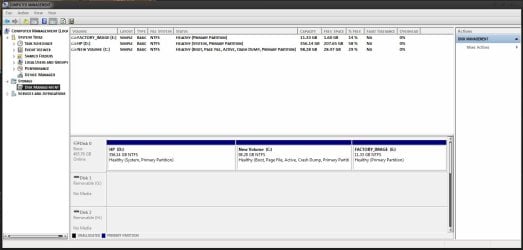
I have 3 partitions on my hard drive. C is for Windows 7 32 bit Ultimate, D is for Vista 32 bit Home Premium and E is a recovery partition. My problem is that I want to delete my Vista partition and then expand my 7 but there's one thing in the way.

D is my system partition. What I want to do is make C my system partition. Just as an extra bit of information, here's the status

E: Healthy, Primary Partition
D: Healthy, system, primary partition
C: healthy, boot, page file, active, crash dump, primary partition
(All NTFS of course :))

So if someone could point me in the right direction I would appreciate it.
 

My Computer

Computer Manufacturer/Model Number
HP
OS
Windows 7 32 bit build 7600
CPU
Intel 7400 2.78 GHz 3MB L2 Cache
Motherboard
Some crappy chipset
Memory
2 x 2048 PC2
Graphics Card(s)
ATI HD 4350
Sound Card
See motherboard
Monitor(s) Displays
HP 2159m and AOC 2236
Hard Drives
Some hitachi thing
PSU
Bad
Case
bad
Cooling
bad
Can you post back a screenshot of your full Disk Management drive map, so we can better advise you of the steps to achieve what you want.

Use Snipping tool in start menu, attach file using paper clip in reply box.
 
I hope this is what you are after
 

Attachments

  • disk map.jpg
    disk map.jpg
    75.3 KB · Views: 199

My Computer

Computer Manufacturer/Model Number
HP
OS
Windows 7 32 bit build 7600
CPU
Intel 7400 2.78 GHz 3MB L2 Cache
Motherboard
Some crappy chipset
Memory
2 x 2048 PC2
Graphics Card(s)
ATI HD 4350
Sound Card
See motherboard
Monitor(s) Displays
HP 2159m and AOC 2236
Hard Drives
Some hitachi thing
PSU
Bad
Case
bad
Cooling
bad
Back up your files and a Win7 backup image externally. Resizing operations can and do fail.

Download and burn to CD free Partition Wizard bootable manager. Boot into it, choose #1 for screen resolution, then right click Vista partition>Delete. Ignore warning, click OK.

Next rightclick Win7 partition>Resize, drag left border all the way over to left side of HD to take up all delete Vista space. OK. Now apply all steps.

Because Vista held the MBR, system will now be unbootable. Boot into Win7 DVD Repair console, click through to Recovery Tools list, select Startup Repair to run 3 separate times with reboots as it will attempt to repair before rewriting the MBR to Win7.

When finished, save a new Win7 Backup Image externally and/or to a primary formatted partition you create in Disk Management. Now you never have to reinstall again, just reimage the HD or a replacement in 15 minutes using the booted Win7 DVD repair console.
 
Thanks for the quick and concise answer, wish me luck!
 

My Computer

Computer Manufacturer/Model Number
HP
OS
Windows 7 32 bit build 7600
CPU
Intel 7400 2.78 GHz 3MB L2 Cache
Motherboard
Some crappy chipset
Memory
2 x 2048 PC2
Graphics Card(s)
ATI HD 4350
Sound Card
See motherboard
Monitor(s) Displays
HP 2159m and AOC 2236
Hard Drives
Some hitachi thing
PSU
Bad
Case
bad
Cooling
bad
The partitions sort of merged so I just popped in the Win 7 disk, booted from it, formatted the new partition and did a clean install. It's probably an error on my end or as you said, they can and do fail.
 

My Computer

Computer Manufacturer/Model Number
HP
OS
Windows 7 32 bit build 7600
CPU
Intel 7400 2.78 GHz 3MB L2 Cache
Motherboard
Some crappy chipset
Memory
2 x 2048 PC2
Graphics Card(s)
ATI HD 4350
Sound Card
See motherboard
Monitor(s) Displays
HP 2159m and AOC 2236
Hard Drives
Some hitachi thing
PSU
Bad
Case
bad
Cooling
bad
Back
Top