
Changing the items in the Windows Explorer Details Pane

VJBenz

New member
Local time
2:04 PM
Messages
8
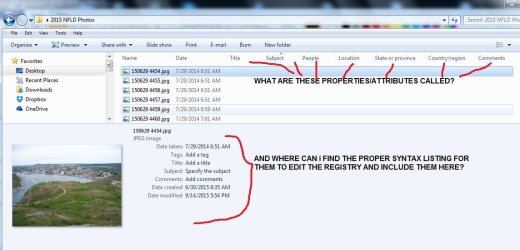
I want to make some specific changes to the default Preview Details string for picture files in Windows Explorer. I have found an excellent write-up on how to edit that string using regedit, but the author was only interested in the specific around music. In the attached picture, I show the file properties/attributes that I am interested in placing in the Detail Pane. The current edited string is shown below.


prop:System.Photo.DateTaken;System.Keywords;System.Title;System.Subject;
*System.Photo.PeopleNames;*System.Contact.Location;*System.Contact.StateOrProvince;
*System.Contact.Country;System.Comment;*System.DateCreated;*System.DateModified;
*System.SharedWith

As you can see, some work, others don't. Is there a comprehensive list of these properties and their syntax in the form
(*)System.xxxx.yyy
that one can refer to when modifying the string?
 

Attachments
  • WE details.jpg
    WE details.jpg
    72.3 KB · Views: 3

My Computer My Computer

OS
Windows 7 Professional 64-bit
CPU
intel i7-3820 CPU @ 3.60 GHz
Motherboard
ASUS P9X79
Memory
16.0 GB
Hard Drives
Internal Main Drive C: 2TB with Windows 7 Professional
Internal SATA slave drive G: 150GB
Internal SATA slave drive H: 185GB
External USB back-up drive I: 2TB WD My Book 1130
There should be a menu item to configure columns (not on a PC to actually check), see if the names given there work?
 

My Computer My Computer

Computer type
PC/Desktop
Computer Manufacturer/Model Number
Custom Build
OS
Windows 7 Ultimate x64 SP1
CPU
AMD Phenom 2 1090T
Motherboard
Gigabyte GA-890FXA-UD5
Memory
2x8GB Kingston HyperX Fury Black 1600Mhz Unganged
Graphics Card(s)
MSI GTX 970 Gaming 4G
Sound Card
Realtek On-Board HD 7.1 Audio / Logitech G35
Monitor(s) Displays
3xAcer GD245HQ
Screen Resolution
1920x1080
Hard Drives
Samsung 850 Pro 512GB SSD - OS /
WD Caviar Black SATA 3 - 1 TBx2 - Dynamic RAID 0 /
WD Caviar Green SATA 2 - 640GBx2 - Dynamic RAID 0 /
WD Caviar Green SATA 2 - 640GB - Internal Backup /
Seagate Barracude SATA 3 - 3TB - External Backup/ Sync
PSU
HighPower 1000W
Case
Cooler Master HAF 932
Cooling
Noctua NH-D14
Keyboard
Logitech G19
Mouse
Logitech G500
Internet Speed
100/4 Mbit Cable (100GB quota)
Antivirus
ZoneAlarm Extreme Security / MBAM Pro / MBAE Free / SAS Free
Browser
IE 11 - Firefox - Chrome
Other Info
Logitech F710/ G27/ G940/ Z5500 // TrackIR 5 // Nvidia 3D Surround Vision
GokAy; I have no idea what you mean. Menu item - where? It is not the columns that I wish to configure. It is the details pane at the bottom of the page.

Vic
 

My Computer My Computer

OS
Windows 7 Professional 64-bit
CPU
intel i7-3820 CPU @ 3.60 GHz
Motherboard
ASUS P9X79
Memory
16.0 GB
Hard Drives
Internal Main Drive C: 2TB with Windows 7 Professional
Internal SATA slave drive G: 150GB
Internal SATA slave drive H: 185GB
External USB back-up drive I: 2TB WD My Book 1130

My Computer My Computer

Computer type
PC/Desktop
Computer Manufacturer/Model Number
Custom Build
OS
Windows 7 Ultimate x64 SP1
CPU
AMD Phenom 2 1090T
Motherboard
Gigabyte GA-890FXA-UD5
Memory
2x8GB Kingston HyperX Fury Black 1600Mhz Unganged
Graphics Card(s)
MSI GTX 970 Gaming 4G
Sound Card
Realtek On-Board HD 7.1 Audio / Logitech G35
Monitor(s) Displays
3xAcer GD245HQ
Screen Resolution
1920x1080
Hard Drives
Samsung 850 Pro 512GB SSD - OS /
WD Caviar Black SATA 3 - 1 TBx2 - Dynamic RAID 0 /
WD Caviar Green SATA 2 - 640GBx2 - Dynamic RAID 0 /
WD Caviar Green SATA 2 - 640GB - Internal Backup /
Seagate Barracude SATA 3 - 3TB - External Backup/ Sync
PSU
HighPower 1000W
Case
Cooler Master HAF 932
Cooling
Noctua NH-D14
Keyboard
Logitech G19
Mouse
Logitech G500
Internet Speed
100/4 Mbit Cable (100GB quota)
Antivirus
ZoneAlarm Extreme Security / MBAM Pro / MBAE Free / SAS Free
Browser
IE 11 - Firefox - Chrome
Other Info
Logitech F710/ G27/ G940/ Z5500 // TrackIR 5 // Nvidia 3D Surround Vision
Back
Top