Solved Changing Welcome/Login Screen Background Back To Default

mysterygurgle

New member
Local time
3:43 AM
Messages
5
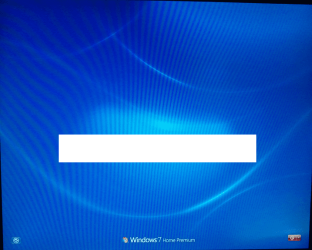
About a month ago, I made a repair install on my family's Dell desktop computer. Everything turned out to be fine except a minor difference. A couple minutes after using it and logging off, the background, where the row(s) of accounts are after booting, switched from a light blue color(with a tiny bird) screen to a dark blue one (w/o the bird).

2013-01-26 23.40.03.png

Was this supposed to happen?

Is there any way to switch the background back to what I assume is the default with the tiny bird?
 

My Computer My Computer

Computer type
PC/Desktop
Computer Manufacturer/Model Number
Dell XPS 8300
OS
Windows 7 Home Premium 64 bit
CPU
Intel Core i7-2600 CPU @ 3.40 GHz
Memory
8GB
Graphics Card(s)
Nvidia GeForce GT 530
Monitor(s) Displays
Dell 17" LCD
Screen Resolution
1280 x 1024
Hard Drives
1TB Western Digital
Antivirus
McAfee & Malwarebytes
Browser
Chrome
Welcome to Seven Forums mysterygurgle. If it was default, running the System File Checker should restore it.

http://www.sevenforums.com/tutorials/1538-sfc-scannow-command-system-file-checker.html

See if this is the image:

12557q8.jpg


It should be located in C:\windows\System32\oobe\background.bmp

You can also change it yourself

http://www.sevenforums.com/tutorials/5382-log-screen-change.html

A Guy
 

My Computer My Computer

Computer type
PC/Desktop
OS
Windows 10 Home x64
CPU
INTEL Core i5-750 Quad-Core 3.37GHz
Motherboard
ASUS P7P55D
Memory
HyperX Fury Black Series 8GB (2 x 4GB) 1866Mhz
Graphics Card(s)
EVGA GeForce GTX 750 Superclocked 1GB 128-Bit GDDR5
Monitor(s) Displays
LG 32MA68HY 32" IPS
Screen Resolution
1920 x 1080
Hard Drives
Samsung 840 Evo 120GB, SEAGATE 500GB Barracuda® 7200.12, SATA 3 Gb/s, 7200 RPM, 16MB cache
PSU
ANTEC TruePower New TP-550, 80 PLUS, 550W
Case
ANTEC Three Hundred Illusion
Cooling
COOLER MASTER Hyper 212 Plus, 4 x 120mm 1 x 140mm Noctua's
Internet Speed
85 + Mbps
Antivirus
Avast
Browser
Vivaldi
Running the System File Checker command did not do anything even though I ran it three times. Using one of the programs listed in Brink's tutorial of changing log screen worked great. I seen that tutorial once before and I can't believe I missed that default background download.

Thanks A Guy. :)
 

My Computer My Computer

Computer type
PC/Desktop
Computer Manufacturer/Model Number
Dell XPS 8300
OS
Windows 7 Home Premium 64 bit
CPU
Intel Core i7-2600 CPU @ 3.40 GHz
Memory
8GB
Graphics Card(s)
Nvidia GeForce GT 530
Monitor(s) Displays
Dell 17" LCD
Screen Resolution
1280 x 1024
Hard Drives
1TB Western Digital
Antivirus
McAfee & Malwarebytes
Browser
Chrome
You're welcome. Glad you got it sorted ;)

A Guy
 

My Computer My Computer

Computer type
PC/Desktop
OS
Windows 10 Home x64
CPU
INTEL Core i5-750 Quad-Core 3.37GHz
Motherboard
ASUS P7P55D
Memory
HyperX Fury Black Series 8GB (2 x 4GB) 1866Mhz
Graphics Card(s)
EVGA GeForce GTX 750 Superclocked 1GB 128-Bit GDDR5
Monitor(s) Displays
LG 32MA68HY 32" IPS
Screen Resolution
1920 x 1080
Hard Drives
Samsung 840 Evo 120GB, SEAGATE 500GB Barracuda® 7200.12, SATA 3 Gb/s, 7200 RPM, 16MB cache
PSU
ANTEC TruePower New TP-550, 80 PLUS, 550W
Case
ANTEC Three Hundred Illusion
Cooling
COOLER MASTER Hyper 212 Plus, 4 x 120mm 1 x 140mm Noctua's
Internet Speed
85 + Mbps
Antivirus
Avast
Browser
Vivaldi
Back
Top