
Check Disk (chkdsk) - Read Event Viewer Log

How to Read the Event Viewer Log for Check Disk (chkdsk) in Vista, Windows 7, and Windows 8

   Information
This will show you how to read the Event Viewer log to see the scan results of Check Disk (chkdsk) in Vista, Windows 7, and Windows 8.


OPTION ONE

To Read chkdsk Results Log Directly in Event Viewer


NOTE: You must be logged in as administrator to be able to open Event Viewer.
1. If you have not already, you will need to have ran Check Disk (chkdsk) in Vista/Windows 7 or Windows 8 prior before it will be in the Event Viewer System log.

2. Press the Windows + R keys to open the Run dialog, type eventvwr.msc, and press Enter.

3. If prompted by UAC, then click on Yes (Windows 7/8) or Continue (Vista).

4. In the left pane of Event Viewer, double click on Windows Logs to expand it, click on Application to select it, then right click on Application and click on Find. (see screenshot below)
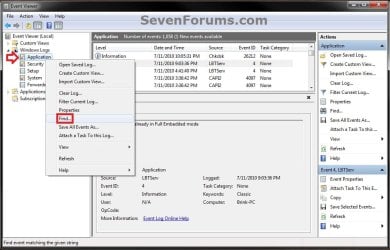
Step1.jpg
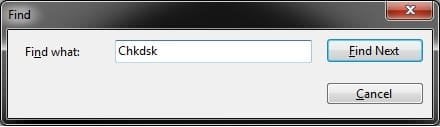
5. Copy and paste Chkdsk into the line, and click on Find Next. (see screenshot below)
NOTE: You can continue to click on Find Next to search for other older application logs (if available) for Check Disk (chkdsk) to see them as well.
Step2.jpg
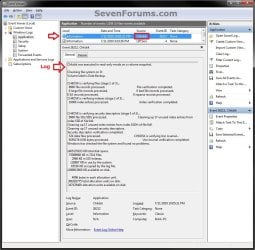
6. You will now see the system log for the scan results of Check Disk (chkdsk). (see screenshot below)
NOTE: The log will have the Chkdsk tag if Check Disk is ran only from within Windows.
Step3.jpg
7. Go back to the top of the log file list in the middle pane of Event Viewer, then copy and paste Wininit into the line, and click on Find Next. (see screenshot below step 5)
NOTE: You can continue to click on Find Next to search for other older application logs (if available) for Check Disk (chkdsk) to see them as well.

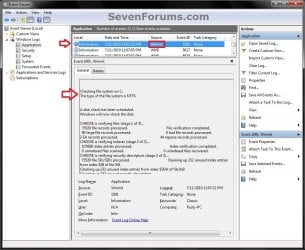
8. You will now see the system log for the scan results of Check Disk (Wininit). (see screenshot below)
NOTE: The log will have the Wininit tag if the computer has to restart to run Check Disk at startup instead of within Windows.
Wininit.jpg
9. When finished searching for Check Disk (chkdsk) application logs, you can close the Find window. (see screenshot below step 5)

10. When finished, you can close Event Viewer.


OPTION TWO

To Create .txt file on Desktop with chkdsk Results Log


   Note
This option is not available in Vista.


1. Press the Windows + R keys to open the Run dialog, type powershell.exe, and press Enter.

2. In PowerShell, copy and paste the command below, and press Enter. (see screenshot below)
NOTE: To paste the copied command into PowerShell, you will just need to right click in PowerShell.

Code:
[COLOR=black]get-winevent -FilterHashTable @{logname="Application"; id="1001"}| ?{$_.providername –match "wininit"} | fl timecreated, message | out-file Desktop\CHKDSKResults.txt[/COLOR]
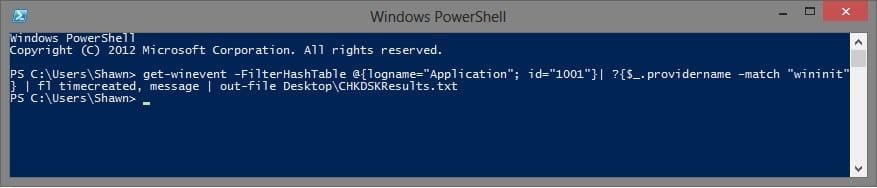
PowerShell.jpg
3. You will now have a CHKDSKResults.txt file created on your desktop that is the log file of your chkdsk scan results from Event Viewer.
That's it,
Shawn


Last edited:
This is for dbdb,

Hi, you seem to be knowledgeable about chkdsk, so here is my question. I believe I have some bad physical blocks on my drive, the symptoms being the laptop will sometimes almost grind to a halt but the disc activity lamp is burning constantly. Running chkdsk with the appropriate switches identifies and corrects the bad blocks and afterwards all is well, but only for a few days. My understanding is that when chkdsk finds a bad block or sector it should write the address in a 'spareing' table which should prevent the block ever being accessed again, but this does not seem to be the case because I have seen the same address reported on more than one occasion. I am running Win7/64 ntfs using the delivered version of chkdsk. Any thoughts?
 

My Computer My Computer

OS
Win 7 Home Premium 64 bit
because i not to understand i ask this , it's make me confused ~
 

My Computer My Computer

OS
Windows 7 Home Premium 64bit
brink, i want ask, if we run chkdsk /f , can detect the Bad Sector? or we must run chkdsk /r to detect the bad sector, if we only run fix, that can detect the bad sector?

I mean chkdsk /f can detect the bad sector or not ? And what happend if our notebook harddisk have bad sector, what's the problem?

because i not to understand i ask this , it's make me confused ~

Hello sle3pingz,

Yes, chkdsk /f will still detect and fix (mark) bad sectors. :)

http://www.sevenforums.com/tutorials/433-disk-check.html
 

My Computer My Computer

Computer type
PC/Desktop
Computer Manufacturer/Model Number
Self built custom
OS
64-bit Windows 11 Pro for Workstations
CPU
Intel i7-8700K OC'd to 5 GHz
Motherboard
ASUS ROG Maximus XI Formula Z390
Memory
64 GB (4x16GB) G.SKILL TridentZ RGB DDR4 3600 MHz
Graphics Card(s)
ASUS ROG-STRIX-GTX1080TI-O11G-GAMING
Sound Card
Integrated
Monitor(s) Displays
2 x Samsung Odyssey G7 27"
Screen Resolution
2560x1440
Hard Drives
1TB Samsung 990 PRO M.2,
4TB Samsung 990 PRO PRO M.2,
TerraMaster F8 SSD Plus NAS
PSU
Seasonic Prime Titanium 850W
Case
Thermaltake Core P3
Cooling
Corsair Hydro H115i
Keyboard
Logitech wireless K800
Mouse
Logitech MX Master 4
Internet Speed
2 Gb/s Download and 100 Mb/s Upload
Antivirus
Malwarebyte Anti-Malware Premium
Browser
Google Chrome
Other Info
Logitech Z625 speaker system,
Logitech BRIO 4K Pro webcam,
HP Color LaserJet Pro MFP M477fdn,
APC SMART-UPS RT 1000 XL - SURT1000XLI,
Galaxy S23 Plus phone
brink, i want ask, if we run chkdsk /f , can detect the Bad Sector? or we must run chkdsk /r to detect the bad sector, if we only run fix, that can detect the bad sector?

I mean chkdsk /f can detect the bad sector or not ? And what happend if our notebook harddisk have bad sector, what's the problem?

because i not to understand i ask this , it's make me confused ~

Hello sle3pingz,

Yes, chkdsk /f will still detect and fix (mark) bad sectors. :)

http://www.sevenforums.com/tutorials/433-disk-check.html

it will detect and fix? what's the different then with the /r? /f can detect bad sector too ? really? sorry if i ask too much question ...
 

My Computer My Computer

OS
Windows 7 Home Premium 64bit
It's no problem at all mate. We are here to help with just such questions. More details at the link below, but here are the basics. :)

http://www.sevenforums.com/tutorials/433-disk-check.html

The /R switch alone only attempts to recover any data that was in the bad sector. It will not attempt to fix or mark the bad sector to no longer be used unless you also include the /F switch below..

The /F switch alone will attempt to fix any errors on the disk. If it can't fix an error (ex: bad sector), then it will mark it so that the bad sector will no longer be used.

If you use both the /R and /F switch (ex: "chkdsk C: /F /R"), then it will do both of the above.
 

My Computer My Computer

Computer type
PC/Desktop
Computer Manufacturer/Model Number
Self built custom
OS
64-bit Windows 11 Pro for Workstations
CPU
Intel i7-8700K OC'd to 5 GHz
Motherboard
ASUS ROG Maximus XI Formula Z390
Memory
64 GB (4x16GB) G.SKILL TridentZ RGB DDR4 3600 MHz
Graphics Card(s)
ASUS ROG-STRIX-GTX1080TI-O11G-GAMING
Sound Card
Integrated
Monitor(s) Displays
2 x Samsung Odyssey G7 27"
Screen Resolution
2560x1440
Hard Drives
1TB Samsung 990 PRO M.2,
4TB Samsung 990 PRO PRO M.2,
TerraMaster F8 SSD Plus NAS
PSU
Seasonic Prime Titanium 850W
Case
Thermaltake Core P3
Cooling
Corsair Hydro H115i
Keyboard
Logitech wireless K800
Mouse
Logitech MX Master 4
Internet Speed
2 Gb/s Download and 100 Mb/s Upload
Antivirus
Malwarebyte Anti-Malware Premium
Browser
Google Chrome
Other Info
Logitech Z625 speaker system,
Logitech BRIO 4K Pro webcam,
HP Color LaserJet Pro MFP M477fdn,
APC SMART-UPS RT 1000 XL - SURT1000XLI,
Galaxy S23 Plus phone
yes , i just curious , i don't know if i run chkdsk /f , can detect my Harddisk have badsector or not, or i need run chkdsk /r for detect the bad sector? what do you think? if i run chkdsk /f , if no bad sector detected , it's mean really no bad sector? /f can detect the bad sector ?
 

My Computer My Computer

OS
Windows 7 Home Premium 64bit
You can run chkdsk C: /F /R to do both at the same time. Just substitute C for the drive letter you want to run it on.
 

My Computer My Computer

Computer type
PC/Desktop
Computer Manufacturer/Model Number
Self built custom
OS
64-bit Windows 11 Pro for Workstations
CPU
Intel i7-8700K OC'd to 5 GHz
Motherboard
ASUS ROG Maximus XI Formula Z390
Memory
64 GB (4x16GB) G.SKILL TridentZ RGB DDR4 3600 MHz
Graphics Card(s)
ASUS ROG-STRIX-GTX1080TI-O11G-GAMING
Sound Card
Integrated
Monitor(s) Displays
2 x Samsung Odyssey G7 27"
Screen Resolution
2560x1440
Hard Drives
1TB Samsung 990 PRO M.2,
4TB Samsung 990 PRO PRO M.2,
TerraMaster F8 SSD Plus NAS
PSU
Seasonic Prime Titanium 850W
Case
Thermaltake Core P3
Cooling
Corsair Hydro H115i
Keyboard
Logitech wireless K800
Mouse
Logitech MX Master 4
Internet Speed
2 Gb/s Download and 100 Mb/s Upload
Antivirus
Malwarebyte Anti-Malware Premium
Browser
Google Chrome
Other Info
Logitech Z625 speaker system,
Logitech BRIO 4K Pro webcam,
HP Color LaserJet Pro MFP M477fdn,
APC SMART-UPS RT 1000 XL - SURT1000XLI,
Galaxy S23 Plus phone
You can run chkdsk C: /F /R to do both at the same time. Just substitute C for the drive letter you want to run it on.

really sorry not too understand , make it simple , chkdsk /f (fix) when scan can detect bad sector like chkdsk /r? if i didn't find bad sector at chkdsk /f , i need to run chkdsk /r for detect bad sector? really sorry , my english is bad ...
 

My Computer My Computer

OS
Windows 7 Home Premium 64bit
Nope, I would recommend to run the command below exactly as is.

F = fix only
R = recover data only

chkdsk C: /F /R
 

My Computer My Computer

Computer type
PC/Desktop
Computer Manufacturer/Model Number
Self built custom
OS
64-bit Windows 11 Pro for Workstations
CPU
Intel i7-8700K OC'd to 5 GHz
Motherboard
ASUS ROG Maximus XI Formula Z390
Memory
64 GB (4x16GB) G.SKILL TridentZ RGB DDR4 3600 MHz
Graphics Card(s)
ASUS ROG-STRIX-GTX1080TI-O11G-GAMING
Sound Card
Integrated
Monitor(s) Displays
2 x Samsung Odyssey G7 27"
Screen Resolution
2560x1440
Hard Drives
1TB Samsung 990 PRO M.2,
4TB Samsung 990 PRO PRO M.2,
TerraMaster F8 SSD Plus NAS
PSU
Seasonic Prime Titanium 850W
Case
Thermaltake Core P3
Cooling
Corsair Hydro H115i
Keyboard
Logitech wireless K800
Mouse
Logitech MX Master 4
Internet Speed
2 Gb/s Download and 100 Mb/s Upload
Antivirus
Malwarebyte Anti-Malware Premium
Browser
Google Chrome
Other Info
Logitech Z625 speaker system,
Logitech BRIO 4K Pro webcam,
HP Color LaserJet Pro MFP M477fdn,
APC SMART-UPS RT 1000 XL - SURT1000XLI,
Galaxy S23 Plus phone
Nope, I would recommend to run the command below exactly as is.

F = fix only
R = recover data only

chkdsk C: /F /R

what do you mean by nope Brink?
chkdsk /f can't detect bad sector?
then only chkdsk /r can detect bad sector?
 

My Computer My Computer

OS
Windows 7 Home Premium 64bit
Nope, as in you should run the command I posted instead. ;)
 

My Computer My Computer

Computer type
PC/Desktop
Computer Manufacturer/Model Number
Self built custom
OS
64-bit Windows 11 Pro for Workstations
CPU
Intel i7-8700K OC'd to 5 GHz
Motherboard
ASUS ROG Maximus XI Formula Z390
Memory
64 GB (4x16GB) G.SKILL TridentZ RGB DDR4 3600 MHz
Graphics Card(s)
ASUS ROG-STRIX-GTX1080TI-O11G-GAMING
Sound Card
Integrated
Monitor(s) Displays
2 x Samsung Odyssey G7 27"
Screen Resolution
2560x1440
Hard Drives
1TB Samsung 990 PRO M.2,
4TB Samsung 990 PRO PRO M.2,
TerraMaster F8 SSD Plus NAS
PSU
Seasonic Prime Titanium 850W
Case
Thermaltake Core P3
Cooling
Corsair Hydro H115i
Keyboard
Logitech wireless K800
Mouse
Logitech MX Master 4
Internet Speed
2 Gb/s Download and 100 Mb/s Upload
Antivirus
Malwarebyte Anti-Malware Premium
Browser
Google Chrome
Other Info
Logitech Z625 speaker system,
Logitech BRIO 4K Pro webcam,
HP Color LaserJet Pro MFP M477fdn,
APC SMART-UPS RT 1000 XL - SURT1000XLI,
Galaxy S23 Plus phone
the command you post?
i don't know which and what you mean?
can you tell me /f can detect bad sector? or only /r? or both can detect bad sector?
 

My Computer My Computer

OS
Windows 7 Home Premium 64bit
chkdsk C: /F /R
 

My Computer My Computer

Computer type
PC/Desktop
Computer Manufacturer/Model Number
Self built custom
OS
64-bit Windows 11 Pro for Workstations
CPU
Intel i7-8700K OC'd to 5 GHz
Motherboard
ASUS ROG Maximus XI Formula Z390
Memory
64 GB (4x16GB) G.SKILL TridentZ RGB DDR4 3600 MHz
Graphics Card(s)
ASUS ROG-STRIX-GTX1080TI-O11G-GAMING
Sound Card
Integrated
Monitor(s) Displays
2 x Samsung Odyssey G7 27"
Screen Resolution
2560x1440
Hard Drives
1TB Samsung 990 PRO M.2,
4TB Samsung 990 PRO PRO M.2,
TerraMaster F8 SSD Plus NAS
PSU
Seasonic Prime Titanium 850W
Case
Thermaltake Core P3
Cooling
Corsair Hydro H115i
Keyboard
Logitech wireless K800
Mouse
Logitech MX Master 4
Internet Speed
2 Gb/s Download and 100 Mb/s Upload
Antivirus
Malwarebyte Anti-Malware Premium
Browser
Google Chrome
Other Info
Logitech Z625 speaker system,
Logitech BRIO 4K Pro webcam,
HP Color LaserJet Pro MFP M477fdn,
APC SMART-UPS RT 1000 XL - SURT1000XLI,
Galaxy S23 Plus phone
It means to type that command exactly as is in the command prompt and press enter to have both switches used. :)

chkdsk C: /F /R
 

My Computer My Computer

Computer type
PC/Desktop
Computer Manufacturer/Model Number
Self built custom
OS
64-bit Windows 11 Pro for Workstations
CPU
Intel i7-8700K OC'd to 5 GHz
Motherboard
ASUS ROG Maximus XI Formula Z390
Memory
64 GB (4x16GB) G.SKILL TridentZ RGB DDR4 3600 MHz
Graphics Card(s)
ASUS ROG-STRIX-GTX1080TI-O11G-GAMING
Sound Card
Integrated
Monitor(s) Displays
2 x Samsung Odyssey G7 27"
Screen Resolution
2560x1440
Hard Drives
1TB Samsung 990 PRO M.2,
4TB Samsung 990 PRO PRO M.2,
TerraMaster F8 SSD Plus NAS
PSU
Seasonic Prime Titanium 850W
Case
Thermaltake Core P3
Cooling
Corsair Hydro H115i
Keyboard
Logitech wireless K800
Mouse
Logitech MX Master 4
Internet Speed
2 Gb/s Download and 100 Mb/s Upload
Antivirus
Malwarebyte Anti-Malware Premium
Browser
Google Chrome
Other Info
Logitech Z625 speaker system,
Logitech BRIO 4K Pro webcam,
HP Color LaserJet Pro MFP M477fdn,
APC SMART-UPS RT 1000 XL - SURT1000XLI,
Galaxy S23 Plus phone
no, my question isn't how to use, i want ask, chkdsk /f can detect bad sector or not? or only chkdsk /r can detect the bad sector? :cry:
 

My Computer My Computer

OS
Windows 7 Home Premium 64bit
Sorry. It would be chkdsk /f or chkdsk /v.

/f = to check (verify) and attempt to fix
/v = to only check (verify) and doesn't attempt to fix
 

My Computer My Computer

Computer type
PC/Desktop
Computer Manufacturer/Model Number
Self built custom
OS
64-bit Windows 11 Pro for Workstations
CPU
Intel i7-8700K OC'd to 5 GHz
Motherboard
ASUS ROG Maximus XI Formula Z390
Memory
64 GB (4x16GB) G.SKILL TridentZ RGB DDR4 3600 MHz
Graphics Card(s)
ASUS ROG-STRIX-GTX1080TI-O11G-GAMING
Sound Card
Integrated
Monitor(s) Displays
2 x Samsung Odyssey G7 27"
Screen Resolution
2560x1440
Hard Drives
1TB Samsung 990 PRO M.2,
4TB Samsung 990 PRO PRO M.2,
TerraMaster F8 SSD Plus NAS
PSU
Seasonic Prime Titanium 850W
Case
Thermaltake Core P3
Cooling
Corsair Hydro H115i
Keyboard
Logitech wireless K800
Mouse
Logitech MX Master 4
Internet Speed
2 Gb/s Download and 100 Mb/s Upload
Antivirus
Malwarebyte Anti-Malware Premium
Browser
Google Chrome
Other Info
Logitech Z625 speaker system,
Logitech BRIO 4K Pro webcam,
HP Color LaserJet Pro MFP M477fdn,
APC SMART-UPS RT 1000 XL - SURT1000XLI,
Galaxy S23 Plus phone
Sorry. It would be chkdsk /f or chkdsk /v.

/f = to check (verify) and attempt to fix
/v = to only check (verify) and doesn't attempt to fix

just make it simple, /f can detect Bad Sector? if there's bad sector at our Harddisk ? :D
 

My Computer My Computer

OS
Windows 7 Home Premium 64bit
I thought I was. ;)

Yes.
 

My Computer My Computer

Computer type
PC/Desktop
Computer Manufacturer/Model Number
Self built custom
OS
64-bit Windows 11 Pro for Workstations
CPU
Intel i7-8700K OC'd to 5 GHz
Motherboard
ASUS ROG Maximus XI Formula Z390
Memory
64 GB (4x16GB) G.SKILL TridentZ RGB DDR4 3600 MHz
Graphics Card(s)
ASUS ROG-STRIX-GTX1080TI-O11G-GAMING
Sound Card
Integrated
Monitor(s) Displays
2 x Samsung Odyssey G7 27"
Screen Resolution
2560x1440
Hard Drives
1TB Samsung 990 PRO M.2,
4TB Samsung 990 PRO PRO M.2,
TerraMaster F8 SSD Plus NAS
PSU
Seasonic Prime Titanium 850W
Case
Thermaltake Core P3
Cooling
Corsair Hydro H115i
Keyboard
Logitech wireless K800
Mouse
Logitech MX Master 4
Internet Speed
2 Gb/s Download and 100 Mb/s Upload
Antivirus
Malwarebyte Anti-Malware Premium
Browser
Google Chrome
Other Info
Logitech Z625 speaker system,
Logitech BRIO 4K Pro webcam,
HP Color LaserJet Pro MFP M477fdn,
APC SMART-UPS RT 1000 XL - SURT1000XLI,
Galaxy S23 Plus phone
I thought I was. ;)

Yes.

Thanks , if after chkdsk /f or chkdsk

if the result is "0 KB in bad sectors" and "0 bad file records processed."
it's mean my harddisk don't have any bad sector right? last question , sorry for troubling you brink , xD :D
 

My Computer My Computer

OS
Windows 7 Home Premium 64bit
Back
Top