
Check Disk (chkdsk) - Read Event Viewer Log

How to Read the Event Viewer Log for Check Disk (chkdsk) in Vista, Windows 7, and Windows 8

   Information
This will show you how to read the Event Viewer log to see the scan results of Check Disk (chkdsk) in Vista, Windows 7, and Windows 8.


OPTION ONE

To Read chkdsk Results Log Directly in Event Viewer


NOTE: You must be logged in as administrator to be able to open Event Viewer.
1. If you have not already, you will need to have ran Check Disk (chkdsk) in Vista/Windows 7 or Windows 8 prior before it will be in the Event Viewer System log.

2. Press the Windows + R keys to open the Run dialog, type eventvwr.msc, and press Enter.

3. If prompted by UAC, then click on Yes (Windows 7/8) or Continue (Vista).

4. In the left pane of Event Viewer, double click on Windows Logs to expand it, click on Application to select it, then right click on Application and click on Find. (see screenshot below)
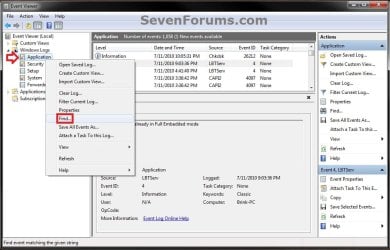
Step1.jpg
5. Copy and paste Chkdsk into the line, and click on Find Next. (see screenshot below)
NOTE: You can continue to click on Find Next to search for other older application logs (if available) for Check Disk (chkdsk) to see them as well.

Step2.jpg
6. You will now see the system log for the scan results of Check Disk (chkdsk). (see screenshot below)
NOTE: The log will have the Chkdsk tag if Check Disk is ran only from within Windows.
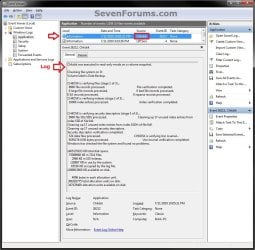
Step3.jpg
7. Go back to the top of the log file list in the middle pane of Event Viewer, then copy and paste Wininit into the line, and click on Find Next. (see screenshot below step 5)
NOTE: You can continue to click on Find Next to search for other older application logs (if available) for Check Disk (chkdsk) to see them as well.

8. You will now see the system log for the scan results of Check Disk (Wininit). (see screenshot below)
NOTE: The log will have the Wininit tag if the computer has to restart to run Check Disk at startup instead of within Windows.
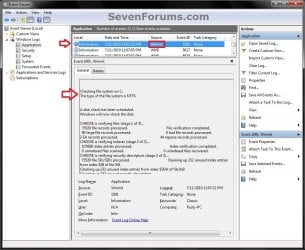
Wininit.jpg
9. When finished searching for Check Disk (chkdsk) application logs, you can close the Find window. (see screenshot below step 5)

10. When finished, you can close Event Viewer.


OPTION TWO

To Create .txt file on Desktop with chkdsk Results Log


   Note
This option is not available in Vista.


1. Press the Windows + R keys to open the Run dialog, type powershell.exe, and press Enter.

2. In PowerShell, copy and paste the command below, and press Enter. (see screenshot below)
NOTE: To paste the copied command into PowerShell, you will just need to right click in PowerShell.

Code:
[COLOR=black]get-winevent -FilterHashTable @{logname="Application"; id="1001"}| ?{$_.providername –match "wininit"} | fl timecreated, message | out-file Desktop\CHKDSKResults.txt[/COLOR]
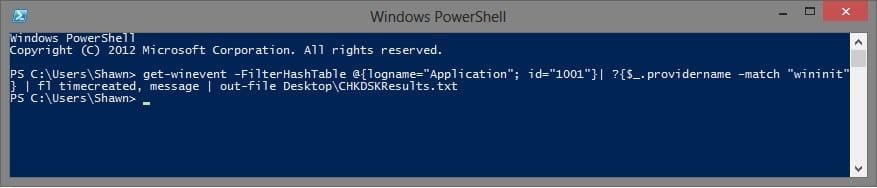
PowerShell.jpg
3. You will now have a CHKDSKResults.txt file created on your desktop that is the log file of your chkdsk scan results from Event Viewer.
That's it,
Shawn


Last edited:
LOL, no problem mate. Yes, that would be correct that it doesn't have any bad sectors found then. :)
 

My Computer My Computer

Computer type
PC/Desktop
Computer Manufacturer/Model Number
Self built custom
OS
64-bit Windows 11 Pro for Workstations
CPU
Intel i7-8700K OC'd to 5 GHz
Motherboard
ASUS ROG Maximus XI Formula Z390
Memory
64 GB (4x16GB) G.SKILL TridentZ RGB DDR4 3600 MHz
Graphics Card(s)
ASUS ROG-STRIX-GTX1080TI-O11G-GAMING
Sound Card
Integrated
Monitor(s) Displays
2 x Samsung Odyssey G7 27"
Screen Resolution
2560x1440
Hard Drives
1TB Samsung 990 PRO M.2,
4TB Samsung 990 PRO PRO M.2,
TerraMaster F8 SSD Plus NAS
PSU
Seasonic Prime Titanium 850W
Case
Thermaltake Core P3
Cooling
Corsair Hydro H115i
Keyboard
Logitech wireless K800
Mouse
Logitech MX Master 4
Internet Speed
2 Gb/s Download and 100 Mb/s Upload
Antivirus
Malwarebyte Anti-Malware Premium
Browser
Google Chrome
Other Info
Logitech Z625 speaker system,
Logitech BRIO 4K Pro webcam,
HP Color LaserJet Pro MFP M477fdn,
APC SMART-UPS RT 1000 XL - SURT1000XLI,
Galaxy S23 Plus phone
"that would be correct that it doesn't have any bad sectors found then" mean? sorry my english is bad :cry: really really sorry , then my harddisk is clean right ? no bad sector right? if the result "0 KB in bad sectors" and "0 bad file records processed."
 

My Computer My Computer

OS
Windows 7 Home Premium 64bit
Correct. No bad sector. :)
 

My Computer My Computer

Computer type
PC/Desktop
Computer Manufacturer/Model Number
Self built custom
OS
64-bit Windows 11 Pro for Workstations
CPU
Intel i7-8700K OC'd to 5 GHz
Motherboard
ASUS ROG Maximus XI Formula Z390
Memory
64 GB (4x16GB) G.SKILL TridentZ RGB DDR4 3600 MHz
Graphics Card(s)
ASUS ROG-STRIX-GTX1080TI-O11G-GAMING
Sound Card
Integrated
Monitor(s) Displays
2 x Samsung Odyssey G7 27"
Screen Resolution
2560x1440
Hard Drives
1TB Samsung 990 PRO M.2,
4TB Samsung 990 PRO PRO M.2,
TerraMaster F8 SSD Plus NAS
PSU
Seasonic Prime Titanium 850W
Case
Thermaltake Core P3
Cooling
Corsair Hydro H115i
Keyboard
Logitech wireless K800
Mouse
Logitech MX Master 4
Internet Speed
2 Gb/s Download and 100 Mb/s Upload
Antivirus
Malwarebyte Anti-Malware Premium
Browser
Google Chrome
Other Info
Logitech Z625 speaker system,
Logitech BRIO 4K Pro webcam,
HP Color LaserJet Pro MFP M477fdn,
APC SMART-UPS RT 1000 XL - SURT1000XLI,
Galaxy S23 Plus phone
Thanks for you Fast Reply Brink :p
 

My Computer My Computer

OS
Windows 7 Home Premium 64bit
Anytime. :)
 

My Computer My Computer

Computer type
PC/Desktop
Computer Manufacturer/Model Number
Self built custom
OS
64-bit Windows 11 Pro for Workstations
CPU
Intel i7-8700K OC'd to 5 GHz
Motherboard
ASUS ROG Maximus XI Formula Z390
Memory
64 GB (4x16GB) G.SKILL TridentZ RGB DDR4 3600 MHz
Graphics Card(s)
ASUS ROG-STRIX-GTX1080TI-O11G-GAMING
Sound Card
Integrated
Monitor(s) Displays
2 x Samsung Odyssey G7 27"
Screen Resolution
2560x1440
Hard Drives
1TB Samsung 990 PRO M.2,
4TB Samsung 990 PRO PRO M.2,
TerraMaster F8 SSD Plus NAS
PSU
Seasonic Prime Titanium 850W
Case
Thermaltake Core P3
Cooling
Corsair Hydro H115i
Keyboard
Logitech wireless K800
Mouse
Logitech MX Master 4
Internet Speed
2 Gb/s Download and 100 Mb/s Upload
Antivirus
Malwarebyte Anti-Malware Premium
Browser
Google Chrome
Other Info
Logitech Z625 speaker system,
Logitech BRIO 4K Pro webcam,
HP Color LaserJet Pro MFP M477fdn,
APC SMART-UPS RT 1000 XL - SURT1000XLI,
Galaxy S23 Plus phone
Brink sorry for disturb you again, Today my Notebook suddenly not responding, and the notebook suddenly restart , not restart by me, then i try to chkdsk , and the result tell me to chkdsk /f ...

• this's the first result chkdsk

Code:
Log Name: Application
Source: Chkdsk
Date: 12/5/2012 2:19:05 AM
Event ID: 26213
Task Category: None
Level: Information
Keywords: Classic
User: N/A
Computer: Frankz-PC
Description:
Chkdsk was executed in read-only mode. A volume snapshot was not used. Extra errors and warnings may be reported as the volume may have changed during the chkdsk run. 
 
Checking file system on C:
The type of the file system is NTFS.
The volume is in use by another process. Chkdsk
might report errors when no corruption is present.
 
WARNING! F parameter not specified.
Running CHKDSK in read-only mode.
 
CHKDSK is verifying files (stage 1 of 3)...
221184 file records processed. 
 
File verification completed.
2507 large file records processed. 
 
0 bad file records processed. 
 
0 EA records processed. 
 
60 reparse records processed. 
 
CHKDSK is verifying indexes (stage 2 of 3)...
282246 index entries processed. 
 
Index verification completed.
0 unindexed files scanned. 
 
0 unindexed files recovered. 
 
CHKDSK is verifying security descriptors (stage 3 of 3)...
221184 file SDs/SIDs processed. 
 
Cleaning up 368 unused index entries from index $SII of file 0x9.
Cleaning up 368 unused index entries from index $SDH of file 0x9.
Cleaning up 368 unused security descriptors.
Security descriptor verification completed.
30532 data files processed. 
 
CHKDSK is verifying Usn Journal...
34837096 USN bytes processed. 
 
Usn Journal verification completed.
The master file table's (MFT) BITMAP attribute is incorrect.
The Volume Bitmap is incorrect.
Windows found problems with the file system.
Run CHKDSK with the /F (fix) option to correct these.
 
686489599 KB total disk space.
340803988 KB in 119670 files.
89944 KB in 30533 indexes.
0 KB in bad sectors.
344003 KB in use by the system.
65536 KB occupied by the log file.
345251664 KB available on disk.
 
4096 bytes in each allocation unit.
171622399 total allocation units on disk.
86312916 allocation units available on disk.
 
Event Xml:
<Event xmlns="http://schemas.microsoft.com/win/2004/08/events/event">
<System>
<Provider Name="Chkdsk" />
<EventID Qualifiers="0">26213</EventID>
<Level>4</Level>
<Task>0</Task>
<Keywords>0x80000000000000</Keywords>
<TimeCreated SystemTime="2012-12-04T19:19:05.000000000Z" />
<EventRecordID>33429</EventRecordID>
<Channel>Application</Channel>
<Computer>Frankz-PC</Computer>
<Security />
</System>
<EventData>
<Data>
 
Checking file system on C:
The type of the file system is NTFS.
The volume is in use by another process. Chkdsk
might report errors when no corruption is present.
 
WARNING! F parameter not specified.
Running CHKDSK in read-only mode.
 
CHKDSK is verifying files (stage 1 of 3)...
221184 file records processed. 
 
File verification completed.
2507 large file records processed. 
 
0 bad file records processed. 
 
0 EA records processed. 
 
60 reparse records processed. 
 
CHKDSK is verifying indexes (stage 2 of 3)...
282246 index entries processed. 
 
Index verification completed.
0 unindexed files scanned. 
 
0 unindexed files recovered. 
 
CHKDSK is verifying security descriptors (stage 3 of 3)...
221184 file SDs/SIDs processed. 
 
Cleaning up 368 unused index entries from index $SII of file 0x9.
Cleaning up 368 unused index entries from index $SDH of file 0x9.
Cleaning up 368 unused security descriptors.
Security descriptor verification completed.
30532 data files processed. 
 
CHKDSK is verifying Usn Journal...
34837096 USN bytes processed. 
 
Usn Journal verification completed.
The master file table's (MFT) BITMAP attribute is incorrect.
The Volume Bitmap is incorrect.
Windows found problems with the file system.
Run CHKDSK with the /F (fix) option to correct these.
 
686489599 KB total disk space.
340803988 KB in 119670 files.
89944 KB in 30533 indexes.
0 KB in bad sectors.
344003 KB in use by the system.
65536 KB occupied by the log file.
345251664 KB available on disk.
 
4096 bytes in each allocation unit.
171622399 total allocation units on disk.
86312916 allocation units available on disk.
</Data>
<Binary>00600300C64A0200CF4B040000000000DA0000003C0000000000000000000000</Binary>
</EventData>
</Event>
• after that i try to chkdsk /f
Code:
Log Name: Application
Source: Microsoft-Windows-Wininit
Date: 12/5/2012 2:26:43 AM
Event ID: 1001
Task Category: None
Level: Information
Keywords: Classic
User: N/A
Computer: Frankz-PC
Description:
 
 
Checking file system on C:
The type of the file system is NTFS.
 
 
A disk check has been scheduled.
Windows will now check the disk. 
 
CHKDSK is verifying files (stage 1 of 3)...
221184 file records processed. 
 
File verification completed.
2507 large file records processed. 
 
0 bad file records processed. 
 
0 EA records processed. 
 
60 reparse records processed. 
 
CHKDSK is verifying indexes (stage 2 of 3)...
282256 index entries processed. 
 
Index verification completed.
0 unindexed files scanned. 
 
0 unindexed files recovered. 
 
CHKDSK is verifying security descriptors (stage 3 of 3)...
221184 file SDs/SIDs processed. 
 
Cleaning up 367 unused index entries from index $SII of file 0x9.
Cleaning up 367 unused index entries from index $SDH of file 0x9.
Cleaning up 367 unused security descriptors.
Security descriptor verification completed.
30537 data files processed. 
 
CHKDSK is verifying Usn Journal...
34910928 USN bytes processed. 
 
Usn Journal verification completed.
Windows has checked the file system and found no problems.
 
686489599 KB total disk space.
340798676 KB in 119669 files.
89948 KB in 30538 indexes.
0 KB in bad sectors.
344003 KB in use by the system.
65536 KB occupied by the log file.
345256972 KB available on disk.
 
4096 bytes in each allocation unit.
171622399 total allocation units on disk.
86314243 allocation units available on disk.
 
Internal Info:
00 60 03 00 ca 4a 02 00 d3 4b 04 00 00 00 00 00 .`...J...K......
da 00 00 00 3c 00 00 00 00 00 00 00 00 00 00 00 ....<...........
00 00 00 00 00 00 00 00 00 00 00 00 00 00 00 00 ................
 
Windows has finished checking your disk.
Please wait while your computer restarts.
 
Event Xml:
<Event xmlns="http://schemas.microsoft.com/win/2004/08/events/event">
<System>
<Provider Name="Microsoft-Windows-Wininit" Guid="{206f6dea-d3c5-4d10-bc72-989f03c8b84b}" EventSourceName="Wininit" />
<EventID Qualifiers="16384">1001</EventID>
<Version>0</Version>
<Level>4</Level>
<Task>0</Task>
<Opcode>0</Opcode>
<Keywords>0x80000000000000</Keywords>
<TimeCreated SystemTime="2012-12-04T19:26:43.000000000Z" />
<EventRecordID>33444</EventRecordID>
<Correlation />
<Execution ProcessID="0" ThreadID="0" />
<Channel>Application</Channel>
<Computer>Frankz-PC</Computer>
<Security />
</System>
<EventData>
<Data>
 
Checking file system on C:
The type of the file system is NTFS.
 
 
A disk check has been scheduled.
Windows will now check the disk. 
 
CHKDSK is verifying files (stage 1 of 3)...
221184 file records processed. 
 
File verification completed.
2507 large file records processed. 
 
0 bad file records processed. 
 
0 EA records processed. 
 
60 reparse records processed. 
 
CHKDSK is verifying indexes (stage 2 of 3)...
282256 index entries processed. 
 
Index verification completed.
0 unindexed files scanned. 
 
0 unindexed files recovered. 
 
CHKDSK is verifying security descriptors (stage 3 of 3)...
221184 file SDs/SIDs processed. 
 
Cleaning up 367 unused index entries from index $SII of file 0x9.
Cleaning up 367 unused index entries from index $SDH of file 0x9.
Cleaning up 367 unused security descriptors.
Security descriptor verification completed.
30537 data files processed. 
 
CHKDSK is verifying Usn Journal...
34910928 USN bytes processed. 
 
Usn Journal verification completed.
Windows has checked the file system and found no problems.
 
686489599 KB total disk space.
340798676 KB in 119669 files.
89948 KB in 30538 indexes.
0 KB in bad sectors.
344003 KB in use by the system.
65536 KB occupied by the log file.
345256972 KB available on disk.
 
4096 bytes in each allocation unit.
171622399 total allocation units on disk.
86314243 allocation units available on disk.
 
Internal Info:
00 60 03 00 ca 4a 02 00 d3 4b 04 00 00 00 00 00 .`...J...K......
da 00 00 00 3c 00 00 00 00 00 00 00 00 00 00 00 ....<...........
00 00 00 00 00 00 00 00 00 00 00 00 00 00 00 00 ................
 
Windows has finished checking your disk.
Please wait while your computer restarts.
</Data>
</EventData>
</Event>
• at last cause i afraid not safe, i try to using this , My Computer > Local Disk C > Properties > Tools > Check Now
- Automatically fix file system errors (Checked)
- Scan for and attempt recovery of bad sectors (Checked)

Result :
Code:
Log Name: Application
Source: Microsoft-Windows-Wininit
Date: 12/5/2012 5:24:05 AM
Event ID: 1001
Task Category: None
Level: Information
Keywords: Classic
User: N/A
Computer: Frankz-PC
Description:
 
 
Checking file system on C:
The type of the file system is NTFS.
 
A disk check has been scheduled.
Windows will now check the disk. 
 
CHKDSK is verifying files (stage 1 of 5)...
221184 file records processed. 
 
File verification completed.
2507 large file records processed. 
 
0 bad file records processed. 
 
0 EA records processed. 
 
60 reparse records processed. 
 
CHKDSK is verifying indexes (stage 2 of 5)...
282212 index entries processed. 
 
Index verification completed.
0 unindexed files scanned. 
 
0 unindexed files recovered. 
 
CHKDSK is verifying security descriptors (stage 3 of 5)...
221184 file SDs/SIDs processed. 
 
Cleaning up 12 unused index entries from index $SII of file 0x9.
Cleaning up 12 unused index entries from index $SDH of file 0x9.
Cleaning up 12 unused security descriptors.
Security descriptor verification completed.
30515 data files processed. 
 
CHKDSK is verifying Usn Journal...
35184128 USN bytes processed. 
 
Usn Journal verification completed.
CHKDSK is verifying file data (stage 4 of 5)...
221168 files processed. 
 
File data verification completed.
CHKDSK is verifying free space (stage 5 of 5)...
86476126 free clusters processed. 
 
Free space verification is complete.
Windows has checked the file system and found no problems.
 
686489599 KB total disk space.
340151160 KB in 119585 files.
89932 KB in 30516 indexes.
0 KB in bad sectors.
344003 KB in use by the system.
65536 KB occupied by the log file.
345904504 KB available on disk.
 
4096 bytes in each allocation unit.
171622399 total allocation units on disk.
86476126 allocation units available on disk.
 
Internal Info:
00 60 03 00 60 4a 02 00 15 4b 04 00 00 00 00 00 .`..`J...K......
da 00 00 00 3c 00 00 00 00 00 00 00 00 00 00 00 ....<...........
00 00 00 00 00 00 00 00 00 00 00 00 00 00 00 00 ................
 
Windows has finished checking your disk.
Please wait while your computer restarts.
 
Event Xml:
<Event xmlns="http://schemas.microsoft.com/win/2004/08/events/event">
<System>
<Provider Name="Microsoft-Windows-Wininit" Guid="{206f6dea-d3c5-4d10-bc72-989f03c8b84b}" EventSourceName="Wininit" />
<EventID Qualifiers="16384">1001</EventID>
<Version>0</Version>
<Level>4</Level>
<Task>0</Task>
<Opcode>0</Opcode>
<Keywords>0x80000000000000</Keywords>
<TimeCreated SystemTime="2012-12-04T22:24:05.000000000Z" />
<EventRecordID>33476</EventRecordID>
<Correlation />
<Execution ProcessID="0" ThreadID="0" />
<Channel>Application</Channel>
<Computer>Frankz-PC</Computer>
<Security />
</System>
<EventData>
<Data>
 
Checking file system on C:
The type of the file system is NTFS.
 
A disk check has been scheduled.
Windows will now check the disk. 
 
CHKDSK is verifying files (stage 1 of 5)...
221184 file records processed. 
 
File verification completed.
2507 large file records processed. 
 
0 bad file records processed. 
 
0 EA records processed. 
 
60 reparse records processed. 
 
CHKDSK is verifying indexes (stage 2 of 5)...
282212 index entries processed. 
 
Index verification completed.
0 unindexed files scanned. 
 
0 unindexed files recovered. 
 
CHKDSK is verifying security descriptors (stage 3 of 5)...
221184 file SDs/SIDs processed. 
 
Cleaning up 12 unused index entries from index $SII of file 0x9.
Cleaning up 12 unused index entries from index $SDH of file 0x9.
Cleaning up 12 unused security descriptors.
Security descriptor verification completed.
30515 data files processed. 
 
CHKDSK is verifying Usn Journal...
35184128 USN bytes processed. 
 
Usn Journal verification completed.
CHKDSK is verifying file data (stage 4 of 5)...
221168 files processed. 
 
File data verification completed.
CHKDSK is verifying free space (stage 5 of 5)...
86476126 free clusters processed. 
 
Free space verification is complete.
Windows has checked the file system and found no problems.
 
686489599 KB total disk space.
340151160 KB in 119585 files.
89932 KB in 30516 indexes.
0 KB in bad sectors.
344003 KB in use by the system.
65536 KB occupied by the log file.
345904504 KB available on disk.
 
4096 bytes in each allocation unit.
171622399 total allocation units on disk.
86476126 allocation units available on disk.
 
Internal Info:
00 60 03 00 60 4a 02 00 15 4b 04 00 00 00 00 00 .`..`J...K......
da 00 00 00 3c 00 00 00 00 00 00 00 00 00 00 00 ....<...........
00 00 00 00 00 00 00 00 00 00 00 00 00 00 00 00 ................
 
Windows has finished checking your disk.
Please wait while your computer restarts.
</Data>
</EventData>
</Event>
there's anything wrong with my notebook? sorry for the long message, please see Brink, and tell me there's any problem with my notebook or already safe? Thank You Very Much ....
 
Last edited:

My Computer My Computer

OS
Windows 7 Home Premium 64bit
Hello sle3pingz,

It's not trouble at all.

Your log doesn't show any bad files or sectors. :)
 

My Computer My Computer

Computer type
PC/Desktop
Computer Manufacturer/Model Number
Self built custom
OS
64-bit Windows 11 Pro for Workstations
CPU
Intel i7-8700K OC'd to 5 GHz
Motherboard
ASUS ROG Maximus XI Formula Z390
Memory
64 GB (4x16GB) G.SKILL TridentZ RGB DDR4 3600 MHz
Graphics Card(s)
ASUS ROG-STRIX-GTX1080TI-O11G-GAMING
Sound Card
Integrated
Monitor(s) Displays
2 x Samsung Odyssey G7 27"
Screen Resolution
2560x1440
Hard Drives
1TB Samsung 990 PRO M.2,
4TB Samsung 990 PRO PRO M.2,
TerraMaster F8 SSD Plus NAS
PSU
Seasonic Prime Titanium 850W
Case
Thermaltake Core P3
Cooling
Corsair Hydro H115i
Keyboard
Logitech wireless K800
Mouse
Logitech MX Master 4
Internet Speed
2 Gb/s Download and 100 Mb/s Upload
Antivirus
Malwarebyte Anti-Malware Premium
Browser
Google Chrome
Other Info
Logitech Z625 speaker system,
Logitech BRIO 4K Pro webcam,
HP Color LaserJet Pro MFP M477fdn,
APC SMART-UPS RT 1000 XL - SURT1000XLI,
Galaxy S23 Plus phone
It just means that your HDD doesn't have any bad sectors or damaged files on it.

If you wanted to help make sure that your system is clean, then you should also do a full scan with Malwarebytes Free.
 

My Computer My Computer

Computer type
PC/Desktop
Computer Manufacturer/Model Number
Self built custom
OS
64-bit Windows 11 Pro for Workstations
CPU
Intel i7-8700K OC'd to 5 GHz
Motherboard
ASUS ROG Maximus XI Formula Z390
Memory
64 GB (4x16GB) G.SKILL TridentZ RGB DDR4 3600 MHz
Graphics Card(s)
ASUS ROG-STRIX-GTX1080TI-O11G-GAMING
Sound Card
Integrated
Monitor(s) Displays
2 x Samsung Odyssey G7 27"
Screen Resolution
2560x1440
Hard Drives
1TB Samsung 990 PRO M.2,
4TB Samsung 990 PRO PRO M.2,
TerraMaster F8 SSD Plus NAS
PSU
Seasonic Prime Titanium 850W
Case
Thermaltake Core P3
Cooling
Corsair Hydro H115i
Keyboard
Logitech wireless K800
Mouse
Logitech MX Master 4
Internet Speed
2 Gb/s Download and 100 Mb/s Upload
Antivirus
Malwarebyte Anti-Malware Premium
Browser
Google Chrome
Other Info
Logitech Z625 speaker system,
Logitech BRIO 4K Pro webcam,
HP Color LaserJet Pro MFP M477fdn,
APC SMART-UPS RT 1000 XL - SURT1000XLI,
Galaxy S23 Plus phone
yes i mean my HDD, safe right?

if clean or not, i scan with KIS 2013 Licensed can't?
 

My Computer My Computer

OS
Windows 7 Home Premium 64bit
Last edited:

My Computer My Computer

Computer type
PC/Desktop
Computer Manufacturer/Model Number
Self built custom
OS
64-bit Windows 11 Pro for Workstations
CPU
Intel i7-8700K OC'd to 5 GHz
Motherboard
ASUS ROG Maximus XI Formula Z390
Memory
64 GB (4x16GB) G.SKILL TridentZ RGB DDR4 3600 MHz
Graphics Card(s)
ASUS ROG-STRIX-GTX1080TI-O11G-GAMING
Sound Card
Integrated
Monitor(s) Displays
2 x Samsung Odyssey G7 27"
Screen Resolution
2560x1440
Hard Drives
1TB Samsung 990 PRO M.2,
4TB Samsung 990 PRO PRO M.2,
TerraMaster F8 SSD Plus NAS
PSU
Seasonic Prime Titanium 850W
Case
Thermaltake Core P3
Cooling
Corsair Hydro H115i
Keyboard
Logitech wireless K800
Mouse
Logitech MX Master 4
Internet Speed
2 Gb/s Download and 100 Mb/s Upload
Antivirus
Malwarebyte Anti-Malware Premium
Browser
Google Chrome
Other Info
Logitech Z625 speaker system,
Logitech BRIO 4K Pro webcam,
HP Color LaserJet Pro MFP M477fdn,
APC SMART-UPS RT 1000 XL - SURT1000XLI,
Galaxy S23 Plus phone
Perfect tutorial thanks man
 

My Computer My Computer

Computer Manufacturer/Model Number
Dell Optiplex 380
OS
Windows 7 Professional 32 bit
CPU
Pentium Dual-Core E5400 @2.70GHz
Memory
4 GB
Graphics Card(s)
NVIDIA Quadro FX 3450/4000 SDI
Keyboard
Dell
Glad it could help itsmeena, and welcome to Seven Forums. :)
 

My Computer My Computer

Computer type
PC/Desktop
Computer Manufacturer/Model Number
Self built custom
OS
64-bit Windows 11 Pro for Workstations
CPU
Intel i7-8700K OC'd to 5 GHz
Motherboard
ASUS ROG Maximus XI Formula Z390
Memory
64 GB (4x16GB) G.SKILL TridentZ RGB DDR4 3600 MHz
Graphics Card(s)
ASUS ROG-STRIX-GTX1080TI-O11G-GAMING
Sound Card
Integrated
Monitor(s) Displays
2 x Samsung Odyssey G7 27"
Screen Resolution
2560x1440
Hard Drives
1TB Samsung 990 PRO M.2,
4TB Samsung 990 PRO PRO M.2,
TerraMaster F8 SSD Plus NAS
PSU
Seasonic Prime Titanium 850W
Case
Thermaltake Core P3
Cooling
Corsair Hydro H115i
Keyboard
Logitech wireless K800
Mouse
Logitech MX Master 4
Internet Speed
2 Gb/s Download and 100 Mb/s Upload
Antivirus
Malwarebyte Anti-Malware Premium
Browser
Google Chrome
Other Info
Logitech Z625 speaker system,
Logitech BRIO 4K Pro webcam,
HP Color LaserJet Pro MFP M477fdn,
APC SMART-UPS RT 1000 XL - SURT1000XLI,
Galaxy S23 Plus phone
Thanks loads for your concise and clear tutorial. After trying to follow some guidance found on other websites and failing miserably, I found your easy steps and images. I have learned a lot just trying to make this post: how to download my system specs (the easy way, again, thanks to you and the person who developed the tool,and how to post an image from disk management which I tried to do right and will hopefully see here.

I have a win8 OS, I hope it is ok to post. I did the Chkdisk /f/r because of a couple critical errors I found on the event viewer one night which seemed to disappear the following morning. I could not find them event viewer. One I had saved to a file because I wanted to share it with Norton support. But it is no longer on the event viewer.

Searching the web I discovered that missing logs on the event viewer, could be a sign of HDD trouble, or malware. Doing a check disk was advised. I decided to do it because of the missing logs and other errors on the event viewer (boot degradation, and other stuff) which I can not pretend to understand. Funny, what prompts a novice to dive in over their heads. Otherwise my notebook runs fine, I think.

A question about the Disk Check results, the scan discovered and cleaned 1068 unused index entries. Because of the high number, should I be concerned? No bad sectors or bad files. Thanks for your work and help.
 

My Computer My Computer

Computer type
PC/Desktop
Computer Manufacturer/Model Number
HP Envy dv6 Notebook PC
OS
Microsoft Windows 8 64-bit 9200 Multiprocessor Free
CPU
Intel(R) Core(TM) i7-3630QM CPU @ 2.40GHz
Motherboard
Hewlett-Packard 181E
Memory
8.00 GB
Graphics Card(s)
(1) NVIDIA GeForce GT 650M (2) Intel(R) HD Graphics 4000
Sound Card
(1) Intel(R) Display Audio (2) IDT High Definition Audio C
Screen Resolution
1920X1080
Hard Drives
ST750LX003-1AC154
Mouse
Logitech mX
Antivirus
Norton 360 2013
Browser
IE 10
Hello Camillia, and welcome to Seven Forums. :)

I don't see any screenshots in your post.

If everything is running fine now, then I wouldn't be to concerned about it.

Logs could have also been deleted if you ran Disk Cleanup or some other 3rd party disk cleaning program (ex: CCleaner).
 

My Computer My Computer

Computer type
PC/Desktop
Computer Manufacturer/Model Number
Self built custom
OS
64-bit Windows 11 Pro for Workstations
CPU
Intel i7-8700K OC'd to 5 GHz
Motherboard
ASUS ROG Maximus XI Formula Z390
Memory
64 GB (4x16GB) G.SKILL TridentZ RGB DDR4 3600 MHz
Graphics Card(s)
ASUS ROG-STRIX-GTX1080TI-O11G-GAMING
Sound Card
Integrated
Monitor(s) Displays
2 x Samsung Odyssey G7 27"
Screen Resolution
2560x1440
Hard Drives
1TB Samsung 990 PRO M.2,
4TB Samsung 990 PRO PRO M.2,
TerraMaster F8 SSD Plus NAS
PSU
Seasonic Prime Titanium 850W
Case
Thermaltake Core P3
Cooling
Corsair Hydro H115i
Keyboard
Logitech wireless K800
Mouse
Logitech MX Master 4
Internet Speed
2 Gb/s Download and 100 Mb/s Upload
Antivirus
Malwarebyte Anti-Malware Premium
Browser
Google Chrome
Other Info
Logitech Z625 speaker system,
Logitech BRIO 4K Pro webcam,
HP Color LaserJet Pro MFP M477fdn,
APC SMART-UPS RT 1000 XL - SURT1000XLI,
Galaxy S23 Plus phone
Sorry, to make a second post just to include my attachments. I uploaded them for my previous (above) but they sat too long, over thirty minutes before clean up. This is what I believe happened after seeing the attachments did not work and rereading the tutorial how to post screenshots and files Here, are the attachments. Sorry, to disrupt the flow of the thread.
After Dskck.PNG

View attachment Check Disk Brink's Tutorial.txt
 

My Computer My Computer

Computer type
PC/Desktop
Computer Manufacturer/Model Number
HP Envy dv6 Notebook PC
OS
Microsoft Windows 8 64-bit 9200 Multiprocessor Free
CPU
Intel(R) Core(TM) i7-3630QM CPU @ 2.40GHz
Motherboard
Hewlett-Packard 181E
Memory
8.00 GB
Graphics Card(s)
(1) NVIDIA GeForce GT 650M (2) Intel(R) HD Graphics 4000
Sound Card
(1) Intel(R) Display Audio (2) IDT High Definition Audio C
Screen Resolution
1920X1080
Hard Drives
ST750LX003-1AC154
Mouse
Logitech mX
Antivirus
Norton 360 2013
Browser
IE 10
From your chkdsk log, you are fine since it had 0 KB in bad sectors. :)
 

My Computer My Computer

Computer type
PC/Desktop
Computer Manufacturer/Model Number
Self built custom
OS
64-bit Windows 11 Pro for Workstations
CPU
Intel i7-8700K OC'd to 5 GHz
Motherboard
ASUS ROG Maximus XI Formula Z390
Memory
64 GB (4x16GB) G.SKILL TridentZ RGB DDR4 3600 MHz
Graphics Card(s)
ASUS ROG-STRIX-GTX1080TI-O11G-GAMING
Sound Card
Integrated
Monitor(s) Displays
2 x Samsung Odyssey G7 27"
Screen Resolution
2560x1440
Hard Drives
1TB Samsung 990 PRO M.2,
4TB Samsung 990 PRO PRO M.2,
TerraMaster F8 SSD Plus NAS
PSU
Seasonic Prime Titanium 850W
Case
Thermaltake Core P3
Cooling
Corsair Hydro H115i
Keyboard
Logitech wireless K800
Mouse
Logitech MX Master 4
Internet Speed
2 Gb/s Download and 100 Mb/s Upload
Antivirus
Malwarebyte Anti-Malware Premium
Browser
Google Chrome
Other Info
Logitech Z625 speaker system,
Logitech BRIO 4K Pro webcam,
HP Color LaserJet Pro MFP M477fdn,
APC SMART-UPS RT 1000 XL - SURT1000XLI,
Galaxy S23 Plus phone
Hi Brink, Thank you for responding to my first post with the non working attachments. I was working on my second post (with working attachments) when you submitted your quick (impressive) reply.

I did not use a third party cleaner before loosing the files. But I did create and save two files from the event viewer without using any tool, like notepad. The two files are in my documents folder and they work like an actual event viewer. I can search other logs from the saved files. Perhaps these files, which I will delete, caused the missing logs from the event viewer program itself? I don't exactly remember how I created the files. I used the margin on the right side of the event viewer and pressed save selected events and copy. Maybe something else. Somehow, I managed to make a file but I do not believe the two I made are proper files because they appear as an active event viewer. I do not know how to relate this in tech terms, but maybe you can decipher.

Anyhow since you did not say that the 1068 unused index entries indicates a problem, I will not worry too much. It is exciting to learn about the hardware and OS. I will continue reading threads and trying things out. Let me know if what I shared about my event viewer files sheds any light on the missing event logs (one missing log is in my created file). Thank you for your tutorial, insight, and welcoming me to the forum.
 

My Computer My Computer

Computer type
PC/Desktop
Computer Manufacturer/Model Number
HP Envy dv6 Notebook PC
OS
Microsoft Windows 8 64-bit 9200 Multiprocessor Free
CPU
Intel(R) Core(TM) i7-3630QM CPU @ 2.40GHz
Motherboard
Hewlett-Packard 181E
Memory
8.00 GB
Graphics Card(s)
(1) NVIDIA GeForce GT 650M (2) Intel(R) HD Graphics 4000
Sound Card
(1) Intel(R) Display Audio (2) IDT High Definition Audio C
Screen Resolution
1920X1080
Hard Drives
ST750LX003-1AC154
Mouse
Logitech mX
Antivirus
Norton 360 2013
Browser
IE 10
You're welcome Camillia.

The unused index entries are nothing to worry about. It's just part of it's maintenance to clean them up.
 

My Computer My Computer

Computer type
PC/Desktop
Computer Manufacturer/Model Number
Self built custom
OS
64-bit Windows 11 Pro for Workstations
CPU
Intel i7-8700K OC'd to 5 GHz
Motherboard
ASUS ROG Maximus XI Formula Z390
Memory
64 GB (4x16GB) G.SKILL TridentZ RGB DDR4 3600 MHz
Graphics Card(s)
ASUS ROG-STRIX-GTX1080TI-O11G-GAMING
Sound Card
Integrated
Monitor(s) Displays
2 x Samsung Odyssey G7 27"
Screen Resolution
2560x1440
Hard Drives
1TB Samsung 990 PRO M.2,
4TB Samsung 990 PRO PRO M.2,
TerraMaster F8 SSD Plus NAS
PSU
Seasonic Prime Titanium 850W
Case
Thermaltake Core P3
Cooling
Corsair Hydro H115i
Keyboard
Logitech wireless K800
Mouse
Logitech MX Master 4
Internet Speed
2 Gb/s Download and 100 Mb/s Upload
Antivirus
Malwarebyte Anti-Malware Premium
Browser
Google Chrome
Other Info
Logitech Z625 speaker system,
Logitech BRIO 4K Pro webcam,
HP Color LaserJet Pro MFP M477fdn,
APC SMART-UPS RT 1000 XL - SURT1000XLI,
Galaxy S23 Plus phone
Brink, Help!

Hi Brink

I'm a total noob with regards to tech stuff and I really hope you can explain some things.
When I ran a chkdsk e: /f /r on my external hard disk, one of things which came up was "Deleting index entry ABC.DOC in index $I30 of file 5.'

Does this mean that chkdsk has deleted the file ABC.doc? If so how can i recover it?
If it was not deleted, then what does that mean essentially?

Sorry if the qn seems dumb but I only have the most basic computer related knowledge. :(
 

My Computer My Computer

Computer type
PC/Desktop
OS
Windows Home 7
Back
Top