Check Disk (chkdsk) - Read Event Viewer Log

How to Read the Event Viewer Log for Check Disk (chkdsk) in Vista, Windows 7, and Windows 8

   Information
This will show you how to read the Event Viewer log to see the scan results of Check Disk (chkdsk) in Vista, Windows 7, and Windows 8.


OPTION ONE

To Read chkdsk Results Log Directly in Event Viewer


NOTE: You must be logged in as administrator to be able to open Event Viewer.
1. If you have not already, you will need to have ran Check Disk (chkdsk) in Vista/Windows 7 or Windows 8 prior before it will be in the Event Viewer System log.

2. Press the Windows + R keys to open the Run dialog, type eventvwr.msc, and press Enter.

3. If prompted by UAC, then click on Yes (Windows 7/8) or Continue (Vista).

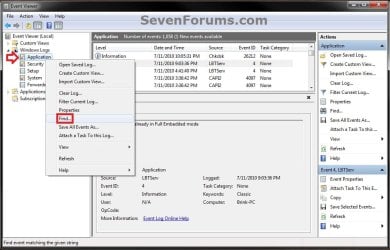
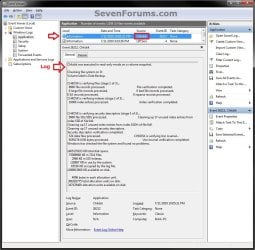
4. In the left pane of Event Viewer, double click on Windows Logs to expand it, click on Application to select it, then right click on Application and click on Find. (see screenshot below)
Step1.jpg
5. Copy and paste Chkdsk into the line, and click on Find Next. (see screenshot below)
NOTE: You can continue to click on Find Next to search for other older application logs (if available) for Check Disk (chkdsk) to see them as well.

Step2.jpg
6. You will now see the system log for the scan results of Check Disk (chkdsk). (see screenshot below)
NOTE: The log will have the Chkdsk tag if Check Disk is ran only from within Windows.
Step3.jpg
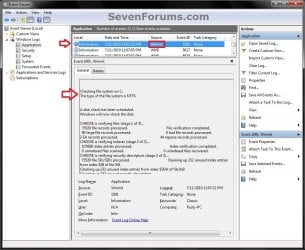
7. Go back to the top of the log file list in the middle pane of Event Viewer, then copy and paste Wininit into the line, and click on Find Next. (see screenshot below step 5)
NOTE: You can continue to click on Find Next to search for other older application logs (if available) for Check Disk (chkdsk) to see them as well.

8. You will now see the system log for the scan results of Check Disk (Wininit). (see screenshot below)
NOTE: The log will have the Wininit tag if the computer has to restart to run Check Disk at startup instead of within Windows.
Wininit.jpg
9. When finished searching for Check Disk (chkdsk) application logs, you can close the Find window. (see screenshot below step 5)

10. When finished, you can close Event Viewer.


OPTION TWO

To Create .txt file on Desktop with chkdsk Results Log


   Note
This option is not available in Vista.


1. Press the Windows + R keys to open the Run dialog, type powershell.exe, and press Enter.

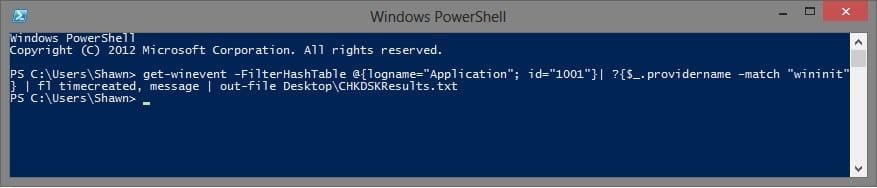
2. In PowerShell, copy and paste the command below, and press Enter. (see screenshot below)
NOTE: To paste the copied command into PowerShell, you will just need to right click in PowerShell.

Code:
[COLOR=black]get-winevent -FilterHashTable @{logname="Application"; id="1001"}| ?{$_.providername –match "wininit"} | fl timecreated, message | out-file Desktop\CHKDSKResults.txt[/COLOR]
PowerShell.jpg
3. You will now have a CHKDSKResults.txt file created on your desktop that is the log file of your chkdsk scan results from Event Viewer.
That's it,
Shawn


Last edited:
Hi Brink

I'm a total noob with regards to tech stuff and I really hope you can explain some things.
When I ran a chkdsk e: /f /r on my external hard disk, one of things which came up was "Deleting index entry ABC.DOC in index $I30 of file 5.'

Does this mean that chkdsk has deleted the file ABC.doc? If so how can i recover it?
If it was not deleted, then what does that mean essentially?

Sorry if the qn seems dumb but I only have the most basic computer related knowledge. :(

Hello JTSH, and welcome to Seven Forums.

No worries. That entry just means it only deleted the reference of the ABC.DOC file in the index. Most likely because that file had been previously deleted, so there's no need to have it in the index for search results. :)
 

My Computer My Computer

Computer type
PC/Desktop
Computer Manufacturer/Model Number
Self built custom
OS
64-bit Windows 11 Pro for Workstations
CPU
Intel i7-8700K OC'd to 5 GHz
Motherboard
ASUS ROG Maximus XI Formula Z390
Memory
64 GB (4x16GB) G.SKILL TridentZ RGB DDR4 3600 MHz
Graphics Card(s)
ASUS ROG-STRIX-GTX1080TI-O11G-GAMING
Sound Card
Integrated
Monitor(s) Displays
2 x Samsung Odyssey G7 27"
Screen Resolution
2560x1440
Hard Drives
1TB Samsung 990 PRO M.2,
4TB Samsung 990 PRO PRO M.2,
TerraMaster F8 SSD Plus NAS
PSU
Seasonic Prime Titanium 850W
Case
Thermaltake Core P3
Cooling
Corsair Hydro H115i
Keyboard
Logitech wireless K800
Mouse
Logitech MX Master 4
Internet Speed
2 Gb/s Download and 100 Mb/s Upload
Antivirus
Malwarebyte Anti-Malware Premium
Browser
Google Chrome
Other Info
Logitech Z625 speaker system,
Logitech BRIO 4K Pro webcam,
HP Color LaserJet Pro MFP M477fdn,
APC SMART-UPS RT 1000 XL - SURT1000XLI,
Galaxy S23 Plus phone
Hi Brink,

Thank you for your reply!

I have a few more questions to ask which might (or not) benefit from a summary of events leading up to this moment:

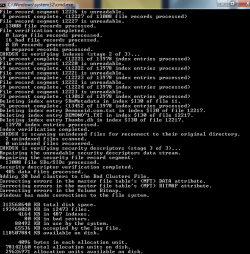
1. I could not access my external hard drive and the message citing "cyclic redundancy check" kept appearing every time I double clicked on the drive.

2. Got the idea after much googling around to run chkdsk e: /f /r.
At stage 4 of 5 <12203 of 12992 files processed>, an unspecified error occurred <6e74667363686b2e b34>.

3. So I ran chkdsk e: /f (this time without the /r), and was able to complete the command and finally access the external drive. However I could not determine what files (if any) had been deleted during chkdsk and couldn't understand the log. On seeing "Deleting index entry ABC.DOC in index $I30 of file 5', I thought some files might have been deleted during chkdsk. But after your earlier explanation to me that index entry is not the file and just the reference, I have a better understanding.

A few other questions I have looking through the log:
1. "16 bad file records processed" - Does that mean that the 16 bad files have been fixed and I'm able to access them? No further details were given like which files etc.
2. 80KB in bad sectors - This just means that 80 KB of my external hard drive is corrupted right?
3. What does it mean when it says "Recovering orphaned file CBA.DOC <1917> into directory file 1914"? What is an orphaned file? Does it mean that the location of these files were not recorded properly previously due to improper shutdown etc and are now being placed back in the correct place?
4. Last and most importantly, how can I know if chkdsk has deleted any of my files? Or what files have been recovered or not?

I hope I'm making sense to you haha

I've attached a printscreen of the last phase of chkdsk e: /f for your reference.
 

Attachments

  • Filerecovery 1.1.png
    Filerecovery 1.1.png
    15.9 KB · Views: 3,140

My Computer My Computer

Computer type
PC/Desktop
OS
Windows Home 7
I don't know all of the specific technicalities of all of it, but answers inline for what I do know. :)

The link below is a good explanation of chkdsk that will help understand chkdsk more. It's for XP and a long read, but the principal is the same. An explanation of the new /C and /I Switches that are available to use with Chkdsk.exe
A few other questions I have looking through the log:
1. "16 bad file records processed" - Does that mean that the 16 bad files have been fixed and I'm able to access them? No further details were given like which files etc.
That means that there was 16 bad file references in the file system found.
2. 80KB in bad sectors - This just means that 80 KB of my external hard drive is corrupted right?
This means that you had 80KB of bad (corrupted) sectors on the hard drive that have been marked to no longer be used by the file system.
3. What does it mean when it says "Recovering orphaned file CBA.DOC <1917> into directory file 1914"? What is an orphaned file? Does it mean that the location of these files were not recorded properly previously due to improper shutdown etc and are now being placed back in the correct place?
An orphaned file is one for which a legitimate FRS (file record segment) exists, but which is not listed in any directory. When an orphaned file is found, it can often be restored to its rightful directory, provided that directory is still around. If the directory that should hold the file no longer exists, CHKDSK will create a directory in the root directory and place the file there. If directory listings are found that reference FRSs that are no longer in use or that are in use but do not correspond to the file listed in the directory, the directory entry is simply removed.

The improper shutdown message means that the files were orphaned because you improperly shut down the computer (ex: pressed the case power button to turn off) while it was still writing files to the hard drive.

It looks like chkdsk corrected this for you though.
4. Last and most importantly, how can I know if chkdsk has deleted any of my files? Or what files have been recovered or not?
The only way to know is to look through the event log for chkdsk to see if there are any unrecovered listings. From what I see in your screenshot, I wouldn't worry about any files being deleted.
 
Last edited:

My Computer My Computer

Computer type
PC/Desktop
Computer Manufacturer/Model Number
Self built custom
OS
64-bit Windows 11 Pro for Workstations
CPU
Intel i7-8700K OC'd to 5 GHz
Motherboard
ASUS ROG Maximus XI Formula Z390
Memory
64 GB (4x16GB) G.SKILL TridentZ RGB DDR4 3600 MHz
Graphics Card(s)
ASUS ROG-STRIX-GTX1080TI-O11G-GAMING
Sound Card
Integrated
Monitor(s) Displays
2 x Samsung Odyssey G7 27"
Screen Resolution
2560x1440
Hard Drives
1TB Samsung 990 PRO M.2,
4TB Samsung 990 PRO PRO M.2,
TerraMaster F8 SSD Plus NAS
PSU
Seasonic Prime Titanium 850W
Case
Thermaltake Core P3
Cooling
Corsair Hydro H115i
Keyboard
Logitech wireless K800
Mouse
Logitech MX Master 4
Internet Speed
2 Gb/s Download and 100 Mb/s Upload
Antivirus
Malwarebyte Anti-Malware Premium
Browser
Google Chrome
Other Info
Logitech Z625 speaker system,
Logitech BRIO 4K Pro webcam,
HP Color LaserJet Pro MFP M477fdn,
APC SMART-UPS RT 1000 XL - SURT1000XLI,
Galaxy S23 Plus phone
Hi Brink.

Thank you very much for your explanation!

I've also read your link which in combination is a lot to digest for a noob and I can't pretend to fully comprehend everything but it's certainly made things a lot clearer! :D

4. Last and most importantly, how can I know if chkdsk has deleted any of my files? Or what files have been recovered or not?
The only way to know is to look through the event log for chkdsk to see if there are any unrecovered listings. From what I see in your screenshot, I would worry about any files being deleted.

OMG, did you say you "would worry" about any files being deleted? :( Or was that a typing error and you meant to type "wouldn't" lol?
 

My Computer My Computer

Computer type
PC/Desktop
OS
Windows Home 7
Sorry, that should be "wouldn't" instead. Autocorrect got me again. LOL :o

I'd recommend to keep an eye on the drive to make sure that it doesn't continue to keep getting bad sectors. If it does, then the HDD may be going bad. The main thing is to not do a hard shut down using the case power button, and use the proper shut down in Windows instead.
 

My Computer My Computer

Computer type
PC/Desktop
Computer Manufacturer/Model Number
Self built custom
OS
64-bit Windows 11 Pro for Workstations
CPU
Intel i7-8700K OC'd to 5 GHz
Motherboard
ASUS ROG Maximus XI Formula Z390
Memory
64 GB (4x16GB) G.SKILL TridentZ RGB DDR4 3600 MHz
Graphics Card(s)
ASUS ROG-STRIX-GTX1080TI-O11G-GAMING
Sound Card
Integrated
Monitor(s) Displays
2 x Samsung Odyssey G7 27"
Screen Resolution
2560x1440
Hard Drives
1TB Samsung 990 PRO M.2,
4TB Samsung 990 PRO PRO M.2,
TerraMaster F8 SSD Plus NAS
PSU
Seasonic Prime Titanium 850W
Case
Thermaltake Core P3
Cooling
Corsair Hydro H115i
Keyboard
Logitech wireless K800
Mouse
Logitech MX Master 4
Internet Speed
2 Gb/s Download and 100 Mb/s Upload
Antivirus
Malwarebyte Anti-Malware Premium
Browser
Google Chrome
Other Info
Logitech Z625 speaker system,
Logitech BRIO 4K Pro webcam,
HP Color LaserJet Pro MFP M477fdn,
APC SMART-UPS RT 1000 XL - SURT1000XLI,
Galaxy S23 Plus phone

My Computer My Computer

Computer type
PC/Desktop
Computer Manufacturer/Model Number
Home made Desktop
OS
Windows 10 Pro. 64/ version 1709 Windows 7 Pro/64
CPU
Intel i7-6800K @ 4.3
Motherboard
ASUS X-99 Deluxe II
Memory
Corsair Platinum 16 gig @2400
Graphics Card(s)
EVGA GTX 1070 OC
Monitor(s) Displays
Asus 27" LED LCD/VE278Q
Screen Resolution
1920-1080 or 1280-720 HDMI
Hard Drives
INTEL SSD 730-240 Gb Sata 3.0/
PSU
EVGA Platium 1200W
Case
Phanteks Luxe Tempered Glass 8 fans/ one radiator
Cooling
XSPC/ Water Cooled CPU
Keyboard
Das 4 Professional
Mouse
Logitech M705/MX Anywhere 2-S
Internet Speed
100 mbits
Antivirus
Microsoft Security Essentials/ Malwarebytes Premium 3.0/ SAS
Browser
I.E. 11 default/Firefox/ ISP Time Warner Cable/Spectrum
Other Info
LG BluRay Burner/
Sound system-KLipsch-THX/
Icy Dock ssd Hot Swap bays.
*breathes a sigh of relief* Haha. That's alright. Autocorrect gets me all the time too!

Thanks for your help and recommendations!

Your last comment about proper shut down reminds me of another separate problem I have which would probably cause the hard drive in my laptop to go bad soon. I will probably post it on the correct thread and you'll soon enough hear from me again! :p

Sorry, that should be "wouldn't" instead. Autocorrect got me again. LOL :o

I'd recommend to keep an eye on the drive to make sure that it doesn't continue to keep getting bad sectors. If it does, then the HDD may be going bad. The main thing is to not do a hard shut down using the case power button, and use the proper shut down in Windows instead.
 

My Computer My Computer

Computer type
PC/Desktop
OS
Windows Home 7
You're most welcome JTSH. :)
 

My Computer My Computer

Computer type
PC/Desktop
Computer Manufacturer/Model Number
Self built custom
OS
64-bit Windows 11 Pro for Workstations
CPU
Intel i7-8700K OC'd to 5 GHz
Motherboard
ASUS ROG Maximus XI Formula Z390
Memory
64 GB (4x16GB) G.SKILL TridentZ RGB DDR4 3600 MHz
Graphics Card(s)
ASUS ROG-STRIX-GTX1080TI-O11G-GAMING
Sound Card
Integrated
Monitor(s) Displays
2 x Samsung Odyssey G7 27"
Screen Resolution
2560x1440
Hard Drives
1TB Samsung 990 PRO M.2,
4TB Samsung 990 PRO PRO M.2,
TerraMaster F8 SSD Plus NAS
PSU
Seasonic Prime Titanium 850W
Case
Thermaltake Core P3
Cooling
Corsair Hydro H115i
Keyboard
Logitech wireless K800
Mouse
Logitech MX Master 4
Internet Speed
2 Gb/s Download and 100 Mb/s Upload
Antivirus
Malwarebyte Anti-Malware Premium
Browser
Google Chrome
Other Info
Logitech Z625 speaker system,
Logitech BRIO 4K Pro webcam,
HP Color LaserJet Pro MFP M477fdn,
APC SMART-UPS RT 1000 XL - SURT1000XLI,
Galaxy S23 Plus phone

My Computer My Computer

Computer type
PC/Desktop
Computer Manufacturer/Model Number
Self built custom
OS
64-bit Windows 11 Pro for Workstations
CPU
Intel i7-8700K OC'd to 5 GHz
Motherboard
ASUS ROG Maximus XI Formula Z390
Memory
64 GB (4x16GB) G.SKILL TridentZ RGB DDR4 3600 MHz
Graphics Card(s)
ASUS ROG-STRIX-GTX1080TI-O11G-GAMING
Sound Card
Integrated
Monitor(s) Displays
2 x Samsung Odyssey G7 27"
Screen Resolution
2560x1440
Hard Drives
1TB Samsung 990 PRO M.2,
4TB Samsung 990 PRO PRO M.2,
TerraMaster F8 SSD Plus NAS
PSU
Seasonic Prime Titanium 850W
Case
Thermaltake Core P3
Cooling
Corsair Hydro H115i
Keyboard
Logitech wireless K800
Mouse
Logitech MX Master 4
Internet Speed
2 Gb/s Download and 100 Mb/s Upload
Antivirus
Malwarebyte Anti-Malware Premium
Browser
Google Chrome
Other Info
Logitech Z625 speaker system,
Logitech BRIO 4K Pro webcam,
HP Color LaserJet Pro MFP M477fdn,
APC SMART-UPS RT 1000 XL - SURT1000XLI,
Galaxy S23 Plus phone
Thanks Shawn.
I knew they didn't want one to defrag a ssd but I didn't know not to run chkdsk. It does make sense once I get all 3 of my brain cells activated.
 

My Computer My Computer

Computer type
PC/Desktop
Computer Manufacturer/Model Number
Home made Desktop
OS
Windows 10 Pro. 64/ version 1709 Windows 7 Pro/64
CPU
Intel i7-6800K @ 4.3
Motherboard
ASUS X-99 Deluxe II
Memory
Corsair Platinum 16 gig @2400
Graphics Card(s)
EVGA GTX 1070 OC
Monitor(s) Displays
Asus 27" LED LCD/VE278Q
Screen Resolution
1920-1080 or 1280-720 HDMI
Hard Drives
INTEL SSD 730-240 Gb Sata 3.0/
PSU
EVGA Platium 1200W
Case
Phanteks Luxe Tempered Glass 8 fans/ one radiator
Cooling
XSPC/ Water Cooled CPU
Keyboard
Das 4 Professional
Mouse
Logitech M705/MX Anywhere 2-S
Internet Speed
100 mbits
Antivirus
Microsoft Security Essentials/ Malwarebytes Premium 3.0/ SAS
Browser
I.E. 11 default/Firefox/ ISP Time Warner Cable/Spectrum
Other Info
LG BluRay Burner/
Sound system-KLipsch-THX/
Icy Dock ssd Hot Swap bays.
Thanks Shawn.
I knew they didn't want one to defrag a ssd but I didn't know not to run chkdsk. It does make sense once I get all 3 of my brain cells activated.


Anytime mate. :)
 
Last edited:

My Computer My Computer

Computer type
PC/Desktop
Computer Manufacturer/Model Number
Self built custom
OS
64-bit Windows 11 Pro for Workstations
CPU
Intel i7-8700K OC'd to 5 GHz
Motherboard
ASUS ROG Maximus XI Formula Z390
Memory
64 GB (4x16GB) G.SKILL TridentZ RGB DDR4 3600 MHz
Graphics Card(s)
ASUS ROG-STRIX-GTX1080TI-O11G-GAMING
Sound Card
Integrated
Monitor(s) Displays
2 x Samsung Odyssey G7 27"
Screen Resolution
2560x1440
Hard Drives
1TB Samsung 990 PRO M.2,
4TB Samsung 990 PRO PRO M.2,
TerraMaster F8 SSD Plus NAS
PSU
Seasonic Prime Titanium 850W
Case
Thermaltake Core P3
Cooling
Corsair Hydro H115i
Keyboard
Logitech wireless K800
Mouse
Logitech MX Master 4
Internet Speed
2 Gb/s Download and 100 Mb/s Upload
Antivirus
Malwarebyte Anti-Malware Premium
Browser
Google Chrome
Other Info
Logitech Z625 speaker system,
Logitech BRIO 4K Pro webcam,
HP Color LaserJet Pro MFP M477fdn,
APC SMART-UPS RT 1000 XL - SURT1000XLI,
Galaxy S23 Plus phone
Thanks again Shawn for this tutorial as th e chkdsk report wassomething I was getting very frustrated to find. My system is playing up and the report shows nothing wrong exact some unused entries so got to keep plugging on:(
 

My Computer My Computer

Computer type
PC/Desktop
Computer Manufacturer/Model Number
Own build (new) Desk1 / Asus ROG Win 7 / Desk2 1st build
OS
Desk1 7 Home Prem / Desk2 10 Pro / Main lap Asus ROG 10 Pro 2 laptop Toshiba 7 Pro Asus P2520 7 & 10
CPU
Desk1 i5 3750K / Laptop i7 GTX 860M / Desk2 i5 2500
Motherboard
Desk1 Asus P877-V / Desk2 Gigabyte H67 UD3H / Laptop ?
Memory
Desk1 8GB (1866) / Desk2 16GB (1333) / Laptop 8Gb DDR3
Graphics Card(s)
Desk 1& 2NVidia GTX 650 & Laptops on board Intel
Sound Card
Desk 1 & 2 -XONAR DG Realtek High Def audio Laptop
Monitor(s) Displays
Desk 1 Benq HD 2450 / Desk2 Philips 24" / Laptop 17.5"
Screen Resolution
1920x1080 D1 & D2 & Laptop 1
Hard Drives
Desk1 Samsung 120GB 830 SSD
Asus ROG 256GB 850 Pro SSD
Desk2 Samsung 840 256 SSD
Toshiba 120GB EVO
PSU
Desk 1 Corsair HX 1050/ Laptop ? / Desk 2 Corsair HX 650
Case
Desk 1 Cooler HAF XM ? Toshiba laptop / Desk2 Coolermaster
Cooling
Fans on all Desk1 -2 Desk2 - all Coolermasters 5 Laptop ?
Keyboard
Desk 1 MS Sidewinder X6 Desk 2 MS Sidewinder X 4
Mouse
Desk 1&2 - Gigabyte MS 900 gamer - laptop - Logitec wireless
Internet Speed
ADSL2+
Other Info
One other Desktop (tester) and spare Toshba laptop both with SSD's
Running Kaspersky 2016 ISS on all machines config'd identically
Logitec audio stereo systems on each machine (x3)
Canon MG5250MFC
Router/modem TP-Link running WPA2SK
I hope you find the source soon.
 

My Computer My Computer

Computer type
PC/Desktop
Computer Manufacturer/Model Number
Self built custom
OS
64-bit Windows 11 Pro for Workstations
CPU
Intel i7-8700K OC'd to 5 GHz
Motherboard
ASUS ROG Maximus XI Formula Z390
Memory
64 GB (4x16GB) G.SKILL TridentZ RGB DDR4 3600 MHz
Graphics Card(s)
ASUS ROG-STRIX-GTX1080TI-O11G-GAMING
Sound Card
Integrated
Monitor(s) Displays
2 x Samsung Odyssey G7 27"
Screen Resolution
2560x1440
Hard Drives
1TB Samsung 990 PRO M.2,
4TB Samsung 990 PRO PRO M.2,
TerraMaster F8 SSD Plus NAS
PSU
Seasonic Prime Titanium 850W
Case
Thermaltake Core P3
Cooling
Corsair Hydro H115i
Keyboard
Logitech wireless K800
Mouse
Logitech MX Master 4
Internet Speed
2 Gb/s Download and 100 Mb/s Upload
Antivirus
Malwarebyte Anti-Malware Premium
Browser
Google Chrome
Other Info
Logitech Z625 speaker system,
Logitech BRIO 4K Pro webcam,
HP Color LaserJet Pro MFP M477fdn,
APC SMART-UPS RT 1000 XL - SURT1000XLI,
Galaxy S23 Plus phone
I hope you find the source soon.

So do I Shawn after an hour waiting for Kaspersky on the phone then another hour trying to sort it and then still no further forward except they tell me I have 22 incompatible softwares on my machines that Kaspersky doesn't work with I am fairly ticked off. Their support is nt what it used to be so I am going to kep plugging on.

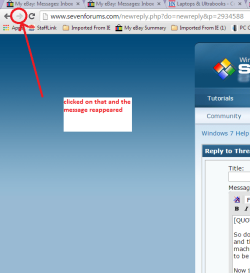
Now just now I lost the post to you and I thought here we go again but I tried the to the right arrow at the top where the back arrow is and the message came back so I am wondering if it is just a random flick back to the previous blank reply screen? .
 

Attachments

  • ARROW.PNG
    ARROW.PNG
    24.4 KB · Views: 916

My Computer My Computer

Computer type
PC/Desktop
Computer Manufacturer/Model Number
Own build (new) Desk1 / Asus ROG Win 7 / Desk2 1st build
OS
Desk1 7 Home Prem / Desk2 10 Pro / Main lap Asus ROG 10 Pro 2 laptop Toshiba 7 Pro Asus P2520 7 & 10
CPU
Desk1 i5 3750K / Laptop i7 GTX 860M / Desk2 i5 2500
Motherboard
Desk1 Asus P877-V / Desk2 Gigabyte H67 UD3H / Laptop ?
Memory
Desk1 8GB (1866) / Desk2 16GB (1333) / Laptop 8Gb DDR3
Graphics Card(s)
Desk 1& 2NVidia GTX 650 & Laptops on board Intel
Sound Card
Desk 1 & 2 -XONAR DG Realtek High Def audio Laptop
Monitor(s) Displays
Desk 1 Benq HD 2450 / Desk2 Philips 24" / Laptop 17.5"
Screen Resolution
1920x1080 D1 & D2 & Laptop 1
Hard Drives
Desk1 Samsung 120GB 830 SSD
Asus ROG 256GB 850 Pro SSD
Desk2 Samsung 840 256 SSD
Toshiba 120GB EVO
PSU
Desk 1 Corsair HX 1050/ Laptop ? / Desk 2 Corsair HX 650
Case
Desk 1 Cooler HAF XM ? Toshiba laptop / Desk2 Coolermaster
Cooling
Fans on all Desk1 -2 Desk2 - all Coolermasters 5 Laptop ?
Keyboard
Desk 1 MS Sidewinder X6 Desk 2 MS Sidewinder X 4
Mouse
Desk 1&2 - Gigabyte MS 900 gamer - laptop - Logitec wireless
Internet Speed
ADSL2+
Other Info
One other Desktop (tester) and spare Toshba laptop both with SSD's
Running Kaspersky 2016 ISS on all machines config'd identically
Logitec audio stereo systems on each machine (x3)
Canon MG5250MFC
Router/modem TP-Link running WPA2SK
Not sure, but could be some issue with the browser. Add-ons or toolbars?
 

My Computer My Computer

Computer type
PC/Desktop
Computer Manufacturer/Model Number
Self built custom
OS
64-bit Windows 11 Pro for Workstations
CPU
Intel i7-8700K OC'd to 5 GHz
Motherboard
ASUS ROG Maximus XI Formula Z390
Memory
64 GB (4x16GB) G.SKILL TridentZ RGB DDR4 3600 MHz
Graphics Card(s)
ASUS ROG-STRIX-GTX1080TI-O11G-GAMING
Sound Card
Integrated
Monitor(s) Displays
2 x Samsung Odyssey G7 27"
Screen Resolution
2560x1440
Hard Drives
1TB Samsung 990 PRO M.2,
4TB Samsung 990 PRO PRO M.2,
TerraMaster F8 SSD Plus NAS
PSU
Seasonic Prime Titanium 850W
Case
Thermaltake Core P3
Cooling
Corsair Hydro H115i
Keyboard
Logitech wireless K800
Mouse
Logitech MX Master 4
Internet Speed
2 Gb/s Download and 100 Mb/s Upload
Antivirus
Malwarebyte Anti-Malware Premium
Browser
Google Chrome
Other Info
Logitech Z625 speaker system,
Logitech BRIO 4K Pro webcam,
HP Color LaserJet Pro MFP M477fdn,
APC SMART-UPS RT 1000 XL - SURT1000XLI,
Galaxy S23 Plus phone
Not sure, but could be some issue with the browser. Add-ons or toolbars?
Don't know mate I just typed a longish post and it disappeared again and that fix did not work. I might try reinstalling IE11 in case it has a bug as Chrome is useless unless I can do my safe money banking through it and trying to contact Google is a nightmare. If that doesn't work then I shall have to do a reinstall:(
 

My Computer My Computer

Computer type
PC/Desktop
Computer Manufacturer/Model Number
Own build (new) Desk1 / Asus ROG Win 7 / Desk2 1st build
OS
Desk1 7 Home Prem / Desk2 10 Pro / Main lap Asus ROG 10 Pro 2 laptop Toshiba 7 Pro Asus P2520 7 & 10
CPU
Desk1 i5 3750K / Laptop i7 GTX 860M / Desk2 i5 2500
Motherboard
Desk1 Asus P877-V / Desk2 Gigabyte H67 UD3H / Laptop ?
Memory
Desk1 8GB (1866) / Desk2 16GB (1333) / Laptop 8Gb DDR3
Graphics Card(s)
Desk 1& 2NVidia GTX 650 & Laptops on board Intel
Sound Card
Desk 1 & 2 -XONAR DG Realtek High Def audio Laptop
Monitor(s) Displays
Desk 1 Benq HD 2450 / Desk2 Philips 24" / Laptop 17.5"
Screen Resolution
1920x1080 D1 & D2 & Laptop 1
Hard Drives
Desk1 Samsung 120GB 830 SSD
Asus ROG 256GB 850 Pro SSD
Desk2 Samsung 840 256 SSD
Toshiba 120GB EVO
PSU
Desk 1 Corsair HX 1050/ Laptop ? / Desk 2 Corsair HX 650
Case
Desk 1 Cooler HAF XM ? Toshiba laptop / Desk2 Coolermaster
Cooling
Fans on all Desk1 -2 Desk2 - all Coolermasters 5 Laptop ?
Keyboard
Desk 1 MS Sidewinder X6 Desk 2 MS Sidewinder X 4
Mouse
Desk 1&2 - Gigabyte MS 900 gamer - laptop - Logitec wireless
Internet Speed
ADSL2+
Other Info
One other Desktop (tester) and spare Toshba laptop both with SSD's
Running Kaspersky 2016 ISS on all machines config'd identically
Logitec audio stereo systems on each machine (x3)
Canon MG5250MFC
Router/modem TP-Link running WPA2SK
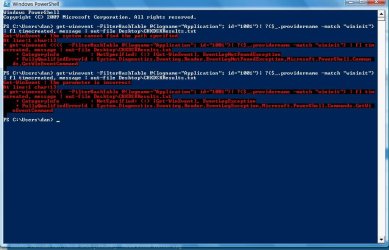
Hmm, method two works great for my Windows 7 machine but doesn't for the Vista machine. I get this message in powershell (image included, couldn't copy/paste.
 

Attachments

  • Vista-CHDKproblem.jpg
    Vista-CHDKproblem.jpg
    72.1 KB · Views: 334

My Computer My Computer

Computer Manufacturer/Model Number
HP Pavilion p6745f
OS
Microsoft Windows 7 Home Premium 64-bit 7601 Multiprocessor Free Service Pack 1
CPU
Intel(R) Core(TM) i5-2300 CPU @ 2.80GHz
Motherboard
PEGATRON CORPORATION 2AB6
Memory
6 GB
Graphics Card(s)
Radeon 6750 1gb
Sound Card
(1) IDT High Definition Audio CODEC (2) Intel(R) Display A
Monitor(s) Displays
Acer x193w
Hard Drives
(1) WDC WD15EARS-60MVWB0 (2) Generic- Compact Flash USB Device (3) Generic- MS/MS-Pro USB Device (4) Generic- SD/MMC USB Device (5) Generic- SM/xD-Picture USB Device (6) WD My Book 1110 USB Device
PSU
Internal 500W (100V-240V)
Case
Mid-size ATX
Cooling
unknown
Keyboard
HP usb multimedia keyboard
Mouse
HP usb compliant mouse
Internet Speed
256 kbps
Other Info
Ver: CHI_713.bin vCHI7.13

My Computer My Computer

Computer type
PC/Desktop
Computer Manufacturer/Model Number
Self built custom
OS
64-bit Windows 11 Pro for Workstations
CPU
Intel i7-8700K OC'd to 5 GHz
Motherboard
ASUS ROG Maximus XI Formula Z390
Memory
64 GB (4x16GB) G.SKILL TridentZ RGB DDR4 3600 MHz
Graphics Card(s)
ASUS ROG-STRIX-GTX1080TI-O11G-GAMING
Sound Card
Integrated
Monitor(s) Displays
2 x Samsung Odyssey G7 27"
Screen Resolution
2560x1440
Hard Drives
1TB Samsung 990 PRO M.2,
4TB Samsung 990 PRO PRO M.2,
TerraMaster F8 SSD Plus NAS
PSU
Seasonic Prime Titanium 850W
Case
Thermaltake Core P3
Cooling
Corsair Hydro H115i
Keyboard
Logitech wireless K800
Mouse
Logitech MX Master 4
Internet Speed
2 Gb/s Download and 100 Mb/s Upload
Antivirus
Malwarebyte Anti-Malware Premium
Browser
Google Chrome
Other Info
Logitech Z625 speaker system,
Logitech BRIO 4K Pro webcam,
HP Color LaserJet Pro MFP M477fdn,
APC SMART-UPS RT 1000 XL - SURT1000XLI,
Galaxy S23 Plus phone

My Computer My Computer

Computer Manufacturer/Model Number
HP Pavilion p6745f
OS
Microsoft Windows 7 Home Premium 64-bit 7601 Multiprocessor Free Service Pack 1
CPU
Intel(R) Core(TM) i5-2300 CPU @ 2.80GHz
Motherboard
PEGATRON CORPORATION 2AB6
Memory
6 GB
Graphics Card(s)
Radeon 6750 1gb
Sound Card
(1) IDT High Definition Audio CODEC (2) Intel(R) Display A
Monitor(s) Displays
Acer x193w
Hard Drives
(1) WDC WD15EARS-60MVWB0 (2) Generic- Compact Flash USB Device (3) Generic- MS/MS-Pro USB Device (4) Generic- SD/MMC USB Device (5) Generic- SM/xD-Picture USB Device (6) WD My Book 1110 USB Device
PSU
Internal 500W (100V-240V)
Case
Mid-size ATX
Cooling
unknown
Keyboard
HP usb multimedia keyboard
Mouse
HP usb compliant mouse
Internet Speed
256 kbps
Other Info
Ver: CHI_713.bin vCHI7.13
Awesome!

Great for when the screen goes by too fast ;D
 

My Computer My Computer

Computer type
PC/Desktop
Computer Manufacturer/Model Number
Custom
OS
Windows 7 x64 Prof
CPU
Intel Pentium G3258 3.2ghz
Motherboard
MSI H81M-P33
Memory
Crucial 4gb DDR3-1600
Graphics Card(s)
R7 240
Hard Drives
Seagate 400GB Sata
PSU
Corsair CX430M
Browser
Avant
Back
Top