
Check disk problems...

koondawg06

New member
Local time
10:49 AM
Messages
26
Hi guys... for some reason chkdsk wants to run at every startup, but then it cancels itself automatically without me doing anything. Anyone know why it's doing this or how to prevent it?
 

My Computer

Computer Manufacturer/Model Number
Dell Inspiron 1501
OS
Windows 7 Ultimate x64
CPU
AMD Sempron Processor 3600+ 2.00 GHz
Motherboard
Dell Inc. 0UW744
Memory
2.00 GB (DDR2 PC2-5300)
Graphics Card(s)
(On Board) ATI Radeon Xpress 1150
Sound Card
On Board
Monitor(s) Displays
Acer 21.5 in. x123H
Screen Resolution
1920X1080 on Monitor, 1280X800 on Laptop Display
Hard Drives
120 GB 5400 RPM Serial ATA Internal Hard Drive
Having similar issues with Windows 7, 64-bit, UE. Even on manual restart like after installing or updating a s/w it wants to run CHKDSK.

Any pointers?
 

My Computer

OS
Windows 7, 64-bit
it's doing it every restart for me since I've done windows update..
 

My Computer

Computer Manufacturer/Model Number
Dell Inspiron 1501
OS
Windows 7 Ultimate x64
CPU
AMD Sempron Processor 3600+ 2.00 GHz
Motherboard
Dell Inc. 0UW744
Memory
2.00 GB (DDR2 PC2-5300)
Graphics Card(s)
(On Board) ATI Radeon Xpress 1150
Sound Card
On Board
Monitor(s) Displays
Acer 21.5 in. x123H
Screen Resolution
1920X1080 on Monitor, 1280X800 on Laptop Display
Hard Drives
120 GB 5400 RPM Serial ATA Internal Hard Drive
it's doing it every restart for me since I've done windows update..


Uninstall the update or use system restore to do it.

Then in an administrator account type cmd in search

In CMD type sfc /scannow.

The process will look for and hopefully correct errors.

If the update is not important just do not install. If it is important and you want to reninstall Make a system restore point, first, so that you can go back if the problem reappears.

Koondawg, you can also try the sfc.
 

My Computer

Computer type
PC/Desktop
Computer Manufacturer/Model Number
Dell XPS 420
OS
Windows 10, Home Clean Install
CPU
Intel Core2 processsor Q8200(2.33Ghz 1333FSB) Quad Core Tech
Motherboard
Dell
Memory
6 gb
Graphics Card(s)
ATI Radeon 256MB HD3650
Sound Card
Intergrated 7.1 Channel Audio
Monitor(s) Displays
Dell SP2009W 20"
Hard Drives
640 GB Serial ATA Hard drive
Cooling
Fan
Keyboard
Dell USB Keyboard
Mouse
Dell Premium Optical USB
Internet Speed
DSL 2.85

My Computer

Computer type
PC/Desktop
Computer Manufacturer/Model Number
Self built custom
OS
64-bit Windows 11 Pro for Workstations
CPU
Intel i7-8700K OC'd to 5 GHz
Motherboard
ASUS ROG Maximus XI Formula Z390
Memory
64 GB (4x16GB) G.SKILL TridentZ RGB DDR4 3600 MHz
Graphics Card(s)
ASUS ROG-STRIX-GTX1080TI-O11G-GAMING
Sound Card
Integrated
Monitor(s) Displays
2 x Samsung Odyssey G7 27"
Screen Resolution
2560x1440
Hard Drives
1TB Samsung 990 PRO M.2,
4TB Samsung 990 PRO PRO M.2,
TerraMaster F8 SSD Plus NAS
PSU
Seasonic Prime Titanium 850W
Case
Thermaltake Core P3
Cooling
Corsair Hydro H115i
Keyboard
Logitech wireless K800
Mouse
Logitech MX Master 4
Internet Speed
2 Gb/s Download and 100 Mb/s Upload
Antivirus
Malwarebyte Anti-Malware Premium
Browser
Google Chrome
Other Info
Logitech Z625 speaker system,
Logitech BRIO 4K Pro webcam,
HP Color LaserJet Pro MFP M477fdn,
APC SMART-UPS RT 1000 XL - SURT1000XLI,
Galaxy S23 Plus phone
Even though I only have one account on this machine (which has admin privileges of course) it tells me I "must be an administrator running a console session in order to use the sfc utility"

Any ideas why?
 

My Computer

Computer Manufacturer/Model Number
Dell Inspiron 1501
OS
Windows 7 Ultimate x64
CPU
AMD Sempron Processor 3600+ 2.00 GHz
Motherboard
Dell Inc. 0UW744
Memory
2.00 GB (DDR2 PC2-5300)
Graphics Card(s)
(On Board) ATI Radeon Xpress 1150
Sound Card
On Board
Monitor(s) Displays
Acer 21.5 in. x123H
Screen Resolution
1920X1080 on Monitor, 1280X800 on Laptop Display
Hard Drives
120 GB 5400 RPM Serial ATA Internal Hard Drive
Koondawg,

You will need to right click on the command prompt shortcut and click on Run as administrator to use the SFC /SCANNOW command. That's all. :)
 

My Computer

Computer type
PC/Desktop
Computer Manufacturer/Model Number
Self built custom
OS
64-bit Windows 11 Pro for Workstations
CPU
Intel i7-8700K OC'd to 5 GHz
Motherboard
ASUS ROG Maximus XI Formula Z390
Memory
64 GB (4x16GB) G.SKILL TridentZ RGB DDR4 3600 MHz
Graphics Card(s)
ASUS ROG-STRIX-GTX1080TI-O11G-GAMING
Sound Card
Integrated
Monitor(s) Displays
2 x Samsung Odyssey G7 27"
Screen Resolution
2560x1440
Hard Drives
1TB Samsung 990 PRO M.2,
4TB Samsung 990 PRO PRO M.2,
TerraMaster F8 SSD Plus NAS
PSU
Seasonic Prime Titanium 850W
Case
Thermaltake Core P3
Cooling
Corsair Hydro H115i
Keyboard
Logitech wireless K800
Mouse
Logitech MX Master 4
Internet Speed
2 Gb/s Download and 100 Mb/s Upload
Antivirus
Malwarebyte Anti-Malware Premium
Browser
Google Chrome
Other Info
Logitech Z625 speaker system,
Logitech BRIO 4K Pro webcam,
HP Color LaserJet Pro MFP M477fdn,
APC SMART-UPS RT 1000 XL - SURT1000XLI,
Galaxy S23 Plus phone
Update: I tried the sfc /scannow with no success

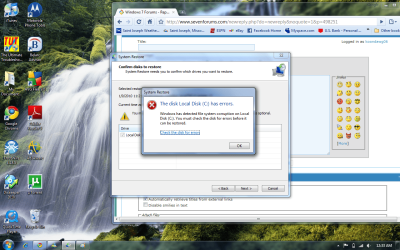
I also tried system restore, however I get the error that is attached, but when I try to run chkdsk it wont let me do it while windows is in session since it is installed on my root drive. So I schedule it for next reboot, and it attempts to run then cancels itself thus not fixing the error its reporting. Hellppppp
 

Attachments

  • error.png
    error.png
    294.7 KB · Views: 103

My Computer

Computer Manufacturer/Model Number
Dell Inspiron 1501
OS
Windows 7 Ultimate x64
CPU
AMD Sempron Processor 3600+ 2.00 GHz
Motherboard
Dell Inc. 0UW744
Memory
2.00 GB (DDR2 PC2-5300)
Graphics Card(s)
(On Board) ATI Radeon Xpress 1150
Sound Card
On Board
Monitor(s) Displays
Acer 21.5 in. x123H
Screen Resolution
1920X1080 on Monitor, 1280X800 on Laptop Display
Hard Drives
120 GB 5400 RPM Serial ATA Internal Hard Drive
Hi again Koondowg,

I was sorry, this morning, to see that you are still having problems. May I make two

suggestions. Brink, our administrator, has provided a tutorial revealing a method to

chkdsk, when it does not operate properly. Did you utilize that method?

My second suggestion, if you cannot get chkdsk to run, attempt a repair install. It

merely entails using your Windows 7 DVD.

Insert Vista DVD. Boot up and select repair. I have provided detailed instructions from our

excellent tutorial library, which is available for your use at any time.

http://www.sevenforums.com/tutorials/3413-repair-install.html?ltr=R


Hope this works.
 

My Computer

Computer type
PC/Desktop
Computer Manufacturer/Model Number
Dell XPS 420
OS
Windows 10, Home Clean Install
CPU
Intel Core2 processsor Q8200(2.33Ghz 1333FSB) Quad Core Tech
Motherboard
Dell
Memory
6 gb
Graphics Card(s)
ATI Radeon 256MB HD3650
Sound Card
Intergrated 7.1 Channel Audio
Monitor(s) Displays
Dell SP2009W 20"
Hard Drives
640 GB Serial ATA Hard drive
Cooling
Fan
Keyboard
Dell USB Keyboard
Mouse
Dell Premium Optical USB
Internet Speed
DSL 2.85
*Update: I've tried all but step 4 of Brinks tutorial (because I didn't feel as though it applied to windows 7) with no success. I also tried doing a windows repair with my DVD but it said that my recovery console was not compatible with the current version or something to that extent.

Should I just re-image?
 

My Computer

Computer Manufacturer/Model Number
Dell Inspiron 1501
OS
Windows 7 Ultimate x64
CPU
AMD Sempron Processor 3600+ 2.00 GHz
Motherboard
Dell Inc. 0UW744
Memory
2.00 GB (DDR2 PC2-5300)
Graphics Card(s)
(On Board) ATI Radeon Xpress 1150
Sound Card
On Board
Monitor(s) Displays
Acer 21.5 in. x123H
Screen Resolution
1920X1080 on Monitor, 1280X800 on Laptop Display
Hard Drives
120 GB 5400 RPM Serial ATA Internal Hard Drive
Koondawg,

Before you do that, you should go to your hard drive's manufacturer's website and download the program that they offer to test your hard drive to just make sure that it is not going bad on you first to be safe and rule it out. Chkdsk is used to fix corruption, so one of those causes could be a failing hard drive. If it was the hard drive, it wouldn't matter how many times you reinstalled Windows 7.
 

My Computer

Computer type
PC/Desktop
Computer Manufacturer/Model Number
Self built custom
OS
64-bit Windows 11 Pro for Workstations
CPU
Intel i7-8700K OC'd to 5 GHz
Motherboard
ASUS ROG Maximus XI Formula Z390
Memory
64 GB (4x16GB) G.SKILL TridentZ RGB DDR4 3600 MHz
Graphics Card(s)
ASUS ROG-STRIX-GTX1080TI-O11G-GAMING
Sound Card
Integrated
Monitor(s) Displays
2 x Samsung Odyssey G7 27"
Screen Resolution
2560x1440
Hard Drives
1TB Samsung 990 PRO M.2,
4TB Samsung 990 PRO PRO M.2,
TerraMaster F8 SSD Plus NAS
PSU
Seasonic Prime Titanium 850W
Case
Thermaltake Core P3
Cooling
Corsair Hydro H115i
Keyboard
Logitech wireless K800
Mouse
Logitech MX Master 4
Internet Speed
2 Gb/s Download and 100 Mb/s Upload
Antivirus
Malwarebyte Anti-Malware Premium
Browser
Google Chrome
Other Info
Logitech Z625 speaker system,
Logitech BRIO 4K Pro webcam,
HP Color LaserJet Pro MFP M477fdn,
APC SMART-UPS RT 1000 XL - SURT1000XLI,
Galaxy S23 Plus phone
I did a quick DTS test in bios which passed.. Any other suggestions before I rebuild? I appreciate everyone's efforts :)
 

My Computer

Computer Manufacturer/Model Number
Dell Inspiron 1501
OS
Windows 7 Ultimate x64
CPU
AMD Sempron Processor 3600+ 2.00 GHz
Motherboard
Dell Inc. 0UW744
Memory
2.00 GB (DDR2 PC2-5300)
Graphics Card(s)
(On Board) ATI Radeon Xpress 1150
Sound Card
On Board
Monitor(s) Displays
Acer 21.5 in. x123H
Screen Resolution
1920X1080 on Monitor, 1280X800 on Laptop Display
Hard Drives
120 GB 5400 RPM Serial ATA Internal Hard Drive
You might try a repair install instead of a clean install first to see if it will work properly afterwards to try and save yourself from having to reinstall everything from scratch again.
 

My Computer

Computer type
PC/Desktop
Computer Manufacturer/Model Number
Self built custom
OS
64-bit Windows 11 Pro for Workstations
CPU
Intel i7-8700K OC'd to 5 GHz
Motherboard
ASUS ROG Maximus XI Formula Z390
Memory
64 GB (4x16GB) G.SKILL TridentZ RGB DDR4 3600 MHz
Graphics Card(s)
ASUS ROG-STRIX-GTX1080TI-O11G-GAMING
Sound Card
Integrated
Monitor(s) Displays
2 x Samsung Odyssey G7 27"
Screen Resolution
2560x1440
Hard Drives
1TB Samsung 990 PRO M.2,
4TB Samsung 990 PRO PRO M.2,
TerraMaster F8 SSD Plus NAS
PSU
Seasonic Prime Titanium 850W
Case
Thermaltake Core P3
Cooling
Corsair Hydro H115i
Keyboard
Logitech wireless K800
Mouse
Logitech MX Master 4
Internet Speed
2 Gb/s Download and 100 Mb/s Upload
Antivirus
Malwarebyte Anti-Malware Premium
Browser
Google Chrome
Other Info
Logitech Z625 speaker system,
Logitech BRIO 4K Pro webcam,
HP Color LaserJet Pro MFP M477fdn,
APC SMART-UPS RT 1000 XL - SURT1000XLI,
Galaxy S23 Plus phone
Well I tried doing a windows repair with my DVD but it said that my system recovery console was not compatible with the current version or something to that extent.
 

My Computer

Computer Manufacturer/Model Number
Dell Inspiron 1501
OS
Windows 7 Ultimate x64
CPU
AMD Sempron Processor 3600+ 2.00 GHz
Motherboard
Dell Inc. 0UW744
Memory
2.00 GB (DDR2 PC2-5300)
Graphics Card(s)
(On Board) ATI Radeon Xpress 1150
Sound Card
On Board
Monitor(s) Displays
Acer 21.5 in. x123H
Screen Resolution
1920X1080 on Monitor, 1280X800 on Laptop Display
Hard Drives
120 GB 5400 RPM Serial ATA Internal Hard Drive

My Computer

Computer Manufacturer/Model Number
Dell Inspiron 1501
OS
Windows 7 Ultimate x64
CPU
AMD Sempron Processor 3600+ 2.00 GHz
Motherboard
Dell Inc. 0UW744
Memory
2.00 GB (DDR2 PC2-5300)
Graphics Card(s)
(On Board) ATI Radeon Xpress 1150
Sound Card
On Board
Monitor(s) Displays
Acer 21.5 in. x123H
Screen Resolution
1920X1080 on Monitor, 1280X800 on Laptop Display
Hard Drives
120 GB 5400 RPM Serial ATA Internal Hard Drive
going to re-image..
 

My Computer

Computer Manufacturer/Model Number
Dell Inspiron 1501
OS
Windows 7 Ultimate x64
CPU
AMD Sempron Processor 3600+ 2.00 GHz
Motherboard
Dell Inc. 0UW744
Memory
2.00 GB (DDR2 PC2-5300)
Graphics Card(s)
(On Board) ATI Radeon Xpress 1150
Sound Card
On Board
Monitor(s) Displays
Acer 21.5 in. x123H
Screen Resolution
1920X1080 on Monitor, 1280X800 on Laptop Display
Hard Drives
120 GB 5400 RPM Serial ATA Internal Hard Drive
Back
Top