Child Proof Windows 7

JeremyAlexander

New member
I would like to know if there is any way to dissable the browse (windows explorer) from starting.
Things I have done to mostly child proof my 4 year olds computer.
Changed the security settings of the destop so he can't delete /copy icons.
Completely stripped taskbar.
Moved all Public Desktop items to admin account.

But there's still two problems.
1) some games need admin privledges 'a disney game' WHY :mad:
is there a way to always run as admin in windows 7 without prompting for password?
2) some how he gets windows explorer (browse) open I don't know how there is no shortcut anywhere but there seems to be a plethora of ways to open it.
Tried making a child group in policy settings and changing group policy settings. That ended in a clean install LOL.
Edit: also tried to deny his account write access to the entire drive- epic fail
 

My Computer

OS
Windows 7 Profesional 64 Bit
CPU
AMD Athlon II X4 620
Motherboard
GA-MA770-UD3
Memory
6 Gigs
Graphics Card(s)
gts 450
Sound Card
built in
Monitor(s) Displays
HP w2338h
Screen Resolution
1920 X 1080
Hard Drives
sata barracuda 1tb seagate X2 IDE Mode
PSU
huh
Case
generic
Cooling
box w/cpu
Internet Speed
LOL 3mbs

My Computer

Computer Manufacturer/Model Number
Self Built
OS
Win 7 Ultimate 32bit
CPU
C2D E6600 2.4Ghz
Motherboard
Intel D965WH
Memory
4G Kingston KHX5400D2
Graphics Card(s)
EVGA GTX 570 HD SC (012-P3-1573-KR)
Sound Card
On-Board
Monitor(s) Displays
Samsung 226BW
Screen Resolution
1680 x 1050
Hard Drives
2 x 250 Seagate Barracuda
2 x 500 Seagate Barracuda (Raid1)
PSU
Corsair TX750W
Case
In-Win C589
Cooling
Stock Intel Cooling
ok I don't mean parental controls. Thanks though. He's 4 I need him to not drag and drop things and rename things ect.
 

My Computer

OS
Windows 7 Profesional 64 Bit
CPU
AMD Athlon II X4 620
Motherboard
GA-MA770-UD3
Memory
6 Gigs
Graphics Card(s)
gts 450
Sound Card
built in
Monitor(s) Displays
HP w2338h
Screen Resolution
1920 X 1080
Hard Drives
sata barracuda 1tb seagate X2 IDE Mode
PSU
huh
Case
generic
Cooling
box w/cpu
Internet Speed
LOL 3mbs

My Computer

Computer type
PC/Desktop
Computer Manufacturer/Model Number
Medion Erazer (note to self: insert model number) - with custom additions
OS
Windows 10 Pro x64
CPU
Intel Core i5 7400 @ 3.00GHz
Motherboard
OEM supllied with PC
Memory
8GB 2133Mhz DDR4 (OEM supplied)
Graphics Card(s)
Gygabyte Windforce GTX 1050Ti (Factory Overclocked)
Sound Card
Realtek
Monitor(s) Displays
Acer Al1980 + HKC
Screen Resolution
1360*768(HKC) / 1280*1024(Acer)
Hard Drives
1TB Toshiba
1TB WD Caviar Green
120GB Samsung Evo 840
PSU
OEM supplied (no power rating on case)
Case
OEM Supplied
Cooling
Stock
Keyboard
Logitech Wireless
Mouse
Logitect Wireless
Internet Speed
40Mb/s Down 10Mb/s Up
Antivirus
Defender
Browser
Firefox
That would be a good solution but there's no media center and that still isn't a preventative to the root cause, but that was one of my early attempts.

on my laptop I have an standard account he can get into that immediately starts kidzui and he can't get out of, but looking for a solution for his own computer. btw if you have kids this is awesome and free KidZui - The Internet for Kids this an enormous amount of safe stuff for kids and can be customized by parents to prevent the child from going back to windows and hurting your pc.
 

My Computer

OS
Windows 7 Profesional 64 Bit
CPU
AMD Athlon II X4 620
Motherboard
GA-MA770-UD3
Memory
6 Gigs
Graphics Card(s)
gts 450
Sound Card
built in
Monitor(s) Displays
HP w2338h
Screen Resolution
1920 X 1080
Hard Drives
sata barracuda 1tb seagate X2 IDE Mode
PSU
huh
Case
generic
Cooling
box w/cpu
Internet Speed
LOL 3mbs
Well,, you will need to get to know Group Policy and

This link might be very helpful....

List of All Kinds of Restrictions for Windows 2000, XP, Server 2003, Vista, Server 2008 and 7 - Tweaking with Vishal


24. Restricting any desired application
Go to following key:
HKEY_CURRENT_USER\Software\Microsoft\Windows\Current Version\Policies\Explorer\DisallowRun
Create new String value with any name, like 1 and set its value to the desired program's EXE file.
e.g., If you want to restrict msconfig, then create a String value 1 and set its value to msconfig.exe. If you want to restrict more programs, simply create more String values with names 2, 3 and so on and set their values to the program's exe file.

Becareful with that, you can lock yourself out but good on that account, or maybe even toast windows.

Get to know how to edit the registry for accounts from other accounts. a.k.a edit other users registry hive
 

My Computer

Computer Manufacturer/Model Number
Self Built
OS
Win 7 Ultimate 32bit
CPU
C2D E6600 2.4Ghz
Motherboard
Intel D965WH
Memory
4G Kingston KHX5400D2
Graphics Card(s)
EVGA GTX 570 HD SC (012-P3-1573-KR)
Sound Card
On-Board
Monitor(s) Displays
Samsung 226BW
Screen Resolution
1680 x 1050
Hard Drives
2 x 250 Seagate Barracuda
2 x 500 Seagate Barracuda (Raid1)
PSU
Corsair TX750W
Case
In-Win C589
Cooling
Stock Intel Cooling
As Tepid states, GPedit is your best bet, but GPedit is only available for Win7 pro and up, and given that this is a 4 yr. olds machine, I'd be surprised if it was running pro.
________________________________________________________________________

Anyway, the problem with GPedit is that you can't selectively apply it (i.e., only to standard accounts).

:o
Correction here:

http://www.sevenforums.com/general-discussion/164244-child-proof-windows-7-a-2.html#post1408138
________________________________________________________________________

The 2 possibilities I can think of off the top of my head:

1) Create an image of his system (Windows Backup, Acronis or similar) that can be reverted to when needed. You would have to create a new image whenever there is an 'authorized' change

2) Find a 3rd party software that will allow you to disable certain aspects of the system.

3) Both

I remember when kids used to play with toys. I guess I'm getting old...:shock:

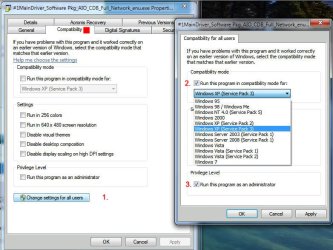
As for the games, have you tried right clicking on the 'Disney' shortcut and choosing Properties|Compatibility tab, making sure that there is a check mark next to 'Run as Admin'? I think that would work (you can ignore the 'Run in compat mode' option [step 2]...stock screenshot :) ).

Admin_Run as_2.JPG

And as for W.E., he can get to it through the start Menu, via any folder shortcut or simply by pressing winkey+E, amongst other ways.

James
 
Last edited:

My Computer

OS
Win7U 64 RTM
CPU
Q9550
Motherboard
GA-EP45-UD3R
Memory
8GB Gskill
Graphics Card(s)
ASUS|EAH4850/HTDI/1GD3/A
Sound Card
xfi Plat
Monitor(s) Displays
Dell 2405fpw
Screen Resolution
1920x1200
Hard Drives
Seagate & WD sata Drives
PSU
Antec
Case
Antec
Keyboard
MS Natural Ergonomic 4000
Mouse
Logitech MX610 USB Cordless
His pc is home premium 32 bit.
Thank you for the links amd your time. I can make some use of this info, but I am not confident that with the information I have I won't 'toast windows' with the group policy again. If I disallow explorer.exe won't that be the same. I just want to only allow a single instance of explorer.exe I thought I was close to something with trying to rename it and run it as a log in task but I guess not. When exactly does explorer.exe run? Isn't there or wasn't there (back in the olden days) a way to make windows shell into another application if so why can't I make that work. I swear in school we had a cash register kinda app that would just start as a shell instead of windows but that was many years ago now. I was hoping I could rename explorer.exe to something else and start that as a shell but I don't remeber how that worked exactly and I don't know if that would even work in windows 7 because I am pretty sure that was windows 'something before xp' but I don't rember for sure.
Really nobody has tried this before I really searched the internet for a solution and all I could find was stuff to keep older kids in line and out of 'bad' internet stiff but nothing to stop drag and drop renaming type things. The only other thing I can think of is to start media center and (somehow) keep it from closing I know what to do to make it say it won't but windows seems to have a bug that lets you out. At anyrate how could I allow his games to be in the extra menu things like lego island(s), tonka search & rescue, dora ect ect. Can't find a good tutorial anywhere for how to get those things in the media center extra's menu. Could someone who knows all this stuff help with that.
 

My Computer

OS
Windows 7 Profesional 64 Bit
CPU
AMD Athlon II X4 620
Motherboard
GA-MA770-UD3
Memory
6 Gigs
Graphics Card(s)
gts 450
Sound Card
built in
Monitor(s) Displays
HP w2338h
Screen Resolution
1920 X 1080
Hard Drives
sata barracuda 1tb seagate X2 IDE Mode
PSU
huh
Case
generic
Cooling
box w/cpu
Internet Speed
LOL 3mbs
I wouldn't recommend disabling Explorer.exe...it's too tied into the system. The best way for you to control system use is by limiting what specific 'user groups' can do. This, however, can be problematic and will require study on your part. This is not something that can be learned via a few posts in a forum. It involves changing permissions for certain user groups and in the security options of programs you wish to restrict access to. Below is a link to a post that has some links and info. This will give you a start:

http://www.sevenforums.com/general-discussion/121776-user-account-help.html#post1049080

And to a Sevenforums Tutorial:

http://www.sevenforums.com/tutorials/122666-permissions-allow-deny-users-groups.html

You can do further searches to give you more (and updated) info.

That said, changing permissions and security settings can get one in trouble, including being locked out of your own system. Before attempting any changes, it is highly, highly recommended that you create an image of the system partition or any other partition you plan to make changes to. There is free software to do this, but you will require an external drive to keep the images on (which can be quite large).

Here is a link to free imaging software:

Macrium Reflect FREE Edition - Information and download

One other strong warning: When changing permissions, security changes and user groups, you must be sure not to remove any admin or system groups. Create an admin account for yourself and make sure that it is included with full access to the programs and activities you wish to limit before you add, remove or change any user groups or user access.

I can't stress these warnings strongly enough. This forum is riddled with threads requesting help with permission problems. If you must follow through with this, do your homework:

1) Familiarize yourself with the imaging software before anything else. Make some images, restore them, make sure you are comfortable with creating, restoring and exploring them.
Have at least two validated images on hand. With these, you have a safety net that will bring you back to where you were before any changes were made.

2) Thoroughly study the use and practice of limiting accounts and the use of and restrictiion of user groups.

3) One other warning: You may run across a utility called TakeOwnership. This utility will not serve your purposes in this case and is a source of problems for many. It's also not to be applied to the system drive under any circumstances!

All of this said, a bit extreme for a toddler, but if you're sure you want to go through this amount of effort, you may learn a lot, and as long as you maintain your system images, you can always go back.


James
 
Last edited:

My Computer

OS
Win7U 64 RTM
CPU
Q9550
Motherboard
GA-EP45-UD3R
Memory
8GB Gskill
Graphics Card(s)
ASUS|EAH4850/HTDI/1GD3/A
Sound Card
xfi Plat
Monitor(s) Displays
Dell 2405fpw
Screen Resolution
1920x1200
Hard Drives
Seagate & WD sata Drives
PSU
Antec
Case
Antec
Keyboard
MS Natural Ergonomic 4000
Mouse
Logitech MX610 USB Cordless
This is a great thread. I was looking for something along the same lines. Curious if anyone knows if there are any third party programs for helping to childproof Windows 7. I would love to just have it boot up to Kidzui (I found that the other day, and was happy to see an endorsement for it here).

However, I would like to put a password on all other windows features like the start menu. Booting up to Kidzui is great, but then how can I set up access to a few icons to the educational games I have for him.

Would be nice if Microsoft would create a kidproof OS option in Windows 8!
 

My Computer

OS
Windows 7 Ultimate
My son is also 4 and I have his account set up so:

His start menu and desktop items are limited to those that he may use.
His explorer window will open to his library only with no navigation pane or details pane. (so he can only really explore within his own library).
He has read only access to shared librarys.

Also you can remove right click context menu items via the registry or 3rd party program (preffered).

To make it easier for him I had 1 click default action turned on instead of double click, i have just turned this off though as hes knowledgable enough.

I have seen Kidzui but havent tried it yet, his browser just points to his jumpstart.com homepage.
 
Last edited:

My Computer

Computer type
PC/Desktop
Computer Manufacturer/Model Number
Self Build
OS
Windows 7 Ultimate x64
CPU
Intel Core2 Quad Q8300 2.5Ghz
Motherboard
Asus P5QD Turbo
Memory
Kingston HyperX 4x1GB DDR2 1066Mhz
Graphics Card(s)
Asus/Nvidia 9500GT 1GB
Sound Card
On-Board HD
Monitor(s) Displays
22" Widescreen TFT
Screen Resolution
1920x1080
Hard Drives
2x 320Gb Seagate SATAII RAID 0
2x 80Gb Seagate SATAII RAID 0
1x 1tb hybrid (8gb ssd)
PSU
650w
Case
ATX
Cooling
140mm front, 120mm Rear, 80mm Chipset + stock CPU and GPU
Keyboard
Plastic one
Mouse
Plastic one
Internet Speed
4Mbps
Other Info
Laptop: HP Elitebook 2560p
i5 @2.7Ghz 4GB DDR3
Yeah, even the best admin mess up permissions and system lock downs.
There will be a whole lot of trial and error.

Yes there are apps that can help make it easier, but if something goes wrong, you won't know what caused it and will have to rely on the 3rd party app alone.

While that will make it easier, and you may not want to become a strict knowledgeable admin, knowing what changes you are making to the system will help a lot when something breaks.
 

My Computer

Computer Manufacturer/Model Number
Self Built
OS
Win 7 Ultimate 32bit
CPU
C2D E6600 2.4Ghz
Motherboard
Intel D965WH
Memory
4G Kingston KHX5400D2
Graphics Card(s)
EVGA GTX 570 HD SC (012-P3-1573-KR)
Sound Card
On-Board
Monitor(s) Displays
Samsung 226BW
Screen Resolution
1680 x 1050
Hard Drives
2 x 250 Seagate Barracuda
2 x 500 Seagate Barracuda (Raid1)
PSU
Corsair TX750W
Case
In-Win C589
Cooling
Stock Intel Cooling
RSAvenell That is how my laptop is set up for my son. He has a standard no password account (yeah I know) and KidZui runs immediately at login. That is one of the settings and requires a password to exit so that is all he can do. When he's done he just closses the laptop. You need to setup the parental account on the website (I think) to get to those parental options.
 

My Computer

OS
Windows 7 Profesional 64 Bit
CPU
AMD Athlon II X4 620
Motherboard
GA-MA770-UD3
Memory
6 Gigs
Graphics Card(s)
gts 450
Sound Card
built in
Monitor(s) Displays
HP w2338h
Screen Resolution
1920 X 1080
Hard Drives
sata barracuda 1tb seagate X2 IDE Mode
PSU
huh
Case
generic
Cooling
box w/cpu
Internet Speed
LOL 3mbs
Thought about this at work today and thinking he can't have xp mode because he's only got home premium but I think he could still run the old virtual machine 2007. There's tons of 3rd party apps to dissable just about everything in xp and the best part would be enabling undo disk. I think I want to experiment with getting that to start at start up but it seems like there should really be a better solution.
Thank you everyone for your help. I have already trashed his windows 7 twice messing with group policies. LOL so I am aware of the risks there.

Would there be a licence issue if I used a xp mode vhd with virtual machine 2007 sp1 is that legal?
 

My Computer

OS
Windows 7 Profesional 64 Bit
CPU
AMD Athlon II X4 620
Motherboard
GA-MA770-UD3
Memory
6 Gigs
Graphics Card(s)
gts 450
Sound Card
built in
Monitor(s) Displays
HP w2338h
Screen Resolution
1920 X 1080
Hard Drives
sata barracuda 1tb seagate X2 IDE Mode
PSU
huh
Case
generic
Cooling
box w/cpu
Internet Speed
LOL 3mbs
You can install VirtualPC on Win7 Home Premium
However, you can not install XP Mode on that system. But if you have Winxp license, You can install it in a VPC.

I would recommend install Virtual PC, not VPC 2007 on a Win7 system.

But, alternatives are VMWare Player and VirtualBox.

Would there be a licence issue if I used a xp mode vhd with virtual machine 2007 sp1 is that legal?

Technically no, it is not legal. However, there are ways to run XP Mode in Vbox and VMWare Player I do believe. But no, it is not legal unless you are running it on Pro, Enterprise or Ultimate.
 

My Computer

Computer Manufacturer/Model Number
Self Built
OS
Win 7 Ultimate 32bit
CPU
C2D E6600 2.4Ghz
Motherboard
Intel D965WH
Memory
4G Kingston KHX5400D2
Graphics Card(s)
EVGA GTX 570 HD SC (012-P3-1573-KR)
Sound Card
On-Board
Monitor(s) Displays
Samsung 226BW
Screen Resolution
1680 x 1050
Hard Drives
2 x 250 Seagate Barracuda
2 x 500 Seagate Barracuda (Raid1)
PSU
Corsair TX750W
Case
In-Win C589
Cooling
Stock Intel Cooling
Ok now I'm confused I thought Virtual PC could only be installed on Pro and ultimate. But after looking for an old xp disk I have decided that I will not do that with xp that is backward thinking and I am ashamed of myself for trying to find such an easy regressive approach. I will figure this out for windows 7. Either someone has a way to do this or I will make a way to do it!
 

My Computer

OS
Windows 7 Profesional 64 Bit
CPU
AMD Athlon II X4 620
Motherboard
GA-MA770-UD3
Memory
6 Gigs
Graphics Card(s)
gts 450
Sound Card
built in
Monitor(s) Displays
HP w2338h
Screen Resolution
1920 X 1080
Hard Drives
sata barracuda 1tb seagate X2 IDE Mode
PSU
huh
Case
generic
Cooling
box w/cpu
Internet Speed
LOL 3mbs
Well,, again,, Group Policy is what you are looking for, you will just need to learn how to use it.
Microsoft is trying to get people away from hacking at the registry. They want you to use Group Policy
If anything, you should install VPC and create a Win7 VHD and test on that, then write down what works and implement.

I would try using a combination of Parental Controls and Group Policies and Access permissions.
That is the only effective way o get what you are looking for.

Again, yes, there are 3rd party apps that will probably work. But if something goes wrong, you won't know where to start looking for what is broken.

Learning what it is that you are changing will do you more good in the long run.
 

My Computer

Computer Manufacturer/Model Number
Self Built
OS
Win 7 Ultimate 32bit
CPU
C2D E6600 2.4Ghz
Motherboard
Intel D965WH
Memory
4G Kingston KHX5400D2
Graphics Card(s)
EVGA GTX 570 HD SC (012-P3-1573-KR)
Sound Card
On-Board
Monitor(s) Displays
Samsung 226BW
Screen Resolution
1680 x 1050
Hard Drives
2 x 250 Seagate Barracuda
2 x 500 Seagate Barracuda (Raid1)
PSU
Corsair TX750W
Case
In-Win C589
Cooling
Stock Intel Cooling
well that was exactly my thinking but If I don't give the vm internet I have 30 days to activate? I don't have an extra licence for windows 7 for the vm. But I deffinately want undo disk before I do this.
 
Last edited:

My Computer

OS
Windows 7 Profesional 64 Bit
CPU
AMD Athlon II X4 620
Motherboard
GA-MA770-UD3
Memory
6 Gigs
Graphics Card(s)
gts 450
Sound Card
built in
Monitor(s) Displays
HP w2338h
Screen Resolution
1920 X 1080
Hard Drives
sata barracuda 1tb seagate X2 IDE Mode
PSU
huh
Case
generic
Cooling
box w/cpu
Internet Speed
LOL 3mbs
I have already trashed his windows 7 twice messing with group policies. LOL so I am aware of the risks there.

Tried making a child group in policy settings and changing group policy settings.

His pc is home premium 32 bit.

Are you sure his PC is win7 HP? GPedit is only available in Pro and up.


Also, I was mistaken here (apologies):


http://www.sevenforums.com/general-discussion/164244-child-proof-windows-7-a.html#post1405904

Anyway, the problem with GPedit is that you can't selectively apply it (i.e., only to standard accounts)...

As I just discovered, GPedit policies can be applied to selective user groups, as can be seen here:

http://www.sevenforums.com/tutorial...es-apply-all-users-except-administrators.html

and

http://www.sevenforums.com/tutorials/151415-group-policy-apply-specific-user-group.html


James
 
Last edited:

My Computer

OS
Win7U 64 RTM
CPU
Q9550
Motherboard
GA-EP45-UD3R
Memory
8GB Gskill
Graphics Card(s)
ASUS|EAH4850/HTDI/1GD3/A
Sound Card
xfi Plat
Monitor(s) Displays
Dell 2405fpw
Screen Resolution
1920x1200
Hard Drives
Seagate & WD sata Drives
PSU
Antec
Case
Antec
Keyboard
MS Natural Ergonomic 4000
Mouse
Logitech MX610 USB Cordless
1) some games need admin privledges 'a disney game' WHY :mad:
is there a way to always run as admin in windows 7 without prompting for password?

which one? Disney's Shift runs fine as a standard user, Perhaps you can install it to the public foldeer instead of program files? this will often resolve games requiring admin.
 

My Computer

Computer type
PC/Desktop
Computer Manufacturer/Model Number
Self Build
OS
Windows 7 Ultimate x64
CPU
Intel Core2 Quad Q8300 2.5Ghz
Motherboard
Asus P5QD Turbo
Memory
Kingston HyperX 4x1GB DDR2 1066Mhz
Graphics Card(s)
Asus/Nvidia 9500GT 1GB
Sound Card
On-Board HD
Monitor(s) Displays
22" Widescreen TFT
Screen Resolution
1920x1080
Hard Drives
2x 320Gb Seagate SATAII RAID 0
2x 80Gb Seagate SATAII RAID 0
1x 1tb hybrid (8gb ssd)
PSU
650w
Case
ATX
Cooling
140mm front, 120mm Rear, 80mm Chipset + stock CPU and GPU
Keyboard
Plastic one
Mouse
Plastic one
Internet Speed
4Mbps
Other Info
Laptop: HP Elitebook 2560p
i5 @2.7Ghz 4GB DDR3
Back
Top