- Local time
- 2:09 PM
- Messages
- 69
I would like to know if there is any way to dissable the browse (windows explorer) from starting.
Things I have done to mostly child proof my 4 year olds computer.
Changed the security settings of the destop so he can't delete /copy icons.
Completely stripped taskbar.
Moved all Public Desktop items to admin account.
But there's still two problems.
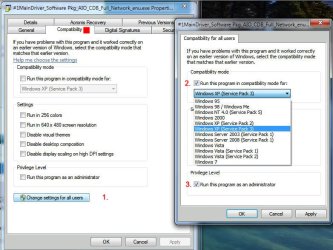
1) some games need admin privledges 'a disney game' WHY
is there a way to always run as admin in windows 7 without prompting for password?
2) some how he gets windows explorer (browse) open I don't know how there is no shortcut anywhere but there seems to be a plethora of ways to open it.
Tried making a child group in policy settings and changing group policy settings. That ended in a clean install LOL.
Edit: also tried to deny his account write access to the entire drive- epic fail
Things I have done to mostly child proof my 4 year olds computer.
Changed the security settings of the destop so he can't delete /copy icons.
Completely stripped taskbar.
Moved all Public Desktop items to admin account.
But there's still two problems.
1) some games need admin privledges 'a disney game' WHY
is there a way to always run as admin in windows 7 without prompting for password?
2) some how he gets windows explorer (browse) open I don't know how there is no shortcut anywhere but there seems to be a plethora of ways to open it.
Tried making a child group in policy settings and changing group policy settings. That ended in a clean install LOL.
Edit: also tried to deny his account write access to the entire drive- epic fail
My Computer
At a glance
Windows 7 Profesional 64 BitAMD Athlon II X4 6206 Gigsgts 450
- OS
- Windows 7 Profesional 64 Bit
- CPU
- AMD Athlon II X4 620
- Motherboard
- GA-MA770-UD3
- Memory
- 6 Gigs
- Graphics Card(s)
- gts 450
- Sound Card
- built in
- Monitor(s) Displays
- HP w2338h
- Screen Resolution
- 1920 X 1080
- Hard Drives
- sata barracuda 1tb seagate X2 IDE Mode
- PSU
- huh
- Case
- generic
- Cooling
- box w/cpu
- Internet Speed
- LOL 3mbs


 ).
).