
CHKDSK deleted 2TB of stuff

band06

New member
Local time
10:43 AM
Messages
6
Hi,

I just finished reformatting my computer. I ran PerfectDisk and defragged the drive that lost the files. I then restarted the computer. Then CHKDSK decided to run (no biggie I thought).

I managed to recover the bootex log which I posted a link to below (I tried to cut a lot of the repetitive stuff out).

Basically about 2 TB of mostly video files have been deleted. The drive is empty in My Computer except for a bootsqm.dat file. There is about 500 GB of used space. I found a system hidden "found.000" folder which contains this 500 GB of data. The files are named but they don't play. The other 2 TB of data is gone as far as I can tell.

I'm currently copying the found.000 folder to another drive and running a deep scan of Recuva (which could take all day). I did cancel the scan a few minutes into it and found a 3GB file from the System Volume Information folder called 2{3808876b-c176-4e48-b7ae-04046e6cc752}. Is this file important? I don't have system restore set up on this drive so I don't know what it is.

What should I do? I'm afraid even if I can recover the files using Recuva or something the file name info will be gone.

I don't have a full back up of this drive. I just bought a second 4TB drive for the purpose of backing it up but naturally this happens before I got a chance to.

Thanks!

CHKDSK log:
'Untitled Post' | TextUploader.com
 

My Computer My Computer

At a glance

Windows 7 Ultimate x64i7 920 @ 3.8GHz12GB DDR3R9 290
Computer type
PC/Desktop
OS
Windows 7 Ultimate x64
CPU
i7 920 @ 3.8GHz
Motherboard
ASUS P6T Deluxe V2
Memory
12GB DDR3
Graphics Card(s)
R9 290
Hard Drives
Crucial M4 128GB
OCZ Vertex 64GB
Hitachi Deskstar 2TB
2 x Hitachi Deskstar NAS 4TB
WD Caviar Black 1TB
Hello band06. Welcome to the Forum.

When you say you re-formatted the computer, you mean you reformatted the hard disk, right?
Do you have just 1 hard disk ? If not, how many do you have?

Why did you (re)format the hard disk? What were you trying to accomplish?

What is Perfect Disk (what does it do when you "run it")?

Initially it looks like you wiped out your files doing the format. CheckDisk ran after that.
 

My Computer My Computer

At a glance

Windows 7 64 Bit Home Premium SP1i7-3820GSkill F3-14900CL9Q - 16GBEVGA GeForce GTX660 - Driver 352.86
Computer type
PC/Desktop
Computer Manufacturer/Model Number
Home Built - Jan 2013
OS
Windows 7 64 Bit Home Premium SP1
CPU
i7-3820
Motherboard
Asus P9X79-PRO - Bios 4608
Memory
GSkill F3-14900CL9Q - 16GB
Graphics Card(s)
EVGA GeForce GTX660 - Driver 352.86
Sound Card
On board Realtek ALC898
Monitor(s) Displays
Acer S271HL
Screen Resolution
1920 x 1080
Hard Drives
#1- Samsung 840 Pro Series
#2- Western Digital WD1002FAEX Sata3 Black
#3- Western Digital WD1002FAEX Sata3 Black
PSU
Corsair CMPSU-850TX-V2 - 850 watt (by Seasonic)
Case
Corsair Obsidian 550D
Cooling
Standard 3 120mm case fans, Cooler Master Hyper 212 EVO
Keyboard
MS KC-0405
Mouse
Intellimouse 5-button
Internet Speed
56 Mbits/Sec (on a good day)
Antivirus
Avast & Malwarebytes
Browser
Firefox
Other Info
Asus DVD - DRW-24B1ST 24X

My Computer My Computer

At a glance

x64 (6.3.9600) Win8.1 Pro & soon dual boot x6...AMD A6-3420M APU with Radeon(tm) HD Graphics6.00 GBAMD Radeon(TM) HD 6520G
Computer type
Laptop
Computer Manufacturer/Model Number
HP Pavilion dv6-6c10us
OS
x64 (6.3.9600) Win8.1 Pro & soon dual boot x64 (6.1.7601) Win7_SP1 HomePrem
CPU
AMD A6-3420M APU with Radeon(tm) HD Graphics
Motherboard
Hewlett-Packard 1805
Memory
6.00 GB
Graphics Card(s)
AMD Radeon(TM) HD 6520G
Sound Card
(1) AMD High Definition Audio Device (2) IDT High Definiti
Monitor(s) Displays
HP W2072a 20" LCD (1600 x 900) @ 60 Hz
Screen Resolution
1366 x 768 x 32 bits (4294967296 colors) @ 60 Hz
Hard Drives
ST640LM0 00 HM641JI SATA Disk Device
Keyboard
Logitech k520 wireless KB
Mouse
Logitech m320 wireless mouse (bundled with KB)
Internet Speed
15/5 | 54 MB Wireless 'n'
Antivirus
Realtime: Defender or Avast | On-demand: Malwarebytes, ESET
Browser
IE 11 on Win8, IE 10 on win 7
Other Info
Media: [Gimp, Audacity, VLC] || Comm: [WEmail 2012, Skype] || Productivity: [OpenOffice,| Textpad] || Utils: [Sysinternals, cCleaner, Speccy, Defraggler]
Thanks for your reply.

These are the drives I have:
Crucial M4 SSD - C: - Operating system & Programs
OCZ Vertex SSD - D:
Hitachi Deskstar 2TB - E:
Hitachi Deskstar NAS 4TB - F: - Movies, TV shows etc. - Drive with the problem
Hitachi Deskstar NAS 4TB - G:
WD Caviar Black - H:

I reformatted the C drive and reinstalled the OS and programs etc. It had been a few years since the last reformat so it was time for a fresh install.

Everything was good after this. All the files on my other drives were still there.

After reinstalling stuff and changing settings to my liking etc., I defragmented the E, F and G drives using PerfectDisk (a defragmentation program).

I then reset the computer which is when CHKDSK ran and deleted everything on the F drive.

It is possible PerfectDisk caused some damage when it defragged the drive (I don't know how or why, all it was supposed to do was defrag some video files).

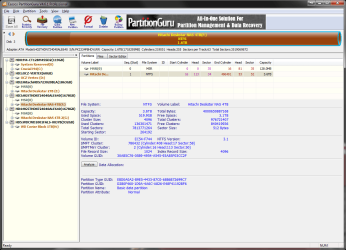
Another thing I've noticed is that some software is reporting the capacity of both 4TB drives as 1678 GB. However it reports the partition capacity correctly as 3726 GB.

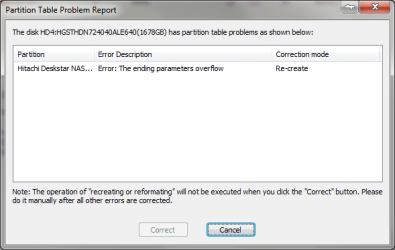
I downloaded Eassos PartitionGuru and when I click on either of the 4TB drives it says:
"The disk has partition table problems as shown below:"
"Error Description: Error: The ending parameters overflow"
"Correction mode: Re-create"

So I guess the partition table has problems.

Should I backup the F drive first before I try and use PartitonGuru to fix the partition table. If so how should I go about backing it up?

Or if you have any other suggestions on how to proceed let me know. I haven't written anything to the drive so I'm hoping all my files are there, it's just a matter fixing the drive so it can see them.

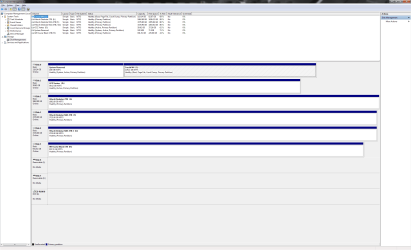
Edit: Disk Management screenshot attached as requested. Still waiting on Recuva to finish. Also attached PartitionGuru screenshots.
 

Attachments

  • Untitled.png
    Untitled.png
    58.7 KB · Views: 12
  • Untitled2.png
    Untitled2.png
    60.4 KB · Views: 3
  • Untitled3.png
    Untitled3.png
    11.8 KB · Views: 51
Last edited:

My Computer My Computer

At a glance

Windows 7 Ultimate x64i7 920 @ 3.8GHz12GB DDR3R9 290
Computer type
PC/Desktop
OS
Windows 7 Ultimate x64
CPU
i7 920 @ 3.8GHz
Motherboard
ASUS P6T Deluxe V2
Memory
12GB DDR3
Graphics Card(s)
R9 290
Hard Drives
Crucial M4 128GB
OCZ Vertex 64GB
Hitachi Deskstar 2TB
2 x Hitachi Deskstar NAS 4TB
WD Caviar Black 1TB
Let Recuva finish and stop running other tools on the drive.

Will begin other troubleshooting if necessary after Recuva finishes.

Thanks for posting more information on the issue and for posting the screen shots.

What are disk 6 & 7 in the Disk Management screen shot?
Do you have any virtual CDrom software (Daemon tools, MagicISO?) installed?

Bill
.
 

My Computer My Computer

At a glance

x64 (6.3.9600) Win8.1 Pro & soon dual boot x6...AMD A6-3420M APU with Radeon(tm) HD Graphics6.00 GBAMD Radeon(TM) HD 6520G
Computer type
Laptop
Computer Manufacturer/Model Number
HP Pavilion dv6-6c10us
OS
x64 (6.3.9600) Win8.1 Pro & soon dual boot x64 (6.1.7601) Win7_SP1 HomePrem
CPU
AMD A6-3420M APU with Radeon(tm) HD Graphics
Motherboard
Hewlett-Packard 1805
Memory
6.00 GB
Graphics Card(s)
AMD Radeon(TM) HD 6520G
Sound Card
(1) AMD High Definition Audio Device (2) IDT High Definiti
Monitor(s) Displays
HP W2072a 20" LCD (1600 x 900) @ 60 Hz
Screen Resolution
1366 x 768 x 32 bits (4294967296 colors) @ 60 Hz
Hard Drives
ST640LM0 00 HM641JI SATA Disk Device
Keyboard
Logitech k520 wireless KB
Mouse
Logitech m320 wireless mouse (bundled with KB)
Internet Speed
15/5 | 54 MB Wireless 'n'
Antivirus
Realtime: Defender or Avast | On-demand: Malwarebytes, ESET
Browser
IE 11 on Win8, IE 10 on win 7
Other Info
Media: [Gimp, Audacity, VLC] || Comm: [WEmail 2012, Skype] || Productivity: [OpenOffice,| Textpad] || Utils: [Sysinternals, cCleaner, Speccy, Defraggler]
Do everything you can to recover files before you do anything else. Don't compound the problem!

Make sure you have a backup of everything on any drive you are going to be working on before running any programs on it.

I suspect, based upon a couple of things you mentioned above, that the defragmenter was not compatible with GPT disks, and the GPT disk(s) were originally formatted that way. That would be a plausible explanation as to why the partition table was corrupted.
 

My Computer My Computer

At a glance

Windows 7 64 Bit Home Premium SP1i7-3820GSkill F3-14900CL9Q - 16GBEVGA GeForce GTX660 - Driver 352.86
Computer type
PC/Desktop
Computer Manufacturer/Model Number
Home Built - Jan 2013
OS
Windows 7 64 Bit Home Premium SP1
CPU
i7-3820
Motherboard
Asus P9X79-PRO - Bios 4608
Memory
GSkill F3-14900CL9Q - 16GB
Graphics Card(s)
EVGA GeForce GTX660 - Driver 352.86
Sound Card
On board Realtek ALC898
Monitor(s) Displays
Acer S271HL
Screen Resolution
1920 x 1080
Hard Drives
#1- Samsung 840 Pro Series
#2- Western Digital WD1002FAEX Sata3 Black
#3- Western Digital WD1002FAEX Sata3 Black
PSU
Corsair CMPSU-850TX-V2 - 850 watt (by Seasonic)
Case
Corsair Obsidian 550D
Cooling
Standard 3 120mm case fans, Cooler Master Hyper 212 EVO
Keyboard
MS KC-0405
Mouse
Intellimouse 5-button
Internet Speed
56 Mbits/Sec (on a good day)
Antivirus
Avast & Malwarebytes
Browser
Firefox
Other Info
Asus DVD - DRW-24B1ST 24X
I don't know what 6 & 7 are. When I click properties one says Generic Flash HS-CF USB Device and the other Generic Flash HS-COMBO USB Device. The CD-ROM is a Daemon Tools virtual one.

I discovered that an old version of Intel Storage Matrix was causing the 4TB drives to be detected as 1801 GB. I uninstalled that and now they're being correctly identified as 3726 GB. However this required a restart so Recuva didn't finish. It got to about 30% and showed hundreds of video files (but named [00025.mp4] etc.).

Someone else had a similar problem in the thread below. Reckons the Intel driver only detected 2TB and when PerfectDisk wrote to sectors beyond this 2TB it caused the problems. I'm guessing because I installed the drives and copied the files to them before I reformatted (and installed Intel Storage Manager) it wasn't until after the reformat that the problem came up.
How to recover lost partition on GPT drive? - [H]ard|Forum

Right now I'm cloning the partition to my other 4TB drive just so I have a backup and don't have to worry about overwriting stuff.

That'll take 10 hours so once that's finished I'll run Recuva on one partition and try and see if I can fix the partition table on the other.
 

My Computer My Computer

At a glance

Windows 7 Ultimate x64i7 920 @ 3.8GHz12GB DDR3R9 290
Computer type
PC/Desktop
OS
Windows 7 Ultimate x64
CPU
i7 920 @ 3.8GHz
Motherboard
ASUS P6T Deluxe V2
Memory
12GB DDR3
Graphics Card(s)
R9 290
Hard Drives
Crucial M4 128GB
OCZ Vertex 64GB
Hitachi Deskstar 2TB
2 x Hitachi Deskstar NAS 4TB
WD Caviar Black 1TB
Okay, I finished backing up the F drive.

I'm using PartitionGuru to try and recover the partition. It seems a lot faster than TestDisk. The partition in one of the first cylinders doesn't contain any of my files (I think it's the partition Windows currently detects). It's scanning and hopefully there is another partition in the drive somewhere with my files.

I ran CHKDSK on the cloned G drive (just a check without fixing anything). I posted the log below. Can anyone make sense of this? It says at the start that 11264 file records processed. That sounds like about how many files I had. I'm assuming this is good? Does this mean the index info of my files is somewhere in the drive?

Many thanks.

CHKDSK log:
'Untitled Post' | TextUploader.com
 

My Computer My Computer

At a glance

Windows 7 Ultimate x64i7 920 @ 3.8GHz12GB DDR3R9 290
Computer type
PC/Desktop
OS
Windows 7 Ultimate x64
CPU
i7 920 @ 3.8GHz
Motherboard
ASUS P6T Deluxe V2
Memory
12GB DDR3
Graphics Card(s)
R9 290
Hard Drives
Crucial M4 128GB
OCZ Vertex 64GB
Hitachi Deskstar 2TB
2 x Hitachi Deskstar NAS 4TB
WD Caviar Black 1TB
Everything in the log points to what we already know: the file table is no good.

Continue to try and recover your files. The recovery program will attempt to stitch together a new file table when it is finished. The accuracy of that process will depend on whether the data in each sector is untouched (unchanged) since the original file table was damaged. If you ran any programs that could have changed or rearranged the data in the sectors (defragmenter), then you could end up with errors or unusable files.

Even on a clean recovery it is not uncommon for the file names to be incorrect. Many times the first letter is missing or replaced with a random character. Expect to do some additional chores even after a clean recovery.

It goes without saying, but you should dig a very deep hole and throw PerfectDisk, and anything to do with it, into the hole and bury it.
 

My Computer My Computer

At a glance

Windows 7 64 Bit Home Premium SP1i7-3820GSkill F3-14900CL9Q - 16GBEVGA GeForce GTX660 - Driver 352.86
Computer type
PC/Desktop
Computer Manufacturer/Model Number
Home Built - Jan 2013
OS
Windows 7 64 Bit Home Premium SP1
CPU
i7-3820
Motherboard
Asus P9X79-PRO - Bios 4608
Memory
GSkill F3-14900CL9Q - 16GB
Graphics Card(s)
EVGA GeForce GTX660 - Driver 352.86
Sound Card
On board Realtek ALC898
Monitor(s) Displays
Acer S271HL
Screen Resolution
1920 x 1080
Hard Drives
#1- Samsung 840 Pro Series
#2- Western Digital WD1002FAEX Sata3 Black
#3- Western Digital WD1002FAEX Sata3 Black
PSU
Corsair CMPSU-850TX-V2 - 850 watt (by Seasonic)
Case
Corsair Obsidian 550D
Cooling
Standard 3 120mm case fans, Cooler Master Hyper 212 EVO
Keyboard
MS KC-0405
Mouse
Intellimouse 5-button
Internet Speed
56 Mbits/Sec (on a good day)
Antivirus
Avast & Malwarebytes
Browser
Firefox
Other Info
Asus DVD - DRW-24B1ST 24X
So far recovery attempts off of the original drive have been largely unsuccessful.

However I still have the drives that the bulk of the data used to be on before I transferred it to the new 4TB drive. They have been quick reformatted and have some bad sectors. I'm currently recovering data off of one of them at the moment. Most of the files are recoverable and still have their files names so that's good. However the second drive has a few thousand bad sectors and is on its last legs, so we'll see how I go with that one.

Like I said in an earlier post, I don't think PerfectDisk was the cause of the problem. It was an old version of the Intel Storage Matrix driver (which both ASUS and Windows Update say to install). The problem didn't occur until I ran PerfectDisk because that was the first time I wrote data to the drives with the Intel driver installed.

If I had used any defrag program or any program that writes data to the disk I think the same problem would have occured.

If anyone out there has HDD's greater than 2.2TB take a close look at what storage/SATA drivers you are using.

IF YOU HAVE DRIVES >2.2TB DO NOT INSTALL INTEL STORAGE MATRIX DRIVER (IF YOU HAVE UNINSTALL IT IMMEDIATELY AND DO NOT WRITE ANYTHING TO THE DRIVE UNTIL YOU HAVE). The new version (Intel Rapid Storage Technology) should be good.
 

My Computer My Computer

At a glance

Windows 7 Ultimate x64i7 920 @ 3.8GHz12GB DDR3R9 290
Computer type
PC/Desktop
OS
Windows 7 Ultimate x64
CPU
i7 920 @ 3.8GHz
Motherboard
ASUS P6T Deluxe V2
Memory
12GB DDR3
Graphics Card(s)
R9 290
Hard Drives
Crucial M4 128GB
OCZ Vertex 64GB
Hitachi Deskstar 2TB
2 x Hitachi Deskstar NAS 4TB
WD Caviar Black 1TB
Well keep working on the data recovery and deal with the repairs afterward. Any changes now has the potential to interfere with recovery.

When that is done you could try running checkdisk with the f and v tags (suggestion from Slartybart). This will attempt to find and fix the file system on the drive.
chkdsk G: /f /v
You could try this with the cloned drive, if it doesn't work you may have to make a new clone.
 

My Computer My Computer

At a glance

Windows 7 64 Bit Home Premium SP1i7-3820GSkill F3-14900CL9Q - 16GBEVGA GeForce GTX660 - Driver 352.86
Computer type
PC/Desktop
Computer Manufacturer/Model Number
Home Built - Jan 2013
OS
Windows 7 64 Bit Home Premium SP1
CPU
i7-3820
Motherboard
Asus P9X79-PRO - Bios 4608
Memory
GSkill F3-14900CL9Q - 16GB
Graphics Card(s)
EVGA GeForce GTX660 - Driver 352.86
Sound Card
On board Realtek ALC898
Monitor(s) Displays
Acer S271HL
Screen Resolution
1920 x 1080
Hard Drives
#1- Samsung 840 Pro Series
#2- Western Digital WD1002FAEX Sata3 Black
#3- Western Digital WD1002FAEX Sata3 Black
PSU
Corsair CMPSU-850TX-V2 - 850 watt (by Seasonic)
Case
Corsair Obsidian 550D
Cooling
Standard 3 120mm case fans, Cooler Master Hyper 212 EVO
Keyboard
MS KC-0405
Mouse
Intellimouse 5-button
Internet Speed
56 Mbits/Sec (on a good day)
Antivirus
Avast & Malwarebytes
Browser
Firefox
Other Info
Asus DVD - DRW-24B1ST 24X
plz help,my important files were gone!
I have a 1T external hard drive( NTFS, my passport Western Digital) .yesterday i right click on drive in windows 7 my computer --> properties --> tools --> check now --> and i check both these boxes :
-Check Disk dialog box Automatically fix file system errors
-Scan for and attempt recovery of bad sectors
after about 2 hour, process finished.but when i go to my external hard drive. i just found 30 gb of my files and folder was remain and other(about 900 gb!) were lost! and the free space of disk wasn't changed that maybe shows folder and files are not deleted.

why were the data deleted? Chkdsk tell nothing me when it completed! If data disappears it usually is because files are damaged and the

Chkdsk utility attempts to separate the damaged files out BUT there aren't any files or folders with such as these names "found.000" or "*.chk" in my external hdd.( showing hidden and system files is on)

note: i found my chkdsk log in event view in windows cp :
there ware a lot of records like this : Deleting orphan file record segment 60010.

plz help to find prob and get my files back .
 

My Computer My Computer

At a glance

Windows 7
Computer type
PC/Desktop
OS
Windows 7

My Computer My Computer

At a glance

Windows 7 64 Bit Home Premium SP1i7-3820GSkill F3-14900CL9Q - 16GBEVGA GeForce GTX660 - Driver 352.86
Computer type
PC/Desktop
Computer Manufacturer/Model Number
Home Built - Jan 2013
OS
Windows 7 64 Bit Home Premium SP1
CPU
i7-3820
Motherboard
Asus P9X79-PRO - Bios 4608
Memory
GSkill F3-14900CL9Q - 16GB
Graphics Card(s)
EVGA GeForce GTX660 - Driver 352.86
Sound Card
On board Realtek ALC898
Monitor(s) Displays
Acer S271HL
Screen Resolution
1920 x 1080
Hard Drives
#1- Samsung 840 Pro Series
#2- Western Digital WD1002FAEX Sata3 Black
#3- Western Digital WD1002FAEX Sata3 Black
PSU
Corsair CMPSU-850TX-V2 - 850 watt (by Seasonic)
Case
Corsair Obsidian 550D
Cooling
Standard 3 120mm case fans, Cooler Master Hyper 212 EVO
Keyboard
MS KC-0405
Mouse
Intellimouse 5-button
Internet Speed
56 Mbits/Sec (on a good day)
Antivirus
Avast & Malwarebytes
Browser
Firefox
Other Info
Asus DVD - DRW-24B1ST 24X
Back
Top