I have a Windows 7 computer which can't be started in normal or safe modes and would like to run chkdsk. I can use the installation disc to get to the System Recovery Options and use Command Prompt to run chkdsk c: /r, but I get the message "CHKDSK cannot be run because it is in use by another process." and then be asked "Would you like to schedule this volume to be checked the next time the system restarts? <Y/N>[/b]".
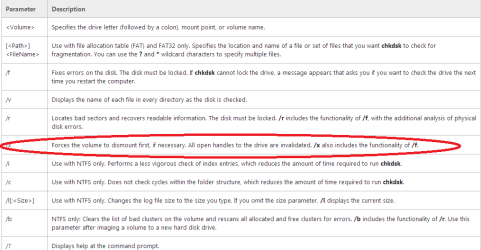
My question is could I use the "x" switch to force chkdsk to run.
chkdsk c: /r /x
My question is could I use the "x" switch to force chkdsk to run.
chkdsk c: /r /x
My Computer
- Computer type
- PC/Desktop
- Computer Manufacturer/Model Number
- Custom
- OS
- Windows 7 Home Premium 64-bit
- CPU
- AMD TA6 - 5400 FM2+R
- Motherboard
- Gigabyte GA-G1 Sniper A88X FM2+R
- Memory
- Crucial 8GB (2x4GB) DDR3-1333/PC3-10600
- Graphics Card(s)
- Integrated
- Sound Card
- Integrated
- Monitor(s) Displays
- 20" LCD
- Hard Drives
- 500GB Western Digital Blue
- PSU
- Antec 450W
- Case
- Rosewill Challenger U3 RTL