
Solved chrome wont update

"Win7 ultimate x64" user from Greece, verifying this still works !! :party::party::party:
Chrome version 72.0.3626.119 (64-bit)
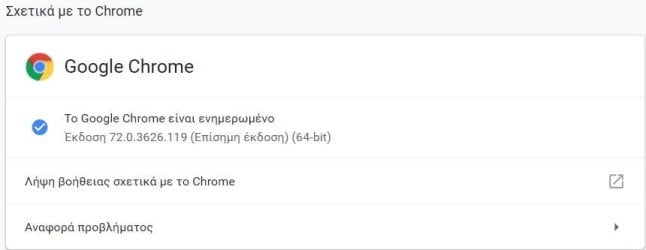
Capture.JPG


I was troubleshooting this for about a year, through version manual updates,
manualy deleting files and reg. after uninstalling chrome, deleting anything in my system named "google", "chrome" AND "chromium", killing prossesses as well, hoping for a solution from google that is nowhere to be heard of....:cry:

Yet, here i am paying my respects to op (djpete), solver (deckard) and (djpete) once more (both) for sharing the zip-file of salvation, for it would be a shame to just download !!


Thank you all so much (forum adms and mods included) !! :thumbsup:
 

My Computer

Computer type
PC/Desktop
OS
Windows 7 Ultimate x64
Totally appreciate the above Chrome Update Fix zip (which is from chrome v60.0.3112.90) even though this did not directly help in my case of latest Chrome (v72.0.3626.121 at the time of writing) not updating.
However, it brought me to another idea: instead of reinstalling the latest version, I cleaned out all remains of Chrome from the drive and the registry, and then installed a fresh, but old version of chrome64_60.0.3112.78 (which is the closest I could find to the one in the update fix above), then used the .zip update folder from above post, then registered the GoogleUpdate.exe, then installed chrome64_63.0.3239.108, and from that onward, the update started to work automatically. And interestingly, now it does not even need any GoogleUpdate services running and yet does the job without errors ;)
 
Last edited:

My Computer

Computer type
Laptop
Computer Manufacturer/Model Number
Dell, Inc.
OS
Windows 7 Ultimate x64 SP1, updated to latest Java and .NET
CPU
Mobile Intel Core i7-4800MQ, 8x 3500 MHz (35 x 100)
Motherboard
Dell Precision M4800
Memory
32 GB ie 4x 8GB SODIMM
Graphics Card(s)
AMD FirePro M5100 and Intel(R) HD Graphics 4600
Sound Card
Realtek Audio and AMD High Definition Audio Device
Monitor(s) Displays
Built-in 1080p, ext 2x 27" 1080p, ext 1x 55" 1080p
Screen Resolution
4x 1920 x 1080 x 32 bits
Hard Drives
2x 1 TB SSD
multiple external drives
PSU
210W for docking station & laptop
Case
Metal
Cooling
2 Fans
Keyboard
US QWERTY
Mouse
touchpad, pointstick, ext mouse
Internet Speed
1Gbps Eth, 512Mbps cable
Antivirus
Avast latest
Browser
various
Here you go. Thankfully, zipped up it's just under the limit for ZIP files.

I have the same update problem. Is somewhere a link to the zip-file?

Best regards

Ralf
 

My Computer

Computer type
Laptop
OS
Windows 7 Professional 64bit
This is what worked for me (Windows 7 Professional):

Exit Google Chrome completely (Task Manager - end process)
Open Windows Explorer and type (or copy) the following into the address bar:

%LOCALAPPDATA%\Google\Chrome\User Data\

Locate the folder called "Default" and rename it "Backup Default". (If you aren't allowed to rename it, it means a Google process or service is running -- find it and end it via Task Manager)

Try opening Google Chrome again. A new Default folder will be automatically created. Go to the "About Chrome" in settings and see if the update now works.

If not, let me know.
 

My Computer

Computer type
PC/Desktop
OS
Windows 7 Professional
Thanks. I did this. But the same problem as before.


+jYXwxrPCi7P5mmFCCCFyaHIJmQLuujwc+YJGZsboP40DJU1CLnYI5tNY+JpL8ftP5vtbDwkhJLqhySWEEEIIIVEHTS4hhBBCCIk6aHIJIYQQQkjUQZNLCCGEEEKiDppcQgghhBASddDkEkIIIYSQqIMmlxBCCCGERB00uYQQQgghJOqIxOT+f8+IDMl+x00rAAAAAElFTkSuQmCC
 

My Computer

Computer type
Laptop
OS
Windows 7 Professional 64bit
Hello. I have the same problem. Is it possible to provide a zip file?
 

My Computer

Computer type
PC/Desktop
Computer Manufacturer/Model Number
Custom build
OS
Windows 7 Ultimate x64
CPU
AMD Phenom II X4
Motherboard
Gigabyte
Memory
8GB
Graphics Card(s)
ATi HD2600XT Ultimate 256MB
Sound Card
On board
Monitor(s) Displays
AOC 27"
Screen Resolution
HD
Back
Top