Solved Clean Install on Raid 1

FastTurtle

New member
Local time
2:35 PM
Messages
38
I have an LSI 9211-8i in HBA/IT mode and am planning a clean install on a Raid1. Yes I've checked the Tutorials but nothing specifically lists how to create a Raid1 array during Installation


What I think is going to be needed is Diskpart to create the array and link it but I "Don't Know" if that's going to be the solution. Worst case would be to create the Raid after the install using Disk Management
 

My Computer

Computer type
PC/Desktop
Computer Manufacturer/Model Number
White Box
OS
Win7-64/Sp1 Ultimate
CPU
AMD Ryzen 5 1600
Motherboard
Asrock B450m Pro
Memory
64GB
Graphics Card(s)
GTX 1060 6GB
Hard Drives
Boot = Crucial MX500 250GB M2 Sata/AHCI
LSI 9211-8i HBA/IT card
Port1 = 1x Team Group GX2 256GB SSD (boot)
1x Crucial MX500 1TB (Raid 1 storage)
2x Team Group GX2 1TB (storage)
Port2 = 1x Team Group GX2 256GB SSD (boot)
1x Crucial MX500 1TB
PSU
EVGA B450
Keyboard
88 key (TKL) mechanical
What are you using for raid the BIOS or add-on card you set up raid on them and then may need drivers for Windows
 

My Computer

Computer type
PC/Desktop
OS
win 8 32 bit
The LSI 9211-8i has its own Flash ROM BIOS, accessible at POST stage of Boot sequence. You will need to configure RAID configuration here, before booting to instillation drive. You will also need to include RAID drivers for windows 7 into the instillation process.
 

My Computer

Computer type
PC/Desktop
OS
Windows 7 x64, Vista x64, 8.1 smartphone
CPU
Intel E8400 65W 64-bit
Motherboard
Gigabyte EP45-UD3LR
Memory
DDR2 2 x 2GB, 1GB x 2
Graphics Card(s)
XFX Radeon HD5750
Sound Card
AMD High Definition Audio; Realtek High Definition Audio
Monitor(s) Displays
iiyama prolite X2377HDS
Screen Resolution
1920 x 1080
Hard Drives
500GB 7200 rpm Seagate ST3500413AS 16MB, 500GB 5400 rpm Toshiba MQ02ABF050H 32MB, 200GB 7200 rpm Seagate ST3200820AS 8MB, 2TB 7200 rpm Western Digital WD20EZRX 64MB
PSU
Enermax Liberty Modular
Case
Antec P193 Midi Tower
Keyboard
Mionix ZIBAL 60
Mouse
Razer USB 2.0 Diamondback Mouse or Huion Graphics Tablet
Browser
Internet Explorer, Lunascape, Firefox, Opera, Avast Safezone
Digging in, I've discovered that I can create a Mirror using Diskpart (add) creates a simply Raid 1 setup.


Everyone: Please Pay attention to the IT/HBA Mode in regards to the LSI Card. It is not a Raid card and was factory flashed that way, which was what I wanted.


Currently, the card is configured to Not Boot as I'm still using the onboard M2 port but am planning a conversion to a Mirrored Boot in a short while - 4th Qtr when I shift everything to a better case. At that time, I'm disabling all Onboard Sata ports and will be using the card for Boot but will have to see what I actually need for Windows to work with the card (Bios/OS or Both) and I'm thinking Both is the correct answer so Windows can access the card as needed. I do have drivers to add if Windows needs them during Installation (seem to be included though) so I may be lucky and already have everything needed
 

My Computer

Computer type
PC/Desktop
Computer Manufacturer/Model Number
White Box
OS
Win7-64/Sp1 Ultimate
CPU
AMD Ryzen 5 1600
Motherboard
Asrock B450m Pro
Memory
64GB
Graphics Card(s)
GTX 1060 6GB
Hard Drives
Boot = Crucial MX500 250GB M2 Sata/AHCI
LSI 9211-8i HBA/IT card
Port1 = 1x Team Group GX2 256GB SSD (boot)
1x Crucial MX500 1TB (Raid 1 storage)
2x Team Group GX2 1TB (storage)
Port2 = 1x Team Group GX2 256GB SSD (boot)
1x Crucial MX500 1TB
PSU
EVGA B450
Keyboard
88 key (TKL) mechanical
You Can't Boot from a Software Mirror

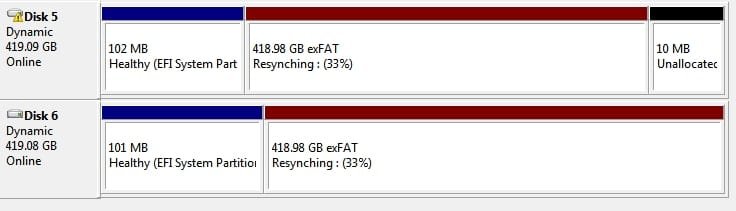
It's taken me a while to determine Why you can not create a Bootable Software Mirror for Windows and it's simple. To use Software Raid, you need to use a Dynamic disk. The problem is, you can not convert the EFI and MSR partitions to Dynamic using Diskpart and any other method will allow Murphy to bite you in the ass.
w9JxeZOYIrb2AAAAABJRU5ErkJggg==
Heres what it looks like, as you can see, the EFI, System Partition is not on a dynamic disk, thus no mirror for boot but You can mirror the windows partition and nothing says you can't setup the EFI and MSR partitions onto a different disk, which looks to offer a very nice solution.
 

Attachments

  • Windows_Mirrored.jpg
    Windows_Mirrored.jpg
    63.1 KB · Views: 7
Last edited:

My Computer

Computer type
PC/Desktop
Computer Manufacturer/Model Number
White Box
OS
Win7-64/Sp1 Ultimate
CPU
AMD Ryzen 5 1600
Motherboard
Asrock B450m Pro
Memory
64GB
Graphics Card(s)
GTX 1060 6GB
Hard Drives
Boot = Crucial MX500 250GB M2 Sata/AHCI
LSI 9211-8i HBA/IT card
Port1 = 1x Team Group GX2 256GB SSD (boot)
1x Crucial MX500 1TB (Raid 1 storage)
2x Team Group GX2 1TB (storage)
Port2 = 1x Team Group GX2 256GB SSD (boot)
1x Crucial MX500 1TB
PSU
EVGA B450
Keyboard
88 key (TKL) mechanical

My Computer

Computer type
PC/Desktop
OS
Windows 7 x64, Vista x64, 8.1 smartphone
CPU
Intel E8400 65W 64-bit
Motherboard
Gigabyte EP45-UD3LR
Memory
DDR2 2 x 2GB, 1GB x 2
Graphics Card(s)
XFX Radeon HD5750
Sound Card
AMD High Definition Audio; Realtek High Definition Audio
Monitor(s) Displays
iiyama prolite X2377HDS
Screen Resolution
1920 x 1080
Hard Drives
500GB 7200 rpm Seagate ST3500413AS 16MB, 500GB 5400 rpm Toshiba MQ02ABF050H 32MB, 200GB 7200 rpm Seagate ST3200820AS 8MB, 2TB 7200 rpm Western Digital WD20EZRX 64MB
PSU
Enermax Liberty Modular
Case
Antec P193 Midi Tower
Keyboard
Mionix ZIBAL 60
Mouse
Razer USB 2.0 Diamondback Mouse or Huion Graphics Tablet
Browser
Internet Explorer, Lunascape, Firefox, Opera, Avast Safezone
Back
Top