Solved Clear Admin Log

sgmdew

New member
Local time
3:44 AM
Messages
61
The test I was referencing was the MGAD and afterwards I ran sfc which said basically no problems found.

"Re: Foreach-Object not recognized as internal or external commands, etc
I want to make sure that you opened an elevated PowerShell, not Command prompt, window. The Foreach-Object is a Powershell command is not recognized in a Command prompt.
and a follow up - you had a similar issue with cmds, but I'm not certain how that was resolved. I made a few suggestions and your response was "After that test... it worked" I'm still not clear on what "test"."

The term wevtutil is not reconized as the name of a cmdlet, program, etc.

I just need to delete the admin log and everything will be ok, I think.
 

My Computer My Computer

At a glance

Win 7 Pro 64 Bitamd 955 be8gbHD7790
Computer type
PC/Desktop
Computer Manufacturer/Model Number
Custom Build
OS
Win 7 Pro 64 Bit
CPU
amd 955 be
Motherboard
Gigabyte 990
Memory
8gb
Graphics Card(s)
HD7790
Hard Drives
SSD 120. Seagate 2TB, Toshiba 1 TB
PSU
750Watt
Internet Speed
Slow
Antivirus
Eset
Browser
IE 11, Firefox
Hmmm, that is strange. MGAD is a diagnostic reporting tool. Why SFC ran afterwards I do not know.

To recap...
In this post you reported that Foreach-Object not reconized as internal or external commands, etc
and in your new thread (thanks) you say
The term wevtutil is not reconized as the name of a cmdlet, program, etc.

If I recall, you already searched for wevtutil.exe and it wasn't found - just for grins and giggles, try this:
open start menu (orb) and paste the folloing into the search box

wevtutil

anything show up in the programs list? If yes, then the program can be located.

Next open an elevated Command Prompt widow and type the following commands
cls
dir /a C:\windows\system32\wevt*.*
dir /a C:\windows\sysWOW64\wevt*.*
set

Post a screen shot of the Command Prompt (perhaps two screen shots so I can see all of the output)


The administrative log is a view that collects and displays information from other logs. It is not really a log.

Without wevtutil, the only choice you have is to manually go through each log and clear it (right click). I'm not even certain you can do that without wevtutil.

Why do you want to clear the logs?
Can you open Event Viewer at all?
Try running SFC again - does it still work?
See: http://www.sevenforums.com/tutorials/1538-sfc-scannow-command-system-file-checker.html

This time please post the output per the tutorial instructions. I'm flying blind here.

Screen shots and actual logs are best for troubleshooting from this side.
See: http://www.sevenforums.com/tutorials/9733-screenshots-files-upload-post-seven-forums.html


Bill
.
 
Last edited:

My Computer My Computer

At a glance

x64 (6.3.9600) Win8.1 Pro & soon dual boot x6...AMD A6-3420M APU with Radeon(tm) HD Graphics6.00 GBAMD Radeon(TM) HD 6520G
Computer type
Laptop
Computer Manufacturer/Model Number
HP Pavilion dv6-6c10us
OS
x64 (6.3.9600) Win8.1 Pro & soon dual boot x64 (6.1.7601) Win7_SP1 HomePrem
CPU
AMD A6-3420M APU with Radeon(tm) HD Graphics
Motherboard
Hewlett-Packard 1805
Memory
6.00 GB
Graphics Card(s)
AMD Radeon(TM) HD 6520G
Sound Card
(1) AMD High Definition Audio Device (2) IDT High Definiti
Monitor(s) Displays
HP W2072a 20" LCD (1600 x 900) @ 60 Hz
Screen Resolution
1366 x 768 x 32 bits (4294967296 colors) @ 60 Hz
Hard Drives
ST640LM0 00 HM641JI SATA Disk Device
Keyboard
Logitech k520 wireless KB
Mouse
Logitech m320 wireless mouse (bundled with KB)
Internet Speed
15/5 | 54 MB Wireless 'n'
Antivirus
Realtime: Defender or Avast | On-demand: Malwarebytes, ESET
Browser
IE 11 on Win8, IE 10 on win 7
Other Info
Media: [Gimp, Audacity, VLC] || Comm: [WEmail 2012, Skype] || Productivity: [OpenOffice,| Textpad] || Utils: [Sysinternals, cCleaner, Speccy, Defraggler]
Posted in txt file the wevt commands and ran the sfc with no problems noted; wevtutil does not show up in the files but wevtutil.exe does. This bugs me as well: nvstreamsvc 1201 warnings in 24 hrs. Seems I am getting a lot of stupid warnings and errors.
 

Attachments

Last edited:

My Computer My Computer

At a glance

Win 7 Pro 64 Bitamd 955 be8gbHD7790
Computer type
PC/Desktop
Computer Manufacturer/Model Number
Custom Build
OS
Win 7 Pro 64 Bit
CPU
amd 955 be
Motherboard
Gigabyte 990
Memory
8gb
Graphics Card(s)
HD7790
Hard Drives
SSD 120. Seagate 2TB, Toshiba 1 TB
PSU
750Watt
Internet Speed
Slow
Antivirus
Eset
Browser
IE 11, Firefox
Thanks, that helped a lot!

It is as I suspected, your path does not contain the system path entries. I don't know why that is, but let's fix it.

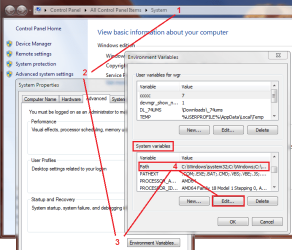
Right click Computer
Click Properites
click Advanced System Settings
click Environment Variables button

Environs.png

The bottom window is system variables
scroll that window to the "Path" entry
click Path
click the Edit... button
press the Home key on your keyboard or move the cursor to the very beginning of the Variable value: box

copy the line below and paste it in the Variable value at the beginning of the field

Code:
%SystemRoot%\system32;%SystemRoot%;%SystemRoot%\system32\wbem;%SYSTEMROOT%\SYSTEM32\WINDOWSPOWERSHELL\V1.0;

The entire path variable should contain these paths before you press ok

Code:
%SystemRoot%\system32;%SystemRoot%;%SystemRoot%\system32\wbem;%SYSTEMROOT%\SYSTEM32\WINDOWSPOWERSHELL\V1.0;C:\Program Files (x86)\NVIDIA Corporation\PhysX\Common;C:\Windows\twain_32\CNQL60;C:\Program Files (x86)\ATI Technologies\ATI.ACE\Core-Static

If the variable looks good, press OK all the way out of advanced system settings.

Try running either Event clean tutorial, but I recommend the Powershell - less things to try and figure out.

Bill
.
 
Last edited:

My Computer My Computer

At a glance

x64 (6.3.9600) Win8.1 Pro & soon dual boot x6...AMD A6-3420M APU with Radeon(tm) HD Graphics6.00 GBAMD Radeon(TM) HD 6520G
Computer type
Laptop
Computer Manufacturer/Model Number
HP Pavilion dv6-6c10us
OS
x64 (6.3.9600) Win8.1 Pro & soon dual boot x64 (6.1.7601) Win7_SP1 HomePrem
CPU
AMD A6-3420M APU with Radeon(tm) HD Graphics
Motherboard
Hewlett-Packard 1805
Memory
6.00 GB
Graphics Card(s)
AMD Radeon(TM) HD 6520G
Sound Card
(1) AMD High Definition Audio Device (2) IDT High Definiti
Monitor(s) Displays
HP W2072a 20" LCD (1600 x 900) @ 60 Hz
Screen Resolution
1366 x 768 x 32 bits (4294967296 colors) @ 60 Hz
Hard Drives
ST640LM0 00 HM641JI SATA Disk Device
Keyboard
Logitech k520 wireless KB
Mouse
Logitech m320 wireless mouse (bundled with KB)
Internet Speed
15/5 | 54 MB Wireless 'n'
Antivirus
Realtime: Defender or Avast | On-demand: Malwarebytes, ESET
Browser
IE 11 on Win8, IE 10 on win 7
Other Info
Media: [Gimp, Audacity, VLC] || Comm: [WEmail 2012, Skype] || Productivity: [OpenOffice,| Textpad] || Utils: [Sysinternals, cCleaner, Speccy, Defraggler]
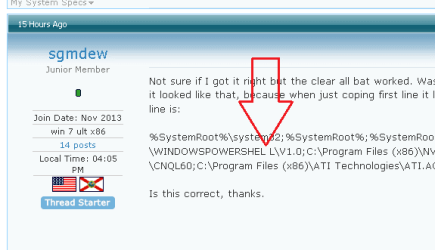
Not sure if I got it right but the clear all bat worked. Wasn't sure which line to copy so I copied last line to make sure it looked like that, because when just coping first line it looked different but was same(just not right). Anyways the line is:

%SystemRoot%\system32;%SystemRoot%;%SystemRoot%\system32\wbem;%SYSTEMROOT%\SYSTEM32\WINDOWSPOWERSHELL\V1.0;C:\Program Files (x86)\NVIDIA Corporation\PhysX\Common;C:\Windows\twain_32\CNQL60;C:\Program Files (x86)\ATI Technologies\ATI.ACE\Core-Static

Is this correct, thanks.
 

My Computer My Computer

At a glance

Win 7 Pro 64 Bitamd 955 be8gbHD7790
Computer type
PC/Desktop
Computer Manufacturer/Model Number
Custom Build
OS
Win 7 Pro 64 Bit
CPU
amd 955 be
Motherboard
Gigabyte 990
Memory
8gb
Graphics Card(s)
HD7790
Hard Drives
SSD 120. Seagate 2TB, Toshiba 1 TB
PSU
750Watt
Internet Speed
Slow
Antivirus
Eset
Browser
IE 11, Firefox
Looks as though you got it right. Good thinking to grab the full line.

Do me one favor.... verify that the space in WINDOWSPOWERSHEL L is an artifact of the forum post.

It should be WINDOWSPOWERSHELL

The easiest way to check this is to run the Powershell event clear script
http://www.sevenforums.com/tutorials/320451-event-viewer-clear-all-events.html

You should not get the Foreach-Object error you got once before.
Let me know how that goes, ok?

If the Powershell script does work and you're happy with the solution, please mark this thread as solved.

Thanks,

Bill
.
 

My Computer My Computer

At a glance

x64 (6.3.9600) Win8.1 Pro & soon dual boot x6...AMD A6-3420M APU with Radeon(tm) HD Graphics6.00 GBAMD Radeon(TM) HD 6520G
Computer type
Laptop
Computer Manufacturer/Model Number
HP Pavilion dv6-6c10us
OS
x64 (6.3.9600) Win8.1 Pro & soon dual boot x64 (6.1.7601) Win7_SP1 HomePrem
CPU
AMD A6-3420M APU with Radeon(tm) HD Graphics
Motherboard
Hewlett-Packard 1805
Memory
6.00 GB
Graphics Card(s)
AMD Radeon(TM) HD 6520G
Sound Card
(1) AMD High Definition Audio Device (2) IDT High Definiti
Monitor(s) Displays
HP W2072a 20" LCD (1600 x 900) @ 60 Hz
Screen Resolution
1366 x 768 x 32 bits (4294967296 colors) @ 60 Hz
Hard Drives
ST640LM0 00 HM641JI SATA Disk Device
Keyboard
Logitech k520 wireless KB
Mouse
Logitech m320 wireless mouse (bundled with KB)
Internet Speed
15/5 | 54 MB Wireless 'n'
Antivirus
Realtime: Defender or Avast | On-demand: Malwarebytes, ESET
Browser
IE 11 on Win8, IE 10 on win 7
Other Info
Media: [Gimp, Audacity, VLC] || Comm: [WEmail 2012, Skype] || Productivity: [OpenOffice,| Textpad] || Utils: [Sysinternals, cCleaner, Speccy, Defraggler]
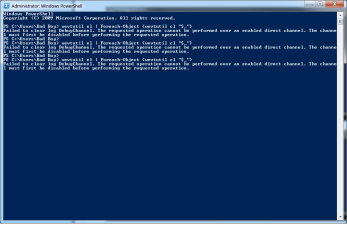
this is what I got in powershell and now sure of what you are asking about the word spelling of powershell (where)
 

Attachments

  • Untitled.png
    Untitled.png
    14.6 KB · Views: 4

My Computer My Computer

At a glance

Win 7 Pro 64 Bitamd 955 be8gbHD7790
Computer type
PC/Desktop
Computer Manufacturer/Model Number
Custom Build
OS
Win 7 Pro 64 Bit
CPU
amd 955 be
Motherboard
Gigabyte 990
Memory
8gb
Graphics Card(s)
HD7790
Hard Drives
SSD 120. Seagate 2TB, Toshiba 1 TB
PSU
750Watt
Internet Speed
Slow
Antivirus
Eset
Browser
IE 11, Firefox

My Computer My Computer

At a glance

W7 Pro SP1 64biti78GBIntel HD Graphics
Computer type
Laptop
Computer Manufacturer/Model Number
Employer provided Dell Latitude
OS
W7 Pro SP1 64bit
CPU
i7
Memory
8GB
Graphics Card(s)
Intel HD Graphics
Hard Drives
crappy SSD
Antivirus
Employer mandated Symantec Endpoint Protection
Browser
Pale Moon 64bit, IE11 64bit & Chrome 64bit
Ok, that's interesting.

First, powershell in the path environment seems to be fine - the command Foreach-Object was recognized. If the space was actually in the path environment, the command would not have been recognized.

If you look carefully at the string you posted in #5, you can see what/where I was trying to determine. I guess the forum tries to break the line at some length and it ends up being a space.

If that's still not clear, you can open a command prompt at type
path
Look at WINDOWSPOWERSHELL in the string returned and you can see that the two Ls are not separated by a space.

This is not an issue on your machine, only the way a long string in a post is presented. So you're good.

Second, I have to research why the DebugChannel log returned the information it did. Basically it says that you have to disable the log before clearing. To be honest I don't know what the msg means.
The requested operation cannot be performed over an enabled direct channel. The channel must first be disabled before performing the requested operation.

See: Error when enabling Analytic or Debug event log: "The requested operation cannot be performed over an enabled direct channel. The channel must first be disabled before performing the requested operation."
Microsoft said:
Cause: For analytic and debug logs, Event Viewer does not allow events to be queried or viewed if the log is both enabled and has Overwrite events as needed (oldest events first) configured. This is not the case for administrative and operational logs such as System, Application and Security logs, which can be viewed when Overwrite events as needed (oldest events first) is configured.

Analytic and debug logs by default are configured for Do not overwrite events (Clear logs manually). But for circular logging where old events are discarded when the maximum log size is reached you would enable Overwrite events as needed (oldest events first).

Note that logging is taking place even though this error is displayed. The error only means you cannot view the events that are currently being logged.

This tells me that for either script to clear Analytic or Debug logs, those logs must be configured in Event Viewer with
Do not overwrite events

The easiest thing to do is to open Event Viewer and manually clear the DebugChannel log. You might have to change the overwrite parameter first.

If you don't use the DebugChanel log or don't know why it is on (it is not on my system that I can find), then I would disable or delete the log.

Do you write code, is it possibly part of your development environment?

It's beyond the scope of the clear event scripts to anticipate specific Analytic or Debug logs on machines. I'm out of ideas on the DebugChannel log, perhaps another member might add some insight.

I'll stay subscribed to your thread, but I don't think I can add much more.

Bill
.
 

My Computer My Computer

At a glance

x64 (6.3.9600) Win8.1 Pro & soon dual boot x6...AMD A6-3420M APU with Radeon(tm) HD Graphics6.00 GBAMD Radeon(TM) HD 6520G
Computer type
Laptop
Computer Manufacturer/Model Number
HP Pavilion dv6-6c10us
OS
x64 (6.3.9600) Win8.1 Pro & soon dual boot x64 (6.1.7601) Win7_SP1 HomePrem
CPU
AMD A6-3420M APU with Radeon(tm) HD Graphics
Motherboard
Hewlett-Packard 1805
Memory
6.00 GB
Graphics Card(s)
AMD Radeon(TM) HD 6520G
Sound Card
(1) AMD High Definition Audio Device (2) IDT High Definiti
Monitor(s) Displays
HP W2072a 20" LCD (1600 x 900) @ 60 Hz
Screen Resolution
1366 x 768 x 32 bits (4294967296 colors) @ 60 Hz
Hard Drives
ST640LM0 00 HM641JI SATA Disk Device
Keyboard
Logitech k520 wireless KB
Mouse
Logitech m320 wireless mouse (bundled with KB)
Internet Speed
15/5 | 54 MB Wireless 'n'
Antivirus
Realtime: Defender or Avast | On-demand: Malwarebytes, ESET
Browser
IE 11 on Win8, IE 10 on win 7
Other Info
Media: [Gimp, Audacity, VLC] || Comm: [WEmail 2012, Skype] || Productivity: [OpenOffice,| Textpad] || Utils: [Sysinternals, cCleaner, Speccy, Defraggler]
Where is this 'admin log'?
There should be the option to Clear Logs in the menu bar.
 

My Computer My Computer

At a glance

Windows 7 Ultimate X64 SP1Intel i5-2550K, Differing ~4.4-4.8GHz No buil...16GB G.Skill Sniper 1866MHz @ 2133MHz 2x8GBASUS GTX650TIB-DC2OC-2GD5, (650TI Boost)
Computer type
PC/Desktop
Computer Manufacturer/Model Number
Home Built Desktop By DataTech
OS
Windows 7 Ultimate X64 SP1
CPU
Intel i5-2550K, Differing ~4.4-4.8GHz No built in GPU
Motherboard
ASUS P8Z68-V PRO/GEN3
Memory
16GB G.Skill Sniper 1866MHz @ 2133MHz 2x8GB
Graphics Card(s)
ASUS GTX650TIB-DC2OC-2GD5, (650TI Boost)
Sound Card
Onboard Realtek 5-1
Monitor(s) Displays
Samsung P2570HD
Screen Resolution
1920x1080
Hard Drives
Samsung 840 Pro 256GB SSD for OS, 500GB Seagate Constellation (Enterprise drive) for Data
PSU
Corsair HX650W
Case
Inwin Dragon Rider
Cooling
Hyper 212 EVO w/two Noctua fans, push-pull, @1300 RPM
Keyboard
E-Z Eyes, bright yellow keys with large characters
Mouse
steelseries SENSEI Laser Pro Gaming
Internet Speed
48-51Mbs Mbs down, 11 Mbs up Xfinity Cable
Antivirus
Norton Internet Security 2013
Browser
IE 10, Opera, Pale Moon if needed
Other Info
4 case fans, LG BluRay-RE, ASUS DVD-RW, Mr. Fusion power supply, 1.21 gigawatts.
I don't know if this will help but I do find lots of things using this little free program.

Everything Search Engine
 

My Computer My Computer

At a glance

Windows 10 Pro. 64/ version 1709 Windows 7 Pr...Intel i7-6800K @ 4.3Corsair Platinum 16 gig @2400EVGA GTX 1070 OC
Computer type
PC/Desktop
Computer Manufacturer/Model Number
Home made Desktop
OS
Windows 10 Pro. 64/ version 1709 Windows 7 Pro/64
CPU
Intel i7-6800K @ 4.3
Motherboard
ASUS X-99 Deluxe II
Memory
Corsair Platinum 16 gig @2400
Graphics Card(s)
EVGA GTX 1070 OC
Monitor(s) Displays
Asus 27" LED LCD/VE278Q
Screen Resolution
1920-1080 or 1280-720 HDMI
Hard Drives
INTEL SSD 730-240 Gb Sata 3.0/
PSU
EVGA Platium 1200W
Case
Phanteks Luxe Tempered Glass 8 fans/ one radiator
Cooling
XSPC/ Water Cooled CPU
Keyboard
Das 4 Professional
Mouse
Logitech M705/MX Anywhere 2-S
Internet Speed
100 mbits
Antivirus
Microsoft Security Essentials/ Malwarebytes Premium 3.0/ SAS
Browser
I.E. 11 default/Firefox/ ISP Time Warner Cable/Spectrum
Other Info
LG BluRay Burner/
Sound system-KLipsch-THX/
Icy Dock ssd Hot Swap bays.
Where is this 'admin log'?
There should be the option to Clear Logs in the menu bar.

Despite the thread's title, the logs in question seem to be all of the event logs. As to why the OP wants to automate (as opposed to manually) clearing these, that question has sort of been asked, but might not have been answered.

~~~
Why do you want to clear the logs?
Can you open Event Viewer at all?
~~~

Unless this was the reason/answer...
Posted in txt file the wevt commands and ran the sfc with no problems noted; wevtutil does not show up in the files but wevtutil.exe does. This bugs me as well: nvstreamsvc 1201 warnings in 24 hrs. Seems I am getting a lot of stupid warnings and errors.

Having a corrupted/bad environmental PATH might be the reason for the high volume of "stupid warnings and errors". If not, then the OP show deal with the root cause and not the symptom.


:::back to lurking:::
 

My Computer My Computer

At a glance

W7 Pro SP1 64biti78GBIntel HD Graphics
Computer type
Laptop
Computer Manufacturer/Model Number
Employer provided Dell Latitude
OS
W7 Pro SP1 64bit
CPU
i7
Memory
8GB
Graphics Card(s)
Intel HD Graphics
Hard Drives
crappy SSD
Antivirus
Employer mandated Symantec Endpoint Protection
Browser
Pale Moon 64bit, IE11 64bit & Chrome 64bit

My Computer My Computer

At a glance

Windows 10 Pro. 64/ version 1709 Windows 7 Pr...Intel i7-6800K @ 4.3Corsair Platinum 16 gig @2400EVGA GTX 1070 OC
Computer type
PC/Desktop
Computer Manufacturer/Model Number
Home made Desktop
OS
Windows 10 Pro. 64/ version 1709 Windows 7 Pro/64
CPU
Intel i7-6800K @ 4.3
Motherboard
ASUS X-99 Deluxe II
Memory
Corsair Platinum 16 gig @2400
Graphics Card(s)
EVGA GTX 1070 OC
Monitor(s) Displays
Asus 27" LED LCD/VE278Q
Screen Resolution
1920-1080 or 1280-720 HDMI
Hard Drives
INTEL SSD 730-240 Gb Sata 3.0/
PSU
EVGA Platium 1200W
Case
Phanteks Luxe Tempered Glass 8 fans/ one radiator
Cooling
XSPC/ Water Cooled CPU
Keyboard
Das 4 Professional
Mouse
Logitech M705/MX Anywhere 2-S
Internet Speed
100 mbits
Antivirus
Microsoft Security Essentials/ Malwarebytes Premium 3.0/ SAS
Browser
I.E. 11 default/Firefox/ ISP Time Warner Cable/Spectrum
Other Info
LG BluRay Burner/
Sound system-KLipsch-THX/
Icy Dock ssd Hot Swap bays.

My Computer My Computer

At a glance

W7 Pro SP1 64biti78GBIntel HD Graphics
Computer type
Laptop
Computer Manufacturer/Model Number
Employer provided Dell Latitude
OS
W7 Pro SP1 64bit
CPU
i7
Memory
8GB
Graphics Card(s)
Intel HD Graphics
Hard Drives
crappy SSD
Antivirus
Employer mandated Symantec Endpoint Protection
Browser
Pale Moon 64bit, IE11 64bit & Chrome 64bit
The clear bat files work now to figure out why ther are a hundred plus 7036 entries everytime I boot up; but thanks for the help on the other stuff.
 

My Computer My Computer

At a glance

Win 7 Pro 64 Bitamd 955 be8gbHD7790
Computer type
PC/Desktop
Computer Manufacturer/Model Number
Custom Build
OS
Win 7 Pro 64 Bit
CPU
amd 955 be
Motherboard
Gigabyte 990
Memory
8gb
Graphics Card(s)
HD7790
Hard Drives
SSD 120. Seagate 2TB, Toshiba 1 TB
PSU
750Watt
Internet Speed
Slow
Antivirus
Eset
Browser
IE 11, Firefox
I think w7, and all Windows, are paranoics. They all keep log of every tiny little thing it does. It has many 'dire' warning which mean little to anyone. If some service or process doesn't start in 0.02 ms, it will give a warning.
 

My Computer My Computer

At a glance

Windows 7 Ultimate X64 SP1Intel i5-2550K, Differing ~4.4-4.8GHz No buil...16GB G.Skill Sniper 1866MHz @ 2133MHz 2x8GBASUS GTX650TIB-DC2OC-2GD5, (650TI Boost)
Computer type
PC/Desktop
Computer Manufacturer/Model Number
Home Built Desktop By DataTech
OS
Windows 7 Ultimate X64 SP1
CPU
Intel i5-2550K, Differing ~4.4-4.8GHz No built in GPU
Motherboard
ASUS P8Z68-V PRO/GEN3
Memory
16GB G.Skill Sniper 1866MHz @ 2133MHz 2x8GB
Graphics Card(s)
ASUS GTX650TIB-DC2OC-2GD5, (650TI Boost)
Sound Card
Onboard Realtek 5-1
Monitor(s) Displays
Samsung P2570HD
Screen Resolution
1920x1080
Hard Drives
Samsung 840 Pro 256GB SSD for OS, 500GB Seagate Constellation (Enterprise drive) for Data
PSU
Corsair HX650W
Case
Inwin Dragon Rider
Cooling
Hyper 212 EVO w/two Noctua fans, push-pull, @1300 RPM
Keyboard
E-Z Eyes, bright yellow keys with large characters
Mouse
steelseries SENSEI Laser Pro Gaming
Internet Speed
48-51Mbs Mbs down, 11 Mbs up Xfinity Cable
Antivirus
Norton Internet Security 2013
Browser
IE 10, Opera, Pale Moon if needed
Other Info
4 case fans, LG BluRay-RE, ASUS DVD-RW, Mr. Fusion power supply, 1.21 gigawatts.
The clear bat files work now to figure out why ther are a hundred plus 7036 entries everytime I boot up; but thanks for the help on the other stuff.

Windows, like any other complicated system, records all events to make troubleshooting 'easier'. The logs are useful to a technical person trying to find the cause of an issue, but seem trivial to a regular user. Knowing what was started or stopped and when can often lead to a solution.

Clearing the logs when the system is running normally makes it a little easier to sort through the clutter when an issue occurs, but there isn't any performance gain and the log don't consume much disk space at all. In other words, there is no real reason to clear the event logs. The same things that bug a regular user (too many trivial entries) will written to the logs again.

More to the point, though... if you clear the logs too often, you might lose that important entry that can lead to quick resolution of an issue.

The best practice is to only view the logs when you need to troubleshoot an issue, otherwise don't bother looking at them. You can also filter the logs so that you don't see all of the information entries. The Administrative view organizes the event logs for you in this sort of manner.

About the 7036 log entry
Troubleshoot Event ID 7036 — Basic Service Operations

This is one of those technician type log entries - a service changed state (started or stopped). This is normal and there is nothing a user can do to change the entry being recorded.

Bill
.
 

My Computer My Computer

At a glance

x64 (6.3.9600) Win8.1 Pro & soon dual boot x6...AMD A6-3420M APU with Radeon(tm) HD Graphics6.00 GBAMD Radeon(TM) HD 6520G
Computer type
Laptop
Computer Manufacturer/Model Number
HP Pavilion dv6-6c10us
OS
x64 (6.3.9600) Win8.1 Pro & soon dual boot x64 (6.1.7601) Win7_SP1 HomePrem
CPU
AMD A6-3420M APU with Radeon(tm) HD Graphics
Motherboard
Hewlett-Packard 1805
Memory
6.00 GB
Graphics Card(s)
AMD Radeon(TM) HD 6520G
Sound Card
(1) AMD High Definition Audio Device (2) IDT High Definiti
Monitor(s) Displays
HP W2072a 20" LCD (1600 x 900) @ 60 Hz
Screen Resolution
1366 x 768 x 32 bits (4294967296 colors) @ 60 Hz
Hard Drives
ST640LM0 00 HM641JI SATA Disk Device
Keyboard
Logitech k520 wireless KB
Mouse
Logitech m320 wireless mouse (bundled with KB)
Internet Speed
15/5 | 54 MB Wireless 'n'
Antivirus
Realtime: Defender or Avast | On-demand: Malwarebytes, ESET
Browser
IE 11 on Win8, IE 10 on win 7
Other Info
Media: [Gimp, Audacity, VLC] || Comm: [WEmail 2012, Skype] || Productivity: [OpenOffice,| Textpad] || Utils: [Sysinternals, cCleaner, Speccy, Defraggler]
Looks as though you got it right. Good thinking to grab the full line.

Do me one favor.... verify that the space in WINDOWSPOWERSHEL L is an artifact of the forum post.

It should be WINDOWSPOWERSHELL

The easiest way to check this is to run the Powershell event clear script
http://www.sevenforums.com/tutorials/320451-event-viewer-clear-all-events.html

You should not get the Foreach-Object error you got once before.
Let me know how that goes, ok?

If the Powershell script does work and you're happy with the solution, please mark this thread as solved.

Thanks,

Bill
.

It is one word, just broke with the posting.
 

My Computer My Computer

At a glance

Win 7 Pro 64 Bitamd 955 be8gbHD7790
Computer type
PC/Desktop
Computer Manufacturer/Model Number
Custom Build
OS
Win 7 Pro 64 Bit
CPU
amd 955 be
Motherboard
Gigabyte 990
Memory
8gb
Graphics Card(s)
HD7790
Hard Drives
SSD 120. Seagate 2TB, Toshiba 1 TB
PSU
750Watt
Internet Speed
Slow
Antivirus
Eset
Browser
IE 11, Firefox
Use more words!

What broke? How? Doing?

If you mean that wevutil or ForEach-Object, then you already know where to look -check your path environment.

Now why is it breaking?


Now to see why the path got altered in the first place, please run a quick on-demand scan for malware.

Check for malware #1


315408d1398523895-sf-post-templates-test-thread-logo_03mbam.png
Anti-Malware Free
Malwarebytes Anti-Malware Free (Mbam) version 2.0 is an on-demand scanner that, in addition to your real-time Anti-Virus (AV) software, protects your system against malware.

It is good practice to run Mbam once a week.


314078d1397697211-sf-post-templates-test-thread-tb00_prep-sf-.png

1. Read the online documentation for Malwarebytes:2. Mbam requires administrator privileges
  • your user profile must be an administrator, or
  • you must elevate the privileges when you launch Mbam.
3. If you require assistance, SevenForums (SF) members helping you need feedback (log files, screen shots) from the processes you will run.
314079d1397697861-sf-post-templates-test-thread-tb01_dnld-sf-.png
Malwarebytes Anti-Malware Free
4. On the Do you want to run or save ... Action Bar
314084d1397697333-sf-post-templates-test-thread-bar0_dlsaveas.png

Select Save as
In the left hand pane of the save location window,
Select the folder you created in the above Prepare section: C:\_SevenForums\Security
do not change the File Name or File Type, only the save location.

314085d1397697333-sf-post-templates-test-thread-asfn_xyz.png

5. On the The ... download has completed Action Bar
  • If your user profile is an Administrator User Account:
    Select Run
    314086d1397697417-sf-post-templates-test-thread-bar1_dlcomprun.png

    314072d1397697158-sf-post-templates-test-thread-1x1.png
  • If your user profile is a Standard User Account:
    Select Open folder
    314087d1397697417-sf-post-templates-test-thread-bar1_dlcompopen.png

    Launch Mbam with elevated privileges (Right click, pick Run as administrator from the context menu)


315386d1398523679-sf-post-templates-test-thread-tb02_acpt-mwb-.png


Allow the application to run (Yes or Run) if Windows User Access Control (UAC) requests permission
  • Read the End User Licenses Agreement, then
    Tick
    314076d1397697158-sf-post-templates-test-thread-tickye_b.png
    I accept... and press the Next button
    314072d1397697158-sf-post-templates-test-thread-1x1.png
  • Read the Information window and press press the Next button
  • Accept the default install location and press the Next button
  • Accept the default Start Menu folder and press the Next button
  • Accept Create a desktop icon and press the Next button
  • Verify the install parameters and press the Install button
Malwarebytes offers you a free trial of the Premium version. This guide suggests that you decline the initial offer made at install time and use the Malwarebytes Free version. The Start Free Trial and the Buy Premuium options are always available to you on the Mbam Dashboard window.
Set the final install options as shown below:

314075d1397697158-sf-post-templates-test-thread-tickno_b.png
Enable free trial...
314076d1397697158-sf-post-templates-test-thread-tickye_b.png
Launch Malwarebytes Anti-Malware
Press the Finish button to launch Mbam and update the database definitions.
:note:If the malware prevents launching Mbam, watch: How to use Malwarebytes Chameleon from the Malwarebytes Youtube channel


315388d1398523679-sf-post-templates-test-thread-tb04_scan-mwb-.png

6. After the Mbam database definitions are updated, the Dashboard Main window presents the initial status:
315393d1398523767t-sf-post-templates-test-thread-02-mwb_a1b.png


315394d1398523767-sf-post-templates-test-thread-02-mwb_a1c-fixnow-.png

Press the Fix Now >> button to run the initial scan on your system with the default Mbam settings.​


315389d1398523693-sf-post-templates-test-thread-tb05_revw-mwb-.png

7. Threat detection results are presented in the main window of the Scan menu.
If no threats were are detected, you can close the utility. This does not mean that your system is clean, it only means that Mbam did not detect any malware. Additional scans using different on-demand scanners might be advised by SF members. Each scanner has a particular focus of design and detects malware using different criteria.

315402d1398523828t-sf-post-templates-test-thread-02-mwb_c5.png


If SF members are assisting you, let them know that Mbam did not find any threats​

314201d1397764338-sf-post-templates-test-thread-tb05b_analyze-vt-.png

Threats detected during an Mbam scan are reported and automatically moved into quarantine. The threat(s) are isolated in the Mbam quarantine and can remain there until you are certain of the correct disposition of the file(s). Note that other malware scanners or AV applications might report the quarantined file as a threat.
Mbam Scanning History Log | Detected threat table.
315406d1398523868-sf-post-templates-test-thread-02-mwb_f2a.png
Occasionally a scanner will identify a legitimate file as malware (false positive). You should check each suspicious file by following the instructions in:
Analyze suspicious files with VirusTotal


315390d1398523693-sf-post-templates-test-thread-tb06_clean-mwb-.png

8. Disposition of malicious objects
If the VirusTotal analysis determines that the file is malicious, return to the Mbam
314074d1397697158-sf-post-templates-test-thread-arrowrt-b.png
History
314074d1397697158-sf-post-templates-test-thread-arrowrt-b.png
Quarantine widow

315404d1398523868t-sf-post-templates-test-thread-02-mwb_e2.png


Tick
314076d1397697158-sf-post-templates-test-thread-tickye_b.png
the checkbox next to the file that VirusTotal flagged as malicious and press the delete button.

After you have processed (deleted, restored, or retained in quarantine) all of the files detected, it is advised that you restart your machine.

Restart your machine to complete the Mbam malware removal process​


314080d1397697211-sf-post-templates-test-thread-tb07_repair-sf-.png

9. Run the Windows System File Checker (SFC) to repair any system files that the malware might have corrupted.
See: How to Repair Windows 7 System Files with System File Checker

If SF members are assisting you, attach the sfc_detail.txt file as described in the System File Checker tutorial.​


314081d1397697211-sf-post-templates-test-thread-tb08_atch-sf-.png

10. Attach any logs, reports, or screen shots that were created during this exercise to a new post on your thread.
See: How to attach files and screen shots

Mbam logs: C:\ProgramData\Malwarebytes\Malwarebytes Anti-Malware\Logs
Mbam log naming convention:
mbam-log-YYYY-MM-DD (HH-MM-SS).xml
example: C:\ProgramData\Malwarebytes\Malwarebytes Anti-Malware\Logs\mbam-log-2014-03-17 (18-11-35).xml

protection-log-YYYY-MM-DD.xml
example: C:\ProgramData\Malwarebytes\Malwarebytes Anti-Malware\Logs\protection-log-2014-03-17.xml
  • The log files are in XML format and must be viewed inside the utility (History menu
    314074d1397697158-sf-post-templates-test-thread-arrowrt-b.png
    Application Logs)
    314072d1397697158-sf-post-templates-test-thread-1x1.png


    315405d1398523868-sf-post-templates-test-thread-02-mwb_f1.png

    314072d1397697158-sf-post-templates-test-thread-1x1.png
  • Protection Logs contain update information (database, program, etc)
  • Scan Logs contain the results of a scan
    Once you open the log for viewing, you can export it to a text file.
    314072d1397697158-sf-post-templates-test-thread-1x1.png
    • Export the log, select Text file(*.txt) as the output format
    • Specify a filename and location for the exported log and press save

    315407d1398523868-sf-post-templates-test-thread-02-mwb_f2b.png

If SF members are assisting you, attach the exported Scan Log text file to a new post on your thread.​
 
Last edited:

My Computer My Computer

At a glance

x64 (6.3.9600) Win8.1 Pro & soon dual boot x6...AMD A6-3420M APU with Radeon(tm) HD Graphics6.00 GBAMD Radeon(TM) HD 6520G
Computer type
Laptop
Computer Manufacturer/Model Number
HP Pavilion dv6-6c10us
OS
x64 (6.3.9600) Win8.1 Pro & soon dual boot x64 (6.1.7601) Win7_SP1 HomePrem
CPU
AMD A6-3420M APU with Radeon(tm) HD Graphics
Motherboard
Hewlett-Packard 1805
Memory
6.00 GB
Graphics Card(s)
AMD Radeon(TM) HD 6520G
Sound Card
(1) AMD High Definition Audio Device (2) IDT High Definiti
Monitor(s) Displays
HP W2072a 20" LCD (1600 x 900) @ 60 Hz
Screen Resolution
1366 x 768 x 32 bits (4294967296 colors) @ 60 Hz
Hard Drives
ST640LM0 00 HM641JI SATA Disk Device
Keyboard
Logitech k520 wireless KB
Mouse
Logitech m320 wireless mouse (bundled with KB)
Internet Speed
15/5 | 54 MB Wireless 'n'
Antivirus
Realtime: Defender or Avast | On-demand: Malwarebytes, ESET
Browser
IE 11 on Win8, IE 10 on win 7
Other Info
Media: [Gimp, Audacity, VLC] || Comm: [WEmail 2012, Skype] || Productivity: [OpenOffice,| Textpad] || Utils: [Sysinternals, cCleaner, Speccy, Defraggler]
Looks as though you got it right. Good thinking to grab the full line.

Do me one favor.... verify that the space in WINDOWSPOWERSHEL L is an artifact of the forum post.

It should be WINDOWSPOWERSHELL

The easiest way to check this is to run the Powershell event clear script
http://www.sevenforums.com/tutorials/320451-event-viewer-clear-all-events.html

You should not get the Foreach-Object error you got once before.
Let me know how that goes, ok?

If the Powershell script does work and you're happy with the solution, please mark this thread as solved.

Thanks,

Bill
.

It is one word, just broke with the posting.

Slartybart,
One way to rewrite the post quoted above might be:
WINDOWSPOWERSHELL is all together in the OS PATH variable.
WINDOWSPOWERSHEL L is indeed an artifact of the forum post.
 

My Computer My Computer

At a glance

W7 Pro SP1 64biti78GBIntel HD Graphics
Computer type
Laptop
Computer Manufacturer/Model Number
Employer provided Dell Latitude
OS
W7 Pro SP1 64bit
CPU
i7
Memory
8GB
Graphics Card(s)
Intel HD Graphics
Hard Drives
crappy SSD
Antivirus
Employer mandated Symantec Endpoint Protection
Browser
Pale Moon 64bit, IE11 64bit & Chrome 64bit
Back
Top