Use more words!
What broke? How? Doing?
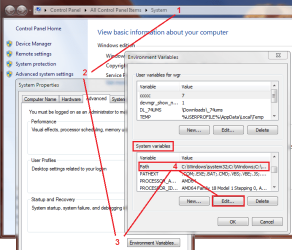
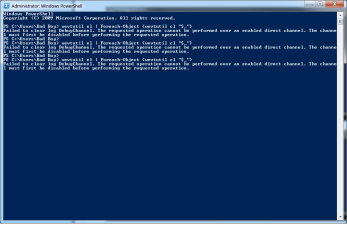
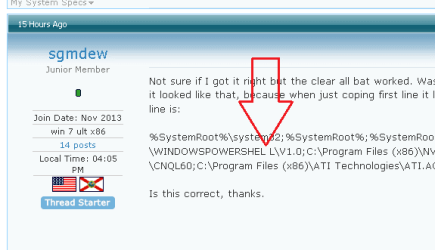
If you mean that wevutil or ForEach-Object, then you already know where to look -check your path environment.
Now why is it breaking?
Now to see why the path got altered in the first place, please run a quick on-demand scan for malware.
Check for malware #1
Anti-Malware Free
Malwarebytes Anti-Malware Free (Mbam) version 2.0 is an on-demand scanner that, in addition to your real-time Anti-Virus (AV) software, protects your system against malware.
It is good practice to run Mbam once a week.
1. Read the online documentation for Malwarebytes:
2. Mbam requires administrator privileges
- your user profile must be an administrator, or
- you must elevate the privileges when you launch Mbam.
3. If you require assistance, SevenForums (SF) members helping you need feedback (log files, screen shots) from the processes you will run.
Malwarebytes Anti-Malware Free
4. On the
Do you want to run or save ... Action Bar
Select
Save asIn the left hand pane of the save location window,
Select the folder you created in the above Prepare section: C:\_SevenForums\Security
do not change the File Name or File Type, only the save location.
On the
The ... download has completed Action Bar
- If your user profile is an Administrator User Account:
Select Run
- If your user profile is a Standard User Account:
Select Open folder
Launch Mbam with elevated privileges (Right click, pick Run as administrator from the context menu)
Allow the application to run (Yes or Run) if Windows User Access Control (UAC) requests permission
- Read the End User Licenses Agreement, then
Tick I accept... and press the Next button
- Read the Information window and press press the Next button
- Accept the default install location and press the Next button
- Accept the default Start Menu folder and press the Next button
- Accept Create a desktop icon and press the Next button
- Verify the install parameters and press the Install button
Malwarebytes offers you a free trial of the Premium version. This guide suggests that you
decline the initial offer made at install time and use the
Malwarebytes Free version. The
Start Free Trial and the
Buy Premuium options are always available to you on the Mbam Dashboard window.
Set the final install options as shown below:
Enable free trial...
Launch Malwarebytes Anti-Malware
Press the
Finish button to launch Mbam and update the database definitions.
:note:If the malware prevents launching Mbam, watch:
How to use Malwarebytes Chameleon from the
Malwarebytes Youtube channel
6. After the Mbam database definitions are updated, the Dashboard Main window presents the initial status:
Press the
Fix Now >> button to run the initial scan on your system with the default Mbam settings.
7. Threat detection results are presented in the main window of the Scan menu.
If no threats were are detected, you can close the utility. This does not mean that your system is clean, it only means that Mbam did not detect any malware. Additional scans using different on-demand scanners might be advised by SF members. Each scanner has a particular focus of design and detects malware using different criteria.
If SF members are assisting you, let them know that Mbam did not find any threats
Threats detected during an Mbam scan are reported and automatically moved into quarantine. The threat(s) are isolated in the Mbam quarantine and can remain there until you are certain of the correct disposition of the file(s). Note that other malware scanners or AV applications might report the quarantined file as a threat.
Mbam Scanning History Log | Detected threat table.
Occasionally a scanner will identify a legitimate file as malware (false positive). You should check each suspicious file by following the instructions in:
Analyze suspicious files with VirusTotal
8. Disposition of malicious objects
If the VirusTotal analysis determines that the file is malicious, return to the Mbam
History
Quarantine widow
Tick
the checkbox next to the file that VirusTotal flagged as malicious and press the delete button.
After you have processed (deleted, restored, or retained in quarantine) all of the files detected, it is advised that you restart your machine.
Restart your machine to complete the Mbam malware removal process
9. Run the Windows
System File Checker (SFC) to repair any system files that the malware might have corrupted.
10. Attach any logs, reports, or screen shots that were created during this exercise to a new post on your thread.
See:
How to attach files and screen shots
Mbam logs: C:\ProgramData\Malwarebytes\Malwarebytes Anti-Malware\Logs
Mbam log naming convention:
mbam-log-YYYY-MM-DD (HH-MM-SS).xml
example: C:\ProgramData\Malwarebytes\Malwarebytes Anti-Malware\Logs\mbam-log-2014-03-17 (18-11-35).xml
protection-log-YYYY-MM-DD.xml
example: C:\ProgramData\Malwarebytes\Malwarebytes Anti-Malware\Logs\protection-log-2014-03-17.xml
- The log files are in XML format and must be viewed inside the utility (History menu Application Logs)
- Protection Logs contain update information (database, program, etc)
- Scan Logs contain the results of a scan
Once you open the log for viewing, you can export it to a text file.
- Export the log, select Text file(*.txt) as the output format
- Specify a filename and location for the exported log and press save
If SF members are assisting you, attach the exported
Scan Log text file to a new post on your thread.