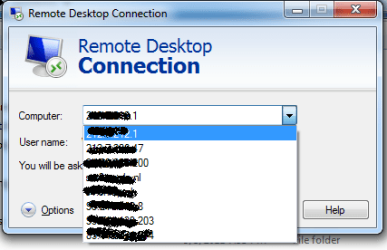
Clear out Remote Desktop connections

eldinv

New member
Guru
Local time
10:50 AM
Messages
560
Location
New Hampshire
Hello,

this may be in the wrong section, please forgive for any mistake.

Can someone tell me how to completely clear out all Remote Desktop connections, including credentials.

Basically so when open Remote Desktop it appears you never connected to another system.


Kind regards,

Eldin
 

My Computers My Computers

System One System Two

  • Computer type
    PC/Desktop
    Computer Manufacturer/Model Number
    PowerSpec G164
    OS
    WIN10
    CPU
    AMD Ryzen 5 3600 6-Core Processor 3.59 GHz
    Memory
    16.0 GB
    Internet Speed
    VERY FAST>>>!!!
  • Antivirus
    ESET Security Premium
Hello,

this may be in the wrong section, please forgive for any mistake.

Can someone tell me how to completely clear out all Remote Desktop connections, including credentials.

Basically so when open Remote Desktop it appears you never connected to another system.
Kind regards,
Eldin

Eldinv, I had to do this and all I did was search for files with .rdp as the extentsion
and delete them.

Of course you have to make sure that hidden and system files are visible.
and in the search tell it to search for filename, *.rdp

Rich
 

My Computer My Computer

Computer type
Laptop
Computer Manufacturer/Model Number
Toshiba Laptop Qosimo X870
OS
Windows 7 Pro x64 SP1
CPU
Intel Core I7
Motherboard
Toshiba Qosmio
Memory
16 Gigs
Graphics Card(s)
NVIDIA GeForce GTX 670M
Monitor(s) Displays
17.7" laptop
Screen Resolution
1600 x 900
Hard Drives
256 Gig SanDisk SSD for C
256 Gig Intel SSD for D
Internet Speed
50/25 FIOS
Antivirus
Vipre (all you can eat for 10 machines)
Browser
IE and FF
Other Info
I have dos 6.22, wfwg 3.11, win98, 2000 and xp VHD's available for testing. MS's Virtual PC works great.
Hello,

I made sure hidden files are visible and I searched out any *.rdp or .rdp files but can't seem to find any. It's very odd there's no simple clean button to clear previous connections.

Anyone else have a solution?


Kind regards,

Eldin
 

Attachments

  • login.png
    login.png
    13.4 KB · Views: 2

My Computers My Computers

System One System Two

  • Computer type
    PC/Desktop
    Computer Manufacturer/Model Number
    PowerSpec G164
    OS
    WIN10
    CPU
    AMD Ryzen 5 3600 6-Core Processor 3.59 GHz
    Memory
    16.0 GB
    Internet Speed
    VERY FAST>>>!!!
  • Antivirus
    ESET Security Premium
Back
Top