Cloned C: drive doesn't match original

Newmaven

New member
Local time
5:15 PM
Messages
49
I used Macrium Reflect to clone my C: drive onto another, identical, drive in onboard dock. My plan was to have a bootable copy of my system in case anything went wrong with updating to Win 10. The original has 32 folders and leaves 736 GB free on a 932-GB total. The clone has 7 files, and 893GB free.

Folders on the clone are:
MG
PerfLogs
Program Files
Program Files (x86)
Program Data
Users
Windows.

Many of my program and program (x86) files didn't make it over, so I guess the idea is to have a clean boot from the new drive. . . . so I think I've answered my own question about the difference.

But: Is there any way to save these old program files and feed them right back into my system if I resort to the new drive?
 

My Computer My Computer

At a glance

win7 Pro x64Intel Core 2 QUAD q6700 @ 2.6 GHz8 GB, DDR2nVidia Quadro NVS 290
Computer type
PC/Desktop
Computer Manufacturer/Model Number
Dell T3400 Workstation
OS
win7 Pro x64
CPU
Intel Core 2 QUAD q6700 @ 2.6 GHz
Motherboard
Dell 0TP412.A02
Memory
8 GB, DDR2
Graphics Card(s)
nVidia Quadro NVS 290
Sound Card
motherboard
Monitor(s) Displays
Samsung T260HD and ViewSonic VA2702w
Screen Resolution
1920*1200, 1920x1080
Hard Drives
Seagate hybrid C:, two WD data drives. 5TB total
PSU
375W
Case
Stock
Cooling
air
Keyboard
Dell
Mouse
Logitech Performance MX
Antivirus
Malwarebytes, Norton 360
Browser
IE 11, Seamonkey, Firefox, Opera
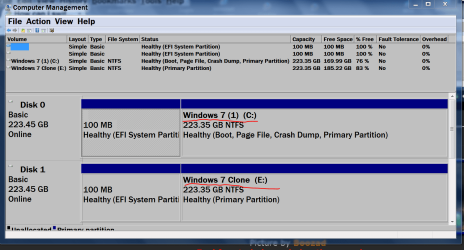
Are you Cloning the complete drive,(Disk) not just partitions?

Are you Cloning one complete drive (Disk) to another drive (Disk). (Not to another partition)

Examples from my computer.


Disk Management Dec 5 2015.PNG

Disk Management Jan 28.PNG

Disk Management.PNG
 

My Computer My Computer

At a glance

Windows 10 Pro. 64/ version 1709 Windows 7 Pr...Intel i7-6800K @ 4.3Corsair Platinum 16 gig @2400EVGA GTX 1070 OC
Computer type
PC/Desktop
Computer Manufacturer/Model Number
Home made Desktop
OS
Windows 10 Pro. 64/ version 1709 Windows 7 Pro/64
CPU
Intel i7-6800K @ 4.3
Motherboard
ASUS X-99 Deluxe II
Memory
Corsair Platinum 16 gig @2400
Graphics Card(s)
EVGA GTX 1070 OC
Monitor(s) Displays
Asus 27" LED LCD/VE278Q
Screen Resolution
1920-1080 or 1280-720 HDMI
Hard Drives
INTEL SSD 730-240 Gb Sata 3.0/
PSU
EVGA Platium 1200W
Case
Phanteks Luxe Tempered Glass 8 fans/ one radiator
Cooling
XSPC/ Water Cooled CPU
Keyboard
Das 4 Professional
Mouse
Logitech M705/MX Anywhere 2-S
Internet Speed
100 mbits
Antivirus
Microsoft Security Essentials/ Malwarebytes Premium 3.0/ SAS
Browser
I.E. 11 default/Firefox/ ISP Time Warner Cable/Spectrum
Other Info
LG BluRay Burner/
Sound system-KLipsch-THX/
Icy Dock ssd Hot Swap bays.
I was attempting to clone the entire drive, which has only one partition. The destination disk had stuff on it, but I understand that Macrium overwrites or deletes all that, and this certainly seems to be the case.
 

My Computer My Computer

At a glance

win7 Pro x64Intel Core 2 QUAD q6700 @ 2.6 GHz8 GB, DDR2nVidia Quadro NVS 290
Computer type
PC/Desktop
Computer Manufacturer/Model Number
Dell T3400 Workstation
OS
win7 Pro x64
CPU
Intel Core 2 QUAD q6700 @ 2.6 GHz
Motherboard
Dell 0TP412.A02
Memory
8 GB, DDR2
Graphics Card(s)
nVidia Quadro NVS 290
Sound Card
motherboard
Monitor(s) Displays
Samsung T260HD and ViewSonic VA2702w
Screen Resolution
1920*1200, 1920x1080
Hard Drives
Seagate hybrid C:, two WD data drives. 5TB total
PSU
375W
Case
Stock
Cooling
air
Keyboard
Dell
Mouse
Logitech Performance MX
Antivirus
Malwarebytes, Norton 360
Browser
IE 11, Seamonkey, Firefox, Opera
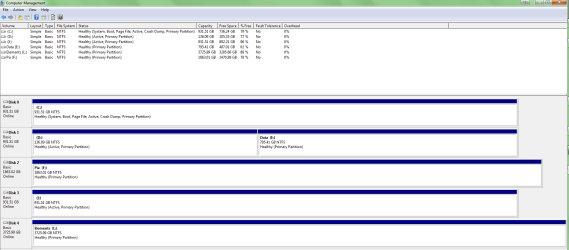
Here's my screenshot. I: should be a clone of C:
 

Attachments

My Computer My Computer

At a glance

win7 Pro x64Intel Core 2 QUAD q6700 @ 2.6 GHz8 GB, DDR2nVidia Quadro NVS 290
Computer type
PC/Desktop
Computer Manufacturer/Model Number
Dell T3400 Workstation
OS
win7 Pro x64
CPU
Intel Core 2 QUAD q6700 @ 2.6 GHz
Motherboard
Dell 0TP412.A02
Memory
8 GB, DDR2
Graphics Card(s)
nVidia Quadro NVS 290
Sound Card
motherboard
Monitor(s) Displays
Samsung T260HD and ViewSonic VA2702w
Screen Resolution
1920*1200, 1920x1080
Hard Drives
Seagate hybrid C:, two WD data drives. 5TB total
PSU
375W
Case
Stock
Cooling
air
Keyboard
Dell
Mouse
Logitech Performance MX
Antivirus
Malwarebytes, Norton 360
Browser
IE 11, Seamonkey, Firefox, Opera

My Computer My Computer

At a glance

Windows 10 Pro. 64/ version 1709 Windows 7 Pr...Intel i7-6800K @ 4.3Corsair Platinum 16 gig @2400EVGA GTX 1070 OC
Computer type
PC/Desktop
Computer Manufacturer/Model Number
Home made Desktop
OS
Windows 10 Pro. 64/ version 1709 Windows 7 Pro/64
CPU
Intel i7-6800K @ 4.3
Motherboard
ASUS X-99 Deluxe II
Memory
Corsair Platinum 16 gig @2400
Graphics Card(s)
EVGA GTX 1070 OC
Monitor(s) Displays
Asus 27" LED LCD/VE278Q
Screen Resolution
1920-1080 or 1280-720 HDMI
Hard Drives
INTEL SSD 730-240 Gb Sata 3.0/
PSU
EVGA Platium 1200W
Case
Phanteks Luxe Tempered Glass 8 fans/ one radiator
Cooling
XSPC/ Water Cooled CPU
Keyboard
Das 4 Professional
Mouse
Logitech M705/MX Anywhere 2-S
Internet Speed
100 mbits
Antivirus
Microsoft Security Essentials/ Malwarebytes Premium 3.0/ SAS
Browser
I.E. 11 default/Firefox/ ISP Time Warner Cable/Spectrum
Other Info
LG BluRay Burner/
Sound system-KLipsch-THX/
Icy Dock ssd Hot Swap bays.
Try this image
 

Attachments

  • Disk Mgmt.PNG
    Disk Mgmt.PNG
    28.5 KB · Views: 8

My Computer My Computer

At a glance

win7 Pro x64Intel Core 2 QUAD q6700 @ 2.6 GHz8 GB, DDR2nVidia Quadro NVS 290
Computer type
PC/Desktop
Computer Manufacturer/Model Number
Dell T3400 Workstation
OS
win7 Pro x64
CPU
Intel Core 2 QUAD q6700 @ 2.6 GHz
Motherboard
Dell 0TP412.A02
Memory
8 GB, DDR2
Graphics Card(s)
nVidia Quadro NVS 290
Sound Card
motherboard
Monitor(s) Displays
Samsung T260HD and ViewSonic VA2702w
Screen Resolution
1920*1200, 1920x1080
Hard Drives
Seagate hybrid C:, two WD data drives. 5TB total
PSU
375W
Case
Stock
Cooling
air
Keyboard
Dell
Mouse
Logitech Performance MX
Antivirus
Malwarebytes, Norton 360
Browser
IE 11, Seamonkey, Firefox, Opera
What is the reasoning for having partitions (D) and (I) active?

Exactly what Disk was Cloned to what Disk?
 

My Computer My Computer

At a glance

Windows 10 Pro. 64/ version 1709 Windows 7 Pr...Intel i7-6800K @ 4.3Corsair Platinum 16 gig @2400EVGA GTX 1070 OC
Computer type
PC/Desktop
Computer Manufacturer/Model Number
Home made Desktop
OS
Windows 10 Pro. 64/ version 1709 Windows 7 Pro/64
CPU
Intel i7-6800K @ 4.3
Motherboard
ASUS X-99 Deluxe II
Memory
Corsair Platinum 16 gig @2400
Graphics Card(s)
EVGA GTX 1070 OC
Monitor(s) Displays
Asus 27" LED LCD/VE278Q
Screen Resolution
1920-1080 or 1280-720 HDMI
Hard Drives
INTEL SSD 730-240 Gb Sata 3.0/
PSU
EVGA Platium 1200W
Case
Phanteks Luxe Tempered Glass 8 fans/ one radiator
Cooling
XSPC/ Water Cooled CPU
Keyboard
Das 4 Professional
Mouse
Logitech M705/MX Anywhere 2-S
Internet Speed
100 mbits
Antivirus
Microsoft Security Essentials/ Malwarebytes Premium 3.0/ SAS
Browser
I.E. 11 default/Firefox/ ISP Time Warner Cable/Spectrum
Other Info
LG BluRay Burner/
Sound system-KLipsch-THX/
Icy Dock ssd Hot Swap bays.
D: is active by accident--it was originally the C: partition before I put C: on a separate drive.

I: is active because it was cloned from C:

Don't know if it's significant in this context, but I switched over to Win 10 last night.
 

My Computer My Computer

At a glance

win7 Pro x64Intel Core 2 QUAD q6700 @ 2.6 GHz8 GB, DDR2nVidia Quadro NVS 290
Computer type
PC/Desktop
Computer Manufacturer/Model Number
Dell T3400 Workstation
OS
win7 Pro x64
CPU
Intel Core 2 QUAD q6700 @ 2.6 GHz
Motherboard
Dell 0TP412.A02
Memory
8 GB, DDR2
Graphics Card(s)
nVidia Quadro NVS 290
Sound Card
motherboard
Monitor(s) Displays
Samsung T260HD and ViewSonic VA2702w
Screen Resolution
1920*1200, 1920x1080
Hard Drives
Seagate hybrid C:, two WD data drives. 5TB total
PSU
375W
Case
Stock
Cooling
air
Keyboard
Dell
Mouse
Logitech Performance MX
Antivirus
Malwarebytes, Norton 360
Browser
IE 11, Seamonkey, Firefox, Opera
I know nothing about W-10

Will (I) boot?
 

My Computer My Computer

At a glance

Windows 10 Pro. 64/ version 1709 Windows 7 Pr...Intel i7-6800K @ 4.3Corsair Platinum 16 gig @2400EVGA GTX 1070 OC
Computer type
PC/Desktop
Computer Manufacturer/Model Number
Home made Desktop
OS
Windows 10 Pro. 64/ version 1709 Windows 7 Pro/64
CPU
Intel i7-6800K @ 4.3
Motherboard
ASUS X-99 Deluxe II
Memory
Corsair Platinum 16 gig @2400
Graphics Card(s)
EVGA GTX 1070 OC
Monitor(s) Displays
Asus 27" LED LCD/VE278Q
Screen Resolution
1920-1080 or 1280-720 HDMI
Hard Drives
INTEL SSD 730-240 Gb Sata 3.0/
PSU
EVGA Platium 1200W
Case
Phanteks Luxe Tempered Glass 8 fans/ one radiator
Cooling
XSPC/ Water Cooled CPU
Keyboard
Das 4 Professional
Mouse
Logitech M705/MX Anywhere 2-S
Internet Speed
100 mbits
Antivirus
Microsoft Security Essentials/ Malwarebytes Premium 3.0/ SAS
Browser
I.E. 11 default/Firefox/ ISP Time Warner Cable/Spectrum
Other Info
LG BluRay Burner/
Sound system-KLipsch-THX/
Icy Dock ssd Hot Swap bays.
I haven't had the chance to try it. The object was to have a usable Win 7 backup in case Win 10 gave me problems. I suyspect it does--from what I can see it's a full clean version of the oS, and nothing else. I had hoped to have my full old program environment.
 

My Computer My Computer

At a glance

win7 Pro x64Intel Core 2 QUAD q6700 @ 2.6 GHz8 GB, DDR2nVidia Quadro NVS 290
Computer type
PC/Desktop
Computer Manufacturer/Model Number
Dell T3400 Workstation
OS
win7 Pro x64
CPU
Intel Core 2 QUAD q6700 @ 2.6 GHz
Motherboard
Dell 0TP412.A02
Memory
8 GB, DDR2
Graphics Card(s)
nVidia Quadro NVS 290
Sound Card
motherboard
Monitor(s) Displays
Samsung T260HD and ViewSonic VA2702w
Screen Resolution
1920*1200, 1920x1080
Hard Drives
Seagate hybrid C:, two WD data drives. 5TB total
PSU
375W
Case
Stock
Cooling
air
Keyboard
Dell
Mouse
Logitech Performance MX
Antivirus
Malwarebytes, Norton 360
Browser
IE 11, Seamonkey, Firefox, Opera
You could try the following.
1) Make a system image of c: to an external drive
2) Make a restore pe disk (I recommend pe5)
3) Disconnect all drives and connect the replacement/backup drive to port 0.
4) Boot the restore pe disk with the ext drive connected and restore the system image.
5) Boot the PC using the new drive. It should boot without problems.
6) Remove or disconnect the replacement drive and connect all other drives and boot as normal.

The replacement drive is now an offline backup.
 

My Computer My Computer

At a glance

Windows 7x64 Home Premium SP1Intel i7 2600kG.Skill Ripjaws (DDR3-1600) 2x4GBNvidia GeForce GTS 450; Intel HD Graphics 300...
Computer type
PC/Desktop
Computer Manufacturer/Model Number
Own build
OS
Windows 7x64 Home Premium SP1
CPU
Intel i7 2600k
Motherboard
ASUS P8Z68 Deluxe
Memory
G.Skill Ripjaws (DDR3-1600) 2x4GB
Graphics Card(s)
Nvidia GeForce GTS 450; Intel HD Graphics 3000(GT2+)
Monitor(s) Displays
Dell Ultrasharp IPS panel U2311H, Samsung SyncMaster P2350
Screen Resolution
1920x1080
Hard Drives
Samsung 850 Pro SSD 256GB, Samsung SSD 840 120GB, Seagates 1TB Barracuda ST31000528AS x2
PSU
Seasonic M12II 520W
Case
Lian Li Lancool PC-K60
Cooling
Case: 1x120mm, 3x140mm CPU: Hyper 212+
Keyboard
Logitech MK520 (wireless)
Mouse
Logitech MK520
Internet Speed
6-7 Mbps
Antivirus
Norton Security Premium, Malwarebytes on 2 (MSE on 3rd PC)
Browser
FireFox
Other Info
Audio: Logitech Z523 2.1
Back
Top