Cloned to SSD now in selective startup mode- Problem?

howardrg

New member
Local time
12:34 AM
Messages
11
Please bear with me for my short (perhaps amusing) tale of difficulty and discovery:


1. I recently cloned my Windows 7 OS from an HDD to an SSD and disconnected the old HDD (though I left it in the computer case, just in case). I reordered my HDDs and startup devices in the BIOS and everything was working smoothly.


2. Background Note #1: a couple of years ago I had a dual boot setup, but I decided to keep Win 7 and ditch Vista so I disabled the dual boot option and deleted the Vista installation. I even repartitioned the old hard drive so the space occupied by the old Vista partition was added to the Win 7 partition. The computer reliably booed straight into Win 7 without asking me to select an OS.


3. I noticed that my newly cloned SSD-based installation of Win 7 was running under "selective startup" rather than "normal startup" (judging from msconfig information). I thought I would just set it to "normal startup" but that turned out to be a bad decision. After I restarting I was presented a dual boot option: Vista or Win 7! I thought I had seen the last of that. I selected Win 7 and then got the message, "Windows failed to start. A recent hardware or software change might be the cause." It suggested I do a repair with the Win 7 setup disk. I do have my Win 7 setup disk but couldn't get the computer to boot from the CD drive.


4. Background Note #2: The reason the computer wouldn't boot from the CD-ROM drive was because I thought that all I had to do was set the CD-ROM as the first boot device in the BIOS and then it would AUTOMATICALLY boot from the CD-ROM. Ha!I now know that I was only part of the way there: I ALSO had to press F8 at the right point in the boot process, select the CD-ROM drive using the arrow keys, and THEN respond to a "press-any-key-to-boot-from-the-CD-ROM" message. Now I know.


5. Not being able to boot to the setup CD, I re-connected my orininal HDD, disconnected the SSD, reordered boot devices in BIOS, and successfully booted to the old installation of Win 7.


6. I re-cloned the HDD to the SSD (repeating step 1) and now I am back where I started.


7. Should I worry that the computer is running in selective startup mode? Now that I know how, should I boot to the setup CD and do a repair (a possible boot-sector issue)? Or should I just leave well enough alone?
 

My Computer My Computer

At a glance

Windows 7 Home Premium 64 bitIntel® Core™2 Duo Processor E8500G.SKILL 8GB (4 x 2GB) 240-Pin DDR2 SDRAM DDR2ASUS GeForce GTX 750 Ti DirectX 11 GTX750TI-O...
Computer type
PC/Desktop
Computer Manufacturer/Model Number
custom build
OS
Windows 7 Home Premium 64 bit
CPU
Intel® Core™2 Duo Processor E8500
Motherboard
ASUS P5Q Deluxe
Memory
G.SKILL 8GB (4 x 2GB) 240-Pin DDR2 SDRAM DDR2
Graphics Card(s)
ASUS GeForce GTX 750 Ti DirectX 11 GTX750TI-OC-2GD5 2GB
Sound Card
on board
Hard Drives
1. SanDisk Ultra II 2.5" 960GB SATA III Internal Solid State Drive

2. Western Digital Blue WD6400AAKS 640GB 7200 RPM 16MB Cache SATA 3.0Gb/s
PSU
OCZ StealthXStream OCZ500SXS 500W
Case
Antec Three Hundred Black Steel ATX Mid Tower
Cloning is a hit or miss. Works for some and not for others.

I tried cloning my hard drive to SSD and it never worked. I tried the cloning program that came with my new Samsung SSD, I tried the clone feature in Macrium Reflect and another cloning program. I was not successful on any of them. I did a "disk image" (drive backup) to the hard drive I use for backups and then "restored" to the new SSD and everything worked properly.

Keep in mind when you clone, you copy everything, even bad and empty blocks to the new drive. When you do the disk image, as I noted, you only get the actual data, minus the bad and empty blocks.

My suggestion is to do the disk image thing. We had a discussion about this last year with some of our software guru's and the general consensus was that it works OK sometimes and not for others.

If you don't have a image program, the free version of Macrium Reflect will do it.
Macrium Reflect Free
 

My Computer My Computer

At a glance

Windows 10 64 bitIntel i7 6700K16GB Corsair DominatorIntel CPU Graphics
Computer type
PC/Desktop
Computer Manufacturer/Model Number
My Own Build
OS
Windows 10 64 bit
CPU
Intel i7 6700K
Motherboard
ASUS ROG Maximus VIII Hero
Memory
16GB Corsair Dominator
Graphics Card(s)
Intel CPU Graphics
Sound Card
RealTek
Monitor(s) Displays
27" Dell S2719dgf
Screen Resolution
2560X1440
Hard Drives
1 TB Samsung 850 EVO SSD for Win 10 Pro
500GB Samsung 850 EVO SSD for Win 10 Insider
2 TB drive for backup
PSU
EVGA Supernova 750G2
Case
BeQuiet Silent Base 600
Cooling
Deepcool Captain 120EX
Keyboard
Microsoft Wireless 2000
Mouse
Microsoft wireless
Internet Speed
100 MB/sec (Cable)
Antivirus
Microsoft Defender and Malwarebytes
Browser
Edge/Firefox
Other Info
Cakewalk (Sonar) by BandLab and Studio One 4.1 Pro recording studio software. MOTU 896Mk3 Hybrid recording interface, Frontier Tranzport wireless control unit, Behringer X-Touch Control Surface.
Five USB connected optical drives for CD Audio production using Nero BurningROM
Believe it or not, I may have actually gotten the benefit of the disk image approach. I didn't provide that detail in my original post too keep it simple, but here's what I did: After the clone to the SSD, I immediately made an image of the SSD using Acronis. Then, after I blew it up by selecting "normal Startup," I did NOT re-clone as stated in the OP, but I restored the Acronis image to the SSD from within Windows (requiring a reboot). I did not use the Acronis rescue disk because at the time I hadn't figured out the steps to get the computer to boot from the CD-ROM :confused:.

Do you think I avoided the bad/empty blocks by doing it this way?

And should I do some kind of boot repair to get back to normal startup, or forget about it? Are there disadvantages to having it run in selective startup?

Thanks for your help!
 

My Computer My Computer

At a glance

Windows 7 Home Premium 64 bitIntel® Core™2 Duo Processor E8500G.SKILL 8GB (4 x 2GB) 240-Pin DDR2 SDRAM DDR2ASUS GeForce GTX 750 Ti DirectX 11 GTX750TI-O...
Computer type
PC/Desktop
Computer Manufacturer/Model Number
custom build
OS
Windows 7 Home Premium 64 bit
CPU
Intel® Core™2 Duo Processor E8500
Motherboard
ASUS P5Q Deluxe
Memory
G.SKILL 8GB (4 x 2GB) 240-Pin DDR2 SDRAM DDR2
Graphics Card(s)
ASUS GeForce GTX 750 Ti DirectX 11 GTX750TI-OC-2GD5 2GB
Sound Card
on board
Hard Drives
1. SanDisk Ultra II 2.5" 960GB SATA III Internal Solid State Drive

2. Western Digital Blue WD6400AAKS 640GB 7200 RPM 16MB Cache SATA 3.0Gb/s
PSU
OCZ StealthXStream OCZ500SXS 500W
Case
Antec Three Hundred Black Steel ATX Mid Tower
@ howard. Use Selective Start Up. Selective Start Up only loads the devices that are necessary to get the computer started, so it make starting up much faster.
My computer is set for selective Start Up & has been like that for years.
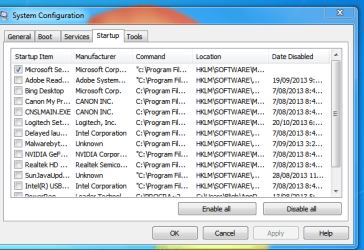
From the screen shot below you can see the only device set for start up in my Anti Virus.
If you untick any program in this list it will reset the computer to Selective Start Up.

Start Up Menu.PNG

I have used Macrium for cloning & for doing images & have found it to be reliable & easy to use & I have never had a problem with cloning.
 

My Computer My Computer

At a glance

Windows 7 Home Premium 64 bit sp1Intel i5 3570 3.4Ghz Ivy Bridge SKT 1155 quad...G-Skill Rip Jaws 16Gb (8x2) DDR3 -1600 PC3 12...Gigabyte NVIDIA GT610 1Gb DDR3 810/1200 PCI-E...
Computer type
PC/Desktop
Computer Manufacturer/Model Number
Self built using existing case
OS
Windows 7 Home Premium 64 bit sp1
CPU
Intel i5 3570 3.4Ghz Ivy Bridge SKT 1155 quad core
Motherboard
Gigabyte Z77-HD3 SKT 1155 2xSata 3, 4x USB 3.0
Memory
G-Skill Rip Jaws 16Gb (8x2) DDR3 -1600 PC3 12800 CL 10 red
Graphics Card(s)
Gigabyte NVIDIA GT610 1Gb DDR3 810/1200 PCI-E 2.0 Silent
Sound Card
NVIDIA High Definition & Realtech High Definition Audio
Monitor(s) Displays
2 x Philips 226V4L 16:9 aspect ratio
Screen Resolution
1920 x 1080 HD
Hard Drives
Samsung 840 Pro 256gb SSD, SATA 3.
Hitachi Touro Portable 1tb, USB 3.0 HDD used for image b/ups.
PSU
Corsair VS450
Case
Codeng
Cooling
PSU fan & CPU fan
Keyboard
Logitech
Mouse
Logitech Wireless trackball M570
Internet Speed
Wireless 3G. 3mg down & 550kb up.
Antivirus
Bitdefender Internet Security 2020
Browser
Opera (Current Version) & Firefox
Other Info
MS Office 2013 Pro. Davis weather station software. MGE Nova 600 avr UPS.
Wow! Don't you need some of those processes to get programs to work? I my setup they are ALL checked.
 

My Computer My Computer

At a glance

Windows 7 Home Premium 64 bitIntel® Core™2 Duo Processor E8500G.SKILL 8GB (4 x 2GB) 240-Pin DDR2 SDRAM DDR2ASUS GeForce GTX 750 Ti DirectX 11 GTX750TI-O...
Computer type
PC/Desktop
Computer Manufacturer/Model Number
custom build
OS
Windows 7 Home Premium 64 bit
CPU
Intel® Core™2 Duo Processor E8500
Motherboard
ASUS P5Q Deluxe
Memory
G.SKILL 8GB (4 x 2GB) 240-Pin DDR2 SDRAM DDR2
Graphics Card(s)
ASUS GeForce GTX 750 Ti DirectX 11 GTX750TI-OC-2GD5 2GB
Sound Card
on board
Hard Drives
1. SanDisk Ultra II 2.5" 960GB SATA III Internal Solid State Drive

2. Western Digital Blue WD6400AAKS 640GB 7200 RPM 16MB Cache SATA 3.0Gb/s
PSU
OCZ StealthXStream OCZ500SXS 500W
Case
Antec Three Hundred Black Steel ATX Mid Tower
No you don't need any of them checked except the AV program. When you need a program it starts when you request it & not before, therefore the start up loading time is reduced & is much faster.
 

My Computer My Computer

At a glance

Windows 7 Home Premium 64 bit sp1Intel i5 3570 3.4Ghz Ivy Bridge SKT 1155 quad...G-Skill Rip Jaws 16Gb (8x2) DDR3 -1600 PC3 12...Gigabyte NVIDIA GT610 1Gb DDR3 810/1200 PCI-E...
Computer type
PC/Desktop
Computer Manufacturer/Model Number
Self built using existing case
OS
Windows 7 Home Premium 64 bit sp1
CPU
Intel i5 3570 3.4Ghz Ivy Bridge SKT 1155 quad core
Motherboard
Gigabyte Z77-HD3 SKT 1155 2xSata 3, 4x USB 3.0
Memory
G-Skill Rip Jaws 16Gb (8x2) DDR3 -1600 PC3 12800 CL 10 red
Graphics Card(s)
Gigabyte NVIDIA GT610 1Gb DDR3 810/1200 PCI-E 2.0 Silent
Sound Card
NVIDIA High Definition & Realtech High Definition Audio
Monitor(s) Displays
2 x Philips 226V4L 16:9 aspect ratio
Screen Resolution
1920 x 1080 HD
Hard Drives
Samsung 840 Pro 256gb SSD, SATA 3.
Hitachi Touro Portable 1tb, USB 3.0 HDD used for image b/ups.
PSU
Corsair VS450
Case
Codeng
Cooling
PSU fan & CPU fan
Keyboard
Logitech
Mouse
Logitech Wireless trackball M570
Internet Speed
Wireless 3G. 3mg down & 550kb up.
Antivirus
Bitdefender Internet Security 2020
Browser
Opera (Current Version) & Firefox
Other Info
MS Office 2013 Pro. Davis weather station software. MGE Nova 600 avr UPS.
Good to know. Thanks!
 

My Computer My Computer

At a glance

Windows 7 Home Premium 64 bitIntel® Core™2 Duo Processor E8500G.SKILL 8GB (4 x 2GB) 240-Pin DDR2 SDRAM DDR2ASUS GeForce GTX 750 Ti DirectX 11 GTX750TI-O...
Computer type
PC/Desktop
Computer Manufacturer/Model Number
custom build
OS
Windows 7 Home Premium 64 bit
CPU
Intel® Core™2 Duo Processor E8500
Motherboard
ASUS P5Q Deluxe
Memory
G.SKILL 8GB (4 x 2GB) 240-Pin DDR2 SDRAM DDR2
Graphics Card(s)
ASUS GeForce GTX 750 Ti DirectX 11 GTX750TI-OC-2GD5 2GB
Sound Card
on board
Hard Drives
1. SanDisk Ultra II 2.5" 960GB SATA III Internal Solid State Drive

2. Western Digital Blue WD6400AAKS 640GB 7200 RPM 16MB Cache SATA 3.0Gb/s
PSU
OCZ StealthXStream OCZ500SXS 500W
Case
Antec Three Hundred Black Steel ATX Mid Tower
Back
Top